English | [简体中文](./README-zh_CN.md)
# @tuya/miniapp-smart-ui
   
## Introduction
`@tuya/miniapp-smart-ui` is a **lightweight and reliable smart mini app component library**, implemented based on `vant-weapp`. It provides a complete set of UI components that comply with Tuya MiniApp mobile design specifications (currently does not support WeChat Mini Program, this component library only supports Tuya MiniApp).
## Preview
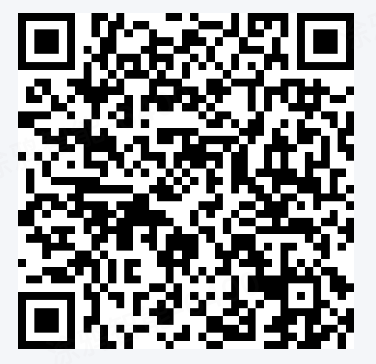
Scan the MiniApp QR code below to experience the component library examples.
 ## Before Using
Before using Smart UI, make sure you have studied the official [Quick Start](https://developer.tuya.com/cn/miniapp/develop/miniapp/guide/start/smart) and [MiniApp Component Introduction](https://developer.tuya.com/cn/miniapp/develop/miniapp/framework/component/intro).
## Installation
```bash
# Install via yarn (recommended)
yarn add @tuya/miniapp-smart-ui
# Install via npm
npm i @tuya/miniapp-smart-ui
```
## Using Components
Take the button component as an example, you only need to introduce the corresponding custom component of the button in the JSON file.
```json
{
"usingComponents": {
"smart-button": "@tuya/miniapp-smart-ui/lib/button/index"
}
}
```
Then you can directly use the component in TYML.
```html
Button
```
## Preview in Developer Tools
```bash
# Install project dependencies
yarn
# Execute component compilation
yarn dev
```
Open [Tuya MiniApp Tools](https://developer.tuya.com/cn/miniapp/devtools/tools), add the `smart-ui/example` directory to preview the examples.
## Base Library Version
`@tuya/miniapp-smart-ui` provides stable support starting from version `2.19.0` of the Tuya MiniApp base library.
## Related Links
[SmartUI Component Library Official Website](https://developer.tuya.com/material/smartui?comId=help-getting-started&lang=en)
[MiniApp SmartUI Component Library Official Website](https://developer.tuya.com/material/smartui?comId=help-getting-started&appType=miniapp&lang=en)
[SmartUI GitHub](https://github.com/Tuya-Community/ray-smart-ui)
[MiniApp SmartUI GitHub](https://github.com/Tuya-Community/miniapp-smart-ui)
[MiniApp Community Forum](https://www.tuyaos.com/viewforum.php?f=37)
[Ray Official Website](https://developer.tuya.com/en/miniapp)
[Ray Material Market](https://developer.tuya.com/material/library_oHEKLjj0/?lang=en)
[Public Source Collection of Materials and Templates](https://github.com/Tuya-Community/tuya-ray-materials)
## Changelog
> This project follows [Angular Style Commit Message Conventions](https://gist.github.com/stephenparish/9941e89d80e2bc58a153)
[Official Changelog](https://developer.tuya.com/material/smartui?comId=help-changelog&appType=miniapp)
## Open-Source License
This project is licensed under the [MIT](https://en.wikipedia.org/wiki/MIT_License) license. Please feel free to enjoy and participate in open-source.