Welcome to @treasure-chess/chess-image-generator 👋


> Generate an image of the game board final state
Adapted from https://github.com/andyruwruw/chess-image-generator. Updated to work in both node and browser environments, with limited features designed specifically for Treasure Chess.
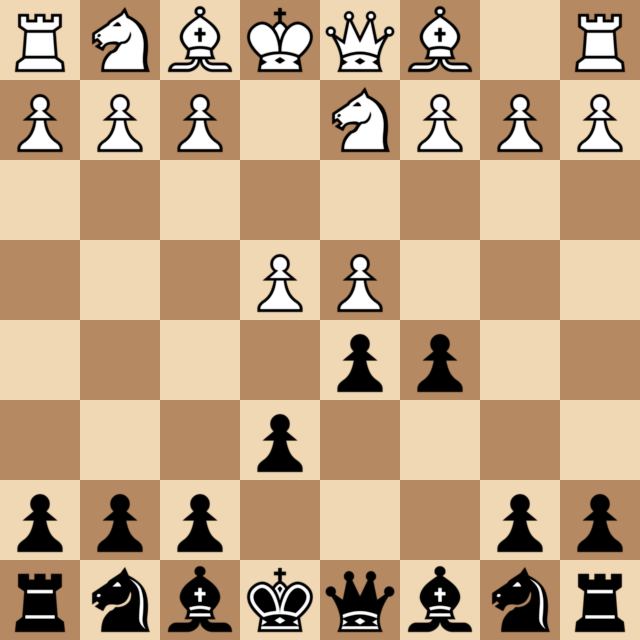
## Demo
The image below is loaded from a vercel deployment of this libary.
```
 ```
## Easy deployment
Vercel [](https://vercel.com/new/clone?repository-url=https%3A%2F%2Fgithub.com/treasure-chess/chess-image-generator)
NOTE: The install step in your vercel deployment must include `yarn add @napi-rs/canvas`.
## Install
```sh
# Browser environments
yarn add canvas @treasure-chess/chess-image-generator
# Node environments
yarn add @napi-rs/canvas @treasure-chess/chess-image-generator
```
## Usage
First calculate the final state of the board using the chess.js library. You should save the output, rather than performing this step every page load, which saves up to 400ms per game.
```js
const { getBoardLayout } = require("@treasure-chess/chess-image-generator");
const moves = `1. e4 e6 2. d4 d5 3. Nd2 c5`;
const boardLayout = getBoardLayout(moves);
```
Now use the data from the previous step to create the image. See available options [here](https://github.com/andyruwruw/chess-image-generator).
```js
// Browser environments
const { getBoardBase64 } = require("@treasure-chess/chess-image-generator");
// Node environments
const getBoardBase64Node = require("@treasure-chess/chess-image-generator/src/node/getBoardBase64-node");
const MyComponent = () => {
const options = {
size: 640,
dark: "rgb(181, 137, 98)",
light: "rgb(241, 216, 180)",
style: "neo",
};
const boardBase64 = await getBoardBase64(
boardLayout,
"black", // Which player to show on bottom
options
);
return
```
## Easy deployment
Vercel [](https://vercel.com/new/clone?repository-url=https%3A%2F%2Fgithub.com/treasure-chess/chess-image-generator)
NOTE: The install step in your vercel deployment must include `yarn add @napi-rs/canvas`.
## Install
```sh
# Browser environments
yarn add canvas @treasure-chess/chess-image-generator
# Node environments
yarn add @napi-rs/canvas @treasure-chess/chess-image-generator
```
## Usage
First calculate the final state of the board using the chess.js library. You should save the output, rather than performing this step every page load, which saves up to 400ms per game.
```js
const { getBoardLayout } = require("@treasure-chess/chess-image-generator");
const moves = `1. e4 e6 2. d4 d5 3. Nd2 c5`;
const boardLayout = getBoardLayout(moves);
```
Now use the data from the previous step to create the image. See available options [here](https://github.com/andyruwruw/chess-image-generator).
```js
// Browser environments
const { getBoardBase64 } = require("@treasure-chess/chess-image-generator");
// Node environments
const getBoardBase64Node = require("@treasure-chess/chess-image-generator/src/node/getBoardBase64-node");
const MyComponent = () => {
const options = {
size: 640,
dark: "rgb(181, 137, 98)",
light: "rgb(241, 216, 180)",
style: "neo",
};
const boardBase64 = await getBoardBase64(
boardLayout,
"black", // Which player to show on bottom
options
);
return  ;
};
```
NOTE: For usage in a web app, the `/resources` folder must be placed in your app's `/public` folder.
## Run tests
```sh
yarn test
```
## Authors
👤 **Patrick Gallagher**
👤 **Joseph Schiarizzi**
- Website: https://niftychess.com
- Twitter: [@niftychess](https://twitter.com/niftychess)
- GitHub: [@treasure-chess](https://github.com/treasure-chess)
👤 **Andrew Young**
## Show your support
Give a ⭐️ if this project helped you!
---
_This README was generated with ❤️ by [readme-md-generator](https://github.com/kefranabg/readme-md-generator)_
;
};
```
NOTE: For usage in a web app, the `/resources` folder must be placed in your app's `/public` folder.
## Run tests
```sh
yarn test
```
## Authors
👤 **Patrick Gallagher**
👤 **Joseph Schiarizzi**
- Website: https://niftychess.com
- Twitter: [@niftychess](https://twitter.com/niftychess)
- GitHub: [@treasure-chess](https://github.com/treasure-chess)
👤 **Andrew Young**
## Show your support
Give a ⭐️ if this project helped you!
---
_This README was generated with ❤️ by [readme-md-generator](https://github.com/kefranabg/readme-md-generator)_