[](https://www.npmjs.com/package/playroom) [](https://github.com/seek-oss/playroom/actions?query=workflow%3AValidate+branch%3Amaster)
---
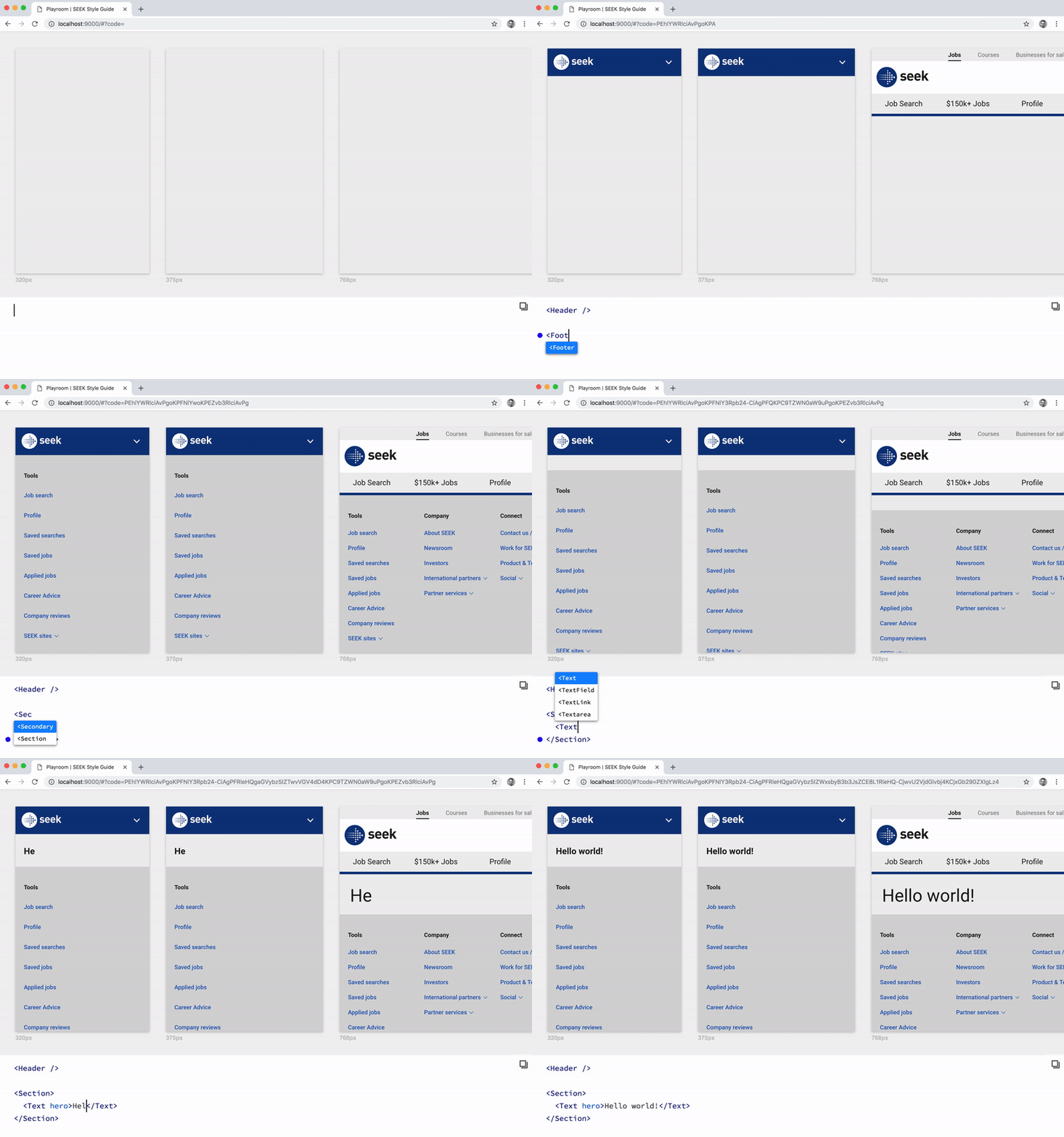
Simultaneously design across a variety of themes and screen sizes, powered by JSX and your own component library.
Playroom allows you to create a zero-install code-oriented design environment, built into a standalone bundle that can be deployed alongside your existing design system documentation.
- Iterate on your designs in the final medium.
- Create quick mock-ups and interactive prototypes with real code.
- Exercise and evaluate the flexibility of your design system.
- Share your work with others by simply copying the URL.
## Demos
[Braid Design System](https://seek-oss.github.io/braid-design-system/playroom/#?code=N4Igxg9gJgpiBcIA8BBANjATgFwATYgDsYBeAHRAEtCAzCCgPiQBUYAPbBgdRjUgFsY%2BCLgAKaAIYBPTBAj8AhEgD0rDk2XosnEABoQ2ABYxBAZwQBtEBIAOEsCAC6%2BgO6UoR8-AsB2AGwAHI4AvkA) (Themed)
[Bumbag](https://bumbag.style/playroom/)
[Overdrive](http://overdrive.autoguru.io/playroom/#?code=N4Igxg9gJgpiBcIA8AhCAPABAIwwZQAsBDKCAdwF4AdEAZhswAcSoBLAOwHMLgBtG+iAA0mGgDYaAXQC+APirtMmJHgAuRMAGtMAZ2ZgO3cTXmKlygCox0qgMIR26jjABOmAjBKGeSABKe2LllfVkxVDxcYTEBeDcBpHaQAen8vILkFc3MkKxtZAHUYABtIAFso1Qgwj0wAQQBXcoBxWpdazFgdVk5FHQBPHVUYYswAWkwAeQA3VygXVimAQkTs1VMMpes7Byd2V1N0zOWASXZGeqYCjRgCCALYF2oQX3JMIkjMHohagH4GBNXlBJqDSaUyJNDoUwgaRAA)
Send us a PR if you'd like to be in this list!
## Getting Started
```bash
$ npm install --save-dev playroom
```
Add the following scripts to your `package.json`:
```json
{
"scripts": {
"playroom:start": "playroom start",
"playroom:build": "playroom build"
}
}
```
Add a `playroom.config.js` file to the root of your project:
```js
module.exports = {
components: './src/components',
outputPath: './dist/playroom',
// Optional:
title: 'My Awesome Library',
themes: './src/themes',
snippets: './playroom/snippets.js',
frameComponent: './playroom/FrameComponent.js',
widths: [320, 375, 768, 1024],
port: 9000,
openBrowser: true,
htmlTemplate: './template.ejs',
paramType: 'search', // default is 'hash'
exampleCode: `
`,
baseUrl: '/playroom/',
webpackConfig: () => ({
// Custom webpack config goes here...
}),
iframeSandbox: 'allow-scripts',
};
```
_Note: `port` and `openBrowser` options will be set to `9000` and `true` (respectively) by default whenever they are omitted from the config above._
_Note 2: `htmlTemplate` will be loaded by [HtmlWebpackPlugin](https://github.com/jantimon/html-webpack-plugin). For advanced templating options, see their [documentation](https://github.com/jantimon/html-webpack-plugin/blob/master/docs/template-option.md) on this option (named `template` and not `htmlTemplate` like Playroom) or the [default template](https://github.com/jantimon/html-webpack-plugin/blob/master/default_index.ejs) used. Insert an element with ID `root` in your HTML and Playroom will be rendered in it._
Your `components` file is expected to export a single object or a series of named exports. For example:
```js
export { default as Text } from '../Text'; // Re-exporting a default export
export { Button } from '../Button'; // Re-exporting a named export
// etc...
```
The `iframeSandbox` option can be used to set the [`sandbox` attribute](https://www.html5rocks.com/en/tutorials/security/sandboxed-iframes/) on Playroom's iframe. A minimum of `allow-scripts` is required for Playroom to work.
Now that your project is configured, you can start a local development server:
```bash
$ npm run playroom:start
```
To build your assets for production:
```bash
$ npm run playroom:build
```
## Snippets
Playroom allows you to quickly insert predefined snippets of code, providing live previews across themes and viewports as you navigate the list. These snippets can be configured via a `snippets` file that looks like this:
```js
export default [
{
group: 'Button',
name: 'Strong',
code: `
`
},
...
];
```
## Custom Frame Component
If your components need to be nested within custom provider components, you can provide a custom React component file via the `frameComponent` option, which is a path to a file that exports a component. For example, if your component library has multiple themes:
```js
import React from 'react';
import ThemeProvider from '../path/to/your/ThemeProvider';
export default ({ theme, children }) => (
{children}
);
```
## Theme Support
If your component library has multiple themes, you can customise Playroom to render every theme simultaneously via the `themes` configuration option.
Similar to your `components` file, your `themes` file is expected to export a single object or a series of named exports. For example:
```js
export { themeA } from './themeA';
export { themeB } from './themeB';
// etc...
```
## TypeScript Support
If a `tsconfig.json` file is present in your project, static prop types are parsed using [react-docgen-typescript](https://github.com/styleguidist/react-docgen-typescript) to provide better autocompletion in the Playroom editor.
**By default, all `.ts` and `.tsx` files in the current working directory are included, excluding `node_modules`.**
If you need to customise this behaviour, you can provide a `typeScriptFiles` option in `playroom.config.js`, which is an array of globs.
```js
module.exports = {
...,
typeScriptFiles: [
'src/components/**/*.{ts,tsx}',
'!**/node_modules'
]
};
```
## Storybook Integration
If you are interested in integrating Playroom into Storybook, check out [storybook-addon-playroom](https://github.com/rbardini/storybook-addon-playroom).
## License
MIT.
 [](https://www.npmjs.com/package/playroom) [](https://github.com/seek-oss/playroom/actions?query=workflow%3AValidate+branch%3Amaster)
---
[](https://www.npmjs.com/package/playroom) [](https://github.com/seek-oss/playroom/actions?query=workflow%3AValidate+branch%3Amaster)
---
 Simultaneously design across a variety of themes and screen sizes, powered by JSX and your own component library.
Playroom allows you to create a zero-install code-oriented design environment, built into a standalone bundle that can be deployed alongside your existing design system documentation.
- Iterate on your designs in the final medium.
- Create quick mock-ups and interactive prototypes with real code.
- Exercise and evaluate the flexibility of your design system.
- Share your work with others by simply copying the URL.
## Demos
[Braid Design System](https://seek-oss.github.io/braid-design-system/playroom/#?code=N4Igxg9gJgpiBcIA8BBANjATgFwATYgDsYBeAHRAEtCAzCCgPiQBUYAPbBgdRjUgFsY%2BCLgAKaAIYBPTBAj8AhEgD0rDk2XosnEABoQ2ABYxBAZwQBtEBIAOEsCAC6%2BgO6UoR8-AsB2AGwAHI4AvkA) (Themed)
[Bumbag](https://bumbag.style/playroom/)
[Overdrive](http://overdrive.autoguru.io/playroom/#?code=N4Igxg9gJgpiBcIA8AhCAPABAIwwZQAsBDKCAdwF4AdEAZhswAcSoBLAOwHMLgBtG+iAA0mGgDYaAXQC+APirtMmJHgAuRMAGtMAZ2ZgO3cTXmKlygCox0qgMIR26jjABOmAjBKGeSABKe2LllfVkxVDxcYTEBeDcBpHaQAen8vILkFc3MkKxtZAHUYABtIAFso1Qgwj0wAQQBXcoBxWpdazFgdVk5FHQBPHVUYYswAWkwAeQA3VygXVimAQkTs1VMMpes7Byd2V1N0zOWASXZGeqYCjRgCCALYF2oQX3JMIkjMHohagH4GBNXlBJqDSaUyJNDoUwgaRAA)
Send us a PR if you'd like to be in this list!
## Getting Started
```bash
$ npm install --save-dev playroom
```
Add the following scripts to your `package.json`:
```json
{
"scripts": {
"playroom:start": "playroom start",
"playroom:build": "playroom build"
}
}
```
Add a `playroom.config.js` file to the root of your project:
```js
module.exports = {
components: './src/components',
outputPath: './dist/playroom',
// Optional:
title: 'My Awesome Library',
themes: './src/themes',
snippets: './playroom/snippets.js',
frameComponent: './playroom/FrameComponent.js',
widths: [320, 375, 768, 1024],
port: 9000,
openBrowser: true,
htmlTemplate: './template.ejs',
paramType: 'search', // default is 'hash'
exampleCode: `
`,
baseUrl: '/playroom/',
webpackConfig: () => ({
// Custom webpack config goes here...
}),
iframeSandbox: 'allow-scripts',
};
```
_Note: `port` and `openBrowser` options will be set to `9000` and `true` (respectively) by default whenever they are omitted from the config above._
_Note 2: `htmlTemplate` will be loaded by [HtmlWebpackPlugin](https://github.com/jantimon/html-webpack-plugin). For advanced templating options, see their [documentation](https://github.com/jantimon/html-webpack-plugin/blob/master/docs/template-option.md) on this option (named `template` and not `htmlTemplate` like Playroom) or the [default template](https://github.com/jantimon/html-webpack-plugin/blob/master/default_index.ejs) used. Insert an element with ID `root` in your HTML and Playroom will be rendered in it._
Your `components` file is expected to export a single object or a series of named exports. For example:
```js
export { default as Text } from '../Text'; // Re-exporting a default export
export { Button } from '../Button'; // Re-exporting a named export
// etc...
```
The `iframeSandbox` option can be used to set the [`sandbox` attribute](https://www.html5rocks.com/en/tutorials/security/sandboxed-iframes/) on Playroom's iframe. A minimum of `allow-scripts` is required for Playroom to work.
Now that your project is configured, you can start a local development server:
```bash
$ npm run playroom:start
```
To build your assets for production:
```bash
$ npm run playroom:build
```
## Snippets
Playroom allows you to quickly insert predefined snippets of code, providing live previews across themes and viewports as you navigate the list. These snippets can be configured via a `snippets` file that looks like this:
```js
export default [
{
group: 'Button',
name: 'Strong',
code: `
`
},
...
];
```
## Custom Frame Component
If your components need to be nested within custom provider components, you can provide a custom React component file via the `frameComponent` option, which is a path to a file that exports a component. For example, if your component library has multiple themes:
```js
import React from 'react';
import ThemeProvider from '../path/to/your/ThemeProvider';
export default ({ theme, children }) => (
Simultaneously design across a variety of themes and screen sizes, powered by JSX and your own component library.
Playroom allows you to create a zero-install code-oriented design environment, built into a standalone bundle that can be deployed alongside your existing design system documentation.
- Iterate on your designs in the final medium.
- Create quick mock-ups and interactive prototypes with real code.
- Exercise and evaluate the flexibility of your design system.
- Share your work with others by simply copying the URL.
## Demos
[Braid Design System](https://seek-oss.github.io/braid-design-system/playroom/#?code=N4Igxg9gJgpiBcIA8BBANjATgFwATYgDsYBeAHRAEtCAzCCgPiQBUYAPbBgdRjUgFsY%2BCLgAKaAIYBPTBAj8AhEgD0rDk2XosnEABoQ2ABYxBAZwQBtEBIAOEsCAC6%2BgO6UoR8-AsB2AGwAHI4AvkA) (Themed)
[Bumbag](https://bumbag.style/playroom/)
[Overdrive](http://overdrive.autoguru.io/playroom/#?code=N4Igxg9gJgpiBcIA8AhCAPABAIwwZQAsBDKCAdwF4AdEAZhswAcSoBLAOwHMLgBtG+iAA0mGgDYaAXQC+APirtMmJHgAuRMAGtMAZ2ZgO3cTXmKlygCox0qgMIR26jjABOmAjBKGeSABKe2LllfVkxVDxcYTEBeDcBpHaQAen8vILkFc3MkKxtZAHUYABtIAFso1Qgwj0wAQQBXcoBxWpdazFgdVk5FHQBPHVUYYswAWkwAeQA3VygXVimAQkTs1VMMpes7Byd2V1N0zOWASXZGeqYCjRgCCALYF2oQX3JMIkjMHohagH4GBNXlBJqDSaUyJNDoUwgaRAA)
Send us a PR if you'd like to be in this list!
## Getting Started
```bash
$ npm install --save-dev playroom
```
Add the following scripts to your `package.json`:
```json
{
"scripts": {
"playroom:start": "playroom start",
"playroom:build": "playroom build"
}
}
```
Add a `playroom.config.js` file to the root of your project:
```js
module.exports = {
components: './src/components',
outputPath: './dist/playroom',
// Optional:
title: 'My Awesome Library',
themes: './src/themes',
snippets: './playroom/snippets.js',
frameComponent: './playroom/FrameComponent.js',
widths: [320, 375, 768, 1024],
port: 9000,
openBrowser: true,
htmlTemplate: './template.ejs',
paramType: 'search', // default is 'hash'
exampleCode: `
`,
baseUrl: '/playroom/',
webpackConfig: () => ({
// Custom webpack config goes here...
}),
iframeSandbox: 'allow-scripts',
};
```
_Note: `port` and `openBrowser` options will be set to `9000` and `true` (respectively) by default whenever they are omitted from the config above._
_Note 2: `htmlTemplate` will be loaded by [HtmlWebpackPlugin](https://github.com/jantimon/html-webpack-plugin). For advanced templating options, see their [documentation](https://github.com/jantimon/html-webpack-plugin/blob/master/docs/template-option.md) on this option (named `template` and not `htmlTemplate` like Playroom) or the [default template](https://github.com/jantimon/html-webpack-plugin/blob/master/default_index.ejs) used. Insert an element with ID `root` in your HTML and Playroom will be rendered in it._
Your `components` file is expected to export a single object or a series of named exports. For example:
```js
export { default as Text } from '../Text'; // Re-exporting a default export
export { Button } from '../Button'; // Re-exporting a named export
// etc...
```
The `iframeSandbox` option can be used to set the [`sandbox` attribute](https://www.html5rocks.com/en/tutorials/security/sandboxed-iframes/) on Playroom's iframe. A minimum of `allow-scripts` is required for Playroom to work.
Now that your project is configured, you can start a local development server:
```bash
$ npm run playroom:start
```
To build your assets for production:
```bash
$ npm run playroom:build
```
## Snippets
Playroom allows you to quickly insert predefined snippets of code, providing live previews across themes and viewports as you navigate the list. These snippets can be configured via a `snippets` file that looks like this:
```js
export default [
{
group: 'Button',
name: 'Strong',
code: `
`
},
...
];
```
## Custom Frame Component
If your components need to be nested within custom provider components, you can provide a custom React component file via the `frameComponent` option, which is a path to a file that exports a component. For example, if your component library has multiple themes:
```js
import React from 'react';
import ThemeProvider from '../path/to/your/ThemeProvider';
export default ({ theme, children }) => (