C-node is a module that allows invoking C code from your nodeJs application.
The module uses the TCC compiler. It does not use node-gyp. It does not use Python.
# Installation
```shell
npm install @thimpat/c-node
```
---
# Usage
CJS
```javascript
const cNode = require("@thimpat/c-node");
```
ESM
```javascript
import cNode from "@thimpat/c-node";
```
----
### From a shell
```shell
// C-node uses the TCC compiler under the hood.
$> c-node [options]
```
---
# Quick start
#### Invoking a function from a .dll in Node
###### dll.c ↴
```c
#include
// Export function "hello_func" to .dll
__declspec(dllexport) char* hello_func (char* name)
{
char str[100];
sprintf(str, "From DLL: %d - %s", 10000, name);
MessageBox (0, "Hi world!", str, MB_ICONINFORMATION);
return "All okay";
}
```
> dll.c will be compiled automatically when loadFunctions is invoked
###### index.js ↴
```javascript
const {loadFunctions} = require("@thimpat/c-node");
// Import c function "hello_func()" from c library
const {hello_func} = loadFunctions("dll.c", {
hello_func: {
// hello_func prototype from dll.c without names (only types)
prototype: "char* hello_func (char*)",
}
});
// Invoke dll function
const result = hello_func("My name is awesome");
console.log(result); // All okay
```
```shell
node index.js
```
💻 ↴
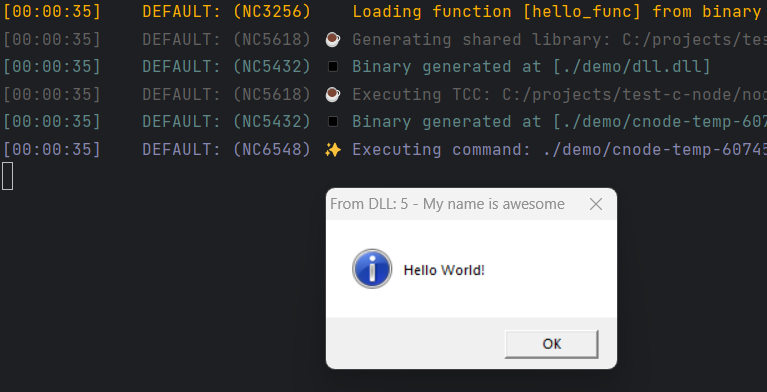
💻 ↴
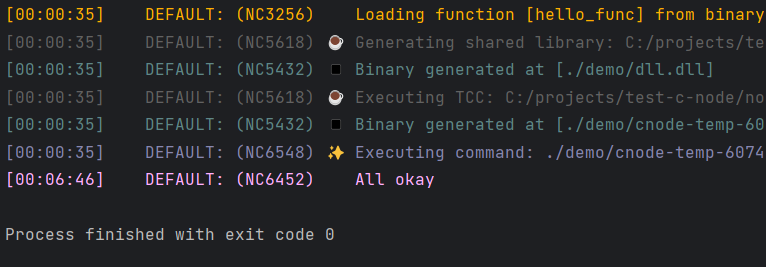
---
# Examples
All examples are part of the TCC library.
### Compilation
#### Example 1 - Compile a C program to an executable
```javascript
const {compileSource} = require("@thimpat/c-node");
const {success, status} = compileSource("examples/hello_win.c");
if (!success)
{
console.error(`Compilation failed. Status: ${status}`)
}
```
---
#### Example 2 - Compile a C source to a shared library (dll)
```javascript
const {compileLibrary} = require("@thimpat/c-node");
const {success, status} = compileLibrary("examples/dll.c")
```
---
### Execution
#### Example 3 - Compile if target nonexistent, then run source
###### example.js ↴
```javascript
const {runFile} = require("@thimpat/c-node");
runFile("examples/hello_win.c");
```
💻 ↴
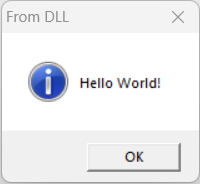
---
### Run source using JIT (Just in time compilation)
###### example.js ↴
```javascript
const {runLive} = require("@thimpat/c-node");
// Runs from source code
runLive("examples/hello_win.c");
```
---
# API
## runFile
> Compile then run a source code
#### Usage
```javascript
runFile(sourcePath, options);
```
#### Options
| Properties | Description | Type | Default | |
|------------|-----------------------------------------|--------|---------------------------------------|-----|
| outputDir | Directory path for generated the binary | string | "" | |
| output | File path for generated binary | string | current location + target binary name | |
| | | | | |
#### Examples
###### example.js ↴
```javascript
const {runFile} = require("@thimpat/c-node");
// Generate ./demo/ex1.exe
runFile("examples/ex1.c", {outputDir: "demo/"});
```
---
## loadBinaryFunctions
Load functions from a .dll
#### Usage
```javascript
loadBinaryFunctions(".dll", {
[funcName]: {
prototype: "...",
},
})
```
#### Examples
###### example.js ↴
```javascript
const {hello_func} = loadBinaryFunctions("dll.dll", {
hello_func: {
prototype: "char* hello_func (char*)",
}
});
const res = hello_func("My name is awesome");
console.log({lid: "NC6452"}, res);
```
---
## invokeFunction
Call a function from a c source code
#### Usage
```javascript
invokeFunction(functionCallString, filePath, {outputDir});
```
#### Options
| Properties | Description | Type | Default | |
|------------|-----------------------------------------|--------|---------------------------------------|-----|
| outputDir | Directory path for generated the binary | string | "" | |
#### Examples
###### example.js ↴
```javascript
const {invokeFunction} = require("@thimpat/c-node");
const result = invokeFunction("hello_func()", "examples/dll.c", {outputDir: "demo/"});
console.log(result);
```
---
## invokeBinaryFunction
Call a function from a .dll
#### Examples
###### example.js ↴
```javascript
const {invokeFunction} = require("@thimpat/c-node");
const result = invokeBinaryFunction("hello_func()", "examples/dll.dll", {outputDir: "demo/"});
console.log(result);
```