# React Native Select
[](https://www.npmjs.com/package/@tenkaipl/react-native-select)
[](https://www.npmjs.com/package/@tenkaipl/react-native-select)
[](https://www.npmjs.com/package/@tenkaipl/react-native-select)
## Why?
Building a select in React Native looks simple — until it meets a real app. Small screens, layered rendering contexts, and platform quirks turn a basic dropdown into a source of edge-case bugs that are painful to track down.
`@tenkaipl/react-native-select` was built to handle these contexts correctly out of the box:
- **Plain Views** — opens and positions correctly regardless of where the component sits in the layout
- **ScrollView / FlatList** — no conflicts with gesture or tap interception (see [ScrollView compatibility](#scrollview-compatibility) below)
- **Modal** — proper z-index handling; the list never hides behind other UI layers
- **On-screen keyboard** — the dropdown doesn't collide with an open keyboard
- **Landscape orientation** — adapts gracefully to limited vertical space
- **SafeArea** — respects safe areas on notched and edge-to-edge devices
## About
A fully customizable select/dropdown for React Native. Inspired by [`react-select`](https://react-select.com/), built for native environments.
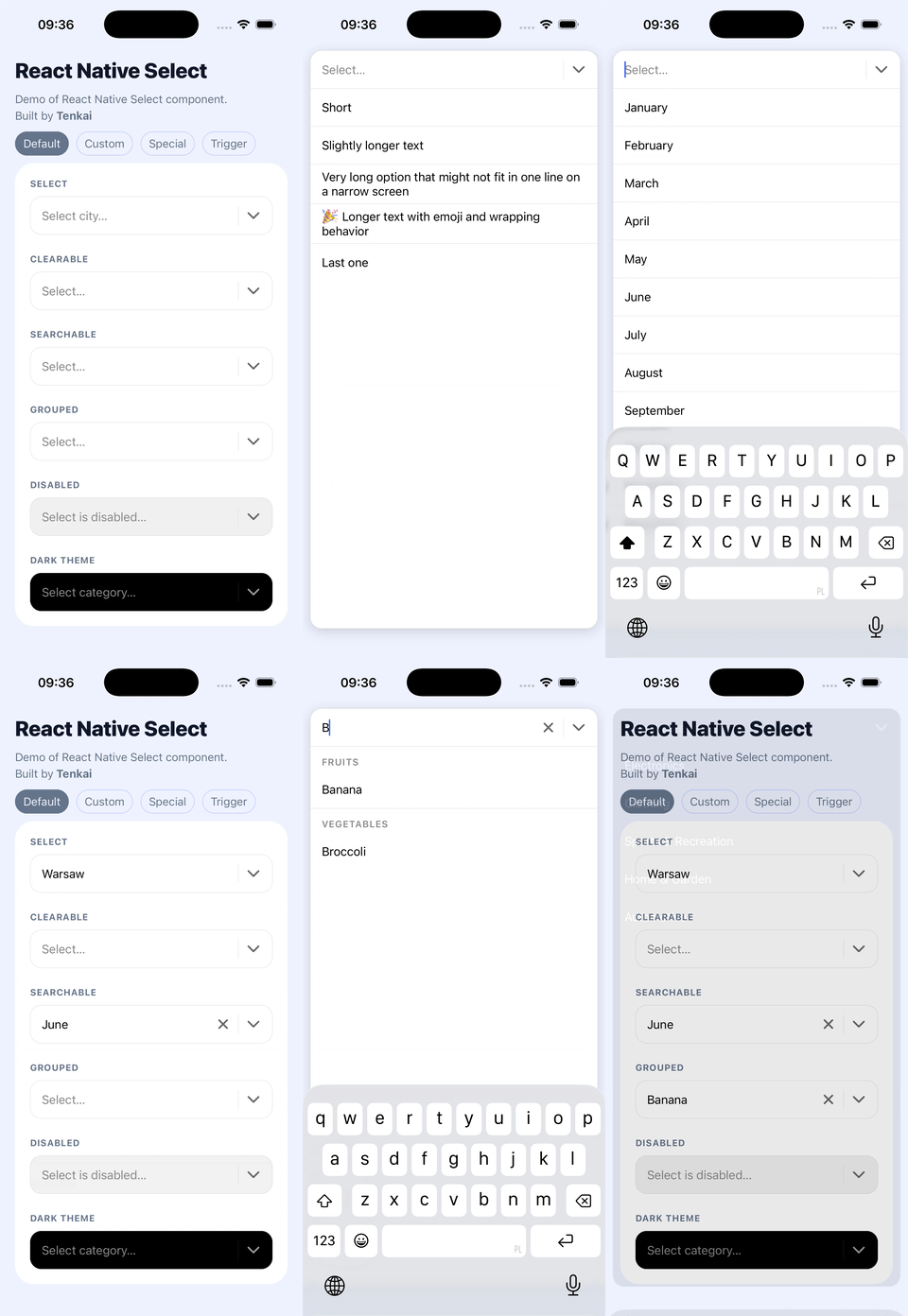
✨ Single select · search · clear · groups · disabled · dark theme
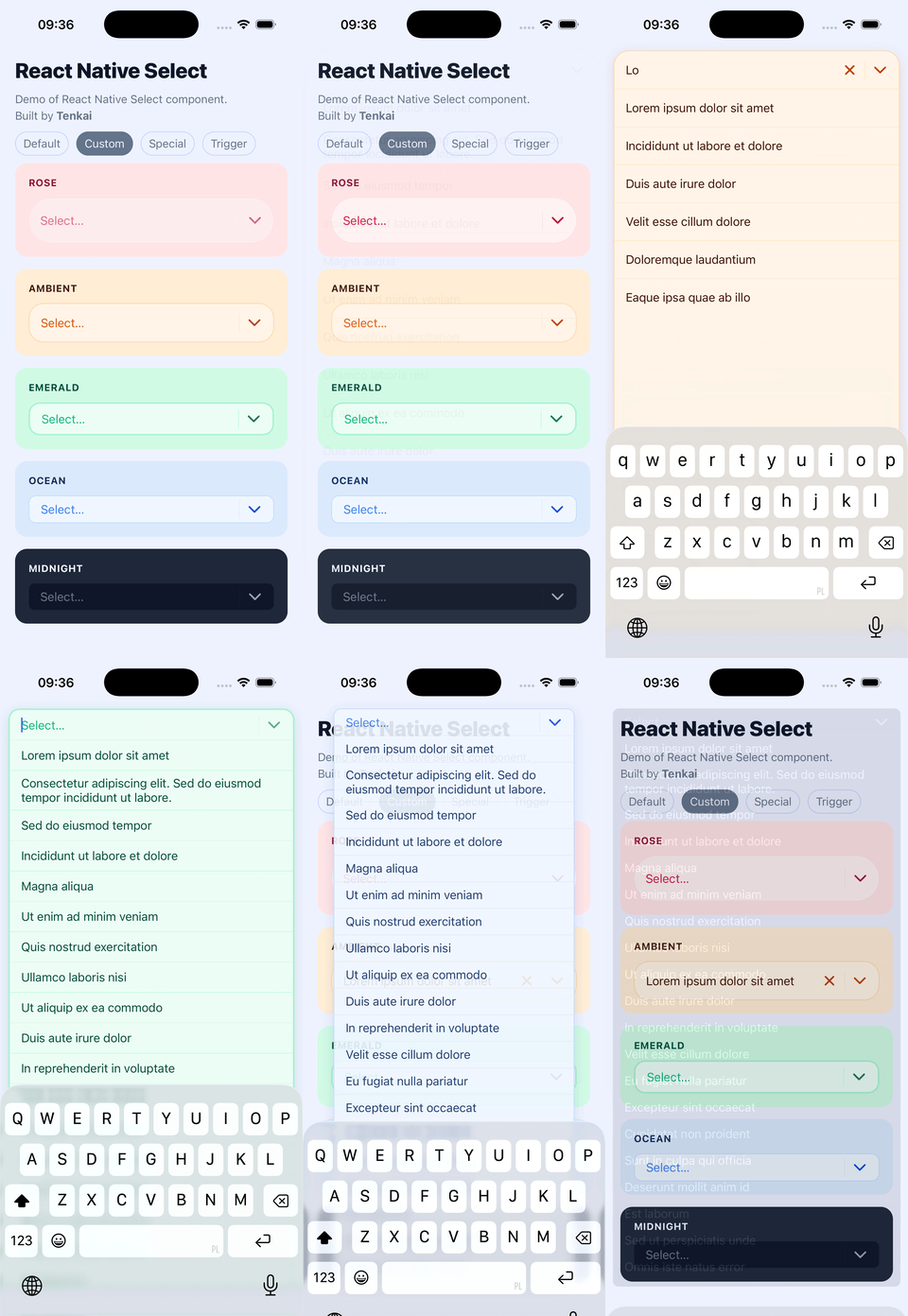
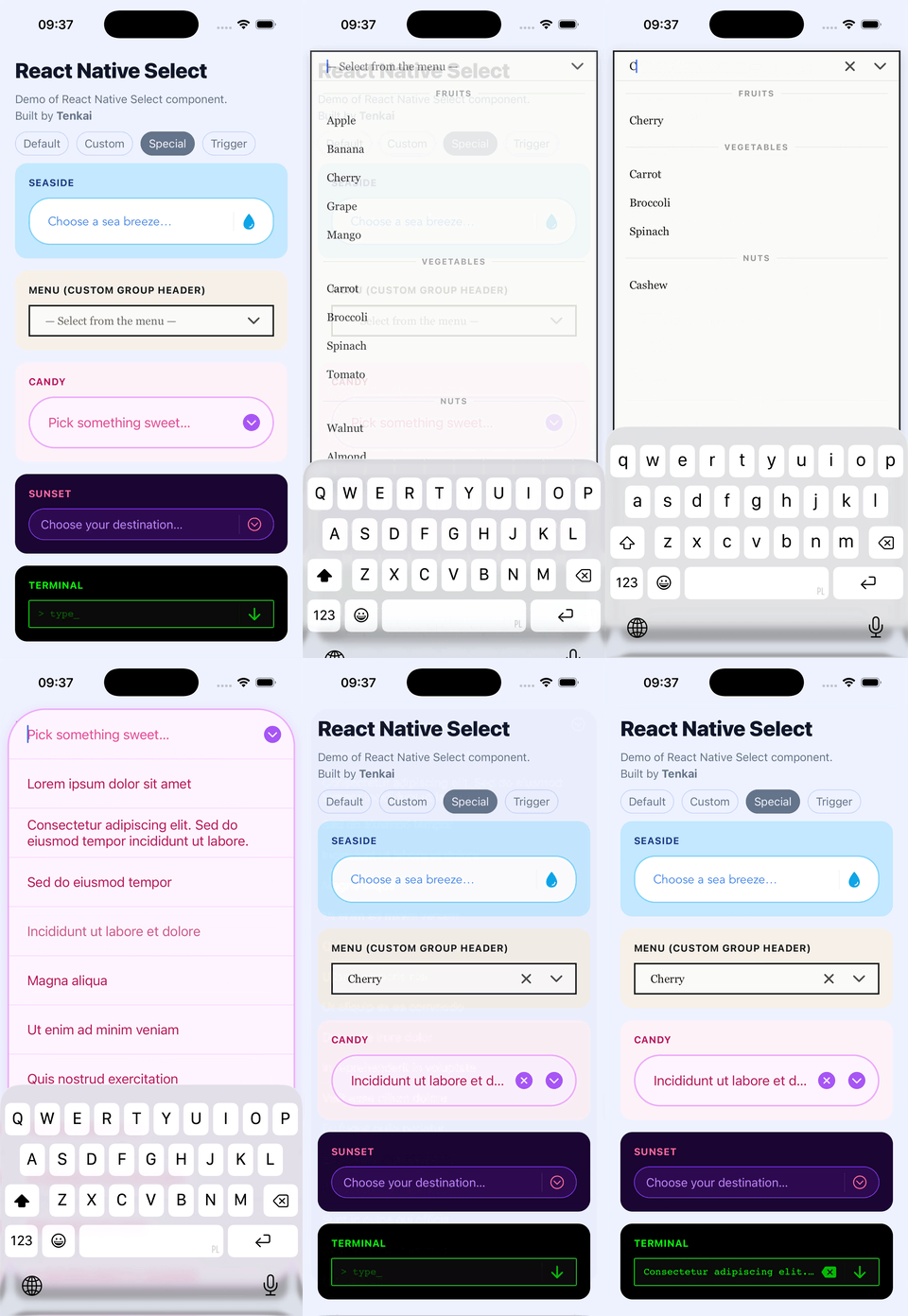
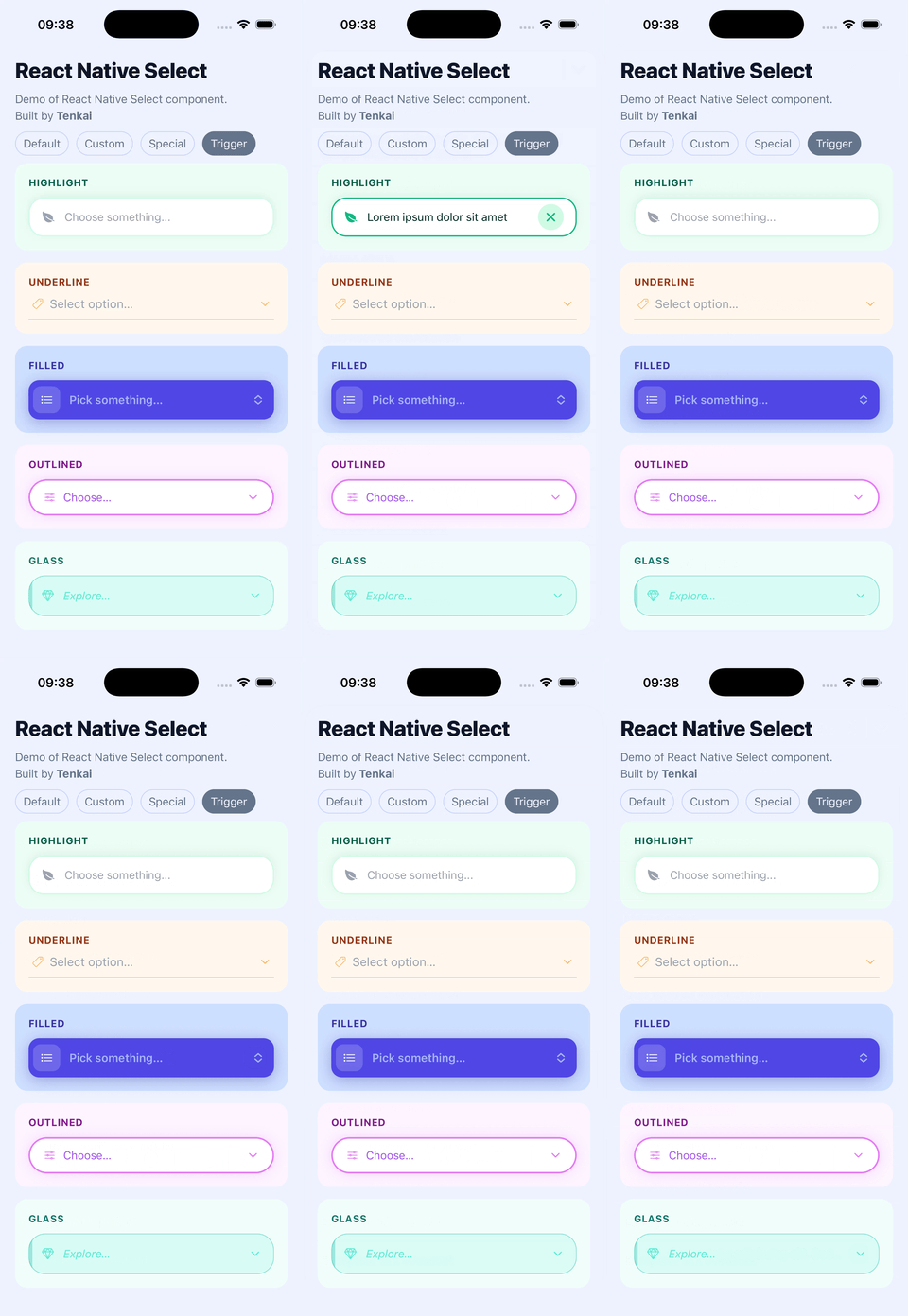
🎨 Custom colors, sizes, typography, icons, trigger, group header
📱 Native-first — keyboard, modal, layout handled correctly
⚡ Works with Expo & bare React Native
**[→ See all examples in the repository](https://github.com/tenkaipl/react-native-select/tree/main/examples/DemoScreen.js)**
---
## Quick example
```jsx
import React, { useState } from 'react';
import ReactNativeSelect from '@tenkaipl/react-native-select';
const OPTIONS = [
{ value: 'apple', label: 'Apple' },
{ value: 'banana', label: 'Banana' },
{ value: 'cherry', label: 'Cherry' },
];
export default function App() {
const [value, setValue] = useState(null);
return (
setValue(item.value)}
placeholder="Select a fruit..."
searchable
clearable
/>
);
}
```
---
## Installation
```bash
npm install @tenkaipl/react-native-select react-native-safe-area-context @expo/vector-icons
```
### SafeAreaProvider (required)
Wrap your app root with `SafeAreaProvider`. Without it, modal layout may be off on notched devices.
```jsx
import { SafeAreaProvider } from 'react-native-safe-area-context';
export default function App() {
return (
{/* your app */}
);
}
```
---
## ScrollView compatibility
⚠️ This is important if you plan to use this component inside a `ScrollView`, `FlatList`, or `SectionList`: please add `keyboardShouldPersistTaps="handled"` to the parent:
```jsx
```
Without it, the first tap on an option dismisses the keyboard instead of selecting — you'd need a second tap. This is caused by how React Native's touch responder system works: the parent `ScrollView` intercepts the first tap even when the select renders inside a `Modal`.
---
## Usage
### Basic
Same as the Quick example above. `onChange` receives the full option object `{ value, label }` — store whichever part you need.
### With groups
```jsx
const OPTIONS = [
{ type: 'group', label: 'Fruits' },
{ type: 'option', value: 'apple', label: 'Apple' },
{ type: 'option', value: 'banana', label: 'Banana' },
{ type: 'group', label: 'Vegetables' },
{ type: 'option', value: 'carrot', label: 'Carrot' },
{ type: 'option', value: 'broccoli', label: 'Broccoli' },
];
```
During search, group headers are shown only when at least one of their options matches the query.
### `flattenGroupedOptions` helper
If your data comes from an API in nested format, use the built-in helper:
```jsx
import ReactNativeSelect, { flattenGroupedOptions } from '@tenkaipl/react-native-select';
const GROUPED_DATA = [
{
label: 'Fruits',
options: [
{ value: 'apple', label: 'Apple' },
{ value: 'banana', label: 'Banana' },
],
},
{
label: 'Vegetables',
options: [{ value: 'carrot', label: 'Carrot' }],
},
];
// Static data — flatten once, outside the component
const OPTIONS = flattenGroupedOptions(GROUPED_DATA);
// Dynamic data (e.g. fetched) — use useMemo
// const options = useMemo(() => flattenGroupedOptions(data), [data]);
```
---
## Options format
```ts
// Regular option (selectable)
{ type?: 'option', value: string | number, label: string }
// Group header (non-selectable, skipped during search matching)
{ type: 'group', label: string }
```
`type` is optional for regular options — plain `{ value, label }` objects work as-is.
---
## Props
### Data
| Prop | Type | Default | Description |
|------|------|---------|-------------|
| `options` | `Option[]` | `[]` | List of options. See [Options format](#options-format). |
| `value` | `string \| number \| null` | — | Currently selected value (not the full object). |
| `onChange` | `(item: Option) => void` | — | Called when the user selects an option. Receives the full `{ value, label }` object. |
| `placeholder` | `string` | `''` | Text shown in the trigger when nothing is selected. |
| `placeholderText` | `string` | `'No results'` | Text shown in the list when the filtered result is empty. |
### Behavior
| Prop | Type | Default | Description |
|------|------|---------|-------------|
| `searchable` | `boolean` | `false` | Enables the search input inside the modal. |
| `clearable` | `boolean` | `false` | Shows a clear (×) button when a value is selected or search text is present. |
| `disabled` | `boolean` | `false` | Disables the trigger and prevents the dropdown from opening. |
| `autoFocus` | `boolean` | `true` | Focuses the search input when the modal opens. On Android handled via `onShow` + `setTimeout`. |
| `animationType` | `'fade' \| 'slide' \| 'none'` | `'fade'` | Animation used by the underlying ``. |
| `transparent` | `boolean` | `true` | Controls the `transparent` prop of ``. |
| `cursorColor` | `string \| null` | `null` | Cursor color of the search `TextInput`. |
| `pressedOpacity` | `number` | `0.6` | Opacity applied to all `Pressable` elements when pressed. |
| `hideDivider` | `boolean` | `false` | Hides the vertical separator between action buttons and the chevron. |
| `hideItemSeparator` | `boolean` | `false` | Hides horizontal separators between list items. |
| `itemLabelSingleLine` | `boolean` | `false` | Renders option labels as a single line with ellipsis instead of wrapping. |
| `autoCorrect` | `boolean` | `false` | Controls `autoCorrect` on the search `TextInput`. |
| `spellCheck` | `boolean` | `false` | Controls `spellCheck` on the search `TextInput`. Note: when enabled, the first tap on the clear button may not register. |
### Render props
| Prop | Type | Description |
|------|------|-------------|
| `renderTrigger` | `({ onPress, disabled, selectedLabel, hasValue, onClear }) => ReactNode` | Fully replaces the default trigger button. |
| `renderGroupHeader` | `({ item }) => ReactNode` | Replaces the default group header row. |
### Design tokens
| Prop | Type | Default | Description |
|------|------|---------|-------------|
| `theme` | `'light' \| 'dark'` | `'light'` | Base color preset. |
| `colors` | `Partial` | `{}` | Overrides individual colors. Merged with the active theme. See [Colors](#colors). |
| `sizes` | `Partial` | `{}` | Overrides dimensions. See [Sizes](#sizes). |
| `typography` | `Partial` | `{}` | Overrides font settings. See [Typography](#typography). |
| `icons` | `Partial` | `{}` | Overrides icon names (Ionicons). See [Icons](#icons). |
### Style overrides
| Prop | Type | Description |
|------|------|-------------|
| `triggerStyle` | `ViewStyle` | Additive style applied to the trigger container. |
| `dropdownStyle` | `ViewStyle` | Additive style applied to the dropdown container. |
| `itemStyle` | `ViewStyle` | Additive style applied to each option row. |
| `groupHeaderStyle` | `ViewStyle` | Additive style applied to each group header row. |
> ⚠️ These are **additive overrides** — they do not replace internal styles. Overriding `height`, `flex`, `overflow`, or positioning properties may break the layout.
---
## Colors
| Key | Description |
|-----|-------------|
| `primary` | Background of the trigger and dropdown. |
| `secondary` | Color of the chevron and close icons. |
| `colorTextPrimary` | Color of the selected label and option text. |
| `colorTextSecondary` | Color of the placeholder and group header text. |
| `lines` | Color of separators. Used as `borderColor` if `border` is not set. |
| `border` | *(optional)* Explicit border color. Falls back to `lines` if omitted. |
| `disabled` | Background of the trigger when `disabled={true}`. |
| `shadow` | `shadowColor` / `elevation` color. |
| `selected` | Background of the selected option row. |
---
## Sizes
| Key | Default | Description |
|-----|---------|-------------|
| `triggerMinWidth` | `180` | Minimum width of the trigger. |
| `itemHeight` | `50` | Height of each row (trigger, option rows, search bar). Clamped between `35`–`70`. |
| `maxListWidth` | `600` | Maximum width of the dropdown. |
| `maxListHeight` | `undefined` | Maximum height of the dropdown. |
| `separatorWidth` | `hairlineWidth` | Height of horizontal separators. |
| `borderRadius` | `15` | Border radius of the trigger and dropdown. |
| `borderWidth` | `hairlineWidth` | Border width of the trigger and dropdown. |
| `iconSize` | `24` | Size of the chevron and close icons. |
| `inputPaddingLeft` | `15` | Left padding of the text / search input. |
| `inputPaddingRight` | `5` | Right padding inside the trigger and search bar. |
| `itemPaddingHorizontal` | `15` | Horizontal padding of option and group header rows. |
`itemHeight` is clamped between `35` and `70`. The lower bound exists because Android breaks the `TextInput` layout in the search bar at smaller heights.
---
## Typography
| Key | Default | Description |
|-----|---------|-------------|
| `fontSize` | `16` | Font size for option labels, placeholder, and group header text. |
| `fontFamily` | `undefined` | Font family applied to all text inside the component. |
---
## Icons
Icon names from [`@expo/vector-icons` Ionicons](https://icons.expo.fyi/).
| Key | Default | Description |
|-----|---------|-------------|
| `chevron` | `'chevron-down'` | Icon on the right side of the trigger and modal header. |
| `close` | `'close'` | Icon for the clear button. |
---
## Roadmap
- Multi-select
- Async options (loadOptions)
- Creatable (add a new option not in the list)
- Fixed options
- RTL – Support for right-to-left languages
- Colored list items
- Inline autocomplete (ghost text)
- onSubmit – select the best match on Enter / search submit
- Keyboard navigation (for web)
- Animations during filtering
- More efficient list rendering for large option sets (maybe using FlashList)
---
## Comparison with react-select
If you're coming from a web project, here's where things stand:
| Feature | react-select | React Native Select |
|---------|-------------|---------------------|
| Single select | ✅ | ✅ |
| Searchable | ✅ | ✅ |
| Clearable | ✅ | ✅ |
| Disabled state | ✅ | ✅ |
| Option groups | ✅ | ✅ |
| Multi-select | ✅ | ❌ planned |
| Async options | ✅ | ❌ planned |
| Creatable | ✅ | ❌ planned |
---
## Compatibility & status
| Platform | Supported |
|----------|-----------|
| iOS | ✅ |
| Android | ✅ |
| Web | ✅ |
| Expo | ✅ |
This is **v1**. The core API and behavior are stable; some edge cases and advanced features are still being refined.
---
## Feedback
If something doesn't work as expected — especially on specific screens (modals, lists, keyboard-heavy views) — please open an issue. Real-world edge cases are exactly what this library is designed to solve.
---
## License
MIT — see [LICENSE](./LICENSE).
---
## Keywords
- react-native
- expo
- react native select
- react native dropdown
- custom select
- custom dropdown
- headless ui
- react native picker alternative
---
Built by [Tenkai Software House](https://www.tenkai.pl) 🇵🇱