# @t007/toast
> A high-performance, physics-driven vanilla JavaScript toast notification system. Features multi-touch drag-to-close gestures, hardware-accelerated animations, and a seamless Promise-resolution API.
[](LICENSE)
[](https://www.npmjs.com/package/@t007/toast)
[Live Demo](https://tobi007-del.github.io/t007-tools/packages/toast/src/index.html) | [Report Bug](https://github.com/Tobi007-del/t007-tools/issues)
---
## Table of contents
- [@t007/toast](#t007toast)
- [Table of contents](#table-of-contents)
- [Overview](#overview)
- [Demo \& Screenshots](#demo--screenshots)
- [Features](#features)
- [Tech Stack](#tech-stack)
- [Getting Started](#getting-started)
- [Usage](#usage)
- [API Reference](#api-reference)
- [Advanced Customization](#advanced-customization)
- [Author](#author)
- [Acknowledgments](#acknowledgments)
- [Star History](#star-history)
---
## Overview
**@t007/toast** is not just another notification library. It is a highly optimized, requestAnimationFrame-driven notification engine that mimics native mobile OS behaviors. It handles complex pointer gestures, pauses on window blur/hover, and manages a dynamic queue to prevent screen flooding.
### Why @t007/toast?
- ✅ **Physics-Driven Gestures:** Native-feeling "drag-to-close" utilizing Pointer Events (`x`, `y`, and directional configuration).
- ✅ **Intelligent Lifecycle:** Automatically pauses the auto-close timer and progress bar when hovered or when the browser tab loses focus.
- ✅ **Promise Integration:** Pass an async operation and the toast will automatically transition from "loading" to "success" or "error".
- ✅ **Haptic Feedback:** Optional built-in `navigator.vibrate` integration for physical feedback on mobile devices.
- ✅ **Zero Frameworks:** Pure vanilla JS, meaning it works flawlessly in React, Vue, Angular, or raw HTML.
---
## Demo & Screenshots
### Standard Toast Notifications
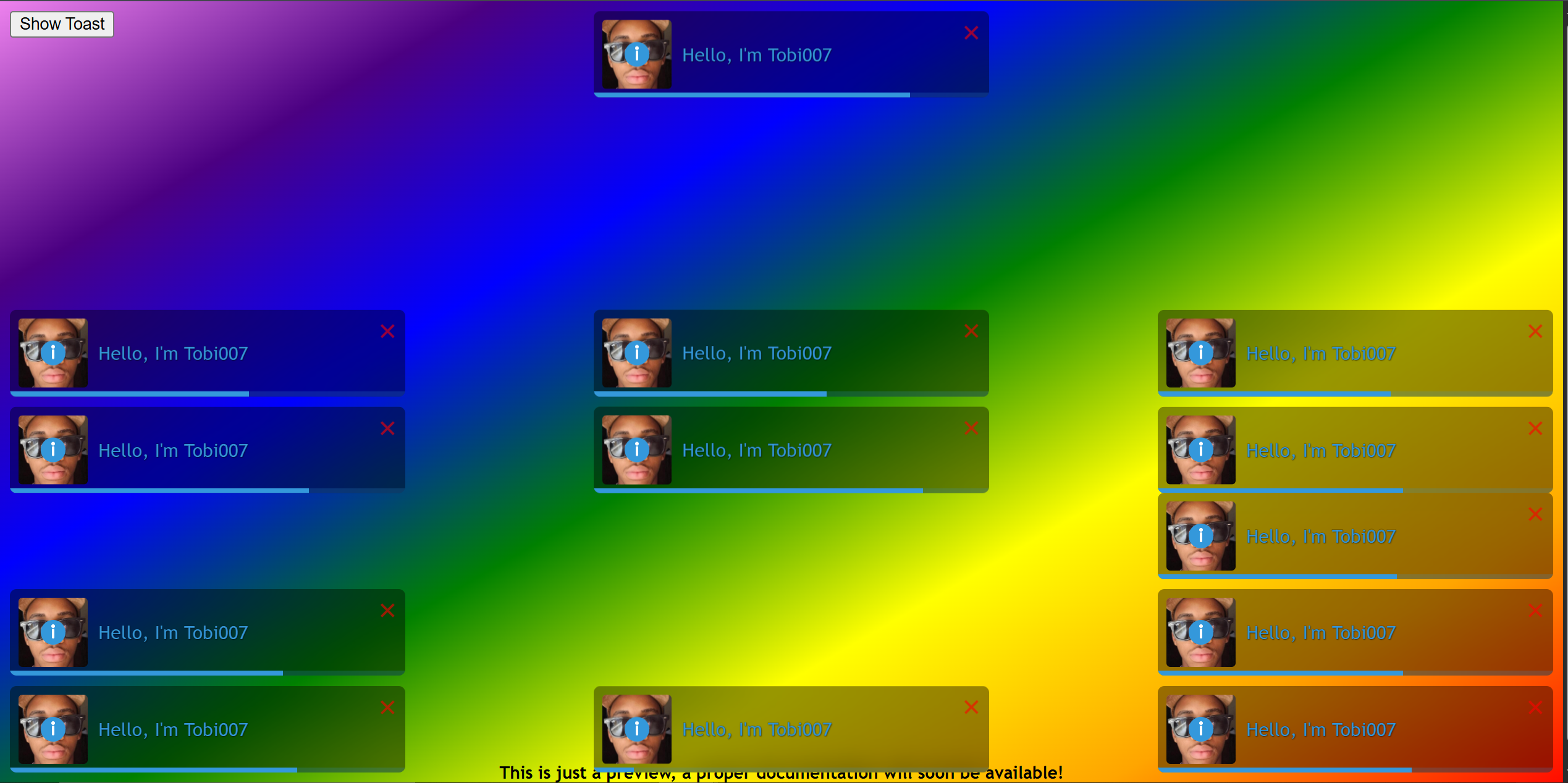
Features built-in SVG icons, custom actions, and smooth hardware-accelerated animations.
---
## Features
- **9 Positioning Zones**: Anchor toasts anywhere on the screen (e.g., `top-right`, `bottom-center`, `center-center`).
- **Dynamic Updating**: Update the text, icon, or type of an active toast without breaking its animation loop.
- **Queue Management**: Strict enforcement of `limit` and `renotify` to keep the UI clean.
- **Custom Hardware Vibrations**: Unique vibration patterns for different alert types (`success`, `error`, `warning`).
---
## Tech Stack
### Built with
- Vanilla JavaScript (ES6+)
- `requestAnimationFrame` Time Loops
- Pointer Events API
- Vibration API
- Bundled via `tsup` (ESM, CJS, IIFE outputs)
---
## Getting Started
### Installation
Install via your preferred package manager:
```bash
npm install @t007/toast @t007/utils
# or
yarn add @t007/toast @t007/utils
# or
pnpm add @t007/toast @t007/utils
````
-----
## Usage
### Modern Bundlers (ESM)
```javascript
import '@t007/toast/style.css';
import toast from '@t007/toast'; // also attached to window.t007
// 1. Simple success toast
toast.success("File uploaded successfully!");
// 2. Error toast with custom actions
toast.error("Connection failed", {
position: "bottom-right",
actions: {
"Retry": (e, instance) => {
console.log("Retrying...");
instance._remove();
}
}
});
// 3. Promise Handling
const myFetch = fetch('[https://api.example.com/data](https://api.example.com/data)');
toast.promise(myFetch, {
pending: "Loading data...",
success: "Data loaded successfully!",
error: "Failed to load data."
});
```
### CDN / Browser (Global)
If you are not using a bundler, the library automatically injects itself into the global `t007` object and provides the convenient `window.toast` fallback.
```html
```
-----
## API Reference
### Basic Toasts
Trigger toasts based on their severity. Returns the unique `id` of the generated toast. If first argument is an id, don't put `id` in options; it will be taken as a fallback `render`.
- `toast(render, options)` (Default / Info)
- `toast.info(renderOrId, options)`
- `toast.success(renderOrId, options)`
- `toast.warn(renderOrId, options)`
- `toast.error(renderOrId, options)`
### Toast Updating
You can dynamically update a toast that is currently on the screen.
```javascript
const toastId = toast.loading("Processing..."); // id is auto-generated reliably
// Later in your code...
toast.update(toastId, {
render: "Processing complete!",
type: "success",
isLoading: false,
autoClose: 3000
});
```
### `id` Upsert vs `tag` + `renotify`
- `id` controls in-place replacement: if a toast with that same active id exists, the call updates it instead of creating a new one.
- `toast.update(id, options)` is explicit update; helper calls (`success`, `info`, etc.) also upsert when `options.id` matches an active toast.
- `tag` is a grouping key, not an update key.
- `renotify: true` + same `tag` removes other active toasts with that tag before showing the new one.
```javascript
toast.success("Added to favorites", { id: `${tipId} favorite` }); // upsert by id, only if you can handle management
toast.info("Sync started", { tag: "sync", renotify: true }); // one active toast per tag
```
### Promise Handling
Automatically maps a JavaScript Promise to the lifecycle of a toast.
```javascript
toast.promise(promiseFunction, {
pending: { render: "Waiting...", type: "info" },
success: { render: (res) => `Success: ${res.data}`, type: "success" },
error: { render: (err) => `Failed: ${err.message}`, type: "error" }
});
```
### Configuration Options
The second argument of any toast call accepts a massive configuration object.
| Property | Type | Default | Description |
| ------------------ | -------------- | ------------- | --------------------------------------------------------- |
| `position` | String | `"top-right"` | The screen anchor point. |
| `autoClose` | Boolean/Number | `true` | MS to close, or false to disable. |
| `dragToClose` | Boolean/String | `true` | Allows swipe-to-dismiss via Pointer Events. |
| `dragToCloseDir` | String | `"x"` | Direction allowed for swiping (`x`, `y`, `x\|y`). |
| `pauseOnHover` | Boolean | `true` | Pauses timer when mouse enters toast. |
| `pauseOnFocusLoss` | Boolean | `true` | Pauses timer when window loses focus. |
| `vibrate` | Boolean/Array | `false` | Triggers device haptic feedback based on severity. |
| `actions` | Object | `null` | Key/Value object of button labels and callback functions. |
*(See source code for global configuration overrides via `t007.TOAST_DEFAULT_OPTIONS`).*
-----
## Advanced Customization
### The Global Config
You can override the default behavior for all toasts globally:
```javascript
window.t007.TOAST_DEFAULT_OPTIONS.position = "bottom-center";
window.t007.TOAST_DEFAULT_OPTIONS.vibrate = true;
// Custom Durations
window.t007.TOAST_DURATIONS.error = 10000; // Leave errors up for 10 seconds
```
### CSS Selectors & Variables
You can easily override the progress bar, animations, and container spacing by targeting `.t007-toast` in your stylesheet.
#### Corporate Override Starter (Google-like)
Use generic brand tokens first, then map them to toast variables. This keeps your theme portable across projects.
```css
/* 1) Brand/system tokens (generic names) */
:root {
--app-surface: #ffffff;
--app-text: #202124;
--app-muted: #5f6368;
--app-muted-2: #9aa0a6;
}
/* 2) Map tokens to toast variables (theme layer) */
.t007-toast {
--t007-toast-type-color: var(--app-text);
--t007-toast-background: var(--app-surface);
--t007-toast-text-shadow: none;
--t007-toast-text-stroke: 0;
--t007-toast-x-color: var(--app-muted-2);
/* ...check source code for all variables... */
}
/* 3) Container sizing/layout layer */
.t007-toast-container {
--t007-toast-unit: 0.9rem;
--t007-toast-width: calc(var(--t007-toast-unit) * 25);
--t007-toast-min-height: 3.25rem;
--t007-toast-progress-height: calc(var(--t007-toast-unit) / 6);
--t007-toast-icon-width: calc(var(--t007-toast-unit) * 1.25);
--t007-toast-icon-height: calc(var(--t007-toast-unit) * 1.25);
--t007-toast-x-size: calc(var(--t007-toast-unit) * 1.5);
}
@media (max-width: 40rem) {
.t007-toast-container {
--t007-toast-unit: 0.95rem;
--t007-toast-container-margin: 16px;
}
}
```
#### Specificity Note (Important)
- Start with `:root` for shared tokens.
- If a token does not apply, override directly on `.t007-toast` (visuals/colors).
- For sizing/layout variables, override `.t007-toast-container` (unit, width, icon size, margins).
- For strong app themes (e.g. `html[data-theme="dark"]`), use equal/stronger selectors on both `.t007-toast` and `.t007-toast-container`.
- Check source code for more details.
### Runtime Data Attributes
The library writes useful data attributes to toast DOM nodes at runtime:
- Toast root (`.t007-toast`): `data-group-id`, `data-animation`, `data-tag`, `data-drag-to-close`
- Container (`.t007-toast-container`): `data-position`
- Body text (`.t007-toast-body-text`): `data-render`
- Icon (`.t007-toast-icon`): `data-icon`
- Image (`.t007-toast-image`): `data-loaded`
-
-----
## Author
- Developer - [Oketade Oluwatobiloba (Tobi007-del)](https://github.com/Tobi007-del)
- Project - [t007-tools](https://github.com/Tobi007-del/t007-tools)
## Acknowledgments
Designed to bring native mobile OS notification physics to the web. Part of the `@t007` utility ecosystem.
## Star History
If you find this project useful, please consider giving it a star! ⭐
[](https://github.com/Tobi007-del/t007-tools)
 ---
## Features
- **9 Positioning Zones**: Anchor toasts anywhere on the screen (e.g., `top-right`, `bottom-center`, `center-center`).
- **Dynamic Updating**: Update the text, icon, or type of an active toast without breaking its animation loop.
- **Queue Management**: Strict enforcement of `limit` and `renotify` to keep the UI clean.
- **Custom Hardware Vibrations**: Unique vibration patterns for different alert types (`success`, `error`, `warning`).
---
## Tech Stack
### Built with
- Vanilla JavaScript (ES6+)
- `requestAnimationFrame` Time Loops
- Pointer Events API
- Vibration API
- Bundled via `tsup` (ESM, CJS, IIFE outputs)
---
## Getting Started
### Installation
Install via your preferred package manager:
```bash
npm install @t007/toast @t007/utils
# or
yarn add @t007/toast @t007/utils
# or
pnpm add @t007/toast @t007/utils
````
-----
## Usage
### Modern Bundlers (ESM)
```javascript
import '@t007/toast/style.css';
import toast from '@t007/toast'; // also attached to window.t007
// 1. Simple success toast
toast.success("File uploaded successfully!");
// 2. Error toast with custom actions
toast.error("Connection failed", {
position: "bottom-right",
actions: {
"Retry": (e, instance) => {
console.log("Retrying...");
instance._remove();
}
}
});
// 3. Promise Handling
const myFetch = fetch('[https://api.example.com/data](https://api.example.com/data)');
toast.promise(myFetch, {
pending: "Loading data...",
success: "Data loaded successfully!",
error: "Failed to load data."
});
```
### CDN / Browser (Global)
If you are not using a bundler, the library automatically injects itself into the global `t007` object and provides the convenient `window.toast` fallback.
```html
```
-----
## API Reference
### Basic Toasts
Trigger toasts based on their severity. Returns the unique `id` of the generated toast. If first argument is an id, don't put `id` in options; it will be taken as a fallback `render`.
- `toast(render, options)` (Default / Info)
- `toast.info(renderOrId, options)`
- `toast.success(renderOrId, options)`
- `toast.warn(renderOrId, options)`
- `toast.error(renderOrId, options)`
### Toast Updating
You can dynamically update a toast that is currently on the screen.
```javascript
const toastId = toast.loading("Processing..."); // id is auto-generated reliably
// Later in your code...
toast.update(toastId, {
render: "Processing complete!",
type: "success",
isLoading: false,
autoClose: 3000
});
```
### `id` Upsert vs `tag` + `renotify`
- `id` controls in-place replacement: if a toast with that same active id exists, the call updates it instead of creating a new one.
- `toast.update(id, options)` is explicit update; helper calls (`success`, `info`, etc.) also upsert when `options.id` matches an active toast.
- `tag` is a grouping key, not an update key.
- `renotify: true` + same `tag` removes other active toasts with that tag before showing the new one.
```javascript
toast.success("Added to favorites", { id: `${tipId} favorite` }); // upsert by id, only if you can handle management
toast.info("Sync started", { tag: "sync", renotify: true }); // one active toast per tag
```
### Promise Handling
Automatically maps a JavaScript Promise to the lifecycle of a toast.
```javascript
toast.promise(promiseFunction, {
pending: { render: "Waiting...", type: "info" },
success: { render: (res) => `Success: ${res.data}`, type: "success" },
error: { render: (err) => `Failed: ${err.message}`, type: "error" }
});
```
### Configuration Options
The second argument of any toast call accepts a massive configuration object.
| Property | Type | Default | Description |
| ------------------ | -------------- | ------------- | --------------------------------------------------------- |
| `position` | String | `"top-right"` | The screen anchor point. |
| `autoClose` | Boolean/Number | `true` | MS to close, or false to disable. |
| `dragToClose` | Boolean/String | `true` | Allows swipe-to-dismiss via Pointer Events. |
| `dragToCloseDir` | String | `"x"` | Direction allowed for swiping (`x`, `y`, `x\|y`). |
| `pauseOnHover` | Boolean | `true` | Pauses timer when mouse enters toast. |
| `pauseOnFocusLoss` | Boolean | `true` | Pauses timer when window loses focus. |
| `vibrate` | Boolean/Array | `false` | Triggers device haptic feedback based on severity. |
| `actions` | Object | `null` | Key/Value object of button labels and callback functions. |
*(See source code for global configuration overrides via `t007.TOAST_DEFAULT_OPTIONS`).*
-----
## Advanced Customization
### The Global Config
You can override the default behavior for all toasts globally:
```javascript
window.t007.TOAST_DEFAULT_OPTIONS.position = "bottom-center";
window.t007.TOAST_DEFAULT_OPTIONS.vibrate = true;
// Custom Durations
window.t007.TOAST_DURATIONS.error = 10000; // Leave errors up for 10 seconds
```
### CSS Selectors & Variables
You can easily override the progress bar, animations, and container spacing by targeting `.t007-toast` in your stylesheet.
#### Corporate Override Starter (Google-like)
Use generic brand tokens first, then map them to toast variables. This keeps your theme portable across projects.
```css
/* 1) Brand/system tokens (generic names) */
:root {
--app-surface: #ffffff;
--app-text: #202124;
--app-muted: #5f6368;
--app-muted-2: #9aa0a6;
}
/* 2) Map tokens to toast variables (theme layer) */
.t007-toast {
--t007-toast-type-color: var(--app-text);
--t007-toast-background: var(--app-surface);
--t007-toast-text-shadow: none;
--t007-toast-text-stroke: 0;
--t007-toast-x-color: var(--app-muted-2);
/* ...check source code for all variables... */
}
/* 3) Container sizing/layout layer */
.t007-toast-container {
--t007-toast-unit: 0.9rem;
--t007-toast-width: calc(var(--t007-toast-unit) * 25);
--t007-toast-min-height: 3.25rem;
--t007-toast-progress-height: calc(var(--t007-toast-unit) / 6);
--t007-toast-icon-width: calc(var(--t007-toast-unit) * 1.25);
--t007-toast-icon-height: calc(var(--t007-toast-unit) * 1.25);
--t007-toast-x-size: calc(var(--t007-toast-unit) * 1.5);
}
@media (max-width: 40rem) {
.t007-toast-container {
--t007-toast-unit: 0.95rem;
--t007-toast-container-margin: 16px;
}
}
```
#### Specificity Note (Important)
- Start with `:root` for shared tokens.
- If a token does not apply, override directly on `.t007-toast` (visuals/colors).
- For sizing/layout variables, override `.t007-toast-container` (unit, width, icon size, margins).
- For strong app themes (e.g. `html[data-theme="dark"]`), use equal/stronger selectors on both `.t007-toast` and `.t007-toast-container`.
- Check source code for more details.
### Runtime Data Attributes
The library writes useful data attributes to toast DOM nodes at runtime:
- Toast root (`.t007-toast`): `data-group-id`, `data-animation`, `data-tag`, `data-drag-to-close`
- Container (`.t007-toast-container`): `data-position`
- Body text (`.t007-toast-body-text`): `data-render`
- Icon (`.t007-toast-icon`): `data-icon`
- Image (`.t007-toast-image`): `data-loaded`
-
-----
## Author
- Developer - [Oketade Oluwatobiloba (Tobi007-del)](https://github.com/Tobi007-del)
- Project - [t007-tools](https://github.com/Tobi007-del/t007-tools)
## Acknowledgments
Designed to bring native mobile OS notification physics to the web. Part of the `@t007` utility ecosystem.
## Star History
If you find this project useful, please consider giving it a star! ⭐
[](https://github.com/Tobi007-del/t007-tools)
---
## Features
- **9 Positioning Zones**: Anchor toasts anywhere on the screen (e.g., `top-right`, `bottom-center`, `center-center`).
- **Dynamic Updating**: Update the text, icon, or type of an active toast without breaking its animation loop.
- **Queue Management**: Strict enforcement of `limit` and `renotify` to keep the UI clean.
- **Custom Hardware Vibrations**: Unique vibration patterns for different alert types (`success`, `error`, `warning`).
---
## Tech Stack
### Built with
- Vanilla JavaScript (ES6+)
- `requestAnimationFrame` Time Loops
- Pointer Events API
- Vibration API
- Bundled via `tsup` (ESM, CJS, IIFE outputs)
---
## Getting Started
### Installation
Install via your preferred package manager:
```bash
npm install @t007/toast @t007/utils
# or
yarn add @t007/toast @t007/utils
# or
pnpm add @t007/toast @t007/utils
````
-----
## Usage
### Modern Bundlers (ESM)
```javascript
import '@t007/toast/style.css';
import toast from '@t007/toast'; // also attached to window.t007
// 1. Simple success toast
toast.success("File uploaded successfully!");
// 2. Error toast with custom actions
toast.error("Connection failed", {
position: "bottom-right",
actions: {
"Retry": (e, instance) => {
console.log("Retrying...");
instance._remove();
}
}
});
// 3. Promise Handling
const myFetch = fetch('[https://api.example.com/data](https://api.example.com/data)');
toast.promise(myFetch, {
pending: "Loading data...",
success: "Data loaded successfully!",
error: "Failed to load data."
});
```
### CDN / Browser (Global)
If you are not using a bundler, the library automatically injects itself into the global `t007` object and provides the convenient `window.toast` fallback.
```html
```
-----
## API Reference
### Basic Toasts
Trigger toasts based on their severity. Returns the unique `id` of the generated toast. If first argument is an id, don't put `id` in options; it will be taken as a fallback `render`.
- `toast(render, options)` (Default / Info)
- `toast.info(renderOrId, options)`
- `toast.success(renderOrId, options)`
- `toast.warn(renderOrId, options)`
- `toast.error(renderOrId, options)`
### Toast Updating
You can dynamically update a toast that is currently on the screen.
```javascript
const toastId = toast.loading("Processing..."); // id is auto-generated reliably
// Later in your code...
toast.update(toastId, {
render: "Processing complete!",
type: "success",
isLoading: false,
autoClose: 3000
});
```
### `id` Upsert vs `tag` + `renotify`
- `id` controls in-place replacement: if a toast with that same active id exists, the call updates it instead of creating a new one.
- `toast.update(id, options)` is explicit update; helper calls (`success`, `info`, etc.) also upsert when `options.id` matches an active toast.
- `tag` is a grouping key, not an update key.
- `renotify: true` + same `tag` removes other active toasts with that tag before showing the new one.
```javascript
toast.success("Added to favorites", { id: `${tipId} favorite` }); // upsert by id, only if you can handle management
toast.info("Sync started", { tag: "sync", renotify: true }); // one active toast per tag
```
### Promise Handling
Automatically maps a JavaScript Promise to the lifecycle of a toast.
```javascript
toast.promise(promiseFunction, {
pending: { render: "Waiting...", type: "info" },
success: { render: (res) => `Success: ${res.data}`, type: "success" },
error: { render: (err) => `Failed: ${err.message}`, type: "error" }
});
```
### Configuration Options
The second argument of any toast call accepts a massive configuration object.
| Property | Type | Default | Description |
| ------------------ | -------------- | ------------- | --------------------------------------------------------- |
| `position` | String | `"top-right"` | The screen anchor point. |
| `autoClose` | Boolean/Number | `true` | MS to close, or false to disable. |
| `dragToClose` | Boolean/String | `true` | Allows swipe-to-dismiss via Pointer Events. |
| `dragToCloseDir` | String | `"x"` | Direction allowed for swiping (`x`, `y`, `x\|y`). |
| `pauseOnHover` | Boolean | `true` | Pauses timer when mouse enters toast. |
| `pauseOnFocusLoss` | Boolean | `true` | Pauses timer when window loses focus. |
| `vibrate` | Boolean/Array | `false` | Triggers device haptic feedback based on severity. |
| `actions` | Object | `null` | Key/Value object of button labels and callback functions. |
*(See source code for global configuration overrides via `t007.TOAST_DEFAULT_OPTIONS`).*
-----
## Advanced Customization
### The Global Config
You can override the default behavior for all toasts globally:
```javascript
window.t007.TOAST_DEFAULT_OPTIONS.position = "bottom-center";
window.t007.TOAST_DEFAULT_OPTIONS.vibrate = true;
// Custom Durations
window.t007.TOAST_DURATIONS.error = 10000; // Leave errors up for 10 seconds
```
### CSS Selectors & Variables
You can easily override the progress bar, animations, and container spacing by targeting `.t007-toast` in your stylesheet.
#### Corporate Override Starter (Google-like)
Use generic brand tokens first, then map them to toast variables. This keeps your theme portable across projects.
```css
/* 1) Brand/system tokens (generic names) */
:root {
--app-surface: #ffffff;
--app-text: #202124;
--app-muted: #5f6368;
--app-muted-2: #9aa0a6;
}
/* 2) Map tokens to toast variables (theme layer) */
.t007-toast {
--t007-toast-type-color: var(--app-text);
--t007-toast-background: var(--app-surface);
--t007-toast-text-shadow: none;
--t007-toast-text-stroke: 0;
--t007-toast-x-color: var(--app-muted-2);
/* ...check source code for all variables... */
}
/* 3) Container sizing/layout layer */
.t007-toast-container {
--t007-toast-unit: 0.9rem;
--t007-toast-width: calc(var(--t007-toast-unit) * 25);
--t007-toast-min-height: 3.25rem;
--t007-toast-progress-height: calc(var(--t007-toast-unit) / 6);
--t007-toast-icon-width: calc(var(--t007-toast-unit) * 1.25);
--t007-toast-icon-height: calc(var(--t007-toast-unit) * 1.25);
--t007-toast-x-size: calc(var(--t007-toast-unit) * 1.5);
}
@media (max-width: 40rem) {
.t007-toast-container {
--t007-toast-unit: 0.95rem;
--t007-toast-container-margin: 16px;
}
}
```
#### Specificity Note (Important)
- Start with `:root` for shared tokens.
- If a token does not apply, override directly on `.t007-toast` (visuals/colors).
- For sizing/layout variables, override `.t007-toast-container` (unit, width, icon size, margins).
- For strong app themes (e.g. `html[data-theme="dark"]`), use equal/stronger selectors on both `.t007-toast` and `.t007-toast-container`.
- Check source code for more details.
### Runtime Data Attributes
The library writes useful data attributes to toast DOM nodes at runtime:
- Toast root (`.t007-toast`): `data-group-id`, `data-animation`, `data-tag`, `data-drag-to-close`
- Container (`.t007-toast-container`): `data-position`
- Body text (`.t007-toast-body-text`): `data-render`
- Icon (`.t007-toast-icon`): `data-icon`
- Image (`.t007-toast-image`): `data-loaded`
-
-----
## Author
- Developer - [Oketade Oluwatobiloba (Tobi007-del)](https://github.com/Tobi007-del)
- Project - [t007-tools](https://github.com/Tobi007-del/t007-tools)
## Acknowledgments
Designed to bring native mobile OS notification physics to the web. Part of the `@t007` utility ecosystem.
## Star History
If you find this project useful, please consider giving it a star! ⭐
[](https://github.com/Tobi007-del/t007-tools)