# Vue Barcode Generator Component

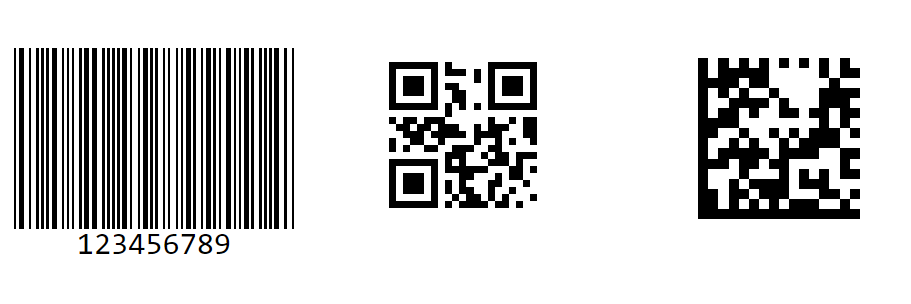
The [Vue Barcode](https://www.syncfusion.com/vue-components/vue-barcode?utm_source=npm&utm_medium=listing&utm_campaign=vue-barcode-npm) (QR Code) Generator Component is a light-weight and high-performance control that displays industry-standard 1D and 2D barcodes in Angular applications. Generated barcodes are optimized for printing and on-screen scanning. It is designed for ease of use and does not require fonts.

<p align="center">
    <a href="https://ej2.syncfusion.com/vue/documentation/barcode/getting-started/?utm_source=npm&utm_medium=listing&utm_campaign=vue-barcode-npm">Getting started</a> . 
    <a href="https://ej2.syncfusion.com/vue/demos/?utm_source=npm&utm_medium=listing&utm_campaign=vue-barcode-npm#/bootstrap5/barcode/ean8">Online demos</a> . 
    <a href="https://www.syncfusion.com/vue-components/vue-barcode?utm_source=npm&utm_medium=listing&utm_campaign=vue-barcode-npm">Learn more</a>
</p>

<p align="center">
	<img src="https://raw.githubusercontent.com/SyncfusionExamples/nuget-img/master/vue/vue-barcode.png" alt="Vue Barcode Component"/>
</p>


<p align="center">
Trusted by the world's leading companies

  <a href="https://www.syncfusion.com">
    <img src="https://raw.githubusercontent.com/SyncfusionExamples/nuget-img/master/syncfusion/syncfusion-trusted-companies.webp" alt="Bootstrap logo">
  </a>
</p>

## Setup

### Create an Vue Application

You can use [`Vue CLI`](https://github.com/vuejs/vue-cli) to setup your Vue 2 applications.To install Vue CLI use the following commands.

```bash
npm install -g @vue/cli
vue create quickstart
cd quickstart
npm run serve
```
Initiating a new project prompts us to choose the type of project to be used for the current application. Select the option `Default ([Vue 2] babel, eslint)` from the menu.

### Adding Syncfusion Barcode package

All Syncfusion Vue packages are published in [npmjs.com](https://www.npmjs.com/~syncfusionorg) registry. To install Vue barcode package, use the following command.

```bash
npm install @syncfusion/ej2-vue-barcode-generator --save
```

### Registering Barcode Component

You can register the Barcode component in your application by using the **Vue.use()**. Refer to the code example given below.

```typescript
import { BarcodeGeneratorPlugin } from '@syncfusion/ej2-vue-barcode-generator';

Vue.use(BarcodeGeneratorPlugin);
```

> Registering **BarcodeGeneratorPlugin** in vue, will register the barcode component along with its required child directives globally.

## Add Barcode Component

Add the Vue Barcode by using **ejs-barcodegenerator** selector in **template** section of the **App.vue** file.

```html
<template>
    <div id="app">
       <ejs-barcodegenerator
              id="barcode"  
              :width="width"
              :height="height"
              :type="type"
              :value="value"
              :mode="mode"
            ></ejs-barcodegenerator>
    </div>
</template>
<script>
import Vue from "vue";
import { BarcodeGeneratorPlugin } from "@syncfusion/ej2-vue-barcode-generator";

Vue.use(BarcodeGeneratorPlugin);

export default {
  data() {
    return {
      width: "200px",
      height: "150px",
      mode: "SVG",
      type: "Ean8",
      value: "11223344",
    };
  },
}
</script>
``` 

## Supported frameworks

Barcode component is also offered in the following list of frameworks.

| [<img src="https://ej2.syncfusion.com/github/images/js.svg" height="50" />](https://www.syncfusion.com/javascript-ui-controls?utm_medium=listing&utm_source=github)<br/>&nbsp;&nbsp;&nbsp;&nbsp;&nbsp;[JavaScript](https://www.syncfusion.com/javascript-ui-controls?utm_medium=listing&utm_source=github)&nbsp;&nbsp;&nbsp;&nbsp; | [<img src="https://ej2.syncfusion.com/github/images/angular-new.svg"  height="50" />](https://www.syncfusion.com/angular-components/?utm_medium=listing&utm_source=github)<br/>&nbsp;&nbsp;&nbsp;&nbsp;&nbsp;&nbsp;&nbsp;[Angular](https://www.syncfusion.com/angular-components/?utm_medium=listing&utm_source=github)&nbsp;&nbsp;&nbsp;&nbsp;&nbsp;&nbsp; | [<img src="https://ej2.syncfusion.com/github/images/vue.svg" height="50" />](https://www.syncfusion.com/vue-ui-components?utm_medium=listing&utm_source=github)<br/>&nbsp;&nbsp;&nbsp;&nbsp;&nbsp;&nbsp;&nbsp;[Vue](https://www.syncfusion.com/vue-ui-components?utm_medium=listing&utm_source=github)&nbsp;&nbsp;&nbsp;&nbsp;&nbsp;&nbsp;&nbsp;&nbsp;&nbsp; | [<img src="https://ej2.syncfusion.com/github/images/netcore.svg" height="50" />](https://www.syncfusion.com/aspnet-core-ui-controls?utm_medium=listing&utm_source=github)<br/>&nbsp;&nbsp;[ASP.NET&nbsp;Core](https://www.syncfusion.com/aspnet-core-ui-controls?utm_medium=listing&utm_source=github)&nbsp;&nbsp; | [<img src="https://ej2.syncfusion.com/github/images/netmvc.svg" height="50" />](https://www.syncfusion.com/aspnet-mvc-ui-controls?utm_medium=listing&utm_source=github)<br/>&nbsp;&nbsp;[ASP.NET&nbsp;MVC](https://www.syncfusion.com/aspnet-mvc-ui-controls?utm_medium=listing&utm_source=github)&nbsp;&nbsp; | 
| :-----: | :-----: | :-----: | :-----: | :-----: |

## Showcase samples

* Loan Calculator - [Source](https://github.com/syncfusion/ej2-showcase-vue-loan-calculator), [Live Demo](https://ej2.syncfusion.com/showcase/vue/loancalculator/?utm_source=npm&utm_medium=listing&utm_campaign=vue-barcode-npm#/default)
* Fitness Tracker - [Source](https://github.com/SyncfusionExamples/showcase-vue-health-tracker-dashboard-demo), [Live Demo](https://ej2.syncfusion.com/showcase/vue/fitness-tracker-app/)

## Key features

* Barcode Symbologies - Supports a wide range of barcode symbologies, including:
	* [QR Code](https://ej2.syncfusion.com/vue/demos/#/bootstrap5/barcode/qrcode.html)
	* [Data Matrix](https://ej2.syncfusion.com/vue/demos/#/bootstrap5/barcode/datamatrix.html)
	* [Code 39](https://ej2.syncfusion.com/vue/demos/#/bootstrap5/barcode/code39.html)
	* [Code 39 Extended](https://ej2.syncfusion.com/vue/demos/#/bootstrap5/barcode/code39Extd.html)
	* [Codabar](https://ej2.syncfusion.com/vue/demos/#/bootstrap5/barcode/codabar.html)
	* [Code 32](https://ej2.syncfusion.com/vue/demos/#/bootstrap5/barcode/code32.html)
	* [Code 93](https://ej2.syncfusion.com/vue/demos/#/bootstrap5/barcode/code93.html)
	* [Code 128](https://ej2.syncfusion.com/vue/demos/#/bootstrap5/barcode/code128.html)
	* [Code 128A](https://ej2.syncfusion.com/vue/demos/#/bootstrap5/barcode/code128A.html)
	* [Code 128B](https://ej2.syncfusion.com/vue/demos/#/bootstrap5/barcode/code128B.html)
	* [Code 128C](https://ej2.syncfusion.com/vue/demos/#/bootstrap5/barcode/code128C.html)
	* [EAN-8](https://ej2.syncfusion.com/vue/demos/#/bootstrap5/barcode/ean8.html)
	* [EAN-13](https://ej2.syncfusion.com/vue/demos/#/bootstrap5/barcode/ean13.html)
	* [UPC-A](https://ej2.syncfusion.com/vue/demos/#/bootstrap5/barcode/upca.html	)
	* [UPC-E](https://ej2.syncfusion.com/vue/demos/#/bootstrap5/barcode/upce.html)
* Text Customization - Allows you to customize the text displayed.
* Exporting - Barcode can be exported as .png or .jpeg fromat image and can also be exported as base64 string.

## Support

Product support is available through the following mediums.

* [Support ticket](https://support.syncfusion.com/support/tickets/create) - Guaranteed Response in 24 hours | Unlimited tickets | Holiday support
* [Community forum](https://www.syncfusion.com/forums/vue-js2?utm_source=npm&utm_medium=listing&utm_campaign=vue-barcode-npm)
* [GitHub issues](https://github.com/syncfusion/ej2-vue-ui-components/issues/new)
* [Request feature or report bug](https://www.syncfusion.com/feedback/vue?utm_source=npm&utm_medium=listing&utm_campaign=vue-barcode-npm)
* Live chat

## Changelog

Check the changelog [here](https://ej2.syncfusion.com/vue/documentation/release-notes). Get minor improvements and bug fixes every week to stay up to date with frequent updates.

## License and copyright

> This is a commercial product and requires a paid license for possession or use. Syncfusion’s licensed software, including this component, is subject to the terms and conditions of Syncfusion's [EULA](https://www.syncfusion.com/eula/es/). To acquire a license for 80+ [Vue UI components](https://www.syncfusion.com/vue-components), you can [purchase](https://www.syncfusion.com/sales/products) or [start a free 30-day trial](https://www.syncfusion.com/account/manage-trials/start-trials).

> A free community [license](https://www.syncfusion.com/products/communitylicense) is also available for companies and individuals whose organizations have less than $1 million USD in annual gross revenue and five or fewer developers.

See [LICENSE FILE](https://github.com/syncfusion/ej2-vue-ui-components/blob/master/license) for more info.

© Copyright 2026 Syncfusion<sup>®</sup> Inc. All Rights Reserved. The Syncfusion<sup>®</sup> Essential Studio<sup>®</sup> license and copyright applies to this distribution.