# React LinearGauge Component
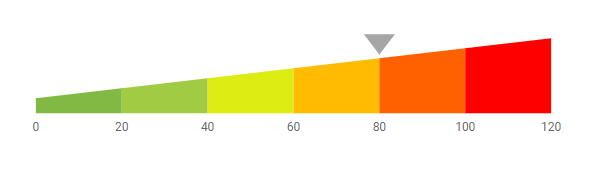
The [React Linear Gauge](https://www.syncfusion.com/react-components/react-linear-gauge?utm_source=npm&utm_medium=listing&utm_campaign=react-lineargauge-npm) component is used to visualize numerical values of an axis in linear manner. All the linear gauge elements are rendered using Scalable Vector Graphics (SVG).
Getting started .
Online demos .
Learn more
Trusted by the world's leading companies

> **Using this package with an AI coding agent**
>
> Before generating Syncfusion code, ask your AI coding agent to run the Syncfusion setup using the following prompt:
>
> ```text
> Set up this project for Syncfusion before generating code. Fetch
> and follow the official instructions at https://ai.syncfusion.com,
> then report the detected platform, installed skill pack, MCP
> status, and any required licensing action.
> ```
> The setup detects your project’s platform and loads the appropriate Syncfusion skill pack. No Syncfusion account or MCP key is required to install or read Syncfusion agent skills.
>
> **Platform reference:** [https://ai.syncfusion.com/react/llms.txt](https://ai.syncfusion.com/react/llms.txt)
## Setup
### Create a React Application
You can use [`create-react-app`](https://github.com/facebookincubator/create-react-app) to setup applications. To create React app, use the following command.
```bash
npx create-react-app my-app --template typescript
cd my-app
npm start
```
### Add Syncfusion Linear Gauge package
All Syncfusion React packages are published in the [npmjs.com](https://www.npmjs.com/~syncfusionorg) registry. To install the React Linear Gauge package, use the following command.
```sh
npm install @syncfusion/ej2-react-lineargauge --save
```
### Add Linear Gauge Component
In the **src/App.tsx** file, use the following code snippet to render the Syncfusion React Linear Gauge component.
```typescript
import React from 'react';
import { LinearGaugeComponent } from '@syncfusion/ej2-react-lineargauge';
function App() {
return ();
}
export default App;
```
## Supported frameworks
Linear Gauge component is also offered in the following list of frameworks.
| [ ](https://www.syncfusion.com/javascript-ui-controls?utm_medium=listing&utm_source=github)
[JavaScript](https://www.syncfusion.com/javascript-ui-controls?utm_medium=listing&utm_source=github) | [ ](https://www.syncfusion.com/angular-components/?utm_medium=listing&utm_source=github)
[Angular](https://www.syncfusion.com/angular-components/?utm_medium=listing&utm_source=github) | [ ](https://www.syncfusion.com/vue-ui-components?utm_medium=listing&utm_source=github)
[Vue](https://www.syncfusion.com/vue-ui-components?utm_medium=listing&utm_source=github) | [ ](https://www.syncfusion.com/aspnet-core-ui-controls?utm_medium=listing&utm_source=github)
[ASP.NET Core](https://www.syncfusion.com/aspnet-core-ui-controls?utm_medium=listing&utm_source=github) | [ ](https://www.syncfusion.com/aspnet-mvc-ui-controls?utm_medium=listing&utm_source=github)
[ASP.NET MVC](https://www.syncfusion.com/aspnet-mvc-ui-controls?utm_medium=listing&utm_source=github) |
| :-----: | :-----: | :-----: | :-----: | :-----: |
## Showcase samples
* Fitness Tracker - [Source](https://github.com/SyncfusionExamples/showcase-react-health-tracker-dashboard-demo), [Live Demo](https://ej2.syncfusion.com/showcase/react/fitness-tracker-app/)
* Progress Tracker - [Live Demo](https://ej2.syncfusion.com/react/demos/?utm_source=npm&utm_campaign=react-lineargauge-npm#/material/linear-gauge/step-progress-bar)
## Key features
* [Axes](https://ej2.syncfusion.com/react/documentation/linear-gauge/axis/?utm_source=npm&utm_campaign=react-lineargauge-npm): Axes is a collection of axis that can be used to indicate the numeric values in linear scale.
* [Orientation](https://ej2.syncfusion.com/react/documentation/linear-gauge/axis/?utm_source=npm&utm_campaign=react-lineargauge-npm#orientation): Renders in both vertical and horizontal directions.
* [Container](https://ej2.syncfusion.com/react/demos/?utm_source=npm&utm_campaign=react-lineargauge-npm#/material/linear-gauge/container): Container holds multiple axes together. It supports three types of containers: normal, rounded rectangle, and thermometer.
* [Ranges](https://ej2.syncfusion.com/react/documentation/linear-gauge/ranges/?utm_source=npm&utm_campaign=react-lineargauge-npm): Supports ranges to categorize the axis values. Any number of ranges can be added to the linear gauge.
* [Pointers](https://ej2.syncfusion.com/react/documentation/linear-gauge/pointers/?utm_source=npm&utm_campaign=react-lineargauge-npm): Pointers are used to indicate values on the axis. Linear gauge supports two types of pointers: bar and marker.
* [Annotation](https://ej2.syncfusion.com/react/documentation/linear-gauge/annotations/?utm_source=npm&utm_campaign=react-lineargauge-npm): Uses any custom HTML element as annotations and place it anywhere on the gauge.
* [Tooltip](https://ej2.syncfusion.com/react/documentation/linear-gauge/user-interaction/?utm_source=npm&utm_campaign=react-lineargauge-npm#tooltip): Provides information about the pointer values on hover.
* [Pointer drag](https://ej2.syncfusion.com/react/documentation/linear-gauge/user-interaction/?utm_source=npm&utm_campaign=react-lineargauge-npm#pointer-drag): Provides support to place the pointer at the desired values by dragging it.
* [Print and Export](https://ej2.syncfusion.com/react/documentation/linear-gauge/print-and-export/?utm_source=npm&utm_campaign=react-lineargauge-npm): Prints or exports the rendered linear gauge to a desired format. Exporting supports four formats: PDF, PNG, JPEG and SVG.
* [Globalization](https://ej2.syncfusion.com/react/documentation/linear-gauge/internationalization/?utm_source=npm&utm_campaign=react-lineargauge-npm): Personalize the linear gauge component with different languages, as well as culture-specific number, date and time formatting.
* [Accessibility](https://ej2.syncfusion.com/react/documentation/linear-gauge/accessibility/?utm_source=npm&utm_campaign=react-lineargauge-npm): Provides with built-in accessibility support which helps to access all the linear gauge component features through the keyboard, screen readers, or other assistive technology devices.
## Support
Product support is available through the following mediums.
* [Support ticket](https://support.syncfusion.com/support/tickets/create) - Guaranteed Response in 24 hours | Unlimited tickets | Holiday support
* [Community forum](https://www.syncfusion.com/forums/react-js2?utm_source=npm&utm_medium=listing&utm_campaign=react-lineargauge-npm)
* [GitHub issues](https://github.com/syncfusion/ej2-react-ui-components/issues/new)
* [Request feature or report bug](https://www.syncfusion.com/feedback/react?utm_source=npm&utm_medium=listing&utm_campaign=react-lineargauge-npm)
* Live chat
## Changelog
Check the changelog [here](https://github.com/syncfusion/ej2-react-ui-components/blob/master/components/lineargauge/CHANGELOG.md?utm_source=npm&utm_campaign=react-lineargauge-npm). Get minor improvements and bug fixes every week to stay up to date with frequent updates.
## License and copyright
> This is a commercial product and requires a paid license for possession or use. Syncfusion’s licensed software, including this component, is subject to the terms and conditions of Syncfusion's [EULA](https://www.syncfusion.com/eula/es/). To acquire a license for 80+ [React UI components](https://www.syncfusion.com/react-components), you can [purchase](https://www.syncfusion.com/sales/products) or [start a free 30-day trial](https://www.syncfusion.com/account/manage-trials/start-trials).
> A free community [license](https://www.syncfusion.com/products/communitylicense) is also available for companies and individuals whose organizations have less than $1 million USD in annual gross revenue and five or fewer developers.
See [LICENSE FILE](https://github.com/syncfusion/ej2-react-ui-components/blob/master/components/lineargauge/license?utm_source=npm&utm_campaign=react-lineargauge-npm) for more info.
© Copyright 2026 Syncfusion® Inc. All Rights Reserved. The Syncfusion® Essential Studio® license and copyright applies to this distribution.