# Angular Rich Text Editor | Angular Markdown Editor
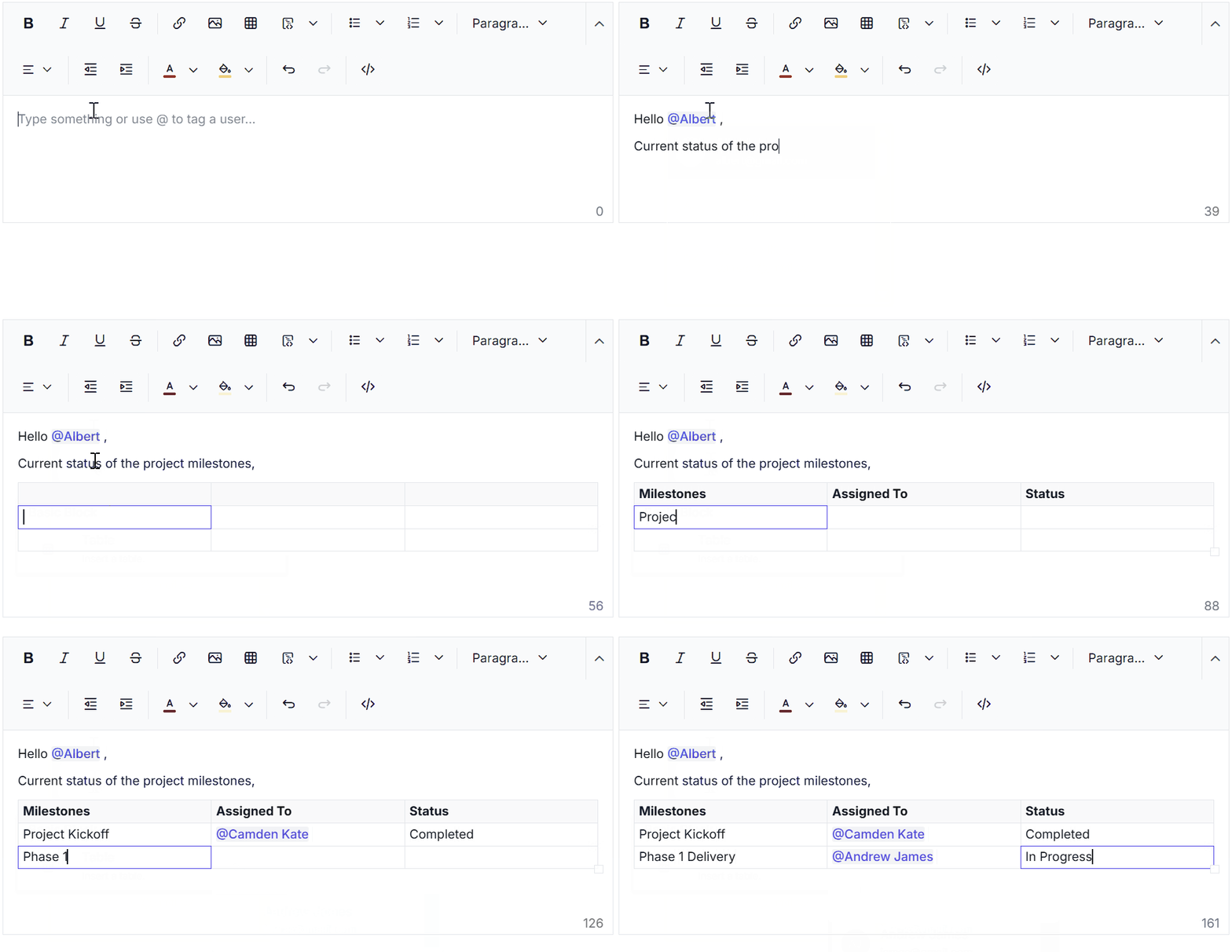
The [Angular RichTextEditor](https://www.syncfusion.com/angular-ui-components/angular-wysiwyg-rich-text-editor?utm_source=npm&utm_medium=listing&utm_campaign=angular-rich-text-editor-npm) is a feature-rich WYSIWYG HTML editor and Markdown editor. The Rich Text Editor is widely used to create blogs, forum posts, notes sections, comment sections, messaging applications, and more. The component provides an efficient user interface for a better editing experience with mobile support. It has a variety of tools to edit and format rich content, and it return a valid HTML markup or Markdown (MD) content. It allows users to insert images, links, tables, media files and lists with modular architectures.
Trusted by the world's leading companies

## ⚡️ Quick Start
Syncfusion ® Rich Text Editor is easy to integrate into Angular applications. Just install the package, configure the module, and drop the component into your template.
### 🛠️ Installation
Install the Rich Text Editor and its dependencies using npm:
```bash
npm install @syncfusion/ej2-angular-richtexteditor --save
```
This command will:
* Adds `@syncfusion/ej2-angular-richtexteditor` package and its peer dependencies to your `package.json` file.
* Registers the Syncfusion® UI default theme (tailwind) in the `angular.json` file.
### ⚙️ Setup
#### 1. Create an Angular Application
You can use [Angular CLI](https://github.com/angular/angular-cli) to setup your Angular applications. To install the Angular CLI, use the following command.
```bash
npm install -g @angular/cli
ng new my-app
cd my-app
```
#### 2. Import the Rich Text Editor Module
In `app.module.ts`, import the required module:
```typescript
import { NgModule } from '@angular/core';
import { BrowserModule } from '@angular/platform-browser';
import { RichTextEditorAllModule } from '@syncfusion/ej2-angular-richtexteditor';
import { AppComponent } from './app.component';
@NgModule({
declarations: [AppComponent],
imports: [BrowserModule, RichTextEditorAllModule],
bootstrap: [AppComponent]
})
export class AppModule { }
```
ℹ️ Note:
RichTextEditorAllModule includes all features of the Rich Text Editor. To reduce bundle size, consider importing only the required modules individually. For detailed information on module injection, refer to the Syncfusion Rich Text Editor Module Documentation.
### 🧩 Add the Rich Text Editor Component
In **src/app/app.component.ts**, use `` selector in `template` attribute of `@Component` directive to render the Syncfusion® Angular Rich Text Editor component.
```typescript
import { Component } from '@angular/core';
import { ToolbarService, LinkService, ImageService, HtmlEditorService } from '@syncfusion/ej2-angular-richtexteditor';
@Component({
selector: 'app-root',
template: `
Start editing your content here.
`,
providers: [ToolbarService, LinkService, ImageService, HtmlEditorService]
})
export class AppComponent { }
```
## 🛠️ Supported frameworks
Rich Text Editor component is also offered in following list of frameworks.
| [ ](https://www.syncfusion.com/javascript-ui-controls?utm_medium=listing&utm_source=github)
[JavaScript](https://www.syncfusion.com/javascript-ui-controls?utm_medium=listing&utm_source=github) | [ ](https://www.syncfusion.com/react-ui-components?utm_medium=listing&utm_source=github)
[React](https://www.syncfusion.com/react-ui-components?utm_medium=listing&utm_source=github) | [ ](https://www.syncfusion.com/vue-ui-components?utm_medium=listing&utm_source=github)
[Vue](https://www.syncfusion.com/vue-ui-components?utm_medium=listing&utm_source=github) | [ ](https://www.syncfusion.com/aspnet-core-ui-controls?utm_medium=listing&utm_source=github)
[ASP.NET Core](https://www.syncfusion.com/aspnet-core-ui-controls?utm_medium=listing&utm_source=github) | [ ](https://www.syncfusion.com/aspnet-mvc-ui-controls?utm_medium=listing&utm_source=github)
[ASP.NET MVC](https://www.syncfusion.com/aspnet-mvc-ui-controls?utm_medium=listing&utm_source=github) |
| :-----: | :-----: | :-----: | :-----: | :-----: |
## 🏗️ Showcase samples
* [Angular HTML editor demo](https://ej2.syncfusion.com/angular/demos/?utm_source=npm&utm_medium=listing&utm_campaign=angular-rich-text-editor-npm/#/bootstrap5/rich-text-editor/tools)
* [Blog posting using angular rich text editor demo](https://ej2.syncfusion.com/angular/demos/?utm_source=npm&utm_medium=listing&utm_campaign=angular-rich-text-editor-npm/#/bootstrap5/rich-text-editor/blog-posting)
* [Angular Markdown editor demo](https://ej2.syncfusion.com/angular/demos/?utm_source=npm&utm_medium=listing&utm_campaign=angular-rich-text-editor-npm/#/bootstrap5/rich-text-editor/markdown-editor)
* [Angular live HTML editor demo](https://ej2.syncfusion.com/angular/demos/?utm_source=npm&utm_medium=listing&utm_campaign=angular-rich-text-editor-npm/#/bootstrap5/rich-text-editor/online-html-editor)
## ✨ Key features
* [Edit mode](https://ej2.syncfusion.com/angular/demos/?utm_source=npm&utm_medium=listing&utm_campaign=angular-rich-text-editor-npm/#/bootstrap5/rich-text-editor/iframe) - HTML content is possible to edit in a `div` element or an `iframe` in the rich text editor.
* [@Mentions](https://ej2.syncfusion.com/angular/demos/#/bootstrap5/rich-text-editor/mention-integration) - Easily mention users, tags, or items with an autocomplete suggestion list.
* [Slash Menu Support](https://ej2.syncfusion.com/angular/demos/#/bootstrap5/rich-text-editor/smart-suggestion) - Quickly insert content blocks using the `/` command.
* [Checklist Suport](https://ej2.syncfusion.com/angular/demos/#/bootstrap5/rich-text-editor/tools) - Allows users to create checklists (to-do lists) directly within the editor. Users can easily add interactive checkbox items to their content.
* [Accessibility & WCAG 2.0 Compliance](https://ej2.syncfusion.com/angular/documentation/rich-text-editor/accessibility) - Ensures full accessibility support, making it user-friendly for people who rely on assistive technologies (AT) or keyboard navigation.
* [Preventing Cross-Site Scripting (XSS)](https://ej2.syncfusion.com/aspnetcore/documentation/rich-text-editor/prevent-cross-site-scripting?utm_source=npm&utm_medium=listing&utm_campaign=javascript-richtexteditor-npm) - The Rich Text Editor allows users to edit the content with security by preventing cross-site scripting (XSS).
* [HTML code editing](https://ej2.syncfusion.com/angular/documentation/rich-text-editor/miscellaneous/?utm_source=npm&utm_medium=listing&utm_campaign=angular-rich-text-editor-npm/#code-view) - The rich text editor allows users to edit the HTML code directly in the HTML code view.
* [Markdown editor](https://ej2.syncfusion.com/angular/demos/?utm_source=npm&utm_medium=listing&utm_campaign=angular-rich-text-editor-npm/#/bootstrap5/rich-text-editor/markdown-editor-preview) - The rich text editor allows you to edit Markdown content using the Markdown syntax.
* [Markdown content preview](https://ej2.syncfusion.com/angular/demos/?utm_source=npm&utm_medium=listing&utm_campaign=angular-rich-text-editor-npm/#/bootstrap5/rich-text-editor/markdown-editor-preview) - Preview of the modified Markdown content in the editor, you can give users the ability to see what the formatted content will look like before they save it.
* [Tools](https://ej2.syncfusion.com/angular/documentation/rich-text-editor/toolbar/?utm_source=npm&utm_medium=listing&utm_campaign=angular-rich-text-editor-npm/#toolbar-items) - The rich text editor handles a wide range of features, including inserting images, hyperlinks, tables, formatting tools, and more.
* [Toolbar appearance](https://ej2.syncfusion.com/angular/demos/?utm_source=npm&utm_medium=listing&utm_campaign=angular-rich-text-editor-npm/#/bootstrap5/rich-text-editor/types) - The rich text editor can provide a fully customizable toolbar that allows users to access the various formatting and editing options that are available.
* [Export and Import](https://ej2.syncfusion.com/angular/demos/?utm_source=npm&utm_medium=listing&utm_campaign=angular-rich-text-editor-npm/#/bootstrap5/rich-text-editor/export-document) - Supports exporting content to PDF, and Word formats.
* [Copy and paste](https://ej2.syncfusion.com/angular/documentation/rich-text-editor/paste-cleanup) - Copy and paste from Microsoft Word, Outlook, or other editors or sources while preserving formatting, styles, and structure.
* [Undo and redo](https://ej2.syncfusion.com/angular/documentation/rich-text-editor/undo-redo) - Users can use undo and redo actions to reverse or repeat actions they took while editing the content.
* [Module injection](https://ej2.syncfusion.com/angular/documentation/rich-text-editor/getting-started/?utm_source=npm&utm_medium=listing&utm_campaign=angular-rich-text-editor-npm/#module-injection) - It is possible to create a editor that utilizes a modular library to load the necessary functionality on demand. This can be useful for optimizing the performance of the editor.
* [Third-party integration](https://ej2.syncfusion.com/angular/documentation/rich-text-editor/third-party-integration/?utm_source=npm&utm_medium=listing&utm_campaign=angular-rich-text-editor-npm) - It is possible to integrate a third-party library into a rich text editor to add additional functionality or features to the editor like `Code-mirror`, `Embedly` and more.
## 📚 Resources
* [Documentation](https://ej2.syncfusion.com/angular/documentation/rich-text-editor/getting-started)
* [Theme Studio](https://ej2.syncfusion.com/themestudio/)
* [What's New](https://www.syncfusion.com/products/whatsnew/angular?utm_medium=listing&utm_source=github)
* [Road Map](https://www.syncfusion.com/products/roadmap/angular)
* [E-Books](https://www.syncfusion.com/succinctly-free-ebooks?searchkey=angular&type=all)
## 🤝 Support
Product support is available through the following mediums.
* [Support ticket](https://support.syncfusion.com/support/tickets/create) - Guaranteed Response in 24 hours | Unlimited tickets | Holiday support
* [Community forum](https://www.syncfusion.com/forums/angular-js2?utm_source=npm&utm_medium=listing&utm_campaign=angular-rich-text-editor-npm)
* [GitHub issues](https://github.com/syncfusion/ej2-angular-ui-components/issues/new)
* [Request feature or report bug](https://www.syncfusion.com/feedback/angular?utm_source=npm&utm_medium=listing&utm_campaign=angular-rich-text-editor-npm)
* Live chat
## 🔄 Change log
Check the changelog [here](https://github.com/syncfusion/ej2-angular-ui-components/blob/master/components/richtexteditor/CHANGELOG.md?utm_source=npm&utm_medium=listing&utm_campaign=angular-rich-text-editor-npm). Get minor improvements and bug fixes every week to stay up to date with frequent updates.
## ⚖️ License and copyright
> This is a commercial product and requires a paid license for possession or use. Syncfusion® licensed software, including this component, is subject to the terms and conditions of Syncfusion® [EULA](https://www.syncfusion.com/eula/es/). To acquire a license for 140+ [Angular UI components](https://www.syncfusion.com/angular-components), you can [purchase](https://www.syncfusion.com/sales/products) or [start a free 30-day trial](https://www.syncfusion.com/account/manage-trials/start-trials).
> A free community [license](https://github.com/syncfusion/ej2-angular-ui-components/blob/master/license?utm_source=npm&utm_medium=listing&utm_campaign=angular-rich-text-editor-npm) is also available for companies and individuals whose organizations have less than $1 million USD in annual gross revenue and five or fewer developers.
See [LICENSE FILE](https://github.com/syncfusion/ej2/blob/master/license?utm_source=npm&utm_medium=listing&utm_campaign=angular-rich-text-editor-npm) for more info.
© Copyright 2026 Syncfusion® Inc. All Rights Reserved. The Syncfusion® Essential Studio® license and copyright applies to this distribution.