# Angular PDF Viewer Component
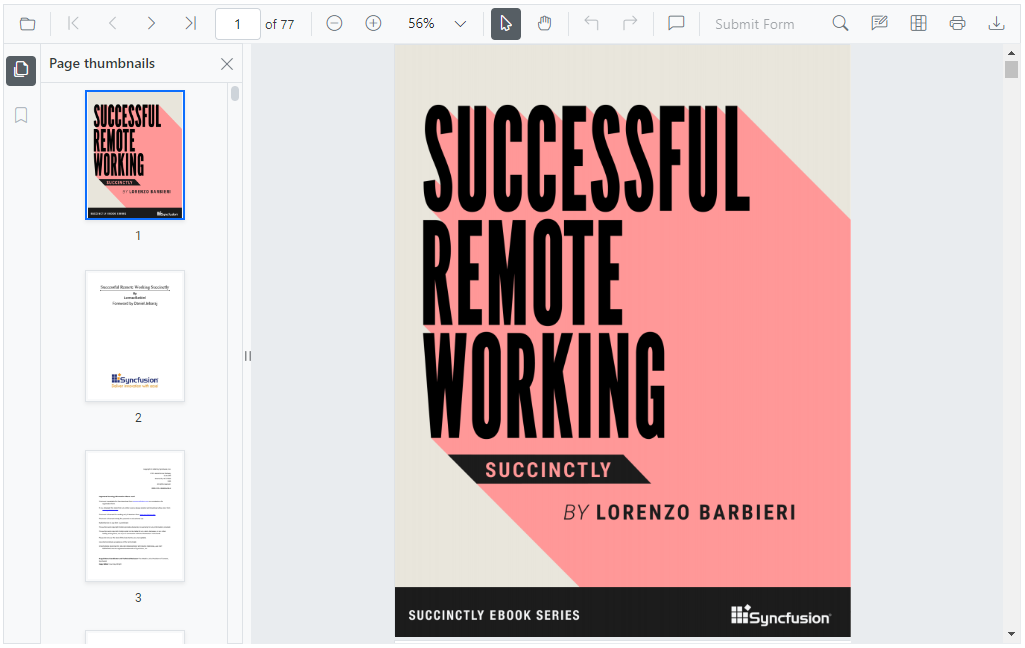
The Syncfusion® [Angular PDF Viewer](https://www.syncfusion.com/pdf-viewer-sdk/angular-pdf-viewer?utm_source=npm&utm_medium=listing&utm_campaign=angular-pdf-viewer-npm) component enables you to view, annotate, prepare and fill forms, and print PDF files from your web applications.
Getting started .
Online demos .
Learn more
Trusted by the world's leading companies

## Setup
### Create an Angular Application
You can use [Angular CLI](https://github.com/angular/angular-cli) to setup your Angular applications. To install the Angular CLI, use the following command.
```bash
npm install -g @angular/cli
```
Create a new Angular application using the following Angular CLI command.
```bash
ng new my-app
cd my-app
```
### Adding Syncfusion® PDF Viewer package
All Syncfusion® Angular packages are available in [npmjs.com](https://www.npmjs.com/~syncfusionorg). To install the Angular PDF Viewer package, use the following command.
```bash
ng add @syncfusion/ej2-angular-pdfviewer
```
The above command does the below configuration to your Angular app.
* Adds `@syncfusion/ej2-angular-pdfviewer` package and its peer dependencies to your `package.json` file.
* Imports the `PdfViewerModule` in your application module `app.module.ts`.
* Registers the Syncfusion® UI default theme (material) in the `angular.json` file.
This makes it easy to add the Syncfusion® Angular PDF Viewer module to your project and start using it in your application.
### Adding CSS references for PDF Viewer
Add CSS references needed for a PDF Viewer in **src/styles.css** from the **../node_modules/@syncfusion** package folder.
```css
@import '../node_modules/@syncfusion/ej2-base/styles/material.css';
@import '../node_modules/@syncfusion/ej2-buttons/styles/material.css';
@import '../node_modules/@syncfusion/ej2-inputs/styles/material.css';
@import '../node_modules/@syncfusion/ej2-popups/styles/material.css';
@import '../node_modules/@syncfusion/ej2-lists/styles/material.css';
@import '../node_modules/@syncfusion/ej2-navigations/styles/material.css';
@import '../node_modules/@syncfusion/ej2-dropdowns/styles/material.css';
@import '../node_modules/@syncfusion/ej2-splitbuttons/styles/material.css';
@import '../node_modules/@syncfusion/ej2-notifications/styles/material.css';
@import "../node_modules/@syncfusion/ej2-angular-pdfviewer/styles/material.css";
```
### Add PDF Viewer component
In **src/app/app.component.ts**, use `` selector in the `template` attribute of the `@Component` directive to render the Syncfusion® Angular PDF Viewer component.
```typescript
import { Component, ViewEncapsulation, OnInit } from '@angular/core';
import {
PdfViewerComponent,
LinkAnnotationService,
BookmarkViewService,
MagnificationService,
ThumbnailViewService,
ToolbarService,
NavigationService,
TextSearchService,
TextSelectionService,
PrintService,
AnnotationService,
FormFieldsService,
FormDesignerService
} from '@syncfusion/ej2-angular-pdfviewer';
@Component({
selector: 'app-root',
template: `
`,
encapsulation: ViewEncapsulation.None,
providers: [
LinkAnnotationService,
BookmarkViewService,
MagnificationService,
ThumbnailViewService,
ToolbarService,
NavigationService,
TextSearchService,
TextSelectionService,
PrintService,
AnnotationService,
FormFieldsService,
FormDesignerService
],
})
export class AppComponent implements OnInit {
public service: string =
'https://ej2services.syncfusion.com/production/web-services/api/pdfviewer';
public document: string = 'PDF_Succinctly.pdf';
ngOnInit(): void {
}
}
```
## Supported frameworks
PDF Viewer component is also offered in the following list of frameworks.
| [ ](https://www.syncfusion.com/pdf-viewer-sdk/javascript-pdf-viewer?utm_medium=listing&utm_source=github)
[JavaScript](https://www.syncfusion.com/pdf-viewer-sdk/javascript-pdf-viewer?utm_medium=listing&utm_source=github) | [ ](https://www.syncfusion.com/pdf-viewer-sdk/react-pdf-viewer?utm_medium=listing&utm_source=github)
[React](https://www.syncfusion.com/pdf-viewer-sdk/react-pdf-viewer?utm_medium=listing&utm_source=github) | [ ](https://www.syncfusion.com/pdf-viewer-sdk/vue-pdf-viewer?utm_medium=listing&utm_source=github)
[Vue](https://www.syncfusion.com/pdf-viewer-sdk/vue-pdf-viewer?utm_medium=listing&utm_source=github) | [ ](https://www.syncfusion.com/pdf-viewer-sdk/asp-net-core-pdf-viewer?utm_medium=listing&utm_source=github)
[ASP.NET Core](https://www.syncfusion.com/pdf-viewer-sdk/asp-net-core-pdf-viewer?utm_medium=listing&utm_source=github) | [ ](https://www.syncfusion.com/pdf-viewer-sdk/asp-net-mvc-pdf-viewer?utm_medium=listing&utm_source=github)
[ASP.NET MVC](https://www.syncfusion.com/pdf-viewer-sdk/asp-net-mvc-pdf-viewer?utm_medium=listing&utm_source=github) |
| :-----: | :-----: | :-----: | :-----: | :-----: |
## Key features
* [View PDF Document](https://help.syncfusion.com/document-processing/pdf/pdf-viewer/angular/getting-started/) - Open and display both the normal and the protected PDF files with AES and RC4 encryption.
* [Annotations](https://help.syncfusion.com/document-processing/pdf/pdf-viewer/angular/annotation/text-markup-annotation/) - Annotate with text markup, shapes, stamps, ink, and sticky notes.
* [Form Fields](https://help.syncfusion.com/document-processing/pdf/pdf-viewer/angular/form-designer/create-fillable-pdf-forms/create-programmatically/) - Form filling and form designing can be done.
* [Signature](https://help.syncfusion.com/document-processing/pdf/pdf-viewer/angular/handwritten-signature/) - Hand-written and digital signatures are allowed.
* [Toolbar](https://help.syncfusion.com/document-processing/pdf/pdf-viewer/angular/toolbar/) - Built-in-toolbar and custom toolbars to perform user interaction of PDF Viewer functionalities.
* [Navigation](https://help.syncfusion.com/document-processing/pdf/pdf-viewer/angular/navigation/) - Easy navigation with the help of bookmarks, thumbnails, hyperlinks, and table of contents.
* [Magnification](https://help.syncfusion.com/document-processing/pdf/pdf-viewer/angular/magnification/) - Fit to page, fit to width, and automatic (fits to the visible area).
* [Search](https://help.syncfusion.com/document-processing/pdf/pdf-viewer/angular/text-search/) - Search a text easily across the PDF document.
* [Core Interactions](https://help.syncfusion.com/document-processing/pdf/pdf-viewer/angular/interaction-mode/) - Allows scrolling, zooming, panning, selection, and page navigation.
* [Print](https://help.syncfusion.com/document-processing/pdf/pdf-viewer/angular/print/) - Print the entire document or a specific page directly from the browser.
* [Globalization](https://help.syncfusion.com/document-processing/pdf/pdf-viewer/angular/globalization/) - Provides inherent support to localize the UI.
## Resources
* [Theme Studio](https://ej2.syncfusion.com/themestudio/)
* [What's New](https://www.syncfusion.com/products/whatsnew/pdf-viewer-sdk?utm_medium=listing&utm_source=github)
* [Road Map](https://www.syncfusion.com/products/roadmap/pdf-viewer-sdk)
* [E-Books](https://www.syncfusion.com/succinctly-free-ebooks?searchkey=angular&type=all)
## Support
Product support is available through the following mediums.
* [Support ticket](https://support.syncfusion.com/support/tickets/create) - Guaranteed Response in 24 hours | Unlimited tickets | Holiday support
* [Community forum](https://www.syncfusion.com/forums/pdf-viewer-sdk?utm_source=npm&utm_medium=listing&utm_campaign=angular-pdf-viewer-npm)
* [GitHub issues](https://github.com/syncfusion/ej2-angular-ui-components/issues/new)
* [Request feature or report bug](https://www.syncfusion.com/feedback/pdf-viewer-sdk?utm_source=npm&utm_medium=listing&utm_campaign=angular-pdf-viewer-npm)
* Live chat
## Changelog
Check the changelog [here](https://github.com/syncfusion/ej2-angular-ui-components/blob/master/components/pdfviewer/CHANGELOG.md?utm_source=npm&utm_medium=listing&utm_campaign=angular-pdf-viewer-npm). Get minor improvements and bug fixes every week to stay up to date with frequent updates.
## License and copyright
> This is a commercial product and requires a paid license for possession or use. Syncfusion® licensed software, including this component, is subject to the terms and conditions of Syncfusion® [EULA](https://www.syncfusion.com/eula/es/). To acquire a license for 140+ [Angular UI components](https://www.syncfusion.com/angular-components), you can [purchase](https://www.syncfusion.com/sales/products) or [start a free 30-day trial](https://www.syncfusion.com/account/manage-trials/start-trials).
> A free community [license](https://www.syncfusion.com/products/communitylicense) is also available for companies and individuals whose organizations have less than $1 million USD in annual gross revenue and five or fewer developers.
© Copyright 2026 Syncfusion® Inc. All Rights Reserved. The Syncfusion® Essential Studio® license and copyright applies to this distribution.