# Angular HeatMap Component
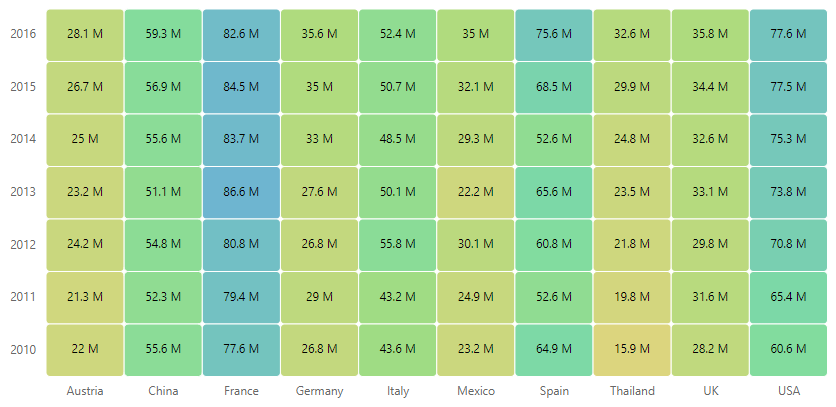
The [Angular HeatMap](https://www.syncfusion.com/angular-components/angular-heatmap-chart?utm_source=npm&utm_medium=listing&utm_campaign=angular-heatmap-npm) component is a graphical representation of two-dimensional data where the values are represented with gradient or solid color variations. The data points are rendered as HeatMap cells using Scalable Vector Graphics (SVG) or canvas UI rendering.
Getting started .
Online demos .
Learn more
Trusted by the world's leading companies

## Setup
### Create an Angular Application
You can use [Angular CLI](https://github.com/angular/angular-cli) to setup your Angular applications. To install the Angular CLI, use the following command.
```bash
npm install -g @angular/cli
```
Create a new Angular application using the following Angular CLI command.
```bash
ng new my-app
cd my-app
```
### Adding Syncfusion® HeatMap package
All Syncfusion® Angular packages are available in [npmjs.com](https://www.npmjs.com/~syncfusionorg). To install the Angular HeatMap package, use the following command.
```sh
npm install @syncfusion/ej2-angular-heatmap
```
The above command does the below configuration to your Angular app.
* Adds `@syncfusion/ej2-angular-heatmap` package and its peer dependencies to your `package.json` file.
* Imports the `HeatMapModule` in your application module `app.module.ts`.
* Registers the Syncfusion® UI default theme (material) in the `angular.json` file.
This makes it easy to add the Syncfusion® Angular HeatMap module to your project and start using it in your application.
### Add HeatMap component
In **src/app/app.component.ts**, use `` selector in the `template` attribute of the `@Component` directive to render the Syncfusion® Angular HeatMap component.
```typescript
import { Component, ViewEncapsulation } from '@angular/core';
import { HeatMap } from '@syncfusion/ej2-heatmap';
@Component({
selector: 'my-app',
template:
`
`,
encapsulation: ViewEncapsulation.None
})
export class AppComponent{
dataSource: Object[] = [
[73, 39, 26, 39, 94, 0],
[93, 58, 53, 38, 26, 68],
[99, 28, 22, 4, 66, 90],
[14, 26, 97, 69, 69, 3],
[7, 46, 47, 47, 88, 6],
[41, 55, 73, 23, 3, 79],
[56, 69, 21, 86, 3, 33],
[45, 7, 53, 81, 95, 79],
[60, 77, 74, 68, 88, 51],
[25, 25, 10, 12, 78, 14],
[25, 56, 55, 58, 12, 82],
[74, 33, 88, 23, 86, 59]
];
}
```
## Supported frameworks
HeatMap component is also offered in the following list of frameworks.
| [ ](https://www.syncfusion.com/javascript-ui-controls?utm_medium=listing&utm_source=github)
[JavaScript](https://www.syncfusion.com/javascript-ui-controls?utm_medium=listing&utm_source=github) | [ ](https://www.syncfusion.com/react-ui-components?utm_medium=listing&utm_source=github)
[React](https://www.syncfusion.com/react-ui-components?utm_medium=listing&utm_source=github) | [ ](https://www.syncfusion.com/vue-ui-components?utm_medium=listing&utm_source=github)
[Vue](https://www.syncfusion.com/vue-ui-components?utm_medium=listing&utm_source=github) | [ ](https://www.syncfusion.com/aspnet-core-ui-controls?utm_medium=listing&utm_source=github)
[ASP.NET Core](https://www.syncfusion.com/aspnet-core-ui-controls?utm_medium=listing&utm_source=github) | [ ](https://www.syncfusion.com/aspnet-mvc-ui-controls?utm_medium=listing&utm_source=github)
[ASP.NET MVC](https://www.syncfusion.com/aspnet-mvc-ui-controls?utm_medium=listing&utm_source=github) |
| :-----: | :-----: | :-----: | :-----: | :-----: |
## Showcase samples
* Annual Flight Traffic Report - [Live Demo](https://ej2.syncfusion.com/angular/demos/?utm_source=npm&utm_campaign=angular-heatmap-npm#/material/heatmap-chart/large-data)
* Expense Tracker - [Source](https://github.com/syncfusion/ej2-showcase-angular-expensetracker?utm_source=npm&utm_medium=listing&utm_campaign=angular-heatmap-npm), [Live Demo](https://ej2.syncfusion.com/showcase/angular/expensetracker/#/dashboard?utm_source=npm&utm_medium=listing&utm_campaign=angular-heatmap-npm)
* Loan Calculator - [Source](https://github.com/syncfusion/ej2-sample-ng-loancalculator?utm_source=npm&utm_medium=listing&utm_campaign=angular-heatmap-npm), [Live Demo](https://ej2.syncfusion.com/showcase/angular/loancalculator/?utm_source=npm&utm_medium=listing&utm_campaign=angular-heatmap-npm)
* Fitness Tracker - [Source](https://github.com/SyncfusionExamples/showcase-angular-health-tracker-dashboard-demo), [Live Demo](https://ej2.syncfusion.com/showcase/angular/fitness-tracker-app/)
## Key features
* [Data binding](https://ej2.syncfusion.com/angular/documentation/heatmap-chart/working-with-data/?utm_source=npm&utm_campaign=angular-heatmap-npm): Binding data in JSON and two-dimensional array formats is supported.
* [Axis types](https://ej2.syncfusion.com/angular/documentation/heatmap-chart/axis/?utm_source=npm&utm_campaign=angular-heatmap-npm#types): Supports three different types of axes to populate the data, namely Numerical, Categorical and DateTime.
* [Axis](https://ej2.syncfusion.com/angular/documentation/heatmap-chart/axis/?utm_source=npm&utm_campaign=angular-heatmap-npm#inversed-axis): Supports inverted axis, opposed position and axis intervals.
* [Rendering modes](https://ej2.syncfusion.com/angular/documentation/heatmap-chart/rendering-mode/?utm_source=npm&utm_campaign=angular-heatmap-npm): Supports automatic switching between SVG and Canvas rendering modes based on the data source length.
* [Palette](https://ej2.syncfusion.com/angular/documentation/heatmap-chart/palette/?utm_source=npm&utm_campaign=angular-heatmap-npm): Different colors are provided for different value ranges to be used in the cells.
* [Legend](https://ej2.syncfusion.com/angular/documentation/heatmap-chart/legend/?utm_source=npm&utm_campaign=angular-heatmap-npm): Summarizes the information for the colors which represents each values in HeatMap.
* [Tooltip](https://ej2.syncfusion.com/angular/documentation/heatmap-chart/tooltip/?utm_source=npm&utm_campaign=angular-heatmap-npm): Provides information about the cell values on hover.
* [Selection](https://ej2.syncfusion.com/angular/documentation/heatmap-chart/selection/?utm_source=npm&utm_campaign=angular-heatmap-npm): Supports selecting the cells that will be the center of attraction.
* [Templates](https://ej2.syncfusion.com/angular/demos/?utm_source=npm&utm_campaign=angular-heatmap-npm#/material/heatmap-chart/tooltip-template): Templates can be used to create custom user experience in the tooltip of the heatmap.
## Resources
* [Documentation](https://ej2.syncfusion.com/angular/documentation/heatmap-chart/getting-started)
* [Theme Studio](https://ej2.syncfusion.com/themestudio/)
* [What's New](https://www.syncfusion.com/products/whatsnew/angular?utm_medium=listing&utm_source=github)
* [Road Map](https://www.syncfusion.com/products/roadmap/angular)
* [E-Books](https://www.syncfusion.com/succinctly-free-ebooks?searchkey=angular&type=all)
## Support
Product support is available through the following mediums.
* [Support ticket](https://support.syncfusion.com/support/tickets/create) - Guaranteed Response in 24 hours | Unlimited tickets | Holiday support
* [Community forum](https://www.syncfusion.com/forums/angular-js2?utm_source=npm&utm_medium=listing&utm_campaign=angular-heatmap-npm)
* [GitHub issues](https://github.com/syncfusion/ej2-angular-ui-components/issues/new)
* [Request feature or report bug](https://www.syncfusion.com/feedback/angular?utm_source=npm&utm_medium=listing&utm_campaign=angular-heatmap-npm)
* Live chat
## Changelog
Check the changelog [here](https://github.com/syncfusion/ej2-angular-ui-components/blob/master/components/heatmap/CHANGELOG.md). Get minor improvements and bug fixes every week to stay up to date with frequent updates.
## License and copyright
> This is a commercial product and requires a paid license for possession or use. Syncfusion’s licensed software, including this component, is subject to the terms and conditions of Syncfusion's [EULA](https://www.syncfusion.com/eula/es/). To acquire a license for 140+ [Angular UI components](https://www.syncfusion.com/angular-components), you can [purchase](https://www.syncfusion.com/sales/products) or [start a free 30-day trial](https://www.syncfusion.com/account/manage-trials/start-trials).
> A free community [license](https://www.syncfusion.com/products/communitylicense) is also available for companies and individuals whose organizations have less than $1 million USD in annual gross revenue and five or fewer developers.
See [LICENSE FILE](https://github.com/syncfusion/ej2-angular-ui-components/blob/master/license?utm_source=npm&utm_campaign=angular-heatmap-npm) for more info.
© Copyright 2026 Syncfusion® Inc. All Rights Reserved. The Syncfusion® Essential Studio® license and copyright applies to this distribution.