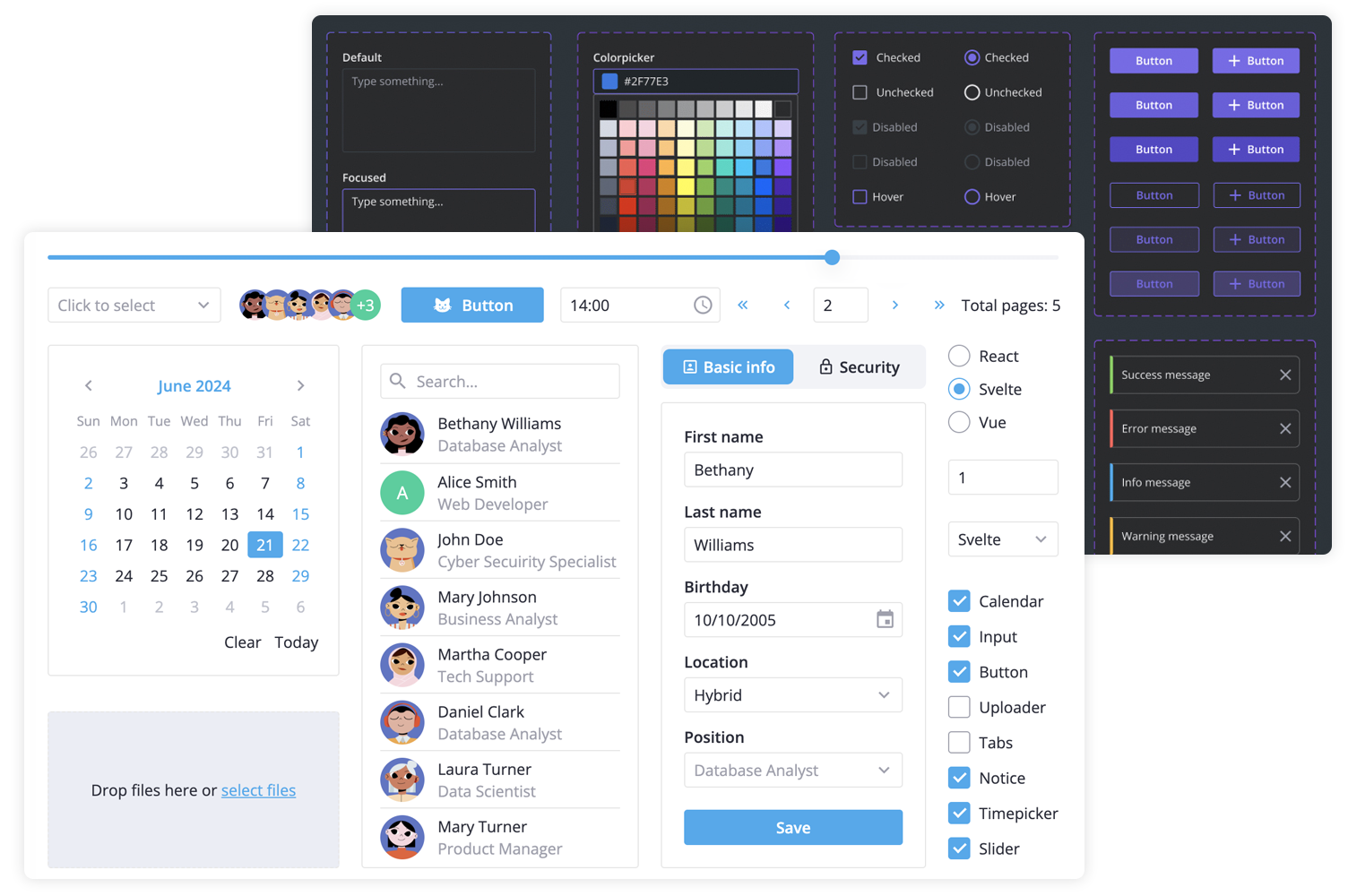
[SVAR Svelte Core library](https://svar.dev/svelte/core/) offers 30+ lightweight, fast-performing Svelte UI components with TypeScript support. Beautifully designed light and dark themes are included and fully customizable via CSS variables. A straightforward API and comprehensive documentation make it easy to start building feature-rich Svelte interfaces faster.
SVAR Svelte Core library includes the following components:
- buttons & form controls,
- calendar (datepicker),
- popups, tooltips,
- notifications,
- sliding sidebar,
- tabs, and more.
Additionally, you can use these SVAR Svelte components to build unified app interfaces:
- [Menu](https://www.npmjs.com/package/@svar-ui/svelte-menu)
- [Toolbar](https://www.npmjs.com/package/@svar-ui/svelte-toolbar)
- [File uploader](https://www.npmjs.com/package/@svar-ui/svelte-uploader)
- [Comments](https://www.npmjs.com/package/@svar-ui/svelte-comments)
- [Tasklist](https://www.npmjs.com/package/@svar-ui/svelte-tasklist)
### :gear: Svelte 4 and Svelte 5 versions
There are two versions of the library: the 1.x version - designed to work with Svelte 4, and the 2.x version - created for Svelte 5.
To use the SVAR Core for Svelte 5, install it as follows:
```
npm install @svar-ui/svelte-core
```
To use the SVAR Core for Svelte 4:
```
npm install wx-svelte-core@1.3.0
```
### :hammer_and_wrench: How to Use
To use any of the Core components, simply import the package and include the desired component in your Svelte file:
```svelte
```
See the [getting started guide](https://docs.svar.dev/svelte/core/getting_started/) to quickly set up and begin using SVAR Core components in your Svelte projects.
### :computer: How to Modify
Typically, you don't need to modify the code. However, if you wish to do so, follow these steps:
1. Run `yarn` to install dependencies. Note that this project is a monorepo using `yarn` workspaces, so npm will not work
2. Start the project in development mode with `yarn start`
### :white_check_mark: Run Tests
To run the test:
1. Start the test examples with:
```sh
yarn start:tests
```
2. In a separate console, run the end-to-end tests with:
```sh
yarn test:cypress
```
### :speech_balloon: Need Help?
Join our [community forum](https://forum.svar.dev) to get help or submit feature requests.
 SVAR Svelte Core library includes the following components:
- buttons & form controls,
- calendar (datepicker),
- popups, tooltips,
- notifications,
- sliding sidebar,
- tabs, and more.
Additionally, you can use these SVAR Svelte components to build unified app interfaces:
- [Menu](https://www.npmjs.com/package/@svar-ui/svelte-menu)
- [Toolbar](https://www.npmjs.com/package/@svar-ui/svelte-toolbar)
- [File uploader](https://www.npmjs.com/package/@svar-ui/svelte-uploader)
- [Comments](https://www.npmjs.com/package/@svar-ui/svelte-comments)
- [Tasklist](https://www.npmjs.com/package/@svar-ui/svelte-tasklist)
### :gear: Svelte 4 and Svelte 5 versions
There are two versions of the library: the 1.x version - designed to work with Svelte 4, and the 2.x version - created for Svelte 5.
To use the SVAR Core for Svelte 5, install it as follows:
```
npm install @svar-ui/svelte-core
```
To use the SVAR Core for Svelte 4:
```
npm install wx-svelte-core@1.3.0
```
### :hammer_and_wrench: How to Use
To use any of the Core components, simply import the package and include the desired component in your Svelte file:
```svelte
```
See the [getting started guide](https://docs.svar.dev/svelte/core/getting_started/) to quickly set up and begin using SVAR Core components in your Svelte projects.
### :computer: How to Modify
Typically, you don't need to modify the code. However, if you wish to do so, follow these steps:
1. Run `yarn` to install dependencies. Note that this project is a monorepo using `yarn` workspaces, so npm will not work
2. Start the project in development mode with `yarn start`
### :white_check_mark: Run Tests
To run the test:
1. Start the test examples with:
```sh
yarn start:tests
```
2. In a separate console, run the end-to-end tests with:
```sh
yarn test:cypress
```
### :speech_balloon: Need Help?
Join our [community forum](https://forum.svar.dev) to get help or submit feature requests.
SVAR Svelte Core library includes the following components:
- buttons & form controls,
- calendar (datepicker),
- popups, tooltips,
- notifications,
- sliding sidebar,
- tabs, and more.
Additionally, you can use these SVAR Svelte components to build unified app interfaces:
- [Menu](https://www.npmjs.com/package/@svar-ui/svelte-menu)
- [Toolbar](https://www.npmjs.com/package/@svar-ui/svelte-toolbar)
- [File uploader](https://www.npmjs.com/package/@svar-ui/svelte-uploader)
- [Comments](https://www.npmjs.com/package/@svar-ui/svelte-comments)
- [Tasklist](https://www.npmjs.com/package/@svar-ui/svelte-tasklist)
### :gear: Svelte 4 and Svelte 5 versions
There are two versions of the library: the 1.x version - designed to work with Svelte 4, and the 2.x version - created for Svelte 5.
To use the SVAR Core for Svelte 5, install it as follows:
```
npm install @svar-ui/svelte-core
```
To use the SVAR Core for Svelte 4:
```
npm install wx-svelte-core@1.3.0
```
### :hammer_and_wrench: How to Use
To use any of the Core components, simply import the package and include the desired component in your Svelte file:
```svelte
```
See the [getting started guide](https://docs.svar.dev/svelte/core/getting_started/) to quickly set up and begin using SVAR Core components in your Svelte projects.
### :computer: How to Modify
Typically, you don't need to modify the code. However, if you wish to do so, follow these steps:
1. Run `yarn` to install dependencies. Note that this project is a monorepo using `yarn` workspaces, so npm will not work
2. Start the project in development mode with `yarn start`
### :white_check_mark: Run Tests
To run the test:
1. Start the test examples with:
```sh
yarn start:tests
```
2. In a separate console, run the end-to-end tests with:
```sh
yarn test:cypress
```
### :speech_balloon: Need Help?
Join our [community forum](https://forum.svar.dev) to get help or submit feature requests.