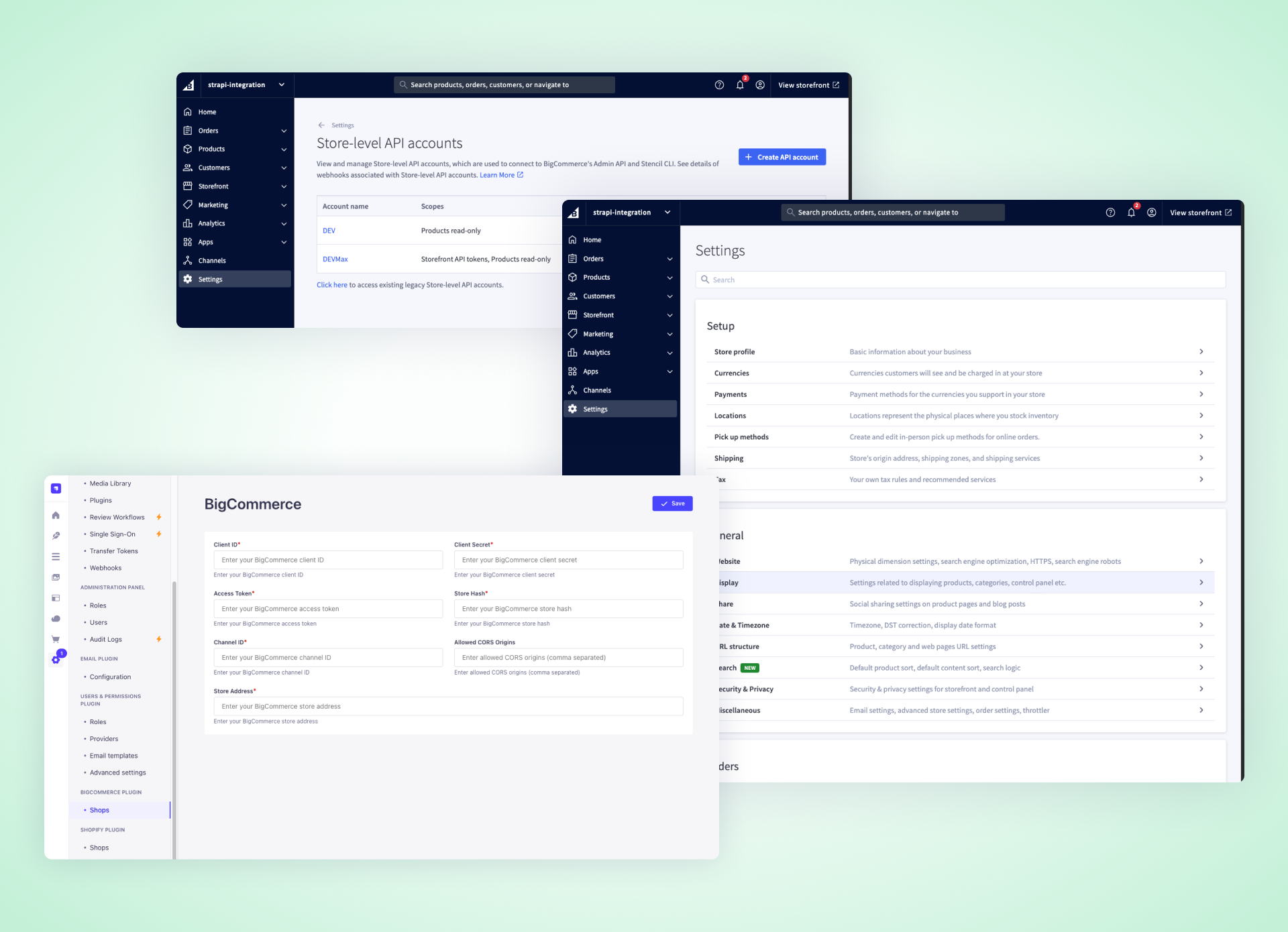
Out-of-the-box seamless BigCommerce integration for your Strapi instance
---
A powerful Strapi plugin that seamlessly connects your Strapi application with BigCommerce stores through a user-friendly interface. It features a custom BigCommerce field and efficient product synchronization capabilities. The plugin comes with built-in content types and configurable caching mechanisms to optimize performance.
## 📋 Table of Contents
- [✨ Features](#features)
- [📋 Requirements](#requirements)
- [📦 Installation](#installation)
- [⚙️ BigCommerce Configuration](#configuring-bigcommerce-step-by-step-with-images)
- [🔧 Plugin Configuration](#plugin-configuration)
- [👨💻 Development & Testing](#development--testing)
- [🔗 Links](#links)
- [💬 Community Support](#community-support)
- [📄 License](#license)
## ✨ Features
- Attach BigCommerce products to Strapi Content Types using dedicated BigCommerce Custom Field
- Map product data between BigCommerce and Strapi
## 📋 Requirements
- Strapi v5.7.0 or later
- Node.js 18+
- For Redis cache: a running Redis instance
- BigCommerce API credentials:
- `clientId`
- `clientSecret`
- `accessToken`
- `storeHash`
- At least one BigCommerce Channel ID
- URL for your BigCommerce Address Store API
- **Required BigCommerce API Token Scopes:**
- `Products`: `read-only` (To read product data)
- `Storefront API Tokens`: `manage` (To create tokens for storefront product searching)
## 📦 Installation
```bash
npm install @strapi-community/bigcommerce@latest
# or
yarn add @strapi-community/bigcommerce@latest
```
Then, rebuild your Strapi admin panel:
```bash
# Using npm
npm run build
# Using yarn
yarn build
```
## ⚙️ Configuring BigCommerce (Step-by-Step with Images)
### 1. Open Your BigCommerce Store
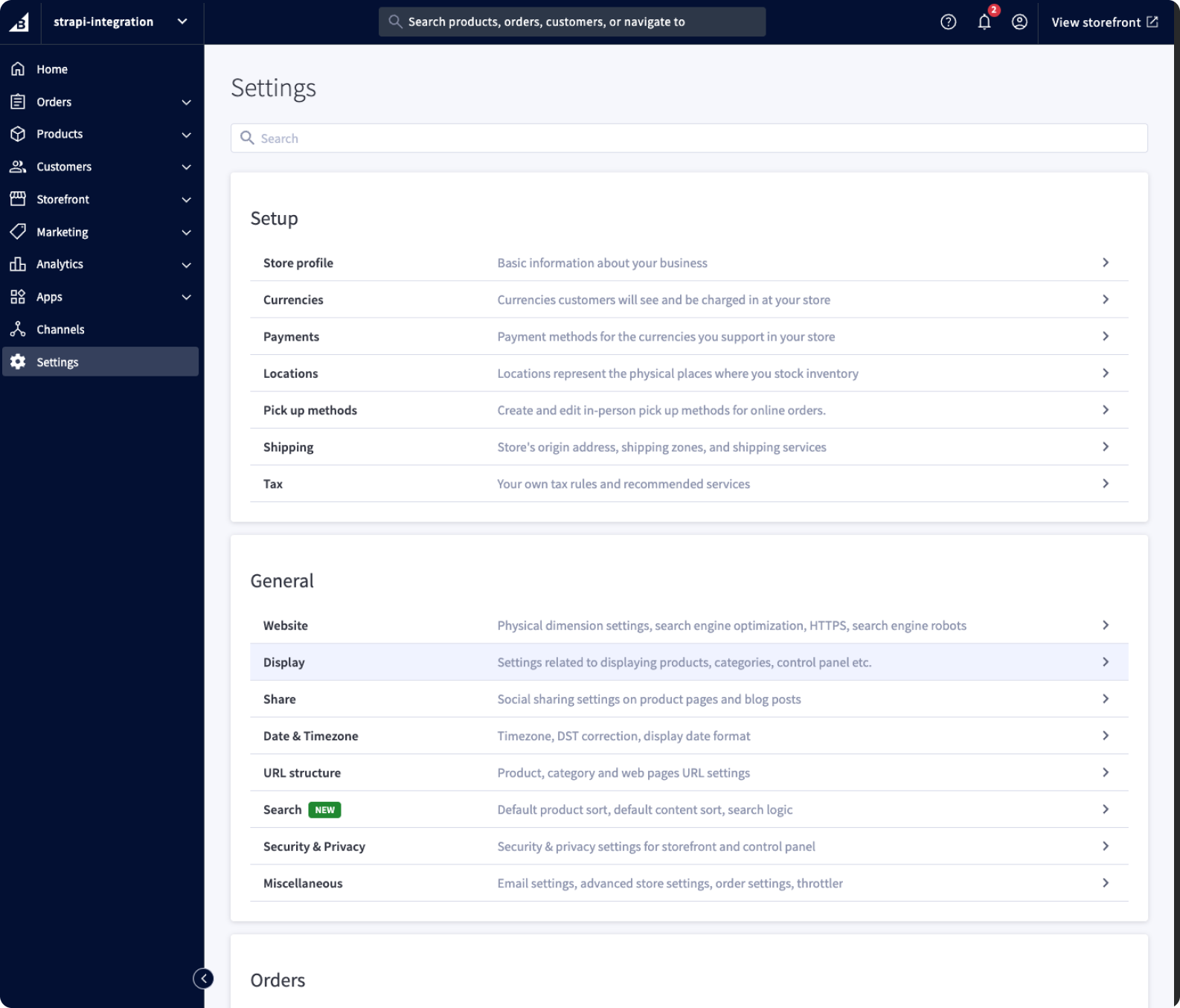
- Log in to your BigCommerce admin dashboard.
### 2. Go to Store-level API accounts
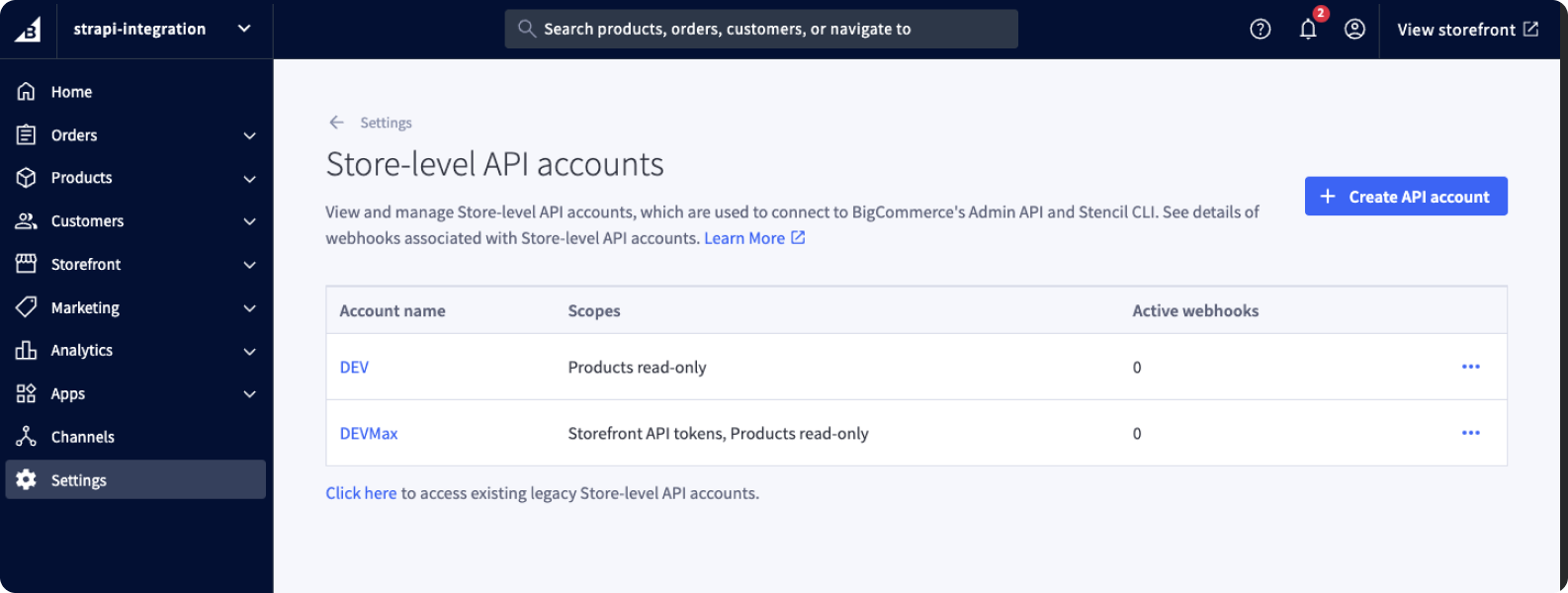
- Search for `Store-level API accounts` and got there.
### 3. Create new account with proper permissions
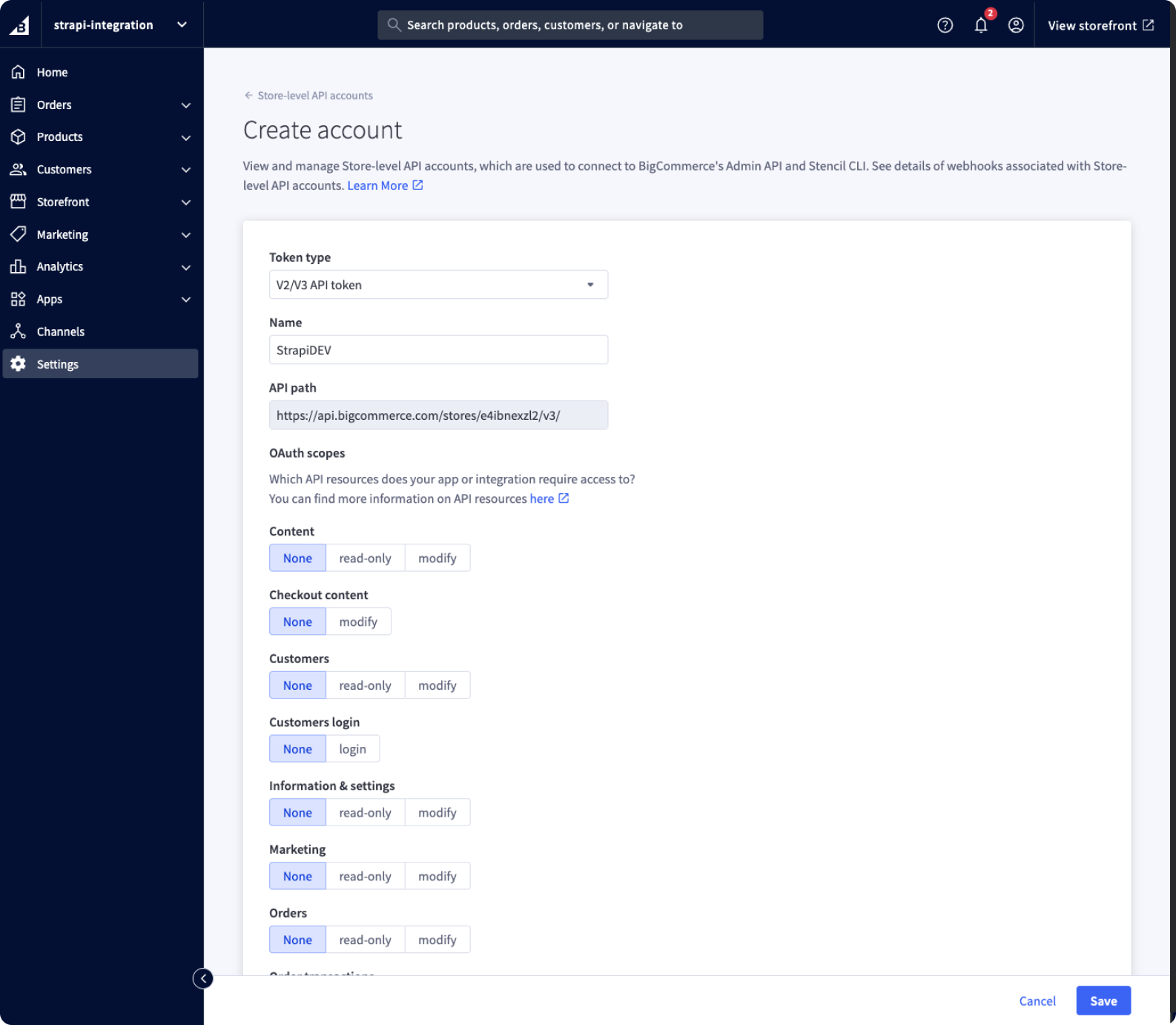
- Create new account with `V2/V3 API Token` type set.
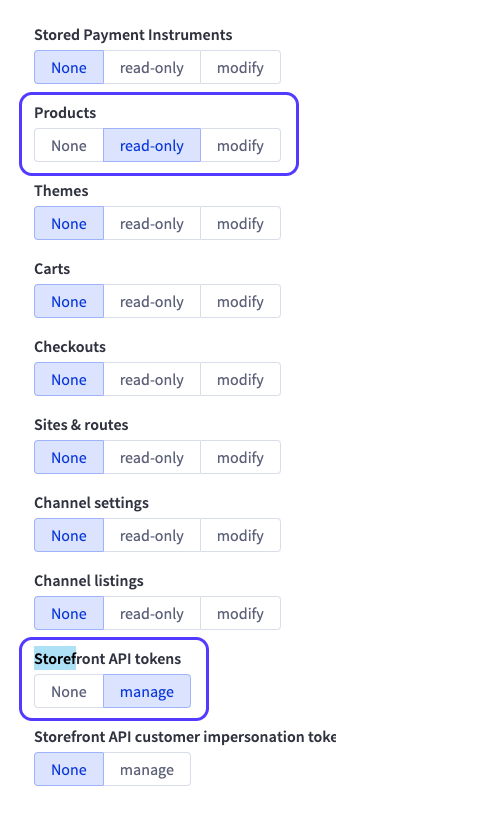
- Set `Products` permissions to `read-only`.
- Set `Storefront API tokens` permissions to `manage`.
### 4. Copy Tokens & Secret to your Strapi Plugin settings page or file
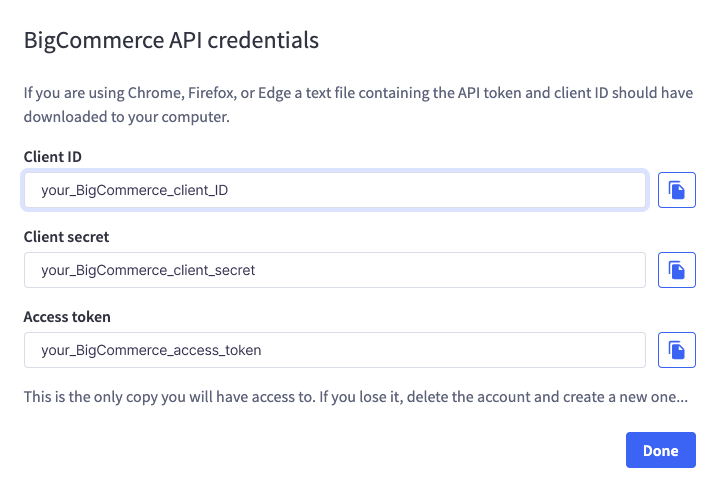
- Copy `ClientID`.
- Copy `Client secret`.
- Copy `Access token`.
## 🔧 Plugin Configuration
### Required Configuration
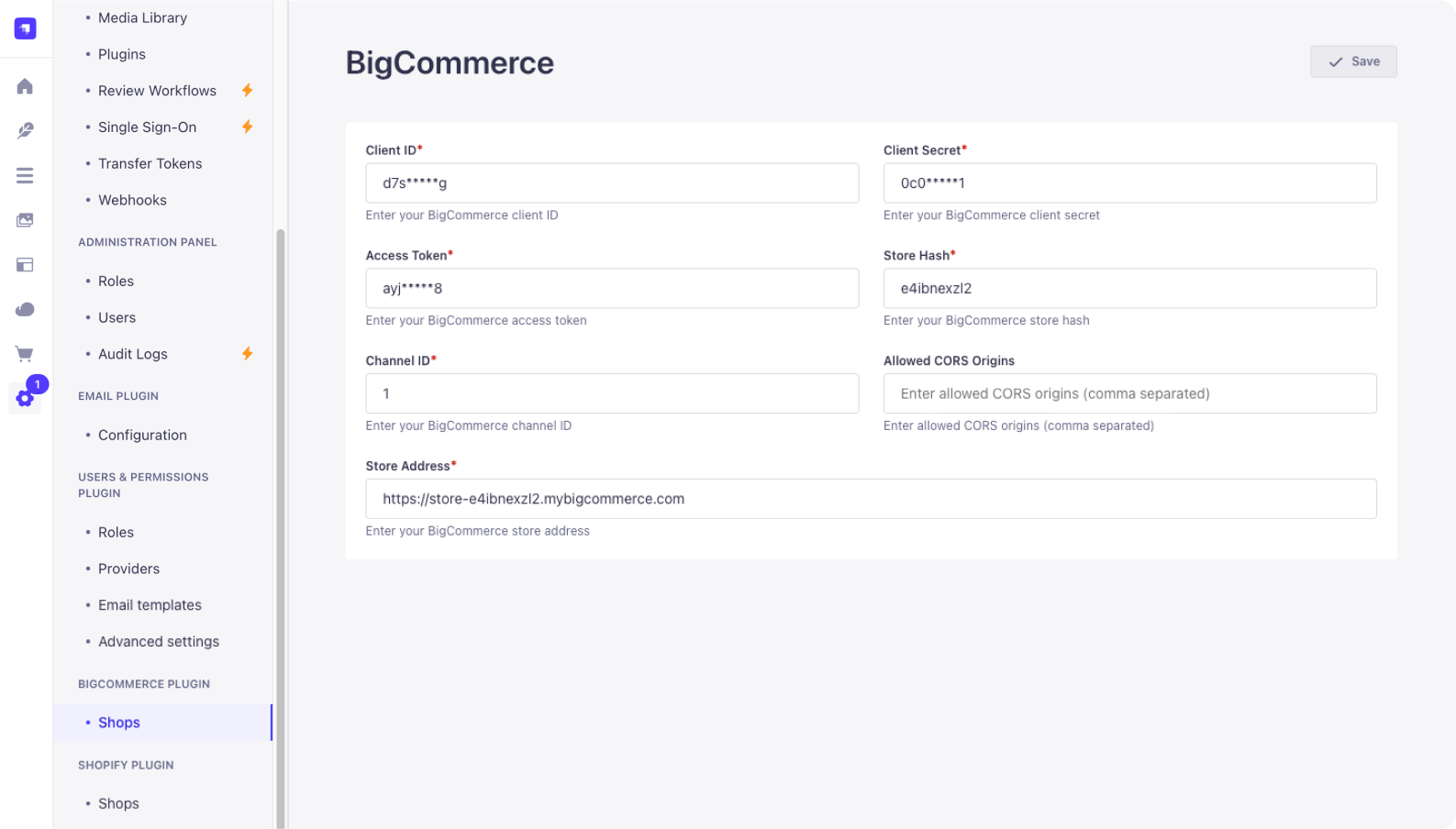
You need to configure the plugin in your Strapi project's `./config/plugins.js` file (or `./config/plugins.ts` if using TypeScript).
The following fields are **required**:
- `clientId` (string): Your BigCommerce App Client ID
- `clientSecret` (string): Your BigCommerce App Client Secret
- `accessToken` (string): Your BigCommerce API Account Access Token
- `storeHash` (string): Your BigCommerce Store Hash
- `channelId` (array of numbers): An array containing at least one BigCommerce Channel ID
- `addressStore` (string): The URL for your BigCommerce Address Store API endpoint
- `encryptionKey` (string): A 32-character string used for encrypting sensitive data
- `engine` (string): Specifies the storage engine for session data. Can be either `'memory'` or `'redis'`
- `connection` (object, **required if `engine` is `'redis'`**): Contains Redis connection details:
- `host` (string)
- `port` (number)
- `db` (number)
- `password` (string, optional)
- `username` (string, optional)
Optional fields:
- `allowedCorsOrigins` (array of strings): An array of allowed origins for CORS requests. Defaults to `[]`
### Example Configurations
Create or update the file `./config/plugins.js` (or `.ts`):
**Using Memory Engine:**
```javascript
// ./config/plugins.js
module.exports = ({ env }) => ({
// ... other plugin configurations
'bigcommerce': {
enabled: true,
config: {
clientId: env('BIGCOMMERCE_CLIENT_ID'),
clientSecret: env('BIGCOMMERCE_CLIENT_SECRET'),
accessToken: env('BIGCOMMERCE_ACCESS_TOKEN'),
storeHash: env('BIGCOMMERCE_STORE_HASH'),
channelId: [parseInt(env('BIGCOMMERCE_CHANNEL_ID', '1'), 10)], // Ensure it's an array of numbers
addressStore: env('BIGCOMMERCE_ADDRESS_STORE_URL'),
allowedCorsOrigins: ['http://localhost:3000'], // Optional
engine: 'memory',
encryptionKey: env('BIGCOMMERCE_ENCRYPTION_KEY'),
},
},
// ... other plugin configurations
});
```
**Using Redis Engine:**
```javascript
// ./config/plugins.js
module.exports = ({ env }) => ({
// ... other plugin configurations
'bigcommerce': {
enabled: true,
config: {
clientId: env('BIGCOMMERCE_CLIENT_ID'),
clientSecret: env('BIGCOMMERCE_CLIENT_SECRET'),
accessToken: env('BIGCOMMERCE_ACCESS_TOKEN'),
storeHash: env('BIGCOMMERCE_STORE_HASH'),
channelId: env.array('BIGCOMMERCE_CHANNEL_IDS', [1]).map(Number), // Example parsing env array
addressStore: env('BIGCOMMERCE_ADDRESS_STORE_URL'),
allowedCorsOrigins: [], // Optional
engine: 'redis',
connection: {
host: env('REDIS_HOST', '127.0.0.1'),
port: env.int('REDIS_PORT', 6379),
db: env.int('REDIS_DB', 0),
password: env('REDIS_PASSWORD', undefined),
username: env('REDIS_USERNAME', undefined), // If using Redis ACLs
},
encryptionKey: env('BIGCOMMERCE_ENCRYPTION_KEY'),
},
},
// ... other plugin configurations
});
```
Remember to add the corresponding environment variables to your `.env` file.
## 👨💻 Development & Testing
- Build: `yarn build`
- Test backend: `yarn test:server`
- Test frontend: `yarn test:ts:front`
## 🔗 Links
- [Strapi website](http://strapi.io/)
- [Strapi community on Slack](http://slack.strapi.io)
- [Strapi news on Twitter](https://twitter.com/strapijs)
## 💬 Community Support
- [GitHub](https://github.com/strapi-community/bigcommerce) (Bug reports, contributions)
You can also use the official Strapi support platform and search for `[VirtusLab]` prefixed people (maintainers)
- [Discord](https://discord.strapi.io) (For live discussion with the Community and Strapi team)
- [Community Forum](https://forum.strapi.io) (Questions and Discussions)
## 📄 License
See the [MIT License](LICENSE) file for licensing information.