[See all available options here](./docs/Options.md).
## Fixed
### build.nsis <- [NsisConfig](./src/lib/config/NsisConfig.ts)
Name | Type | Description
--- | --- | ---
languages | string[] | Languages for NSIS installers. *Multiple languages* (**fixed**) will result in a language selection dialog on startup. See /assets/nsis/Contrib/Language files/ for available values. Defaults to [ 'English' ].
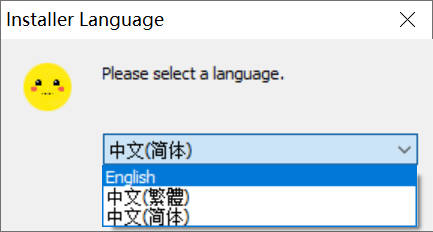 ```json
{
"build": {
"nsis": {
"languages": [
"English",
"SimpChinese",
"TradChinese"
]
}
}
}
```
## New features
### build.win <- [WinConfig](./src/lib/config/WinConfig.ts)
Name | Type | Description
--- | --- | ---
displayName | string | The name use for display (install GUI, shortcut name, start menu folder), independent of the appName (`name` of `package.json`) and `win.productName`. Defaults to `${ productName \|\| appName }`.
runAsAdmin | boolean | Run as administrator. Defaults to `false`.
### build.nsis <- [NsisConfig](./src/lib/config/NsisConfig.ts)
Name | Type | Description
--- | --- | ---
installerIcon | string | .ico icon file for NSIS installers relative to the project root. Defaults to `undefined`.
uninstallerIcon | string | .ico icon file for NSIS uninstallers relative to the project root. Defaults to `undefined`.
welcomeBmp | string | Bitmap for the Welcome page and the Finish page (recommended size: 164x314 pixels). Defaults to `undefined`.
licenses | string[] | License text/RTF files in multiple languages matching `nsis.languages` for NSIS installers relative to the project root. Defaults to `undefined`.
```json
{
"build": {
"nsis": {
"languages": [
"English",
"SimpChinese",
"TradChinese"
]
}
}
}
```
## New features
### build.win <- [WinConfig](./src/lib/config/WinConfig.ts)
Name | Type | Description
--- | --- | ---
displayName | string | The name use for display (install GUI, shortcut name, start menu folder), independent of the appName (`name` of `package.json`) and `win.productName`. Defaults to `${ productName \|\| appName }`.
runAsAdmin | boolean | Run as administrator. Defaults to `false`.
### build.nsis <- [NsisConfig](./src/lib/config/NsisConfig.ts)
Name | Type | Description
--- | --- | ---
installerIcon | string | .ico icon file for NSIS installers relative to the project root. Defaults to `undefined`.
uninstallerIcon | string | .ico icon file for NSIS uninstallers relative to the project root. Defaults to `undefined`.
welcomeBmp | string | Bitmap for the Welcome page and the Finish page (recommended size: 164x314 pixels). Defaults to `undefined`.
licenses | string[] | License text/RTF files in multiple languages matching `nsis.languages` for NSIS installers relative to the project root. Defaults to `undefined`.
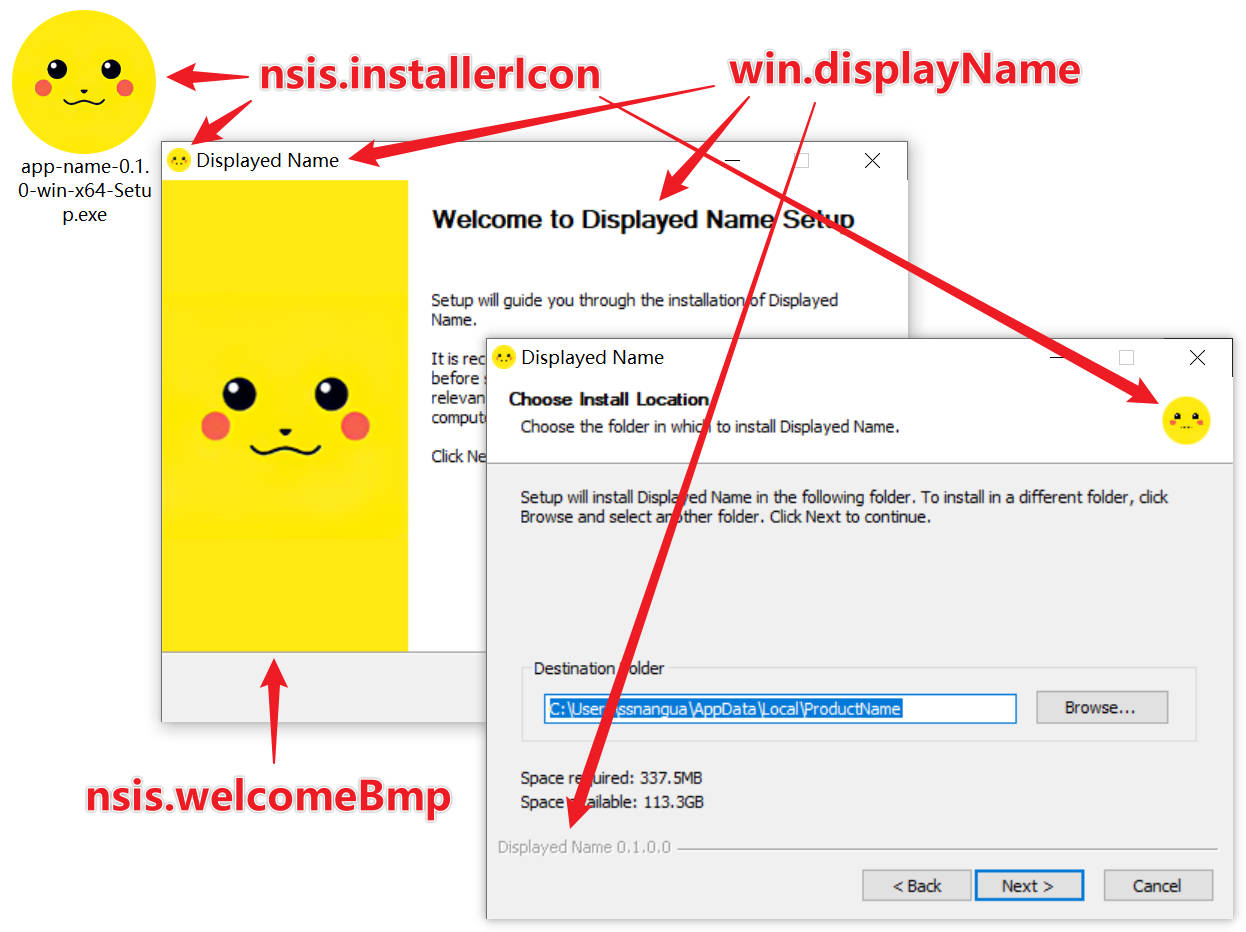 ```json
{
"build": {
"win": {
"displayName": "Displayed Name",
"runAsAdmin": false
},
"nsis": {
"installerIcon": "installer.ico",
"uninstallerIcon": "uninstaller.ico",
"welcomeBmp": "welcome-164x314.bmp"
}
}
}
```
#### icons
In my project, `icon` and `unIcon` didn't work, so you may need to set both `icon` and `installerIcon`, `unIcon` and `uninstallerIcon`:
```json
{
"build": {
"nsis": {
"icon": "installer.ico",
"installerIcon": "installer.ico",
"unIcon": "uninstaller.ico",
"uninstallerIcon": "uninstaller.ico"
}
}
}
```
#### `nsis.licenses`
**Note** that the order of the license files needs to match `nsis.languages`.
**Note** the encoding of the text/RTF files, see https://en.wikipedia.org/wiki/Rich_Text_Format#Character_encoding.
For example, `SimpChinese` uses `GBK`-encoded license file, and `TradChinese` uses `Big5`-encoded license file.
```json
{
"build": {
"nsis": {
"languages": [
"English",
"SimpChinese",
"TradChinese"
],
"licenses": [
"License-English.txt",
"License-SimpChinese.rtf",
"License-TradChinese.rtf"
],
}
}
}
```
---
# nwjs-builder-phoenix [](https://npmjs.org/package/nwjs-builder-phoenix) [](https://github.com/conventional-changelog/standard-version)
A possible solution to build and package a ready for distribution NW.js app for Windows, macOS and Linux.
## Why Bother?
We already had `nw-builder`, but it has made little progress on the way, and `nwjs-builder` has been hard to continue due to personal and historic reasons.
`electron-builder` inspired me when I became an Electron user later, loose files excluding, various target formats, auto updater, artifacts publishing and code signing, amazing!
Although NW.js has much lesser popularity than Electron, and is really troubled by historic headaches, let's have something modern.
## Features
* Building for Windows, macOS and Linux
* Common: `zip`, `7z`
* Windows: `nsis`, [`nsis7z`](./docs/FAQs.md)
* macOS: TODO
* Linux: TODO
* Building for different platforms concurrently
* Configurable executable fields and icons for Windows and macOS
* Exclusion of loose files from `node_modules`
* [Chrome App support](./docs/FAQs.md)
* `nwjs-ffmpeg-prebuilt` integration
* [Auto Updater](./packages/nsis-compat-tester/)
* TODO Rebuilding native modules
* TODO Code signing
* Ideas appreciated :)
## Getting Started
* Make sure your NW.js project has a valid `package.json` (e.g. generated by `npm init`), and have basic fields like `name`, `description` and `version` filled.
* For apps destined for Mac, providing a `product_string` in the `package.json` will allow the Helper app to be [renamed for you](http://docs.nwjs.io/en/latest/For%20Users/Package%20and%20Distribute/#mac-os-x).
* Install `nwjs-builder-phoenix` as a `devDependencies` of your NW.js project as follows:
```shell
# Optional wine for building for Windows on other platforms.
# The command may differ in different Linux distributions.
#sudo apt-get install wine
npm install nwjs-builder-phoenix --save-dev
```
By installing it locally, `build` and `run` commands will be available in npm scripts. You can access option lists via `./node_modules/.bin/{ build, run } --help`.
DO NOT install it globally, as the command names are just too common.
* Add `build` properties at the root of the `package.json`, for example:
```json
// package.json
{
"build": {
"nwVersion": "0.14.7"
}
}
```
This will specify the NW.js version we are using. See more in the following Options section.
* Add some helper npm scripts, for example:
```javascript
// package.json
{
"scripts": {
// Deprecated. "dist": "build --win --mac --linux --x86 --x64 --mirror https://dl.nwjs.io/ .",
"dist": "build --tasks win-x86,win-x64,linux-x86,linux-x64,mac-x64 --mirror https://dl.nwjs.io/ .",
"start": "run --x86 --mirror https://dl.nwjs.io/ ."
}
}
```
The above code snippet enables `npm run dist` and `npm run start`/`npm start`. The former builds for all major platforms and both x86 and x64 arch, and the latter runs the project with x86 binaries, both with the specified version of NW.js and use specified mirror to accelerate the download.
* Well done.
This should be the common use case, read the following Options section and [FAQs](./docs/FAQs.md) if something is missing.
See also [sample project](./assets/project/) and [test cases](./test/) for reference.
## Options
Passing and managing commandline arguments can be painful. In `nwjs-builder-phoenix`, we configure via the `build` property of the `package.json` of your NW.js project.
Also [see all available options here](./docs/Options.md).
## Differences to `nwjs-builder`
* `nwjs-builder-phoenix` queries `versions.json` only when a symbol like `lts`, `stable` or `latest` is used to specify a version.
* `nwjs-builder-phoenix` uses `rcedit` instead of `node-resourcehacker`, thus it's up to you to create proper `.ico` files with different sizes.
* `nwjs-builder-phoenix` supports node.js 4.x and later versions only.
* `nwjs-builder-phoenix` writes with TypeScript and benefits from strong typing and async/await functions.
## Development
```bash
git clone https://github.com/evshiron/nwjs-builder-phoenix
cd nwjs-builder-phoenix
npm install
npm test
```
By the way, I use some custom strings in NSIS scripts which might not be fully translated, if anyone is interested in translating them into languages that aren't available, feel free to fork and send PRs.
## Available Mirrors
If you have difficulties connecting to the official download source, you can specify a mirror via `--mirror` argument of both `build` and `run`, or by setting `NWJS_MIRROR` environment variable. Environment variables like `HTTP_PROXY`, `HTTPS_PROXY` and `ALL_PROXY` should be useful too.
* China Mainland
* https://npm.taobao.org/mirrors/nwjs/
* Singapore
* https://cnpmjs.org/mirrors/nwjs/
## License
MIT.
```json
{
"build": {
"win": {
"displayName": "Displayed Name",
"runAsAdmin": false
},
"nsis": {
"installerIcon": "installer.ico",
"uninstallerIcon": "uninstaller.ico",
"welcomeBmp": "welcome-164x314.bmp"
}
}
}
```
#### icons
In my project, `icon` and `unIcon` didn't work, so you may need to set both `icon` and `installerIcon`, `unIcon` and `uninstallerIcon`:
```json
{
"build": {
"nsis": {
"icon": "installer.ico",
"installerIcon": "installer.ico",
"unIcon": "uninstaller.ico",
"uninstallerIcon": "uninstaller.ico"
}
}
}
```
#### `nsis.licenses`
**Note** that the order of the license files needs to match `nsis.languages`.
**Note** the encoding of the text/RTF files, see https://en.wikipedia.org/wiki/Rich_Text_Format#Character_encoding.
For example, `SimpChinese` uses `GBK`-encoded license file, and `TradChinese` uses `Big5`-encoded license file.
```json
{
"build": {
"nsis": {
"languages": [
"English",
"SimpChinese",
"TradChinese"
],
"licenses": [
"License-English.txt",
"License-SimpChinese.rtf",
"License-TradChinese.rtf"
],
}
}
}
```
---
# nwjs-builder-phoenix [](https://npmjs.org/package/nwjs-builder-phoenix) [](https://github.com/conventional-changelog/standard-version)
A possible solution to build and package a ready for distribution NW.js app for Windows, macOS and Linux.
## Why Bother?
We already had `nw-builder`, but it has made little progress on the way, and `nwjs-builder` has been hard to continue due to personal and historic reasons.
`electron-builder` inspired me when I became an Electron user later, loose files excluding, various target formats, auto updater, artifacts publishing and code signing, amazing!
Although NW.js has much lesser popularity than Electron, and is really troubled by historic headaches, let's have something modern.
## Features
* Building for Windows, macOS and Linux
* Common: `zip`, `7z`
* Windows: `nsis`, [`nsis7z`](./docs/FAQs.md)
* macOS: TODO
* Linux: TODO
* Building for different platforms concurrently
* Configurable executable fields and icons for Windows and macOS
* Exclusion of loose files from `node_modules`
* [Chrome App support](./docs/FAQs.md)
* `nwjs-ffmpeg-prebuilt` integration
* [Auto Updater](./packages/nsis-compat-tester/)
* TODO Rebuilding native modules
* TODO Code signing
* Ideas appreciated :)
## Getting Started
* Make sure your NW.js project has a valid `package.json` (e.g. generated by `npm init`), and have basic fields like `name`, `description` and `version` filled.
* For apps destined for Mac, providing a `product_string` in the `package.json` will allow the Helper app to be [renamed for you](http://docs.nwjs.io/en/latest/For%20Users/Package%20and%20Distribute/#mac-os-x).
* Install `nwjs-builder-phoenix` as a `devDependencies` of your NW.js project as follows:
```shell
# Optional wine for building for Windows on other platforms.
# The command may differ in different Linux distributions.
#sudo apt-get install wine
npm install nwjs-builder-phoenix --save-dev
```
By installing it locally, `build` and `run` commands will be available in npm scripts. You can access option lists via `./node_modules/.bin/{ build, run } --help`.
DO NOT install it globally, as the command names are just too common.
* Add `build` properties at the root of the `package.json`, for example:
```json
// package.json
{
"build": {
"nwVersion": "0.14.7"
}
}
```
This will specify the NW.js version we are using. See more in the following Options section.
* Add some helper npm scripts, for example:
```javascript
// package.json
{
"scripts": {
// Deprecated. "dist": "build --win --mac --linux --x86 --x64 --mirror https://dl.nwjs.io/ .",
"dist": "build --tasks win-x86,win-x64,linux-x86,linux-x64,mac-x64 --mirror https://dl.nwjs.io/ .",
"start": "run --x86 --mirror https://dl.nwjs.io/ ."
}
}
```
The above code snippet enables `npm run dist` and `npm run start`/`npm start`. The former builds for all major platforms and both x86 and x64 arch, and the latter runs the project with x86 binaries, both with the specified version of NW.js and use specified mirror to accelerate the download.
* Well done.
This should be the common use case, read the following Options section and [FAQs](./docs/FAQs.md) if something is missing.
See also [sample project](./assets/project/) and [test cases](./test/) for reference.
## Options
Passing and managing commandline arguments can be painful. In `nwjs-builder-phoenix`, we configure via the `build` property of the `package.json` of your NW.js project.
Also [see all available options here](./docs/Options.md).
## Differences to `nwjs-builder`
* `nwjs-builder-phoenix` queries `versions.json` only when a symbol like `lts`, `stable` or `latest` is used to specify a version.
* `nwjs-builder-phoenix` uses `rcedit` instead of `node-resourcehacker`, thus it's up to you to create proper `.ico` files with different sizes.
* `nwjs-builder-phoenix` supports node.js 4.x and later versions only.
* `nwjs-builder-phoenix` writes with TypeScript and benefits from strong typing and async/await functions.
## Development
```bash
git clone https://github.com/evshiron/nwjs-builder-phoenix
cd nwjs-builder-phoenix
npm install
npm test
```
By the way, I use some custom strings in NSIS scripts which might not be fully translated, if anyone is interested in translating them into languages that aren't available, feel free to fork and send PRs.
## Available Mirrors
If you have difficulties connecting to the official download source, you can specify a mirror via `--mirror` argument of both `build` and `run`, or by setting `NWJS_MIRROR` environment variable. Environment variables like `HTTP_PROXY`, `HTTPS_PROXY` and `ALL_PROXY` should be useful too.
* China Mainland
* https://npm.taobao.org/mirrors/nwjs/
* Singapore
* https://cnpmjs.org/mirrors/nwjs/
## License
MIT.