# PDFME





TypeScript base PDF generator and React base UI.
Open source, developed by the community, and completely free to use under the MIT license!

## Features
| Fast PDF Generator | Easy PDF template design | Simple JSON template |
| -------------------------------------------------------------------------------------------- | ----------------------------------------------------- | -------------------------------------------------------------- |
| Works on node and browser. Use templates to generate PDF, Complex operations are not needed. | Anyone can easily create templates with the designer. | Templates are JSON data that is easy to understand and handle. |
---
## Introduction
pdfme was created to simplify the design and generation process of a PDF. It is especially useful for the following use cases:
- Need to create a designed PDF with short code.
- Need to integrate PDF editor features into an application.
- Need to create a large number of PDFs without compromising performance
As an example, the author's service [https://labelmake.jp/](https://labelmake.jp/) can create more than 100 varieties of PDFs and generates more than 100,000 PDF files per month.
## Installation
The operating requirements should be the node environment `>=14`. *Please see the note at the end of this section for usage on Node.js <16.*
There are two packages in pdfme, generator and UI.
The package for generating PDF can be installed with the following command.
```
npm i @pdfme/generator
```
The packages for using PDF designer, forms and viewers can be installed with the following commands.
```
npm i @pdfme/ui
```
The following type, function and classes are available in pdfme.
`@pdfme/generator`
- [generate](https://pdfme.com/docs/getting-started#generator)
- [Template](https://pdfme.com/docs/getting-started#template)
`@pdfme/ui`
- [Designer](https://pdfme.com/docs/getting-started#designer)
- [Form](https://pdfme.com/docs/getting-started#form)
- [Viewer](https://pdfme.com/docs/getting-started#viewer)
- [Template](https://pdfme.com/docs/getting-started#template)
If your environment uses webpack, import the necessary items as shown below.
```ts
import { Template, generate } from '@pdfme/generator';
```
```ts
import { Template, Designer, Form, Viewer } from '@pdfme/ui';
```
**All objects use `Template`, which will be briefly explained in the next section.**
## Template
The core of pdfme library are Templates.
Template Type can be imported by both `@pdfme/generator` or `@pdfme/ui`. Templates are used everywhere.
A template can be divided into two parts: a fixed part and a variable part.
We call them basePdf and schema.
The following image is a good illustration of a template.
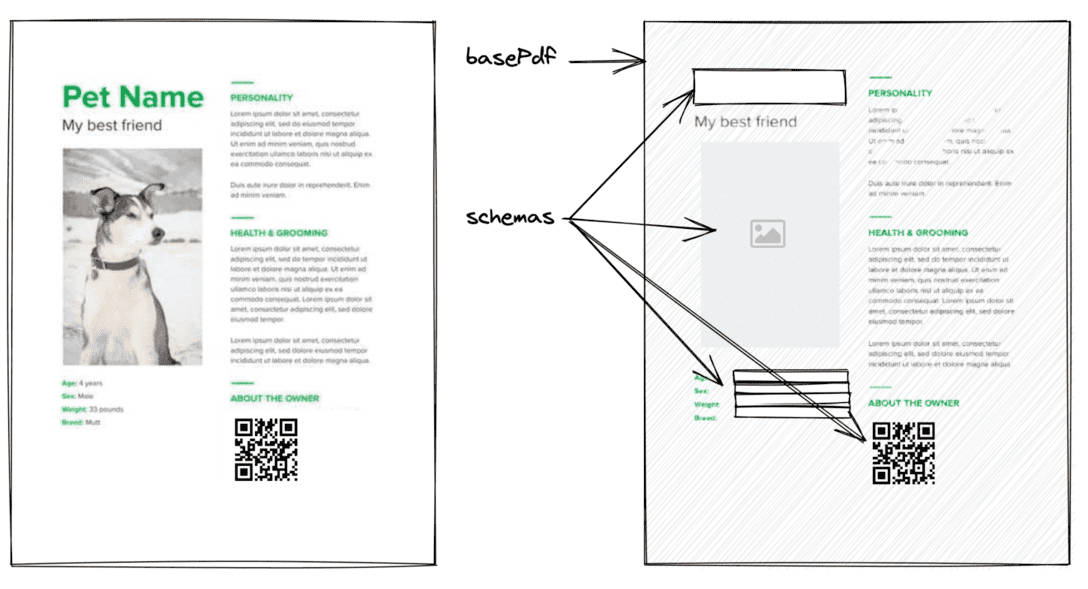
- **basePdf**: PDF data for the fixed part of the PDF to be generated.
- **schemas**: Definition data for the variable part of the PDF to be generated.
**basePdf** can be given a `string`(base64), `ArrayBuffer`, or `Uint8Array`.
A blank A4 PDF can be imported with `BLANK_PDF`. You can use it to check how it works.
**schemas** currently has the following types of data available
- text
- image
- Various types of barcodes
Let's take a look at some specific data.
(If you are using TypeScript, you can import the Template type.)
### Minimal Template
```ts
import { Template, BLANK_PDF } from '@pdfme/generator';
// import { Template, BLANK_PDF } from '@pdfme/ui'; <- Template types and BLANK_PDF can also be imported from @pdfme/ui.
const template: Template = {
basePdf: BLANK_PDF,
schemas: [
{
a: {
type: 'text',
position: { x: 0, y: 0 },
width: 10,
height: 10,
},
b: {
type: 'text',
position: { x: 10, y: 10 },
width: 10,
height: 10,
},
c: {
type: 'text',
position: { x: 20, y: 20 },
width: 10,
height: 10,
},
},
],
};
```
[For more information, please refer to the API documentation of the Template type here](https://pdfme.com/docs/api/common/#template).
You can create a template from [Template Design page](https://pdfme.com/template-design). Or, if you want to integrate the template creation feature into your application, check out the [Designer section](https://pdfme.com/docs/getting-started#designer).
## Generator
The PDF generator function, `generate`, takes 2 arguments of `template` and `inputs` for generate a PDF. It works both in Node.js and in the browser.
The code to generate a PDF file using the [template created above](https://pdfme.com/docs/getting-started#sample-template) is shown below.
```ts
import { Template, generate } from '@pdfme/generator';
const template: Template = {
// skip... Check the Template section.
};
const inputs = [{ a: 'a1', b: 'b1', c: 'c1' }];
generate({ template, inputs }).then((pdf) => {
console.log(pdf);
// Browser
// const blob = new Blob([pdf.buffer], { type: 'application/pdf' });
// window.open(URL.createObjectURL(blob));
// Node.js
// fs.writeFileSync(path.join(__dirname, `test.pdf`), pdf);
});
```
You can create a PDF file like the below.

Also, each element in the inputs array corresponds to a page in the PDF, you can create a multi-page PDF file by providing multiple elements of inputs.
[For more information, please refer to the API documentation of the generate function here](https://pdfme.com/docs/api/generator/#generate).
## UI
### Designer
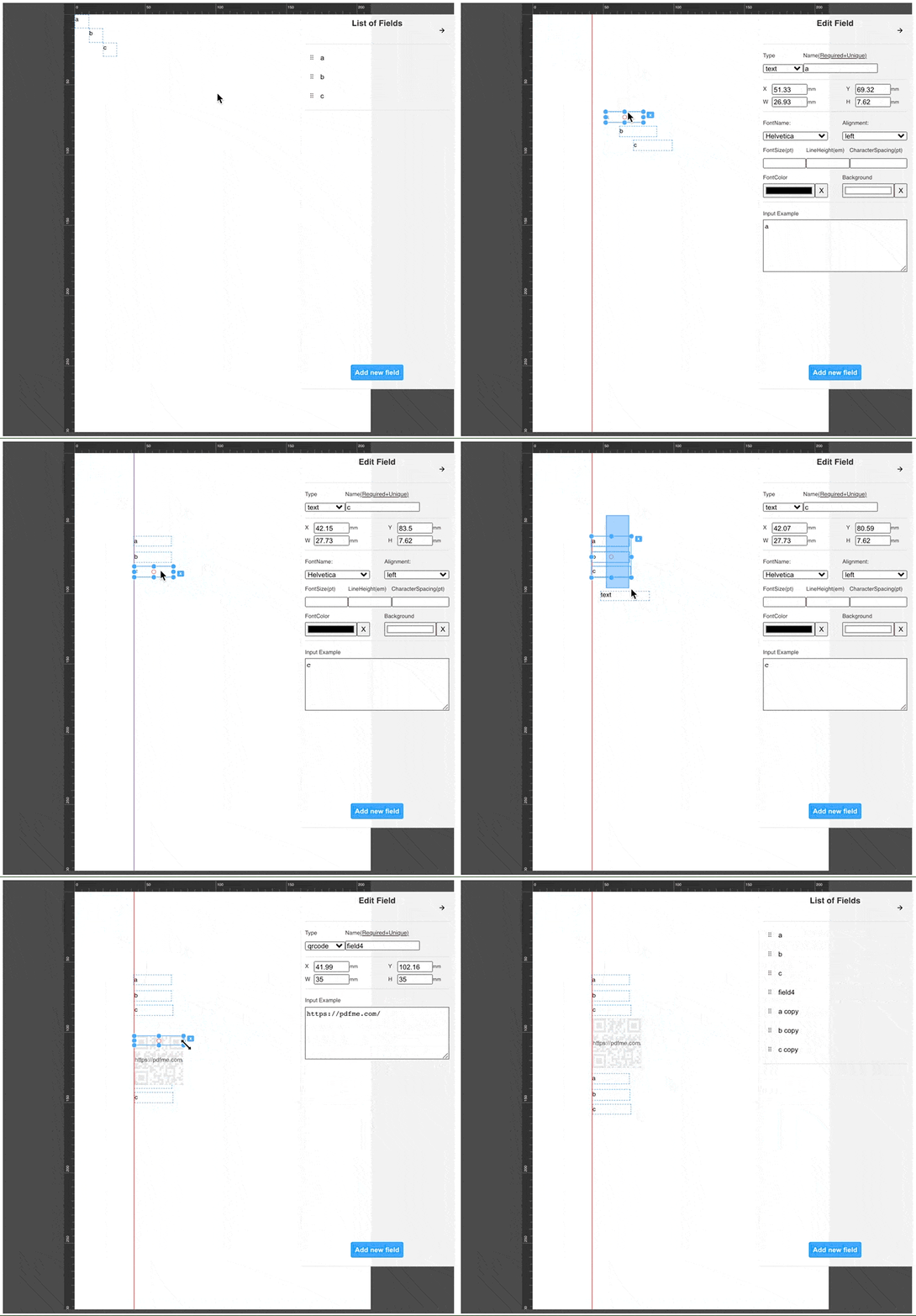
The Designer allows you to edit the Template schemas, making it easy for anyone to create Template json objects.
You can design your own template from [Template Design page](https://pdfme.com/template-design), or you can integrate the designer into your application.
Let's integrate the designer using the template created above as the default template.
```ts
import { Template, Designer } from '@pdfme/ui';
const domContainer = document.getElementById('container');
const template: Template = {
// skip... Check the Template section.
};
const designer = new Designer({ domContainer, template });
```
The Designer class is instantiated as shown above, and the template designer is displayed in the `domContainer`.
You can edit the template as shown below. The operation is like Google Slides, etc., so you can use common keyboard shortcuts.
The designer instance can be manipulated with the following methods.
- `saveTemplate`
- `updateTemplate`
- `getTemplate`
- `onChangeTemplate`
- `onSaveTemplate`
- `destroy`
[For more information, please refer to the API documentation of the Designer class here](https://pdfme.com/docs/api/ui/classes/Designer).
### Form
You can use templates to create forms and PDF viewers.
The Form creates a UI for the user to enter schemas based on the template.
```ts
import { Template, Form } from '@pdfme/ui';
const domContainer = document.getElementById('container');
const template: Template = {
// skip...
};
// This is initial data.
const inputs = [{ a: 'a1', b: 'b1', c: 'c1' }];
const form = new Form({ domContainer, template, inputs });
```
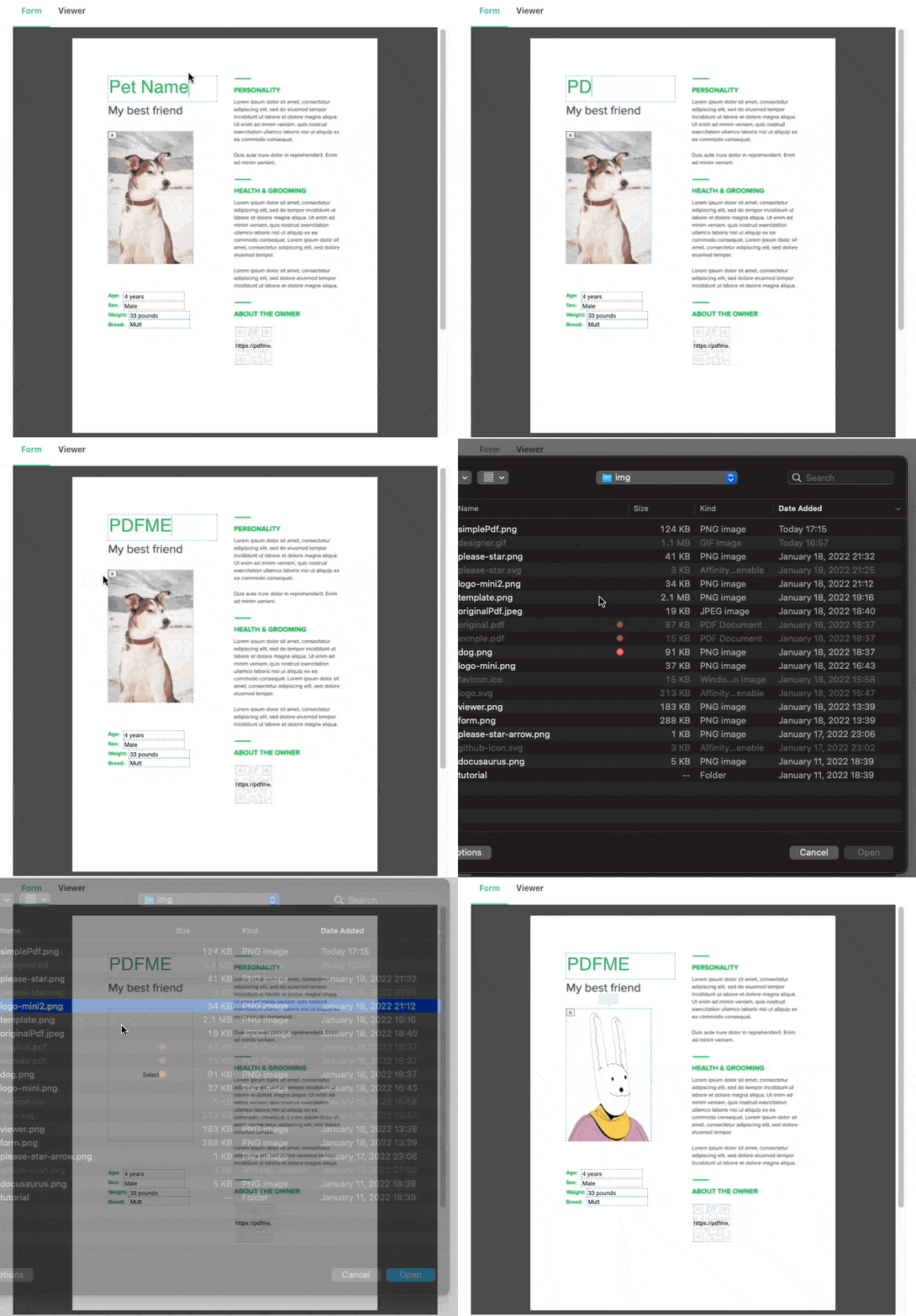
The form instance has a method `getInputs` to get the user's input.
You can generate a PDF file based on the user's input by passing the data you get from `getInputs` as inputs to generate, as shown in the code below.
```ts
generate({ template, inputs: form.getInputs() }).then((pdf) => {
const blob = new Blob([pdf.buffer], { type: 'application/pdf' });
window.open(URL.createObjectURL(blob));
});
```
[For more information, please refer to the API documentation of the Form class here](https://pdfme.com/docs/api/ui/classes/Form).
### Viewer
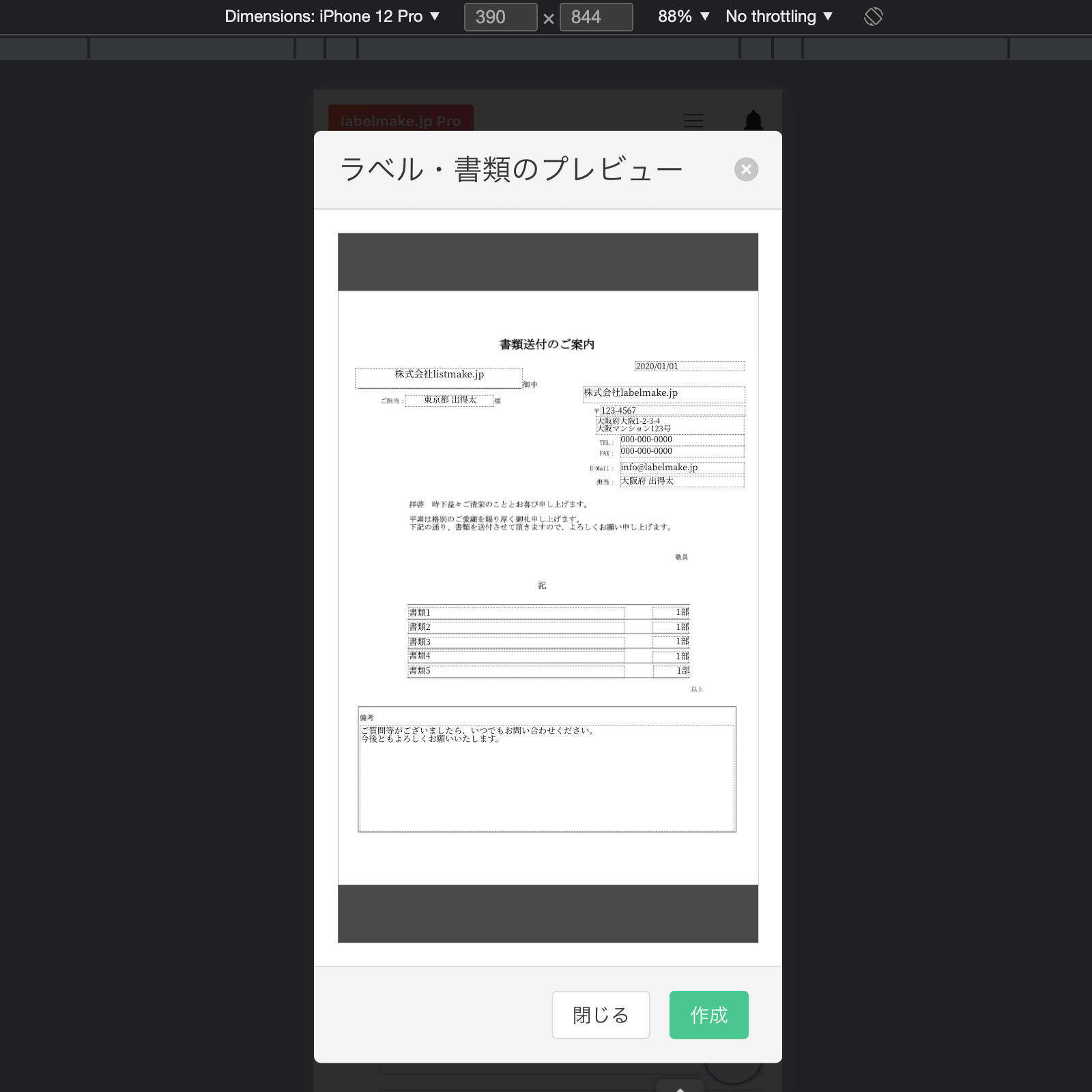
Viewing a PDF file in a mobile browser is a pain, because it doesn't display well in an iframe.
The Viewer is a byproduct of the Form development process, but it allows you to show your users a preview of the PDF file you will create.
Using the Viewer is basically the same as using the Form, except that user cannot edit it.
```ts
import { Template, Viewer } from '@pdfme/ui';
const domContainer = document.getElementById('container');
const template: Template = {
// skip...
};
const inputs = [{ a: 'a1', b: 'b1', c: 'c1' }];
const viewer = new Viewer({ domContainer, template, inputs });
```
[For more information, please refer to the API documentation of the Viewer class here](https://pdfme.com/docs/api/ui/classes/Viewer).
## Special Thanks
- [pdf-lib](https://pdf-lib.js.org/): Used in PDF generation.
- [PDF.js](https://mozilla.github.io/pdf.js/): Used in PDF viewing.
- [React](https://reactjs.org/): Used in building the UI.
- [react-moveable](https://daybrush.com/moveable/), [react-selecto](https://github.com/daybrush/selecto), [@scena/react-guides](https://daybrush.com/guides/): Used in Designer UI.
- [dnd-kit](https://github.com/clauderic/dnd-kit): Used in Designer UI.
- [bwip-js](https://github.com/metafloor/bwip-js): Used in barcode generation.
- [zod](https://github.com/colinhacks/zod): Used in Validation.
I definitely could not have created pdfme without these libraries. I am grateful to the developers of these libraries.