# vue-element-table

> A simple, customizable and pageable table, based on vue2 and element-ui@2.x.

[中文文档](README.CN.md)

## Simple Demo

```
<template>
    <ve-table :data="tableData" :columns="columns"></ve-table>
</template>

<script>
    import Mock from 'mockjs';

    export default {
        data() {
            return {
                tableData: (() =>
                    {
                        const data = [];
                        for (let i = 0; i < 50; i++) {
                            data.push(Mock.mock({
                                date: '@date',
                                name: '@cname',
                                address: '@county(true)'
                            }))
                        }
                        return data;
                    }
                )(),
                columns: [
                    {
                        prop: 'date',
                        label: '日期',
                        width: 180
                    },
                    {
                        prop: 'name',
                        label: '姓名',
                        width: 180
                    },
                    {
                        prop: 'address',
                        label: '地址',
                    }
                ]
            }
        }
    }
</script>
```

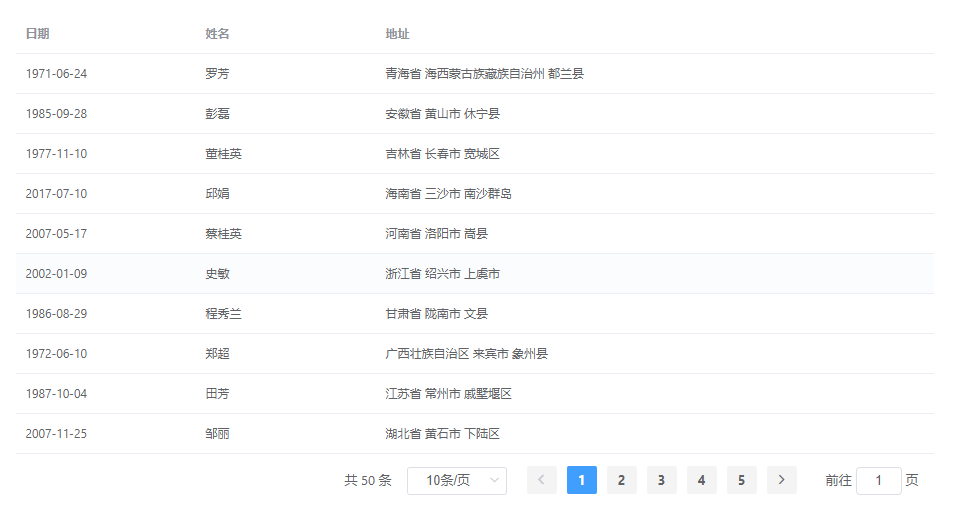
You will got this.

![](./public/images/demo.png)

More details visit [vue-element-table](https://springliao.github.io/vue-element-table/).

## Install

```bash
yarn add @springliao/vue-element-table
```

## Usage

### Fully import

In main.js:

```js
import VeTable from '@springliao/vue-element-table'
import '@springliao/vue-element-table/dist/VeTable.css';

Vue.use(VeTable);
```

The above imports Element entirely. Note that CSS file needs to be imported separately.

Now, just use it:

```vue
<ve-table :data="data"></ve-table>

<ve-table-sync :http-request="request"></ve-table-sync>

<ve-tree-table :data="data"></ve-tree-table>
```

### On demand

<b>Todo.</b>

## Dev Setup

``` bash

# install dependencies
yarn

# build for production with minification
yarn run build

# run eslint and fix code style
npm run lint

# run all tests
yarn run test

```

## Buy me coffee

![](./public/images/alipay.png)
![](./public/images/wechatpay.png)

For a detailed explanation on how things work, contact me <www.389055604@qq.com>.