# @souscheflabs/reanimated-flashlist
A high-performance animated FlashList with drag-to-reorder and entry/exit animations for React Native.
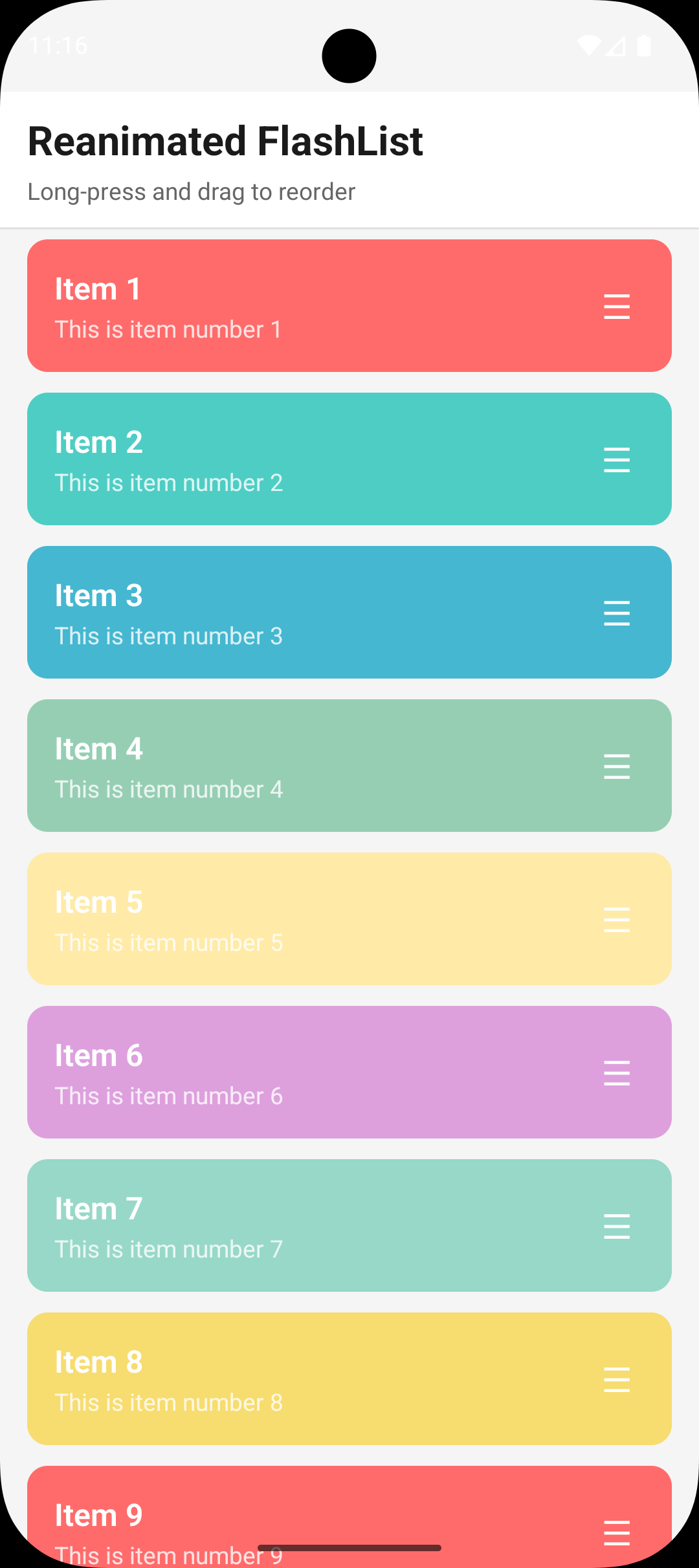
## Features
- **Drag-to-reorder** with smooth animations and autoscroll
- **Entry animations** when items appear in the list
- **Exit animations** with configurable slide/fade/scale effects
- **Layout animations** for remaining items when one is removed
- **60fps performance** via Reanimated UI-thread animations
- **Full TypeScript support** with generics
## Installation
### From npm (when published)
```bash
npm install @souscheflabs/reanimated-flashlist
```
### From GitHub (private repo)
Using HTTPS (will prompt for credentials):
```bash
npm install github:SousChefLabs/reanimated-flashlist#v0.1.1
```
Using SSH (recommended for CI/private repos):
```bash
npm install git+ssh://git@github.com:SousChefLabs/reanimated-flashlist.git#v0.1.1
```
Or add to `package.json`:
```json
{
"dependencies": {
"@souscheflabs/reanimated-flashlist": "github:SousChefLabs/reanimated-flashlist#v0.1.1"
}
}
```
Replace `v0.1.1` with the desired version tag.
### Requirements
**React Native New Architecture required.** This library uses TurboModules and JSI for optimal performance.
- React Native 0.74.0+ with [New Architecture enabled](https://reactnative.dev/architecture/landing-page)
- `@shopify/flash-list` v2.0.0+
- `react-native-reanimated` v4.0.0+
- `react-native-gesture-handler` v2.14.0+
```bash
npm install @shopify/flash-list react-native-reanimated react-native-gesture-handler
```
## Quick Start
```tsx
import { AnimatedFlashList, type AnimatedListItem } from '@souscheflabs/reanimated-flashlist';
import { GestureDetector } from 'react-native-gesture-handler';
interface MyItem extends AnimatedListItem {
title: string;
}
function MyList() {
const [items, setItems] = useState([
{ id: '1', title: 'Item 1' },
{ id: '2', title: 'Item 2' },
]);
return (
data={items}
keyExtractor={(item) => item.id}
renderItem={({ item, dragHandleProps, triggerExitAnimation }) => (
{item.title}
{/* Drag handle */}
{dragHandleProps && (
)}
{/* Delete button with exit animation */}
{
triggerExitAnimation(1, () => {
setItems(prev => prev.filter(i => i.id !== item.id));
}, 'fast');
}}
>
)}
dragEnabled
onReorder={(itemId, fromIndex, toIndex) => {
setItems(prev => {
const newItems = [...prev];
const [removed] = newItems.splice(fromIndex, 1);
newItems.splice(toIndex, 0, removed);
return newItems;
});
}}
/>
);
}
```
## API Reference
### AnimatedFlashListProps
| Prop | Type | Default | Description |
|------|------|---------|-------------|
| `data` | `T[]` | Required | Array of items (must extend `AnimatedListItem`) |
| `keyExtractor` | `(item: T, index: number) => string` | Required | Extract unique key for each item |
| `renderItem` | `(info: AnimatedRenderItemInfo) => ReactElement` | Required | Render function for items |
| `dragEnabled` | `boolean` | `false` | Enable drag-to-reorder |
| `onReorder` | `(itemId, fromIndex, toIndex) => void` | - | Called when item is reordered |
| `onReorderByNeighbors` | `(itemId, afterId, beforeId) => void` | - | Alternative callback with neighbor IDs (for fractional indexing) |
| `canDrag` | `(item: T, index: number) => boolean` | `() => true` | Control which items can be dragged |
| `onHapticFeedback` | `(type: HapticFeedbackType) => void` | - | Haptic feedback callback |
| `config` | `AnimatedFlashListConfig` | - | Configuration overrides |
### AnimatedRenderItemInfo
Props passed to your `renderItem` function:
| Prop | Type | Description |
|------|------|-------------|
| `item` | `T` | The item data |
| `index` | `number` | Current index |
| `totalItems` | `number` | Total items in list |
| `dragHandleProps` | `{ gesture, isDragging } \| null` | Spread onto GestureDetector for drag handle |
| `isDragEnabled` | `boolean` | Whether drag is enabled for this item |
| `triggerExitAnimation` | `(direction, onComplete, preset?) => void` | Trigger exit animation |
| `resetExitAnimation` | `() => void` | Reset exit animation state |
## Recipes
### Checkbox Toggle with Exit Animation
When a checkbox is toggled and the item should exit:
```tsx
renderItem={({ item, triggerExitAnimation }) => (
{
// Trigger exit animation, then remove item
triggerExitAnimation(1, () => {
removeItem(item.id);
}, 'fast'); // 'fast' preset for quick actions
}}
/>
{item.title}
)}
```
### Swipe to Delete
```tsx
renderItem={({ item, triggerExitAnimation }) => (
{
triggerExitAnimation(1, () => deleteItem(item.id));
}}
onSwipeLeft={() => {
triggerExitAnimation(-1, () => deleteItem(item.id));
}}
>
)}
```
### Custom Drag Handle
```tsx
renderItem={({ item, dragHandleProps }) => (
{item.title}
{dragHandleProps && (
({
opacity: dragHandleProps.isDragging.value ? 0.5 : 1,
})),
]}
>
)}
)}
```
## Configuration
### Drag Configuration
```tsx
```
### Animation Presets
Exit animations have two presets:
- **`'default'`** (300ms): Standard exit with staggered fade/scale
- **`'fast'`** (200ms): Quick exit for checkbox toggles
```tsx
// Use fast preset for quick actions
triggerExitAnimation(1, onComplete, 'fast');
// Use default preset for deliberate actions
triggerExitAnimation(-1, onComplete, 'default');
```
## Layout Animations
When an item exits the list, remaining items automatically animate to fill the gap. This uses React Native's `LayoutAnimation` API and is enabled by default.
The animation is triggered automatically when `triggerExitAnimation` is called - no additional setup required.
## Performance Tips
### Enable Reanimated Feature Flags
For optimal animation performance, enable Reanimated's static feature flags. These reduce commit hook overhead and enable platform-specific fast paths for style updates.
**Requirements:** React Native 0.80+ and Reanimated 4.2.0+
Create or update `react-native.config.js` in your project root:
```js
module.exports = {
reanimated: {
staticFeatureFlags: {
// Reduces commit hook overhead by limiting when hooks fire
USE_COMMIT_HOOK_ONLY_FOR_REACT_COMMITS: true,
// Fast path for non-layout style updates (opacity, transform)
ANDROID_SYNCHRONOUSLY_UPDATE_UI_PROPS: true,
IOS_SYNCHRONOUSLY_UPDATE_UI_PROPS: true,
},
},
};
```
Add to your `babel.config.js`:
```js
module.exports = {
plugins: [
[
'react-native-reanimated/plugin',
{
enableCppPropsIteratorSetter: true, // Faster C++ prop iteration
},
],
],
};
```
> **Note:** These flags require a clean rebuild. Run `npx react-native start --reset-cache` after changing config.
### Enable React Compiler
For optimal performance in your app, enable [React Compiler](https://react.dev/learn/react-compiler) (React 19+). It automatically memoizes components and callbacks, reducing re-renders.
```bash
npm install babel-plugin-react-compiler eslint-plugin-react-compiler --save-dev
```
Add to your `babel.config.js`:
```js
module.exports = {
plugins: [
['babel-plugin-react-compiler', {}],
],
};
```
And to your ESLint config:
```js
// eslint.config.js (flat config)
import reactCompiler from 'eslint-plugin-react-compiler';
export default [
{
plugins: { 'react-compiler': reactCompiler },
rules: { 'react-compiler/react-compiler': 'warn' },
},
];
```
### Memoize renderItem and keyExtractor
Always wrap `renderItem` and `keyExtractor` with `useCallback` to prevent unnecessary re-renders:
```tsx
const keyExtractor = useCallback((item: MyItem) => item.id, []);
const renderItem = useCallback(
({ item, dragHandleProps }: AnimatedRenderItemInfo) => (
),
[]
);
```
### Wrap Item Components with React.memo
```tsx
const MyItemComponent = React.memo(({ item, dragHandleProps }) => {
// ...
});
```
## Advanced Usage
### Using Individual Hooks
For custom implementations, you can use the hooks directly:
```tsx
import {
useDragGesture,
useDragShift,
useDragAnimatedStyle,
useListExitAnimation,
useListEntryAnimation,
} from '@souscheflabs/reanimated-flashlist';
```
### Context Providers
For building custom list implementations:
```tsx
import {
DragStateProvider,
ListAnimationProvider,
useDragState,
useListAnimation,
} from '@souscheflabs/reanimated-flashlist';
```
## License
MIT