# @skyra/discord-components-react
**React bindings for
[@skyra/discord-components-core](https://github.com/skyra-project/discord-components/tree/main/packages/core)**
**Web components to easily build and display fake Discord messages on your
webpages**
[](https://github.com/skyra-project/discord-components/blob/main/LICENSE.md)
[](https://donate.skyra.pw/patreon)
_Core Package_
[](https://www.npmjs.com/package/@skyra/discord-components-core)
[](https://www.npmjs.com/package/@skyra/discord-components-core)
[](https://bundlephobia.com/result?p=@skyra/discord-components-core)
_React Bindings_
[](https://www.npmjs.com/package/@skyra/discord-components-react)
[](https://www.npmjs.com/package/@skyra/discord-components-react)
[](https://bundlephobia.com/result?p=@skyra/discord-components-react)
[](https://join.skyra.pw)
---
**_Table of Contents_**
- [@skyra/discord-components-react](#skyradiscord-components-react)
- [Description](#description)
- [Upgrading guide](#upgrading-guide)
- [Features](#features)
- [Installation](#installation)
- [Usage](#usage)
- [Important](#important)
- [Using the Discord font](#using-the-discord-font)
- [Vite](#vite)
- [Live Demo](#live-demo)
- [Create React App](#create-react-app)
- [Important Notes](#important-notes)
- [NextJS](#nextjs)
- [Live Demo Pages Directory](#live-demo-pages-directory)
- [Live Demo App Directory](#live-demo-app-directory)
- [Known limitations](#known-limitations)
- [Docusaurus](#docusaurus)
- [Live Demo](#live-demo-1)
- [Notes](#notes)
- [TypeScript module augments](#typescript-module-augments)
- [Avatar shortcuts](#avatar-shortcuts)
- [Profile shortcuts](#profile-shortcuts)
- [Theming](#theming)
- [Components notes](#components-notes)
- [DiscordMessages component](#discordmessages-component)
- [DiscordMention component](#discordmention-component)
- [DiscordEmbed component](#discordembed-component)
- [EmbedFields component](#embedfields-component)
- [EmbedField component](#embedfield-component)
- [Screenshots](#screenshots)
- [Dark Mode](#dark-mode)
- [Light Mode](#light-mode)
- [Contributors](#contributors)
## Description
Discord message components to easily build and display fake Discord messages on
your webpage.
**This is an adaptation of [wc-discord-message] from [Danktuary]**
### Upgrading guide
The source code and documentation of this package has been updated for version
4.x of this package. To find out how to upgrade from v3.x to v4.x, please refer
to the
[upgrading guide](https://discord-components.js.org/upgrading/v3x-v4x/#component-changes)
## Features
- Design modelled after [Discord](https://discord.com/) itself
- Comfy and compact mode support
- Dark and light themes support
- Set the message author's username, avatar (use defaults or provide your own),
role color, and "bot" tag status
- Display fake user, role, and channel mentions
- Complete embed support
- Uses [Lit Element][lit] to support all browsers and environments
- Simple syntax!
## Installation
```bash
yarn add @skyra/discord-components-core @skyra/discord-components-react
# or npm install @skyra/discord-components-core @skyra/discord-components-react
```
## Usage
> [!IMPORTANT]
>
> For further examples on how to use components, please refer to the Stackblitz
> examples linked below. Choose the framework you are using and click on the
> "Open in Stackblitz" button to see the code and how it renders in the browser.
### Important
React is currently the only library among the "big" libraries for frontend
development that does not fully support custom elements / webcomponents yet (see
[this React documentation page for more info](https://react.dev/reference/react-dom/components#custom-html-elements)).
For this reason we ship the package `@skyra/discord-components-react`.
We sincerely hope that this situation will improve in the future, but no one
knows what their plans are.
### Using the Discord font
This library can use the Discord font if you load it into your project. You can
do so by including the CSS below:
```css
@font-face {
font-family: 'Whitney';
src: url('https://cdn.skyra.pw/whitney-font/v2/Book.woff') format('woff');
font-weight: 400;
}
@font-face {
font-family: 'Whitney';
src: url('https://cdn.skyra.pw/whitney-font/v2/Medium.woff') format('woff');
font-weight: 500;
}
@font-face {
font-family: 'Whitney';
src: url('https://cdn.skyra.pw/whitney-font/v2/Semibold.woff') format('woff');
font-weight: 600;
}
@font-face {
font-family: 'Whitney';
src: url('https://cdn.skyra.pw/whitney-font/v2/Bold.woff') format('woff');
font-weight: 700;
}
```
### Vite
#### Live Demo
[](https://stackblitz.com/github/skyra-project/discord-components-implementations/tree/main/templates/react-vite-ts)
### Create React App
#### Important Notes
Create React App is no longer the recommended way to start with a React app as
per React's own documentation. We very strongly recommend using Vite instead.
### NextJS
#### Live Demo Pages Directory
[](https://stackblitz.com/github/skyra-project/discord-components-implementations/tree/main/templates/nextjs-ts)
#### Live Demo App Directory
[](https://stackblitz.com/github/skyra-project/discord-components-implementations/tree/main/templates/nextjs-app-directory-ts)
#### Known limitations
1. All the React components will only render on the client, they are bundled
with the `'use client';` header that NextJS expects for CSR only components.
This is because there is currently no good way to render webcomponents on the
server. When
[@lit-labs/nextjs](https://www.npmjs.com/package/@lit-labs/nextjs) adds
[support for the app directory](https://github.com/lit/lit/issues/3657) we
can revisit this limitation.
2. When using the app directory we are not able to get profiles working. We are
open to suggestions on how to fix this, ideally through a pull request to
[https://github.com/skyra-project/discord-components-implementations/tree/main/templates/nextjs-ts].
### Docusaurus
#### Live Demo
[](https://stackblitz.com/github/skyra-project/discord-components-implementations/tree/main/templates/react-docusaurus-ts)
## Notes
### TypeScript module augments
This library uses a custom object on the browser `window` for configuration.
Under normal circumstances by simply importing the package (with
`import @skyra/discord-components-react`) the module augmentations should also
be loaded. If for whatever reason this does not happen, then you can define them
manually yourself. You can do so with the following code snippet:
```ts
import type { DiscordMessageOptions } from '@skyra/discord-components-react';
declare global {
// eslint-disable-next-line no-var
var $discordMessage: DiscordMessageOptions | undefined;
}
```
### Avatar shortcuts
The current avatar shortcut strings available are "blue" (default), "gray",
"green", "orange", and "red". These shortcuts map to the following image links:
```json
{
"blue": "https://cdn.discordapp.com/attachments/654503812593090602/665721745466195978/blue.png",
"gray": "https://cdn.discordapp.com/attachments/654503812593090602/665721746569166849/gray.png",
"green": "https://cdn.discordapp.com/attachments/654503812593090602/665721748431306753/green.png",
"orange": "https://cdn.discordapp.com/attachments/654503812593090602/665721750201434138/orange.png",
"red": "https://cdn.discordapp.com/attachments/654503812593090602/665721752277483540/red.png"
}
```
If you want to add to or override the shortcuts, you can set them via
`globalThis.$discordMessage.avatars` or by using the `setConfig` function
(`import { setConfig } from '@skyra/discord-components-react'`).
```ts
globalThis.$discordMessage = {
avatars: {
default: 'blue',
skyra: 'https://github.com/NM-EEA-Y.png',
djs: require('./assets/discord-avatar-djs.png') // You can use require syntax as well
}
};
```
```ts
import { setConfig } from '@skyra/discord-components-react';
setConfig({
avatars: {
default: 'blue',
skyra: 'https://github.com/NM-EEA-Y.png',
djs: require('./assets/discord-avatar-djs.png') // You can use require syntax as well
}
});
```
### Profile shortcuts
Sometimes you'll want to use the same message data across multiple messages. You
can do so by providing an object of profiles in
`globalThis.$discordMessage.profiles` or by using the `setConfig` function
(`import { setConfig } from '@skyra/discord-components-react'`).
```ts
globalThis.$discordMessage = {
profiles: {
skyra: {
author: 'Skyra',
avatar: 'https://github.com/NM-EEA-Y.png',
bot: true,
verified: true,
roleColor: '#1e88e5'
},
favna: {
author: 'Favna',
avatar: 'https://github.com/favna.png',
roleColor: '#ff0000'
}
}
};
```
```ts
import { setConfig } from '@skyra/discord-components-react';
setConfig({
profiles: {
skyra: {
author: 'Skyra',
avatar: 'https://github.com/NM-EEA-Y.png',
bot: true,
verified: true,
roleColor: '#1e88e5'
},
favna: {
author: 'Favna',
avatar: 'https://github.com/favna.png',
roleColor: '#ff0000'
}
}
});
```
And then in your React code:
```tsx
Welcome to our server, Favna!
Hey, glad to be here!
```
### Theming
Each of the components accepts the standard HTML properties for passing styling,
such as `className` for passing CSS classes (JSS / CSS / SCSS etc.) or `style`
to pass inline style.
You can also pass your own custom HTML tags, for example set a `data-qa` to be
able to navigate to the component in your unit tests / end-to-end tests
### Components notes
Below are notes for a few certain components. If you want to see what props each
component has, check their readme.md file in [the respective folder].
#### DiscordMessages component
This is a wrapper for any child `` component. It must be used in
order for messages to display properly.
#### DiscordMention component
If the default slot is left empty, the mention will be rendered as `'User'`,
`'Role'`, or `'channel`', depending on the `type` prop given.
#### DiscordEmbed component
An embed that can be attached to the end of your messages. The default slot is
used for the embed's description. The `footer` slot is used for the footer text.
To ensure the embed gets displayed correctly inside your message, be sure to
give it the proper `slot` attribute.
```tsx
Hi, I'm part of the normal message content.
Hi, I'm part of the embed message content.
```
#### EmbedFields component
A wrapper for any child `` components. Must be used in order
for fields to display properly. To ensure the embed fields gets displayed
correctly inside your embed, be sure to give it the proper `slot` attribute.
```tsx
Hi, I'm part of the embed message content.
```
#### EmbedField component
At least 2 consecutive fields need to be marked as inline in order for them to
actually display next to each other. The maximum amount of inline fields is 3,
and drops to 2 if an embed thumbnail is used.
```tsx
Hi, I'm part of the embed message content.
Field content.
Field content.
```
## Screenshots
### Dark Mode
**_A normal conversation_**
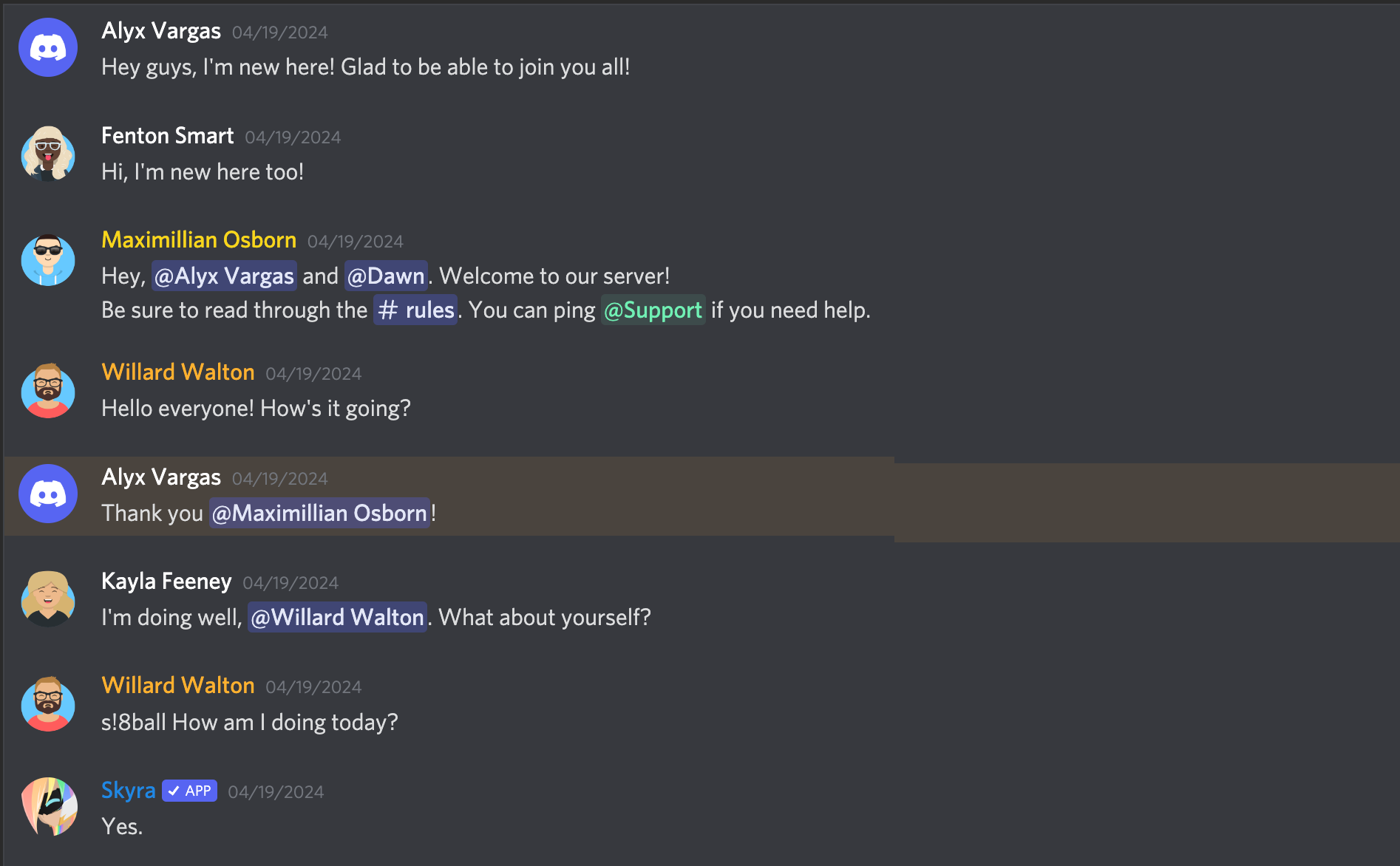
**_Compact mode_**

**_With an embed_**
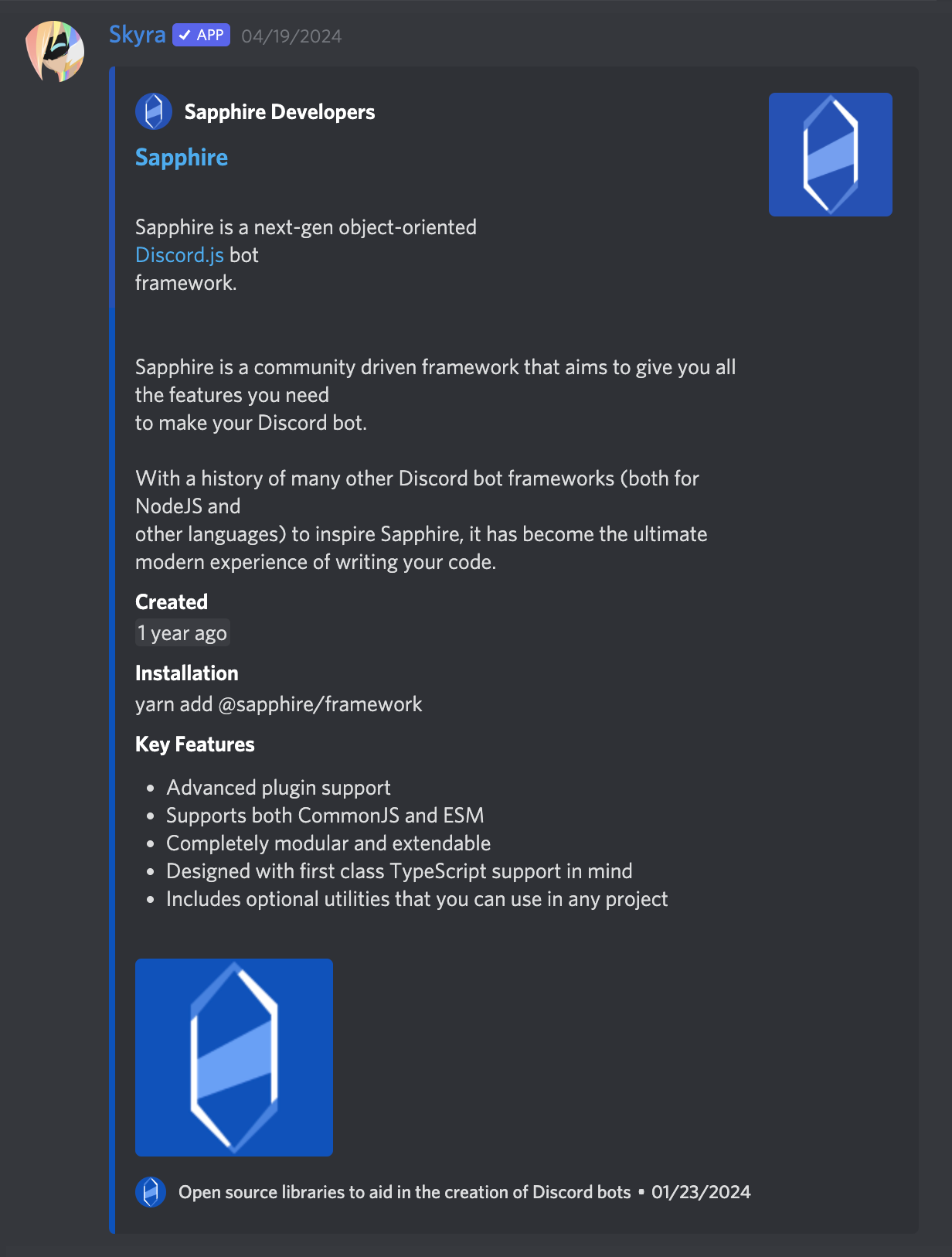
### Light Mode
**_A normal conversation_**
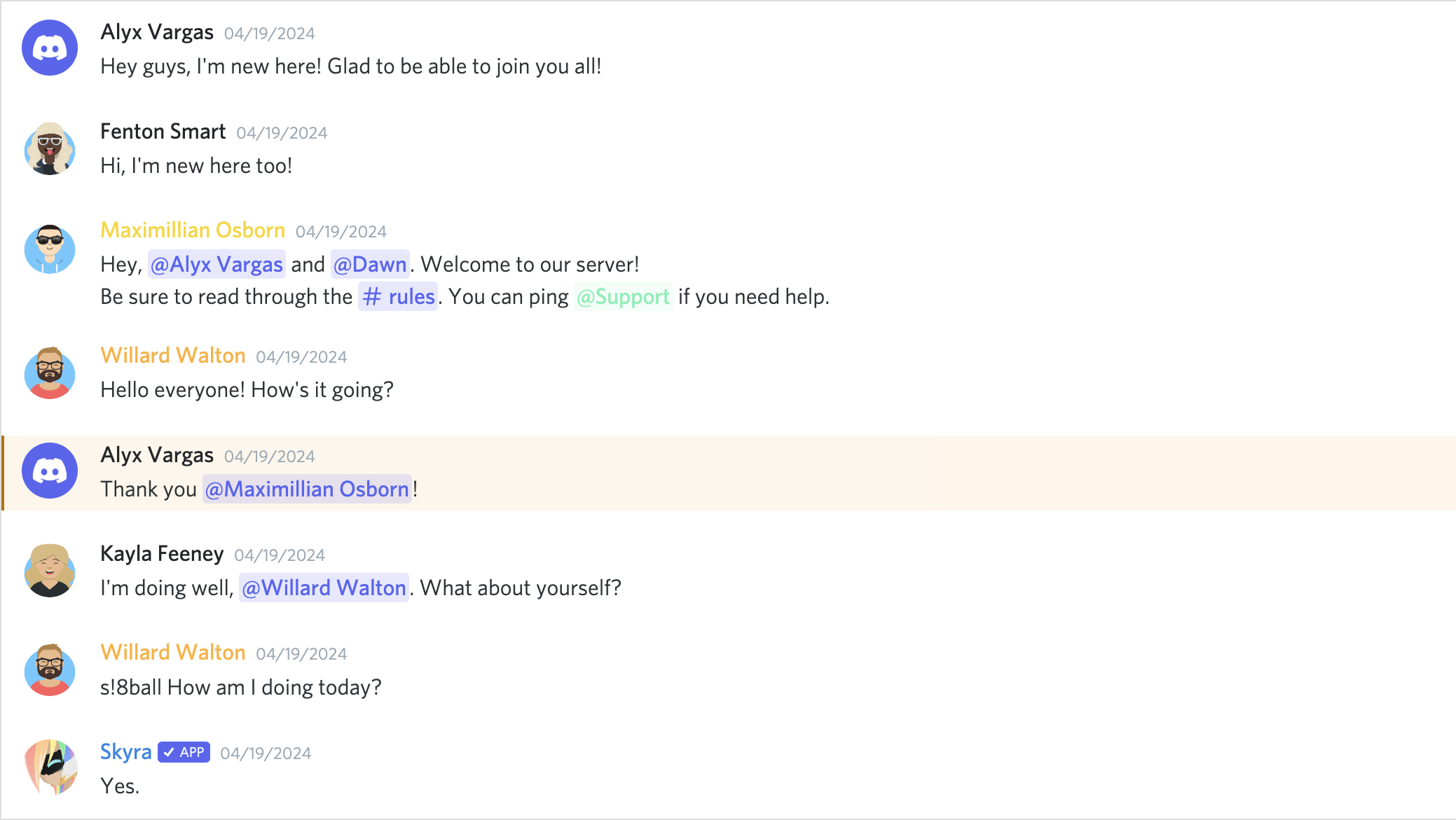
**_Compact mode_**

**_With an embed_**
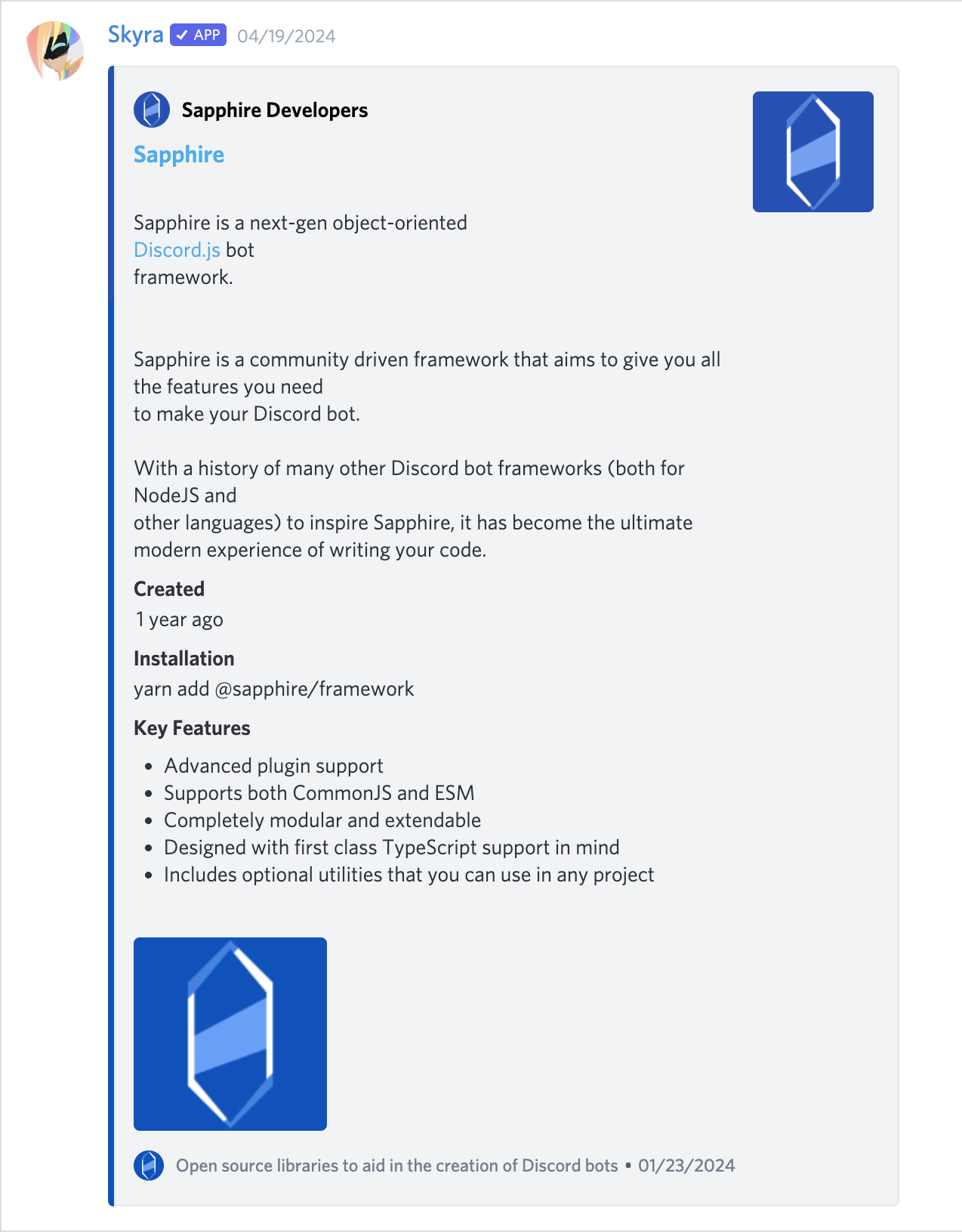
## Contributors
Please make sure to read the [Contributing Guide][contributing] before making a
pull request.
Thank you to all the people who already contributed to Discord Components!
 [contributing]: ../../.github/CONTRIBUTING.md
[wc-discord-message]: https://github.com/Danktuary/wc-discord-message
[danktuary]: https://github.com/Danktuary
[the respective folder]:
(https://github.com/skyra-project/discord-components/blob/main/packages/core/src/components/)
[contributing]: ../../.github/CONTRIBUTING.md
[wc-discord-message]: https://github.com/Danktuary/wc-discord-message
[danktuary]: https://github.com/Danktuary
[the respective folder]:
(https://github.com/skyra-project/discord-components/blob/main/packages/core/src/components/)