# Tanto Widget
**Tanto Widget** is a React component library designed to provide a seamless **Connect Wallet** experience for Web3 applications, with a focus on **Ronin Wallets** and Ethereum-compatible wallets.
## Features
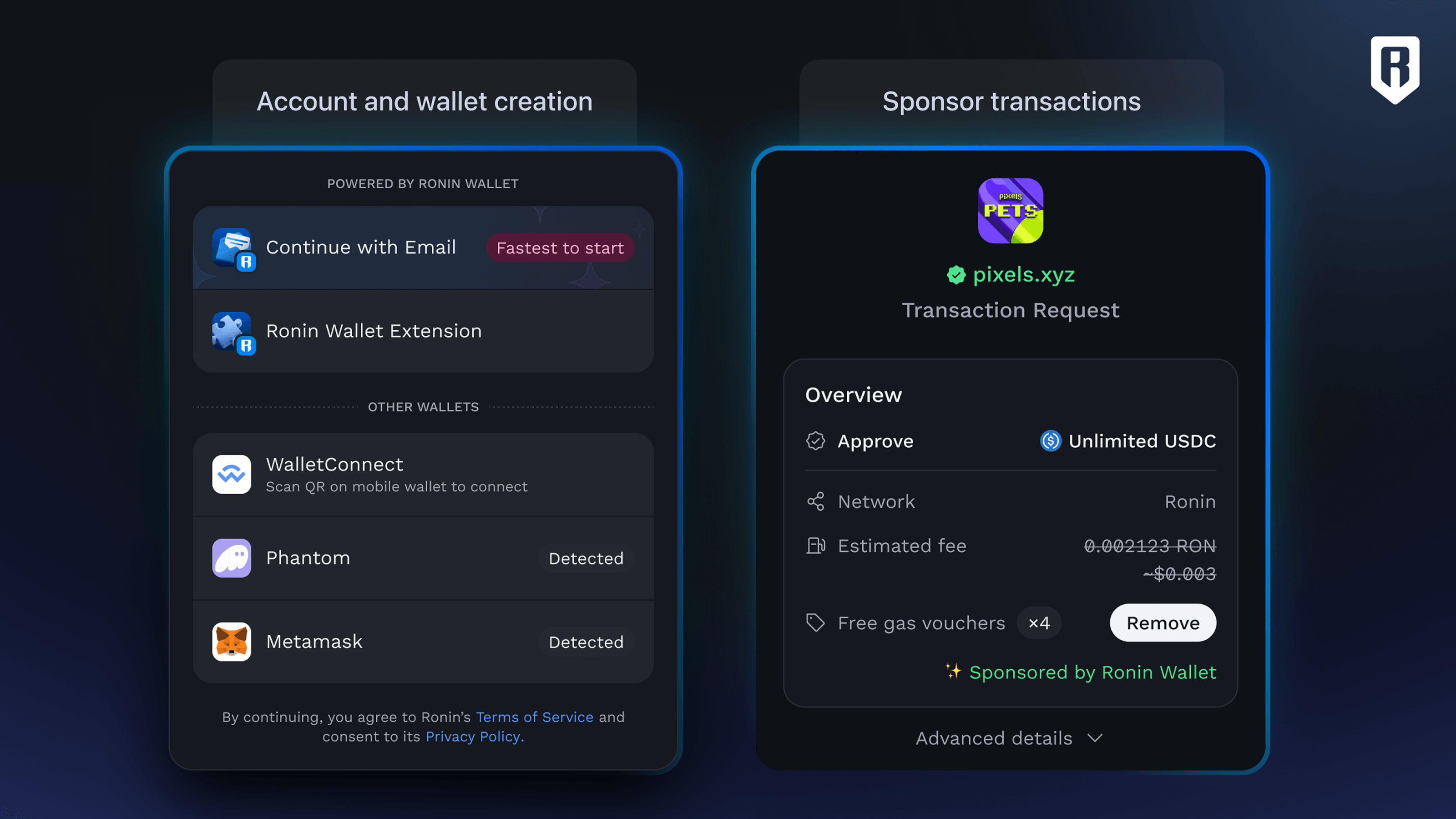
- **Unified Ronin Wallet Integration**: Connect to Ronin Wallets effortlessly, handling edge cases for desktop, mobile, and in-wallet browsers.
- **Supported Wallets**:
- Ronin Waypoint
- Ronin Wallet
- WalletConnect
- Coinbase Wallet
- Safe Wallet
- Injected Wallets (EIP-6963 compliant)
- **Responsive Design**: Optimized for all screen sizes and devices.
- **Customizable Themes**: Tailor the widget's appearance to match your application's branding.
- **Powered by Wagmi**: Leverages Wagmi's React hooks for wallet state management, signing, transactions, and blockchain interactions.
## Demo
- **Live Demo**: [Tanto Widget Playground](https://tanto-widget-playground.vercel.app/)
- **Demo Source Code**: [GitHub Repository](https://github.com/nguyenhuugiatri/tanto-widget-playground)
- **SDK Source Code**: [GitHub Repository](https://github.com/skymavis/tanto-kit/tree/main/packages/widget)
## Installation
### Prerequisites
Install the required peer dependencies:
```bash
yarn add wagmi viem@2.x @tanstack/react-query
```
### Install Tanto Widget
```bash
yarn add @sky-mavis/tanto-widget
```
## Setup
Wrap your application with the necessary providers (`WagmiProvider`, `QueryClientProvider`, and `TantoProvider`) to enable Tanto Widget functionality.
```tsx
import { getDefaultConfig, TantoProvider } from '@sky-mavis/tanto-widget';
import { QueryClient, QueryClientProvider } from '@tanstack/react-query';
import { WagmiProvider } from 'wagmi';
const config = getDefaultConfig();
const queryClient = new QueryClient();
function App() {
return (
{/* Your App Components */}
);
}
export default App;
```
## Usage
### TantoConnectButton
Add wallet connection functionality with the `TantoConnectButton` component.
```tsx
import { TantoConnectButton } from '@sky-mavis/tanto-widget';
function Page() {
return ;
}
```
**Behavior**:
- **Disconnected**: Displays a "Connect Wallet" button that opens a modal for wallet selection.
- **Connected**: Shows the wallet's avatar and address. Clicking it opens a **Profile Modal** with wallet details and a disconnect option.
### Blockchain Interactions
Use **Wagmi** hooks to interact with the blockchain, such as reading wallet state, signing messages, or sending transactions.
#### Example: Signing a Message
```tsx
import { useSignMessage } from 'wagmi';
function SignMessageButton() {
const { signMessage } = useSignMessage();
const handleSign = () => {
signMessage({ message: 'Hello, Web3!' });
};
return ;
}
```
For more hooks (e.g., `useAccount`, `useSendTransaction`), see the [Wagmi Documentation](https://wagmi.sh/).
## Customization
### Theme
Tanto supports three themes out of the box:
- `dark` – Dark mode
- `light` – Light mode
> **Default Theme**: `dark`
To set the theme, wrap your application with the `TantoProvider` and pass the desired theme as a prop:
```tsx
import { TantoProvider } from '@tanto/widget';
{/* Your App */};
```
### Custom Themes
Customize the widget's appearance by extending from `lightTheme` or `darkTheme`.
```tsx
import { TantoProvider, lightTheme } from '@sky-mavis/tanto-widget';
const customTheme = lightTheme({
mode: 'light',
fontFamily: ["'Nunito'", 'sans-serif'],
fontSize: '1em',
buttonPrimaryBackground: 'oklch(0.71 0.097 111.7)',
buttonPrimaryColor: 'oklch(0.98 0.005 0)',
modalBackground: 'oklch(0.92 0.042 83.6)',
modalBorderRadius: '0.625rem',
// Add more theme tokens as needed
});
function App() {
return (
{/* Your App */}
);
}
```
See `TantoWidgetCustomTheme` for a full list of theme tokens.
### Custom Wallet Configuration
Customize wallet connection options via `getDefaultConfig`.
```tsx
import { getDefaultConfig } from '@sky-mavis/tanto-widget';
import { ronin, saigon } from 'viem/chains';
const config = getDefaultConfig({
appMetadata: {
appName: 'My DApp',
appIcon: '',
appDescription: 'A decentralized application for Web3 enthusiasts',
appUrl: '',
},
keylessWalletConfig: {
chainId: 2020, // Ronin Mainnet
clientId: 'YOUR_CLIENT_ID',
waypointOrigin: '',
popupCloseDelay: 1000,
},
walletConnectConfig: {
projectId: 'YOUR_WALLETCONNECT_PROJECT_ID',
},
coinbaseWalletConfig: {
enable: true,
},
chains: [ronin, saigon],
});
```
**Parameters**:
- `chains` (optional): An array of supported blockchain networks.
- Default: `[ronin, saigon]`
- You can import and use any EVM-compatible chain from `viem/chains` or define your own custom chain object.
- `appMetadata` (optional): Metadata for your DApp.
- `appName` (optional): Name of your DApp (e.g., "My DApp"). Defaults to "Ronin Wallet".
- `appIcon` (optional): URL to your DApp's icon (e.g., ""). Defaults to Ronin Wallet icon.
- `appDescription` (optional): Brief description of your DApp. Defaults to "Your passport into a digital nation".
- `appUrl` (optional): Your DApp's URL. Defaults to `https://wallet.roninchain.com`.
- `walletConnectConfig` (optional): Configuration for WalletConnect.
- `projectId` (optional): WalletConnect project ID from [WalletConnect Cloud](https://cloud.walletconnect.com/). Defaults to a predefined Ronin project ID.
- `enable` (optional): Enable or disable WalletConnect (default: `true`).
- `keylessWalletConfig` (optional): Configuration for Waypoint (keyless) wallet.
- Check out [Ronin Keyless Wallet guideline](https://docs.skymavis.com/mavis/ronin-waypoint/guides/get-started)
- `chainId` (optional): Blockchain chain ID (2020 or 2021).
- `clientId` (required): Your client ID for authentication.
- `popupCloseDelay` (optional): Delay (ms) before closing the popup (e.g., 1000).
- `enable` (optional): Enable or disable Waypoint (default: `true`).
- `coinbaseWalletConfig` (optional): Configuration for Coinbase Wallet.
- `enable` (optional): Enable or disable Coinbase Wallet (default: `false`).
- `multiInjectedProviderDiscovery` (optional): Enable/disable multi-injected provider discovery (default: `true`).
See [Wagmi Configuration Docs](https://wagmi.sh/core/config) for advanced options.
### TantoProvider Configuration
Customize the widget's behavior with the `config` prop.
```tsx
"
initialChainId: 2020,
createAccountOnConnect: true
}}
>
{/* Your App */}
```
**Options**:
- `hideConnectSuccessPrompt` (boolean): Skips the success animation (~1.5s) after connection.
- `initialChainId` (number): Target chain ID for the widget (e.g., 2021 for Ronin Testnet).
- `createAccountOnConnect` (boolean): Automatically creates a Ronin Account upon connection. Set this to true if you want to enroll in the [Ronin Referral Program](https://www.notion.so/skymavis/Ronin-Referral-Program-1c1c48ae3fdd80d2a5b8ffb11bf300da) for Studios (Earn Up to 10% Revenue Share).
- `clientId`: required when `createAccountOnConnect` is enabled. It is used for tracking purposes in the [Referral program](https://www.notion.so/skymavis/Ronin-Referral-Program-1c1c48ae3fdd80d2a5b8ffb11bf300da).
### Custom Connect Button
Create a custom connection button using the render prop pattern.
```tsx
import { TantoConnectButton } from '@sky-mavis/tanto-widget';
function CustomButton() {
return (
{({ isConnected, showModal, address, rns, chainId }) =>
isConnected ? (
{rns || address} ({chainId})
) : (
)
}
);
}
```
### TantoEmbeddedWidget
Embed the wallet connection UI directly in your page instead of a modal.
```tsx
import { TantoEmbeddedWidget } from '@sky-mavis/tanto-widget';
function Page() {
return ;
}
```
### useTantoModal Hook
Programmatically control the wallet connection modal.
```tsx
import { useTantoModal } from '@sky-mavis/tanto-widget';
function ModalControl() {
const { open, show, hide } = useTantoModal();
return (
Modal is {open ? 'open' : 'closed'}
);
}
```
## 🔗 RNS - Ronin Name Service
Tanto Widget provides convenient hooks for working with **Ronin Name Service (RNS)**:
- `useRnsName` – Retrieves the primary name associated with a given wallet address.
- `useRnsAddress` – Resolves a Ronin name to its corresponding wallet address.
```tsx
const name = useRnsName({ address: '0x123...abc' }); // Returns e.g. "vitalik.ron"
const address = useRnsAddress({ name: 'vitalik.ron' }); // Returns e.g. "0x123...abc"
```
## Migrating from Ethers.js
If your project currently uses Ethers.js, you can migrate to Viem (the default provider for Wagmi v2) by following the official [Wagmi migration guide](https://wagmi.sh/react/guides/ethers). This guide covers how to update your hooks and provider setup for compatibility with Wagmi.
## Troubleshooting
### Resolving `Module not found: Can't resolve 'pino-pretty'` in Next.js and PNPM
When using **Next.js** with **pnpm**, you may encounter the following error: Can't resolve 'pino-pretty'
This error occurs due to optional dependencies such as `pino-pretty`, `lokijs`, and `encoding` included in WalletConnect packages. These dependencies are not required in a browser environment but can cause resolution issues during the build process.
Update your Next.js configuration to exclude these modules by marking them as externals.
```js
const nextConfig = {
webpack: (config) => {
config.resolve.fallback = { fs: false, net: false, tls: false };
config.externals.push('pino-pretty', 'lokijs', 'encoding')
return config
}
}
```