
Situm Capacitor & Cordova Example
A sample Capacitor application to start learning the power of [**@situm/cordova**](https://www.npmjs.com/package/@situm/cordova).
[](https://opensource.org/licenses/MIT)
[](https://www.npmjs.com/package/@situm/cordova)
[](https://www.npmjs.com/package/@situm/cordova)
## What's in here
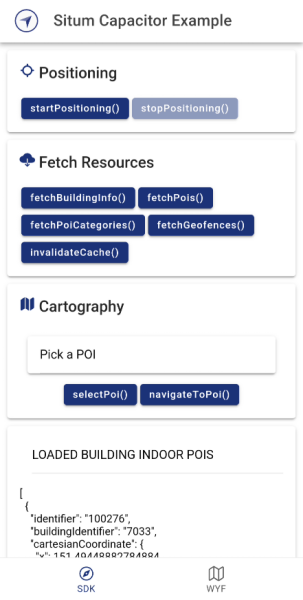
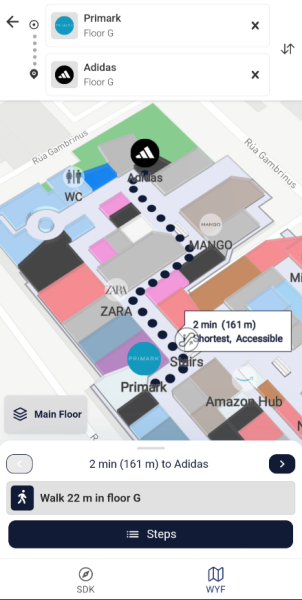
This folder contains the source code of a Capacitor + Ionic example application using the [**Situm Cordova Plugin**](../README.md). You can also **integrate this plugin on a Cordova project**! Learn how to do it in this [section](#using-situmcordova-on-a-cordova-app).
## How to run the app
### Step 1: Install the dependencies
1. The first step is to download this repo:
```bash
git clone https://github.com/situmtech/cordova.git
```
2. Then install the plugin dependencies alongside the `example` app as follows:
```bash
cd cordova/example
npm install
```
> [!TIP]
> You might want to try out this configuration if you are facing some issues to build our sample app:
>
> - node >= 18.13.X
> - @ionic/cli 7.1.5
> - gradle 8.4
> - java 17.0.6
> [!NOTE]
> Make sure you are using `@ionic/cli` and not the deprecated `ionic` npm package. Otherwise you won't be able to build the app and you will receive the following error:
```diff
- [ERROR] Invalid project type: angular-standalone (project config: ./ionic.config.json).
```
### Step 2: Set up your Situm credentials
This example provides you with a template on [`src/constants.ts.example`](src/constants.ts.example) to set all your credentials used on the sdk tab just in one file. So rename this file to `constants.ts` and set up your credentials before running the app:
```typescript
export const API_USER = 'YOUR_SITUM_API_USER';
export const API_KEY = 'YOUR_SITUM_API_KEY';
export const BUILDING_IDENTIFIER = 'YOUR_BUILDING_IDENTIFIER';
export const PROFILE = 'YOUR_MAPVIEW_PROFILE';
export const VIEWER_DOMAIN = 'https://map-viewer.situm.com';
```
> [!NOTE]
> The credentials will also be set in the [`src/app/wyf/wyf.page.html`](./src/app/wyf/wyf.page.html) automatically in this example app. Make sure you set your credentials inside this file in your integration.
### Step 3: Run the app
From the `example/` folder, execute the following command to run the app on your device:
```bash
# For Android devices
ionic cap run android
# For iOS devices
ionic cap run ios
```
> [!NOTE]
> iOS only
>
> You might need to update the pods of this app by executing inside `example/ios/App`:
>
> $ pod install --repo-update
>
> Also check out the project [code signing](https://developer.apple.com/support/code-signing/) before you run the example.
You can also run the app from your IDE:
- On Android: open `example/android/` with Android Studio.
- On iOS: open `example/ios/App/App.xcworkspace` with XCode.
## Using @situm/cordova on a Cordova app
To integrate our plugin in a Cordova project, follow this 3 steps:
1. Configure your Content-Security-Policy \ tag in your `www/index.html` to be able to display our MapView on Android:
```html
```
2. Configure your `config.xml` file to be able to display our MapView on iOS by adding the following \ tag:
```html
...
```
3. All ready to use our plugin in a Cordova app!
```bash
cordova plugin add @situm/cordova
# For Android
cordova run android
# For iOS
cordova run iOS
```
> [!TIP]
> You might want to learn [how to create a basic Cordova app using our @situm/cordova plugin](https://situm.com/docs/a-basic-cordova-app/).
## Documentation
More information on how to use the official [**@situm/cordova**](https://www.npmjs.com/package/@situm/cordova) plugin and the set of APIs, the functions, parameters and results each function accepts and provides can be found in our [SDK API Reference](https://developers.situm.com/sdk_documentation/cordova/jsdoc/latest/situm) and [Wayfinding API Reference](https://developers.situm.com/sdk_documentation/cordova/jsdoc/latest/mapview).
### Examples
In case you want to learn how to use our plugin, you may want to take a look at our code samples of the basics functionalities:
1. [**Basic SDK and Wayfinding functionality**](./src/app/sdk/sdk.page.ts): showcases how to initialize the Situm SDK (refer to the [cordova sdk quickstart guide](https://situm.com/docs/a-basic-cordova-app/) for more information) and how to use some basic features like positioning and obtaining the information of a given building.
## Versioning
We use [SemVer](http://semver.org/) for versioning.
Please refer to [CHANGELOG.md](../CHANGELOG.md) for a list of notables changes for each version of the library.
You can also see the [tags on this repository](https://github.com/situmtech/cordova/tags).
## Submitting Contributions
You will need to sign a Contributor License Agreement (CLA) before making a submission. [Learn more here.](https://situm.com/contributions/)
## License
This project is licensed under the MIT - see the [LICENSE](../LICENSE) file for details.
## More information
More info is available at our [Developers Page](https://situm.com/docs/01-introduction/).
## Support information
For any question or bug report, please send an email to [support@situm.es](mailto:support@situm.es)