---
sidebar_position: 0
---
# video
We know how crucial video is for digital signage. So we made it easy. This guide will walk you through playing video using the sos.video API. This allows you to play video natively on any platform.
The `sos.video` provides you 4 methods to handle the playback:
- `prepare()` - Prepare will load the video into memory and prepare it for immediate playback.
- `play()` - This method loads the video into memory (if it hasn't been loaded previously) and starts the video playback.
- `pause()` / `resume()` - This method pauses the video that was previously started to play, it is possible to resume the playback with `resume()`.
- `stop()` - This method stops the playback and unloads the video from memory.
:::warning Video identification
First 5 parameters (uri, x, y, width, and height) are unique identifiers for playing the video using play, stop, resume, and pause methods.
:::
Device Video Capabilities
| Capability | Description |
|:------------|:-------------|
| `VIDEO_4K` | If device supports playing 4k videos |
If you want to check if the device supports this capability, use [`sos.display.supports()`](https://developers.signageos.io/sdk/sos/display#supports).
## Gapless video playback
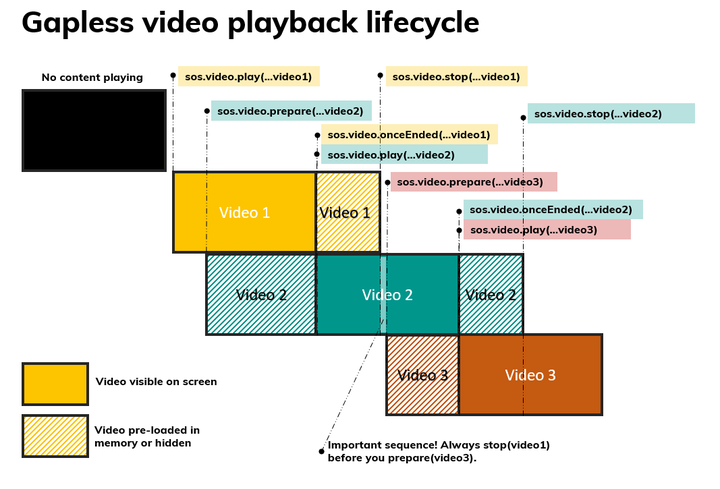
It is often desirable to be able to play different videos consecutively without "black" frames. To achieve this next video in the queue needs to be loaded before the current video ends. How to achieve this may differ from platform to platform. Applet JS SDK handles this under the hood and provides you with `prepare()`, `play()` and `stop()` methods.
Each video has to be pre-loaded with `prepare()` while the previous video is still playing, and after the video ends it should be unloaded immediately with `stop()`. This is because some (especially older ones) platforms support that only 2 videos are loaded into memory at any time (one playing and one ready to play).
```ts
const { filePath } = await sos.offline.cache.loadOrSaveFile(
'video-1.mp4',
'https://static.signageos.io/assets/video-test-1_e07fc21a7a72e3d33478243bd75d7743.mp4',
);
const video = [filePath, 0, 0, 1280, 720];
await sos.video.play(...video);
// pause the video after 2s
setTimeout(() => sos.video.pause(...video), 2000);
// resume the paused video
setTimeout(() => sos.video.resume(...video), 2500);
// stop and unload the video
setTimeout(() => sos.video.stop(...video), 4000);
```
## Methods
### onceEnded()
The `onceEnded()` method returns a promise that is resolved after the specified video ends.
```ts expandable
onceEnded(uri: string, x: number, y: number, width: number, height: number): Promise;
```
#### Params
| Name | Type | Required | Description |
|----------|----------|------------------|------------------------------------------------|
| `uri` | `string` | Yes
| Address to remote (online) or local video file |
| `x` | `number` | Yes
| x-position for video on screen |
| `y` | `number` | Yes
| y-position for video on screen |
| `width` | `number` | Yes
| Video width on screen |
| `height` | `number` | Yes
| Video height on screen |
#### Return value
Returns a promise that resolves when the video ends.
#### Possible errors
- Error If the parameters are not valid.
- Error If the video was not played yet.
#### Example
```ts
// Example of using onceEnded to wait for a video to end
await sos.video.prepare('https://example.com/video.mp4', 0, 0, 1920, 1080);
while (true) {
await sos.video.play('https://example.com/video.mp4', 0, 0, 1920, 1080);
// Wait for the video to stop to start playing it again
await sos.video.onceEnded('https://example.com/video.mp4', 0, 0, 1920, 1080);
}
```
### onceStop()
The `onceStop()` method returns a promise that is resolved after the specified video has been stopped.
```ts expandable
onceStop(uri: string, x: number, y: number, width: number, height: number): Promise;
```
#### Params
| Name | Type | Required | Description |
|----------|----------|------------------|------------------------------------------------|
| `uri` | `string` | Yes
| Address to remote (online) or local video file |
| `x` | `number` | Yes
| x-position for video on screen |
| `y` | `number` | Yes
| y-position for video on screen |
| `width` | `number` | Yes
| Video width on screen |
| `height` | `number` | Yes
| Video height on screen |
#### Return value
Returns a promise that resolves when the video is stopped.
#### Possible errors
- Error If the parameters are not valid.
- Error If the video was not played yet.
#### Example
```ts
// Example of using onceStop to wait for a video to stop
await sos.video.prepare('https://example.com/video.mp4', 0, 0, 1920, 1080);
while (true) {
await sos.video.play('https://example.com/video.mp4', 0, 0, 1920, 1080);
// Wait few seconds for the video to play
await new Promise((resolve) => setTimeout(resolve, 5000));
// Stop the video and wait for it to stop
await sos.video.stop('https://example.com/video.mp4', 0, 0, 1920, 1080);
await sos.video.onceStop('https://example.com/video.mp4', 0, 0, 1920, 1080);
// Now the video is stopped, and we can play it again
}
```
### onEnded()
The `onEnded()` method sets up a listener, which is called whenever a video finished playing successfully.
```ts expandable
onEnded(listener: (event: IVideoEvent) => void): void;
// show-more
interface IVideoEvent {
type: VideoEventType;
srcArguments: IVideoProperties;
}
type VideoEventType = 'prepare' | 'play' | 'stop' | 'pause' | 'resume' | 'ended' | 'error';
interface IVideoProperties {
uri: string;
x: number;
y: number;
width: number;
height: number;
}
```
#### Params
| Name | Type | Required | Description |
|------------|--------------------------------|------------------|----------------------------------------------------------------|
| `listener` | `(event: IVideoEvent) => void` | Yes
| The listener function to be called when an ended event occurs. |
#### Return value
Resolves when the listener is successfully set up.
#### Example
```ts
// Play a video and handle the end of playback
await sos.video.play('https://example.com/video.mp4', 0, 0, 1920, 1080);
sos.video.onEnded((event) => {
console.log('Video ended:', event);
});
```
### onError()
The `onError()` method sets up a listener, which is called whenever a video failed to finish playing.
```ts expandable
onError(listener: (event: IVideoEvent) => void): void;
// show-more
interface IVideoEvent {
type: VideoEventType;
srcArguments: IVideoProperties;
}
type VideoEventType = 'prepare' | 'play' | 'stop' | 'pause' | 'resume' | 'ended' | 'error';
interface IVideoProperties {
uri: string;
x: number;
y: number;
width: number;
height: number;
}
```
#### Params
| Name | Type | Required | Description |
|------------|--------------------------------|------------------|----------------------------------------------------------|
| `listener` | `(event: IVideoEvent) => void` | Yes
| The listener function to be called when an error occurs. |
#### Return value
Resolves when the listener is successfully set up.
#### Example
```ts
// Play a video and handle errors
await sos.video.play('https://example.com/video.mp4', 0, 0, 1920, 1080);
sos.video.onError((event) => {
console.error('Video error:', event);
});
```
### onPause()
The `onPause()` method sets up a listener, which is called whenever a video is paused with `pause()` method.
```ts expandable
onPause(listener: (event: IVideoEvent) => void): void;
// show-more
interface IVideoEvent {
type: VideoEventType;
srcArguments: IVideoProperties;
}
type VideoEventType = 'prepare' | 'play' | 'stop' | 'pause' | 'resume' | 'ended' | 'error';
interface IVideoProperties {
uri: string;
x: number;
y: number;
width: number;
height: number;
}
```
#### Params
| Name | Type | Required | Description |
|------------|--------------------------------|------------------|---------------------------------------------------------------|
| `listener` | `(event: IVideoEvent) => void` | Yes
| The listener function to be called when a pause event occurs. |
#### Return value
Resolves when the listener is successfully set up.
#### Example
```ts
// Play a video and handle the pause event
await sos.video.play('https://example.com/video.mp4', 0, 0, 1920, 1080);
sos.video.onPause((event) => {
console.log('Video paused:', event); // Logs the pause event
});
```
### onPlay()
The `onPlay()` method sets up a listener, which is called whenever a video starts to play.
```ts expandable
onPlay(listener: (event: IVideoEvent) => void): void;
// show-more
interface IVideoEvent {
type: VideoEventType;
srcArguments: IVideoProperties;
}
type VideoEventType = 'prepare' | 'play' | 'stop' | 'pause' | 'resume' | 'ended' | 'error';
interface IVideoProperties {
uri: string;
x: number;
y: number;
width: number;
height: number;
}
```
#### Params
| Name | Type | Required | Description |
|------------|--------------------------------|------------------|--------------------------------------------------------------|
| `listener` | `(event: IVideoEvent) => void` | Yes
| The listener function to be called when a play event occurs. |
#### Return value
Resolves when the listener is successfully set up.
#### Example
```ts
// Play a video and handle the play event
await sos.video.prepare('https://example.com/video.mp4', 0, 0, 1920, 1080);
sos.video.onPlay((event) => {
console.log('Video started playing:', event);
});
await sos.video.play('https://example.com/video.mp4', 0, 0, 1920, 1080);
```
### onPrepare()
The `onPrepare()` method sets up a listener, which is called whenever a video starts to be prepared.
```ts expandable
onPrepare(listener: (event: IVideoEvent) => void): void;
// show-more
interface IVideoEvent {
type: VideoEventType;
srcArguments: IVideoProperties;
}
type VideoEventType = 'prepare' | 'play' | 'stop' | 'pause' | 'resume' | 'ended' | 'error';
interface IVideoProperties {
uri: string;
x: number;
y: number;
width: number;
height: number;
}
```
#### Params
| Name | Type | Required | Description |
|------------|--------------------------------|------------------|-----------------------------------------------------------------|
| `listener` | `(event: IVideoEvent) => void` | Yes
| The listener function to be called when a prepare event occurs. |
#### Return value
Resolves when the listener is successfully set up.
#### Example
```ts
// Play a video and handle the prepare event
await sos.video.prepare('https://example.com/video.mp4', 0, 0, 1920, 1080);
sos.video.onPrepare((event) => {
console.log('Video prepared:', event);
});
```
### onResume()
The `onResume()` method sets up a listener, which is called whenever a video is resumed with the `resume()` method.
```ts expandable
onResume(listener: (event: IVideoEvent) => void): void;
// show-more
interface IVideoEvent {
type: VideoEventType;
srcArguments: IVideoProperties;
}
type VideoEventType = 'prepare' | 'play' | 'stop' | 'pause' | 'resume' | 'ended' | 'error';
interface IVideoProperties {
uri: string;
x: number;
y: number;
width: number;
height: number;
}
```
#### Params
| Name | Type | Required | Description |
|------------|--------------------------------|------------------|----------------------------------------------------------------|
| `listener` | `(event: IVideoEvent) => void` | Yes
| The listener function to be called when a resume event occurs. |
#### Return value
Resolves when the listener is successfully set up.
#### Example
```ts
// Play a video and handle the resume event
await sos.video.play('https://example.com/video.mp4', 0, 0, 1920, 1080);
sos.video.onResume((event) => {
console.log('Video resumed:', event); // Logs the resume event
});
await sos.video.pause('https://example.com/video.mp4', 0, 0, 1920, 1080);
await sos.video.resume('https://example.com/video.mp4', 0, 0, 1920, 1080);
```
### onStop()
The `onStop()` method sets up a listener, which is called whenever a video has been stopped with `stop()` method.
```ts expandable
onStop(listener: (event: IVideoEvent) => void): void;
// show-more
interface IVideoEvent {
type: VideoEventType;
srcArguments: IVideoProperties;
}
type VideoEventType = 'prepare' | 'play' | 'stop' | 'pause' | 'resume' | 'ended' | 'error';
interface IVideoProperties {
uri: string;
x: number;
y: number;
width: number;
height: number;
}
```
#### Params
| Name | Type | Required | Description |
|------------|--------------------------------|------------------|--------------------------------------------------------------|
| `listener` | `(event: IVideoEvent) => void` | Yes
| The listener function to be called when a stop event occurs. |
#### Return value
Resolves when the listener is successfully set up.
#### Example
```ts
// Play a video and handle the stop event
await sos.video.play('https://example.com/video.mp4', 0, 0, 1920, 1080);
sos.video.onStop((event) => {
console.log('Video stopped:', event);
});
// Stop the video later...
await sos.video.stop('https://example.com/video.mp4', 0, 0, 1920, 1080);
```
### pause()
The `pause()` method pauses the video; playback can be resumed with `resume()`. Stopped video can't be paused.
```ts expandable
pause(uri: string, x: number, y: number, width: number, height: number): Promise;
```
#### Params
| Name | Type | Required | Description |
|----------|----------|------------------|------------------------------------------------|
| `uri` | `string` | Yes
| Address to remote (online) or local video file |
| `x` | `number` | Yes
| x-position for video on screen |
| `y` | `number` | Yes
| y-position for video on screen |
| `width` | `number` | Yes
| Video width on screen |
| `height` | `number` | Yes
| Video height on screen |
#### Return value
Returns a promise that resolves when the video is paused.
#### Possible errors
- Error If the parameters are not valid.
- Error If any error occurs during the pausing of the video.
#### Example
```ts
// Example of resuming a paused video
const { filePath } = await sos.offline.cache.loadOrSaveFile('video-1.mp4', 'https://static.signageos.io/assets/video-test-1_e07fc21a7a72e3d33478243bd75d7743.mp4');
const video = [filePath, 0, 0, 1920, 1080];
// Prepare the video
await sos.video.prepare(...video);
// Play the video
await sos.video.play(...video);
// Pause the video after 2 seconds
setTimeout(() => sos.video.pause(...video), 2000);
```
### play()
The `play()` method starts the playback of a video or video that has been previously prepared by the `prepare()` method.
```ts expandable
play(uri: string, x: number, y: number, width: number, height: number): Promise;
```
#### Params
| Name | Type | Required | Description |
|----------|----------|------------------|------------------------------------------------|
| `uri` | `string` | Yes
| Address to remote (online) or local video file |
| `x` | `number` | Yes
| x-position for video on screen |
| `y` | `number` | Yes
| y-position for video on screen |
| `width` | `number` | Yes
| Video width on screen |
| `height` | `number` | Yes
| Video height on screen |
#### Return value
Returns a promise that resolves when the video starts playing.
#### Possible errors
- Error If the parameters are not valid.
- Error If any error occurs during the playback of the video.
#### Example
```ts
const { filePath } = await sos.offline.cache.loadOrSaveFile('fileName', 'https://example.com/video.mp4');
const video = [filePath, 0, 0, 1920, 1080];
// Play the video
await sos.video.play(...video);
```
:::note[GitHub Example]
- [ Play one video in infinite loop](https://github.com/signageos/applet-examples/blob/master/examples/content-js-api/video-loop-one)
- [ Play multiple videos in infinite loop](https://github.com/signageos/applet-examples/tree/master/examples/content-js-api/video-multiple)
- [ Switching video and images in infinite loop](https://github.com/signageos/applet-examples/tree/master/examples/content-js-api/video-and-images)
:::
### prepare()
The `prepare()` method loads the video into memory and prepares it for a playback, this is useful for gapless playback.
```ts expandable
prepare(uri: string, x: number, y: number, width: number, height: number, options?: IOptions): Promise;
// show-more
interface IOptions {
'4k'?: boolean;
background?: boolean;
volume?: number;
}
```
#### Params
| Name | Type | Required | Description |
|----------------------|------------------------|------------------|------------------------------------------------|
| `uri` | `string` | Yes
| Address to remote (online) or local video file |
| `x` | `number` | Yes
| x-position for video on screen |
| `y` | `number` | Yes
| y-position for video on screen |
| `width` | `number` | Yes
| Video width on screen |
| `height` | `number` | Yes
| Video height on screen |
| `options` | `IOptions` | No
| Optional options for preparing the video. |
| `options.background` | `boolean \| undefined` | No
| If view should be prepared in background. |
| `options.volume` | `number \| undefined` | No
| Initial volume value of the video. |
#### Return value
Returns a promise which resolves when the video is prepared.
#### Possible errors
- Error If the parameters are not valid.
- Error If any error occurs during the preparation of the video.
#### Example
```ts
// Example of preparing and playing a video
const { filePath } = await sos.offline.cache.loadOrSaveFile('video-1.mp4', 'https://static.signageos.io/assets/video-test-1_e07fc21a7a72e3d33478243bd75d7743.mp4');
const video = [filePath, 0, 0, 1920, 1080];
// Prepare the video
await sos.video.prepare(...video);
// Play the video
await sos.video.play(...video);
```
### removeEventListeners()
The `removeEventListeners()` method removes all listeners set up for all videos.
```ts expandable
removeEventListeners(): void;
```
### resume()
The `resume()` method resumes the video paused by `pause()` function. Stopped video can't be resumed.
```ts expandable
resume(uri: string, x: number, y: number, width: number, height: number): Promise;
```
#### Params
| Name | Type | Required | Description |
|----------|----------|------------------|------------------------------------------------|
| `uri` | `string` | Yes
| Address to remote (online) or local video file |
| `x` | `number` | Yes
| x-position for video on screen |
| `y` | `number` | Yes
| y-position for video on screen |
| `width` | `number` | Yes
| Video width on screen |
| `height` | `number` | Yes
| Video height on screen |
#### Return value
Returns a promise that resolves when the video is resumed.
#### Possible errors
- Error If the parameters are not valid.
- Error If any error occurs during the resuming of the video.
#### Example
```ts
// Example of resuming a paused video
const { filePath } = await sos.offline.cache.loadOrSaveFile('video-1.mp4', 'https://static.signageos.io/assets/video-test-1_e07fc21a7a72e3d33478243bd75d7743.mp4');
const video = [filePath, 0, 0, 1920, 1080];
// Prepare the video
await sos.video.prepare(...video);
// Play the video
await sos.video.play(...video);
// Pause the video after 2 seconds
setTimeout(() => sos.video.pause(...video), 2000);
// Resume the video after 3 seconds
setTimeout(() => sos.video.resume(...video), 5000);
```
### stop()
The `stop()` method stops the video; it can't be resumed with the `resume()` method.
```ts expandable
stop(uri: string, x: number, y: number, width: number, height: number): Promise;
```
#### Params
| Name | Type | Required | Description |
|----------|----------|------------------|------------------------------------------------|
| `uri` | `string` | Yes
| Address to remote (online) or local video file |
| `x` | `number` | Yes
| x-position for video on screen |
| `y` | `number` | Yes
| y-position for video on screen |
| `width` | `number` | Yes
| Video width on screen |
| `height` | `number` | Yes
| Video height on screen |
#### Return value
Returns a promise which resolves when the video is stopped.
#### Possible errors
- Error If the parameters are not valid.
- Error If any error occurs during the stopping of the video.
#### Example
```ts
// Example of stopping a video
const { filePath } = await sos.offline.cache.loadOrSaveFile('video-1.mp4', 'https://static.signageos.io/assets/video-test-1_e07fc21a7a72e3d33478243bd75d7743.mp4');
const video = [filePath, 0, 0, 1920, 1080];
// Prepare and play the video
await sos.video.prepare(...video);
await sos.video.play(...video);
// Stop the video after 5 seconds
setTimeout(() => sos.video.stop(...video), 5000);
```