


Natural-language diagrams for pi.
Turns a description into editable .drawio XML and exports it to PNG / SVG / PDF / JPG with the native draw.io desktop CLI — entirely on your machine.
---
DrawMe is a native Pi **extension** for diagram authoring. Describe a diagram and Pi plans it, writes editable `.drawio` XML (or Mermaid on draw.io v30+), lints every source revision, critiques the rendered preview when the active model can view images, and exports the final deliverable — fully autonomously, with no human intervention once started.
| DrawMe |
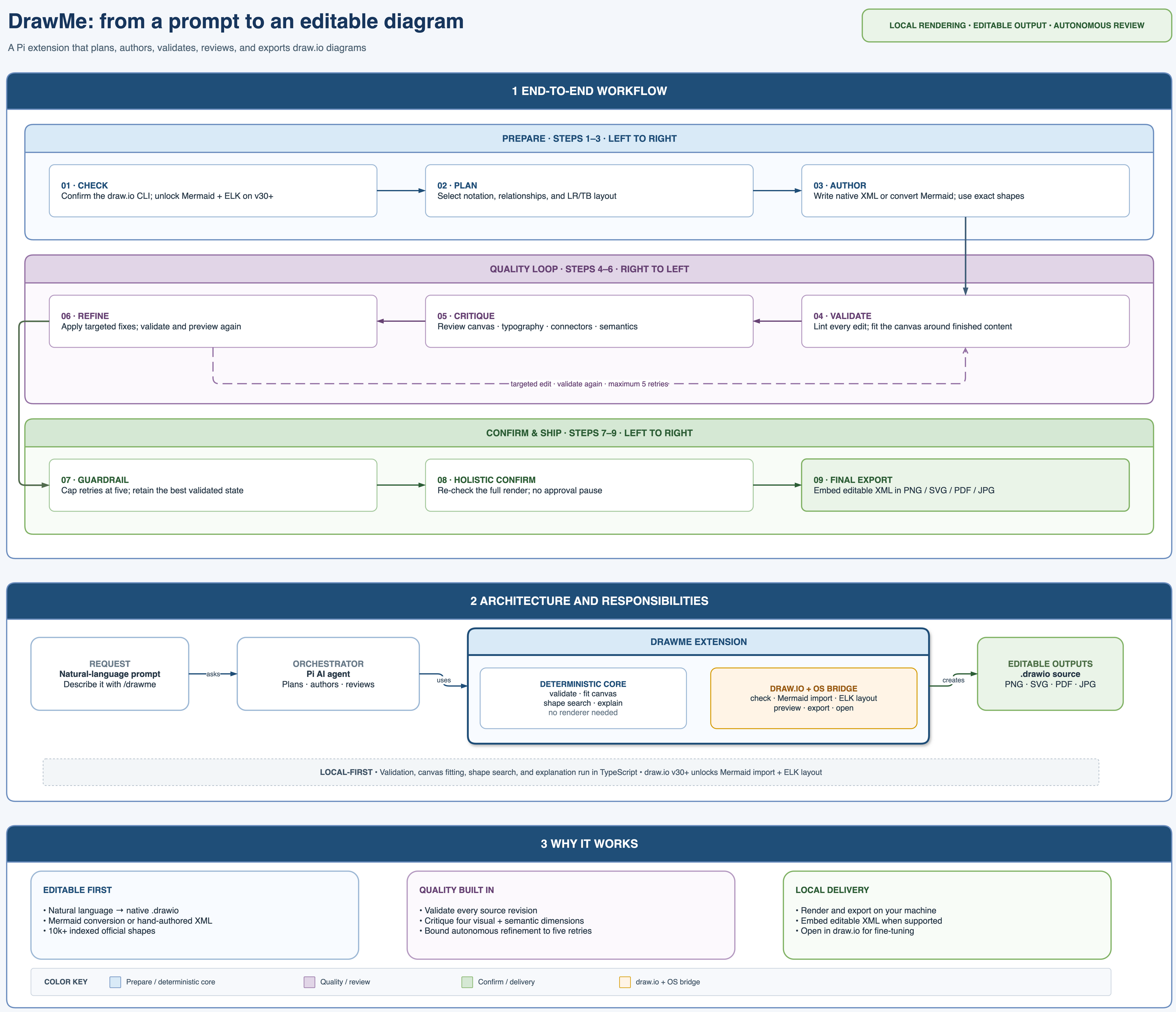
|
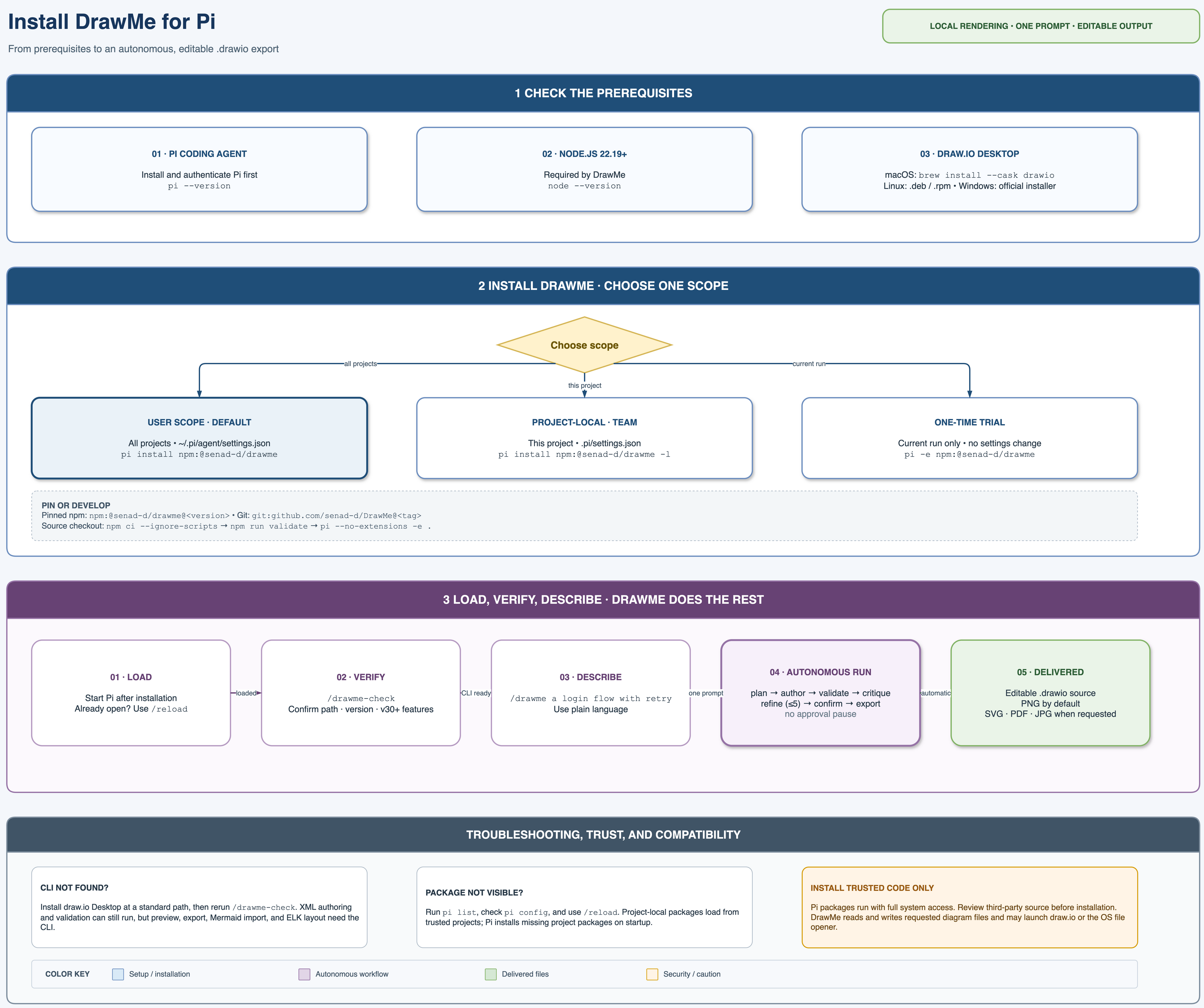
|
- **Natural-language authoring:** flowcharts, architecture, UML, BPMN, ERD, C4, network, ML — as native `.drawio`, or as Mermaid with automatic layout on v30+.
- **Guided workflow:** CLI detection, planning, authoring, validation, a gated multi-pass visual review (fit/sizing → element placement → connections → holistic confirmation), and final export run end to end from a single `/drawme` — no approval pauses.
- **Deterministic validation:** a structural linter catches dangling edges, duplicate/reserved ids, malformed geometry, page/container overflow, inadequate margins, conservative readability defects, overlaps, and explicit edge-routing defects before you look at a pixel.
- **Vision-aware previews:** successful PNG previews attach the actual image only when the active model can view images — the result text says which case applies — so text-only models get an honest structural-review path instead of a placeholder; each replacement removes the previous same-source preview file so only the latest remains on disk.
- **Exact shapes, not guesses:** search 10k+ official AWS/Azure/GCP/Cisco/Kubernetes/UML/BPMN styles from a bundled local index.
- **Editable source of truth:** final PNG/SVG/PDF exports embed the diagram XML, the truncated `-e` PNG chunk is auto-repaired, and final export removes the one remaining latest preview.
> **Security:** Pi packages run with your full system permissions. DrawMe reads and writes diagram files and can launch the draw.io CLI or your OS file opener. Review [`SECURITY.md`](SECURITY.md) before installation.
## Table of Contents
- [Implementation Status](#implementation-status)
- [Extension Reference](#extension-reference)
- [Quick Start](#quick-start)
- [Installation](#installation)
- [Commands](#commands)
- [Tools](#tools)
- [Architecture](#architecture)
- [The /drawme Workflow](#the-drawme-workflow)
- [Bundled References and Assets](#bundled-references-and-assets)
- [Requirements and Compatibility](#requirements-and-compatibility)
- [Security](#security)
- [Examples](#examples)
- [Development](#development)
- [Publishing](#publishing)
- [License](#license)
---
## Implementation Status
This checkout implements the DrawMe core loop as a Pi extension:
- Nine model-callable tools (`drawio_check`, `drawio_export`, `drawio_validate`, `drawio_fit_canvas`, `drawio_shapesearch`, `drawio_from_mermaid`, `drawio_layout`, `drawio_explain`, `drawio_open`) and three commands (`/drawme`, `/drawme-check`, `/drawme-export`).
- A guided `/drawme` workflow that steers authoring, validation after every edit, a gated multi-pass visual review, and autonomous final multi-format export.
- Pure-TypeScript structural linting, `-e` PNG IEND repair, shape search over a bundled index, and diagram-to-Markdown description — no Python runtime required.
- draw.io binary resolution across macOS/Linux/Windows/WSL, headless-Linux `xvfb-run` handling, and version-gated Mermaid conversion + ELK auto-layout (draw.io v30+).
- Validation pipeline: golden asset-integrity check, TypeScript typecheck, ESLint, a custom format check, and unit + real-CLI integration tests.
## Extension Reference
[`docs/reference.md`](docs/reference.md) catalogs the extension's public surface — every command, tool option, default, output behavior, and functional limitation — for other projects and integrations that use DrawMe. It is documentation, not runtime input: the `/drawme` workflow and the registered tool descriptions carry the complete operational instructions themselves.
## Quick Start
### 1) Install the draw.io desktop CLI
```bash
brew install --cask drawio # macOS
# others: https://github.com/jgraph/drawio-desktop/releases (Linux: prefer the .deb/.rpm, not snap)
drawio --version
```
### 2) Install the extension
```bash
cd /path/to/your/project
pi install npm:@senad-d/drawme
```
### 3) Start Pi and check the CLI
```bash
pi
```
Inside Pi:
```text
/drawme-check
```
### 4) Draw something
```text
/drawme a flowchart of a user login: enter credentials, validate, then success or retry
```
Pi checks the CLI, plans and writes the `.drawio`, validates every revision, critiques the rendered preview when the active model can view images (or reviews structurally when it cannot), and exports the final editable deliverable — all in one run, without asking for approval along the way.
### Run from a source checkout
```bash
git clone https://github.com/senad-d/DrawMe.git
cd DrawMe
npm ci --ignore-scripts
npm run validate
pi --no-extensions -e .
```
## Installation
| Scope | Command | Notes |
| --- | --- | --- |
| Global | `pi install npm:@senad-d/drawme` | Loads in every trusted Pi project. |
| Project-local | `pi install npm:@senad-d/drawme -l` | Writes to `.pi/settings.json` in the current project. |
| One run | `pi -e npm:@senad-d/drawme` | Try without changing settings. |
| Git | `pi install git:senad-d/DrawMe` | Install from Git; pin a tag or commit for a fixed version. |
| Local checkout | `pi --no-extensions -e .` | Develop or test this repository. |
## Commands
| Command | Description |
| --- | --- |
| `/drawme ` | Kick off authoring, per-edit validation, the gated multi-pass visual review, and autonomous final export. |
| `/drawme-check` | Report whether the draw.io CLI is available, its version, and v30+ feature support. |
| `/drawme-export [png\|svg\|pdf\|jpg]` | One-shot final export of an existing `.drawio`. |
## Tools
Registered for the model to call directly.
| Tool | Purpose |
| --- | --- |
| `drawio_check` | Resolve the draw.io binary, version, and whether it supports Mermaid import / `--layout` (v30+). |
| `drawio_export` | Export a `.drawio` to PNG/SVG/PDF/JPG. `mode:"preview"` → clean width-capped PNG returned as text/metadata, with the image block attached when the active model can view images (the text states which); each successful preview removes the previous same-source preview file so only the latest remains. `mode:"final"` → embedded editable deliverable, with truncated PNG repair and cleanup of the remaining preview. |
| `drawio_validate` | Deterministic lint: dangling edges, duplicate/reserved ids, broken parents, malformed vertex/edge geometry; warnings for page/container bounds, margins, conservative readability, overlap, and explicit routes through/crossing shapes; observations and readability score are reported separately. |
| `drawio_fit_canvas` | Fit each page's canvas to its content plus a margin (default 40px): grows cramped pages, tightens oversized ones, and shifts content to the margin origin — instead of shrinking or cramming elements. Deterministic, no CLI. |
| `drawio_shapesearch` | Exact official `style=` strings for 10k+ AWS/Azure/GCP/Cisco/Kubernetes/UML/BPMN shapes, from a bundled local index. Use instead of guessing a style. |
| `drawio_from_mermaid` | Convert Mermaid text (inline or a `.mmd`) to a native `.drawio` with automatic layout. Requires draw.io **v30+**. |
| `drawio_layout` | Re-place nodes / route edges with an ELK preset (`verticalFlow`, `horizontalFlow`, `verticalTree`, `horizontalTree`, `radialTree`, `organic`) for large graphs. Requires draw.io **v30+**. |
| `drawio_explain` | Describe an existing `.drawio` as structured Markdown (components by container, relations) — for READMEs/PR summaries or model read-back. |
| `drawio_open` | Open a `.drawio`/export in the OS default app (draw.io desktop) for fine-tuning. |
## Architecture
```text
Natural-language request
└── Pi agent
└── DrawMe extension (check · validate · export · shape search · Mermaid · layout · explain · open)
└── draw.io desktop CLI (renders and exports, local process)
└── Deliverables: .drawio source + PNG / SVG / PDF / JPG
```
The extension factory in `src/index.ts` registers the tools and commands. Rendering, conversion, and layout launch the draw.io CLI on demand with an argument list rather than a shell; validation, shape search, and explanation run directly in the extension.
## The /drawme Workflow
`/drawme` injects a guided nine-step workflow that the model follows using the tools above:
1. **Check** — the command itself resolves the CLI and embeds the result plus the authoring references into the workflow message (v30+ unlocks Mermaid conversion and ELK layout), so the run starts with everything in context — no upfront tool calls or file reads.
2. **Plan** — pick the diagram type, relationships, finite canvas, and layout direction.
3. **Author** — write editable uncompressed XML (or Mermaid on v30+), using exact searched shapes and optional ELK layout.
4. **Validate after every edit** — fix all errors; fix each warning or record why it is reviewed and acceptable.
5. **Visual review in gated passes** — with the preview image attached (one preview per page for multi-page files), the model runs three focused passes, each answering explicit questions on its own preview: **fit and sizing** (does the diagram fit its page; does the canvas or an element need resizing), **element placement** (is every element positioned correctly; is there a visibly better arrangement), and **connections** (is every connection correct, cleanly routed, symmetric where the layout is symmetric, and anchored to the middle of the facing element side where possible). A fourth **holistic pass** reads every label word for word, checks contrast, semantics, and the diagram type's own review checklist, and re-checks the earlier passes for regressions. Concrete defects to hunt (overlapping or clipped text, labels struck through by lines, floating endpoints, edges through unrelated shapes, …) are spelled out per pass, and each finding lands in a numbered ledger naming the affected cells and planned fix. Without the image, the model reviews structurally with validation and explanation instead of describing renders.
6. **Fix and verify before the next pass** — a pass's findings become targeted edits, validation, and a replacement preview; the new image is compared against the previous one and every addressed finding gets an explicit verdict (fixed / not fixed / regressed) — a fix counts only when the new render shows the defect gone, and the next pass starts only when the current one is clean. Each successful preview removes the previous preview file, leaving only the current image.
7. **Bound corrections** — pass inspection previews do not count as retries; permit at most eight targeted edit → validation → replacement-preview correction retries total. If a finding is still open at the limit, the run keeps the best validated state, finishes the remaining passes as inspection-only, continues to final export, and names the unresolved finding, its pass, and its last verdict in the report; `drawio_open` is offered afterwards for manual fine-tuning.
8. **No human gate** — the run never pauses for approval or feedback; if the user interrupts with feedback, it is handled as new critique findings and the run continues.
9. **Final export** — immediately after the holistic confirmation, export requested embedded/editable formats (each page of a multi-page file separately), remove the one remaining latest review preview, and report deliverables (including any unresolved finding from the correction limit) plus cleanup warnings.
Deterministic checks cover XML contracts, IDs/references, finite page and container bounds, outer margins, overlaps, explicit waypoint routes, and conservative font/wrapping cases. Rendered clipping and wrapping, contrast, typography at full-diagram scale, visual balance, semantics, and draw.io's automatic connector routes can only be judged from the preview image, so they are critiqued when the active model can view images and reported as unverified when it cannot. Vision's job in the loop is to narrow every rendered defect down to specific cells (the authoring reference maps each defect to a source fix) and then to confirm from the replacement image that the defect is actually gone. A 2000px preview that makes labels unreadable requires a tighter/simpler layout, page splitting, or a focused re-export — it must never be accepted as-is.
## Bundled References and Assets
These stay plain Markdown files for easy editing. `/drawme` embeds the diagram-types, XML-authoring, and (on v30+) Mermaid references directly into its workflow message, so the model starts with them in context; the troubleshooting reference is read on demand when an export fails.
- `docs/reference.md` — catalog of commands, tool options, defaults, output behavior, and limitations (documentation only; not read at runtime).
- `assets/references/xml-authoring.md` — `.drawio` skeleton, cell/edge forms, containers, palette, spacing.
- `assets/references/diagram-types.md` — per-type presets (ERD, UML, sequence, C4, architecture, ML, flowchart, SysML, BPMN, network, swimlane).
- `assets/references/mermaid-authoring.md` — Mermaid authoring for the v30+ conversion path.
- `assets/references/troubleshooting.md` — export/render failure recovery.
- `assets/data/shape-index.json.gz` — the vendored draw.io shape index behind `drawio_shapesearch` (see its notice).
## Requirements and Compatibility
- **Node.js** ≥ 22.19.
- **draw.io desktop CLI** on PATH (or a known app path); resolved automatically on macOS (`.app`), Linux, Windows, and WSL. Pass an explicit `binary` to any tool to override.
- **draw.io v30+** for `drawio_from_mermaid` and `drawio_layout`; on older versions those tools return a clear "needs v30+" message and everything else works normally.
- **Headless Linux:** exports are wrapped in `xvfb-run` automatically when no display is present.
## Security
DrawMe works with diagram files and may launch the draw.io CLI, `xvfb-run` on headless Linux, or the OS
file opener (`open`/`xdg-open`/`start`). Pi extensions inherit the permissions of the Pi process, so
install only packages you trust. See [`SECURITY.md`](SECURITY.md) for runtime and dependency details.
## Examples
Sample diagrams authored with DrawMe live in [`example/`](example/):
- [`drawme-how-it-works.drawio`](example/drawme-how-it-works.drawio) — the workflow/architecture overview shown above.
- [`drawme-installation-guide.drawio`](example/drawme-installation-guide.drawio) — an installation walkthrough.
- [`git-graph-example.drawio`](example/git-graph-example.drawio) — a branching release-history example.
## Development
```bash
npm ci --ignore-scripts # install the locked dependency set
npm run validate # golden check + lint + tests
```
Individual checks:
```bash
npm run typecheck # tsc --noEmit
npm run lint:eslint # eslint . --max-warnings=0
npm run format:check # LF endings, no trailing whitespace, final newline, valid JSON
npm run check:golden # SHA-256 integrity of bundled assets (--update to re-baseline)
npm test # vitest run
npm run coverage # vitest run --coverage
pi --no-extensions -e . # load this checkout in Pi
```
Source layout:
- `src/index.ts` — registers the tools and commands.
- `src/drawio.ts` — binary resolution, a pure/testable export planner, the CLI runner, Mermaid conversion, ELK layout, and file-open.
- `src/validate.ts` — structural linter.
- `src/shapesearch.ts` — shape search over the bundled index.
- `src/explain.ts` — diagram-to-Markdown describer.
- `src/dom.ts` — shared xmldom helpers used by `validate`/`explain`.
- `src/png.ts` — `-e` PNG IEND repair.
- `src/workflow.ts` — the guidance `/drawme` injects.
## Publishing
DrawMe publishes to npm as `@senad-d/drawme`. Run from a clean working tree after validation.
```bash
npm login
npm run validate
npm version
npm publish --access public
```
Push the release commit and tag after the package is published.
## License
MIT — see [`LICENSE`](LICENSE).