@sap/approuter
==============
- [Overview](#overview)
- [Deploying a business application with microservices](#deploying-a-business-application-with-microservices)
- [Working directory](#working-directory)
- [Configurations](#configurations)
* [Destinations](#destinations)
+ [Environment-destinations](#environment-destinations)
+ [Destination-service](#destination-service)
* [UAA configuration](#uaa-configuration)
* [Additional headers configuration](#additional-headers-configuration)
* [Additional Cookie Attributes](#additional-cookie-attributes)
* [Plugins configuration](#plugins-configuration)
* [Session timeout configuration](#session-timeout-configuration)
* [X-Frame-Options configuration](#x-frame-options-configuration)
* [Cross-Origin Resource Sharing configuration](#cross-origin-resource-sharing-configuration)
* [Direct Routing URI Patterns configuration](#direct-routing-uri-patterns-configuration)
* [NodeJS Minimal Logging Level configuration](#nodejs-minimal-logging-level-configuration)
* [Dynamic Identity Provider configuration](#dynamic-identity-provider-configuration)
- [Routes](#routes)
* [Example routes](#example-routes)
- [Replacements](#replacements)
- [*xs-app.json* configuration file](#xs-appjson-configuration-file)
* [*welcomeFile* property](#welcomefile-property)
* [*authenticationMethod* property](#authenticationmethod-property)
* [*routes* property](#routes-property)
* [*login* property](#login-property)
* [*logout* property](#logout-property)
* [*destinations* property](#destinations-property)
* [*services* property](#services-property)
* [*responseHeaders* property](#responseHeaders-property)
* [*compression* property](#compression-property)
* [*pluginMetadataEndpoint* property](#pluginmetadataendpoint-property)
* [*whitelistService* property](#whitelistservice-property)
* [*websockets* property](#websockets-property)
* [*errorPage* property](#errorpage-property)
* [*cors* property](#cors-property)
* [*outgoingRequestOptions* property](#outgoingrequestoptions-property)
* [Complete example of a *xs-app.json* configuration file](#complete-example-of-an-xs-appjson-configuration-file)
- [Headers](#headers)
* [Forwarding Headers](#forwarding-headers)
* [Hop-by-hop Headers](#hop-by-hop-headers)
* [Custom Headers](#custom-headers)
* [Authorization Header](#authorization-header)
- [CSRF Protection](#csrf-protection)
- [Support of SAP Statistics](#support-of-sap-statistics)
- [Connectivity](#connectivity)
* [Support for Corporate Identity Provider Token Propagation](#support-for-corporate-identity-provider-token-propagation)
- [SaaS Application Registration in SAP BTP](#saas-application-registration-in-SAP-BTP)
* [How To Expose Approuter for SaaS Subscription](#how-to-expose-approuter-for-saas-subscription)
- [Authentication with Identity Service (IAS)](#authentication-with-identity-service-ias)
- [Mutual TLS Authentication (mTLS) and Certificates Handling](#mutual-tls-authentication-mtls-and-certificates-handling)
- [Integration with HTML5 Application Repository](#integration-with-html5-application-repository)
- [Integration with Business Services](#integration-with-business-services)
- [Web Sockets](#web-sockets)
- [Session Handling](#session-handling)
* [Session Contents](#session-contents)
- [External Session Management](#external-session-management)
- [Service to Application Router](#service-to-application-router)
- [Central Logout](#central-logout)
- [User API Service](#user-api-service)
- [Allowlist Service](#whitelist-service)
* [Enable the service](#enable-the-service)
* [Configuring allowed hostnames / domains](#configuring-allowed-hostnames--domains)
* [Return value](#return-value)
- [Scaling](#scaling)
- [Sizing Guide for Application Router](#sizing-guide-for-application-router)
- [Configure server-side HTTPS](#configure-server-side-https)
- [Audit-Log Service](#audit-log-service)
- [Troubleshooting](#troubleshooting)
- [Getting Support](#getting-support)
- [Extending Application Router](#extending-application-router)
- [Best practices](#best-practices)
* [Security best practices](#security-best-practices)
+ [Content-Security-Policy](#content-security-policy)
## Overview
When a business application consists of several different apps (microservices),
the application router is used to provide a single entry point to that business application.
It has the responsibility to:
* Dispatch requests to backend microservices (reverse proxy)
* Authenticate users
* Serve static content
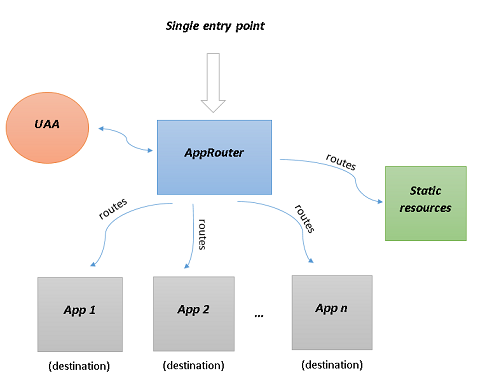
Let's think of the different apps (microservices) as _destinations_ to which the incoming request will be forwarded.
The rules that determine which request should be forwarded to which destination are called _routes_.
For every destination there can be more than one route. You may read more on the concept of [routes](#routes) later in this document.
If the backend microservices require authentication, the application router can be configured to authenticate the users and propagate the user information.
Again by using routes, the application router can serve static content.
The application router is designed to work in XS Advanced - Cloud Foundry and XS OnPremise Runtime.
A calling component accesses a target service by means of the application router only if there is no JWT token available, for example,
if a user invokes the application from a Web browser.
If a JWT token is already available, for example, because the user has already been authenticated, or the calling component uses a JWT token for its own OAuth client,
the calling component calls the target service directly; it does not need to use the application router.
**Note** that the application router does not hide the backend microservices in any way. They are still directly accessible bypassing the application router. So the backend microservices _must_ protect all their endpoints by validating the JWT token and implementing proper scope checks. Network isolation is not provided currently by the platform.
## Deploying a business application with microservices
For example we can have a business application that has the following structure:
+-- manifest.yml
+-- manifest-op.yml
|  +-- microservice-1
|  | +-- ...
|  | +-- ...
|  +-- microservice-2
|  | +-- ...
|  | +-- ...
|  +-- web
|  | +-- ...
|  | +-- ...
The *manifest.yml* file is used to deploy the business application on Cloud Foundry and the *manifest-op.yml* - on the XS OnPremise Runtime.
These files should describe all the microservices for that business application.
Folders are used to isolate the different microservices. Let's assume that the application router is the microservice in the *web* folder (every business application has its own application router).
Here is how we can include the application router:
* Manually create the *node_modules* folder in the *web* folder.
* Copy and paste the folder that contains the self-contained application router into *node_modules*. In this example the name of that folder is *@sap/approuter*, see the *start* script in the *package.json* below.
* Check the version of the application router you just copied.
* Create a *package.json* file in *web* with content similar to the following and replace the version's value with the version of your application router:
```json
{
"name": "hello-world-approuter",
"dependencies": {
"@sap/approuter": "2.6.1"
},
"scripts": {
"start": "node node_modules/@sap/approuter/approuter.js"
}
}
```
In order to use the application router you don't have to write any JavaScript code.
Only some configurations have to be provided in the *web* folder. Here is a complete example:
+-- web
| +-- package.json
| +-- xs-app.json
| +-- resources
| | +-- hello-world.html
| | +-- my-page.html
| +-- node_modules
| |   +-- ...
| +-- default-env.json
| +-- default-services.json
The *web* folder contains the *package.json*, *node_modules*, some configuration files used by the application router, and static resources to be served.
You can read more about the [configurations](#configurations) later in this document.
By default, the application router runs on port 5000 (if started locally) or it takes the port from the `PORT` environment variable.
## Working directory
The working directory contains configuration files that the application router needs and static resources that can be served at runtime.
In the [previous example](#deploying-a-business-application-with-microservices), the *web* folder is the working directory.
By default the current directory is the working directory.
It is possible to configure it during start up of the application router with the following command line argument:
```bash
node approuter.js -w
```
Application router will abort if the working directory does not contain *xs-app.json* file.
## Configurations
The application router makes use of the following configurations:
- [Main configuration](#xs-appjson-configuration-file) - this is the *xs-app.json* file. This file is mandatory and contains the main configurations of the application router.
- [UAA configuration](#uaa-configuration) - the application router reads this configuration either from the `VCAP_SERVICES` environment variable (when deployed on Cloud Foundry or XS Advanced OnPremise Runtime)
or from the *default-services.json* file (when running locally). Refer to the documentation of the `@sap/xsenv` package for more details.
- Configurations from the environment - these configurations are either read from the application router's environment (when deployed on Cloud Foundry or XS Advanced OnPremise Runtime)
or from the *default-env.json* file (when running locally). Refer to the documentation of the `@sap/xsenv` package for more details.
Note that when running application router locally it is required to set the `NODE_ENV` environment variable to `development`explicitly in order to load the *default-env.json* file.
The environment variables that the application router takes into account are:
| Configuration | Environment variable | Description |
|--------------------------------------------------------------------------------|-------------------------------------------------|----------------------------------------------------------------------------------------------------------------------------------------------------------------------------------------------------------------------------------------------------------------------------------------------------------------------------------------------------------------------------------------------------------------------------------------------------------------------------------------------------------------------------------------------------------------------------------------------------------------------------------------------------------------------------------------------------------------------------------------------------------------------------------------------------------------------------------------------------------------------------------------------------------------------------------------------------------------------------------------------------------------------------------------------------------------------------------------------------------------------------------------------------------------------------------------------------------------|
| [UAA service name](#uaa-configuration) | `UAA_SERVICE_NAME` | Contains the name of the UAA service to be used. |
| [Destinations](#destinations) | `destinations` | Provides information about the available destinations. |
| [Additional headers](#additional-headers-configuration) | `httpHeaders` | Provides headers that the application router will return to the client in its responses. |
| [Additional cookie attributes](#additional-cookie-attributes) | `COOKIES` | The application router triggers the generation of the following third-party cookies and sends them to the client: • locationAfterLogin • fragmentAfterLogin • signature • JSESSIONID To control the behavior and usage of the third-party cookies, you can configure the attributes SameSite and Partitioned.For more information about third-party cookies, please see [KBA 3409306](https://me.sap.com/notes/3409306). |
| [Plugins](#plugins-configuration) | `plugins` | A plugin is just like a [*route*](#routes) except that you can't configure some inner properties. |
| [Session timeout](#session-timeout-configuration) | `SESSION_TIMEOUT` | Positive integer representing the session timeout in minutes. The default timeout is 15 minutes. |
| [X-Frame-Options](#x-frame-options-configuration) | `SEND_XFRAMEOPTIONS`, `httpHeaders` | Configuration for the X-Frame-Options header value. |
| [Allowlist service](#whitelist-service) | `CJ_PROTECT_WHITELIST` | Configuration for the allowlist that is preventing clickjack attacks. |
| [Web Sockets origins allowlist](#web-sockets) | `WS_ALLOWED_ORIGINS` | An allowlist configuration that is used for verifying the `Origin` header of the initial upgrade request when establishing a web socket connection. |
| JWT Token refresh | `JWT_REFRESH` | The time in minutes before a JWT token expires and the application router should trigger a token refresh routine. |
| Incoming connection timeout | `INCOMING_CONNECTION_TIMEOUT` | Maximum time in milliseconds for a client connection. After that time the connection is closed. If set to 0, the timeout is disabled. Default: 120000 (2 min) |
| Incoming request timeout | `INCOMING_REQUEST_TIMEOUT` | Maximum time in milliseconds for an incoming request. After that time the request is rejected with 408 status. If set to 0, the timeout is disabled. Default: 300000 (5 min) |
| Tenant host pattern | `TENANT_HOST_PATTERN` | String containing a regular expression with a capturing group. The request host is matched against this regular expression. The value of the first capturing group is used as tenant id. |
| Destination host pattern | `DESTINATION_HOST_PATTERN` | String containing a regular expression with a capturing group. The request host is matched against this regular expression. The value of the capturing group is used as destination name. |
| [Compression](#compression-property) | `COMPRESSION` | Configuration regarding compressing resources before responding to the client. |
| _Secure_ flag of session cookie | `SECURE_SESSION_COOKIE` | Can be set to `true` or `false`. By default, the _Secure_ flag of the session cookie is set depending on the environment the application router runs in. For example, when application router is behind a router (Cloud Foundry's router or SAP Web Dispatcher) that is configured to serve HTTPS traffic, then this flag will be present. During local development the flag is not set. This environment variable can be used to enforce setting or omitting the _Secure_ flag. **Note**: If the Secure flag is enforced, the application router will reject requests sent over unencrypted connection (http). |
| Trusted CA certificates | `XS_CACERT_PATH` | List of files paths with trusted CA certificates used for outbound https connections (UAA, destinations, etc.). File paths are separated by [path.delimiter](https://nodejs.org/api/path.html#path_path_delimiter). If this is omitted, several well known "root" CAs (like VeriSign) will be used. This variable is set automatically by XSA On-premise runtime. |
| Reject untrusted certificates | `NODE_TLS_REJECT_UNAUTHORIZED` | By default an outbound https connection is terminated if the remote end does not provide a trusted certificate. This check can be disabled by setting `NODE_TLS_REJECT_UNAUTHORIZED` to `0`. This is a built-in feature of Node.js. **Note:** Do not use this in production as it compromises security! |
| External reverse proxy flag | `EXTERNAL_REVERSE_PROXY` | Boolean value that indicates the use of application router behind an external reverse proxy (outside of Cloud Foundry domain) |
| Skip client credentials tokens load on start | `SKIP_CLIENT_CREDENTIALS_TOKENS_LOAD` | Boolean value that indicates that no client credentials tokens should be created during the application router start phase |
| [Cross-Origin Resource Sharing](#cross-origin-resource-sharing-configuration) | `CORS` | Configuration regarding CORS enablement. |
| Preserve URL fragment | `PRESERVE_FRAGMENT` | When set to `true` or not set, fragment part of the URL provided during first request of not logged-in user to protected route will be preserved, and after login flow user is redirected to original URL including fragment part. However, this may break programmatic access to Approuter (e.g. e2e tests), since it introduces change in login flow, which is incompatible with Approuter version 4.0.1 and earlier. Setting value to `false` makes login flow backward compatible, however will not take fragment part of the URL into account. |
| [Direct Routing URI Patterns](#direct-routing-uri-patterns-configuration) | `DIRECT_ROUTING_URI_PATTERNS` | Configuration for direct routing URI patterns. |
| [NodeJS Minimal Logging Level](#nodejs-minimal-logging-level-configuration) | `CF_NODEJS_LOGGING_LEVEL` | Configuration for NodeJS minimal logging level. |
| [Dynamic Identity Provider](#dynamic-identity-provider-configuration) | `DYNAMIC_IDENTITY_PROVIDER` | Configuration for dynamic identity provider. |
| Backend Cookies Secret | `BACKEND_COOKIES_SECRET` | Secret that is used to encrypt backend session cookies in service to Application Router flow. Should be set in case multiple instances of Application Router are used. By default a random sequence of characters is used. |
| [Remove clashing backend session cookie](#remove-clashing-backend-session-cookie) | `REMOVE_CLASHING_BACKEND_SESSION_COOKIE` | When set to `true`, any backend cookie whose name matches the approuter session cookie name is intercepted server-side, preventing it from reaching the browser. Default: not set (opt-in). |
| Service to Application Router | `SERVICE_2_APPROUTER` | If `true`, when the SAP Passport header is received from the application router, it will be transferred without modification to the backend application. |
| Client certificate header name | `CLIENT_CERTIFICATE_HEADER_NAME` | When set application router will use this header name to get the client certificate from the request header in subscription callback. If not provided the default header name `x-forwarded-client-cert` is used. |
| Server Keep Alive | `SERVER_KEEP_ALIVE` | server keep alive timeout (positive integer in milliseconds). |
| Minimum Token Validity | `MINIMUM_TOKEN_VALIDITY` | positive integer in seconds. When set, approuter will check that the token returned from the authorization service has an expiration time higher than the minimum token validity value. |
| State Parameter Secret | `STATE_PARAMETER_SECRET` | enables the use of state parameters to prevent CSRF attacks. If this environment variable is set, the application router creates a state parameter for each initial request. Note that the state parameter value is returned as a session cookie, which enables session stickiness to the same application router instance. After the login callback is executed, this session cookie is replaced by another session cookie. By validating that the authentication server returns the same state parameter in its response, the application router can verify that the response did not originate from a third party. In **Cloud Foundry**, session stickiness is activated automatically. In **Kyma**, you must set up the session stickiness manually by using a destination rule [(see HTTPCookie)](https://istio.io/latest/docs/reference/config/networking/destination-rule/#LoadBalancerSettings-ConsistentHashLB-HTTPCookie) or another method. The application router stores the state parameter for 60 seconds by default. If the login process is not completed within this time, the request fails with a 401 error. To adjust this time limit, you can use the `STATE_CACHE` environment variable. |
| PKCE | `PKCE_ENABLED` | Enables Proof Key for Code Exchange (PKCE) for the OAuth2 authorization code flow. PKCE is enabled by default when `STATE_PARAMETER_SECRET` is set. Disabling state protection also disables PKCE. Set to `false` to disable PKCE while keeping state protection enabled. |
| HTTP2 Support | `HTTP2_SUPPORT` | Enables the application router to start as an HTTP/2 server. Note: To configure HTTP/2 support, you must use Cloud Foundry routes with an HTTP/2 destination protocol. See [Configuring HTTP/2 Support](https://docs.cloudfoundry.org/adminguide/supporting-http2.html#application) in the Cloud Foundry Documentation. As connection-specific header fields aren't supported by the HTTP/2 protocol, see [rfc9113](https://datatracker.ietf.org/doc/html/rfc9113), the application router removes such headers automatically when they are returned from a backend to prevent a failure of the HTTP/2 response. |
| Store CSRF token in external session | SVC2AR_STORE_CSRF_IN_EXTERNAL_SESSION | If `true` and have enabled [external session management](#external-session-management), the application router can generate and validate CSRF tokens in service-to-application-router flows by storing the token in an external session. |
| Cache service credentials | CACHE_SERVICE_CREDENTIALS | If `true`, services credentials are cached in the application router memory |
| Enable x-forwarded-host header validation | ENABLE_X_FORWARDED_HOST_VALIDATION | If `true`, x-forwarded-host validation will be performed, allowing letters, digits, hypens (-), underscores (_) and dots (.). As well as it validates hostname length. |
| Add the content security policy headers to the response | ENABLE_FRAME_ANCESTORS_CSP_HEADERS | If `true`, Approuter will include the content security policy (CSP) header using subaccount trusted domains with frame-ancestors policy. |
| Time cache value for frame ancestors CSP header | FRAME_ANCESTORS_CSP_HEADER_CACHE_TIME | Time in seconds for the frame ancestors CSP header to be cached. The default value is 300 seconds. |
| Extended Content-Security-Policy Header for Login | EXTENDED_LOGIN_CSP | By default, the application router applies basic Content-Security-Policy (CSP) headers during login. To enable extended CSP headers that include the additional directives `default-src`, `style-src`, `img-src` (including `data:`), `connect-src`, `font-src`, `base-uri`, and `form-action`, set this environment variable to `true`. This configuration enhances the security during authentication by explicitly defining allowed sources for default content, styles, images, data, connection, font, base URI and form submissions. This environment variable is disabled by default to maintain backward compatibility. |
| Omit Content-Security-Policy Header for Login | OMIT_LOGIN_CSP | When set to `true`, the application router will not send any Content-Security-Policy (CSP) header during the login flow. This allows approuter owners to completely disable CSP headers in the login response if needed. This environment variable is disabled by default. |
| Store backend session cookies in external session store | STORE_SESSION_COOKIES_IN_EXTERNAL_SESSION_STORE | If `true`, the application router will store backend session cookies in an external session store in the service-to-application-router flow. In this case the "ARBE" cookie will not be returned to the calling service. |
| Direct external session ID usage | `SVC2AR_DIRECT_EXT_SESSION_ID_USAGE` | If `true`, the `x-approuter-ext-session-id` header is accepted without requiring the `x-approuter-ext-session-id-sig` signature header, and signature verification is skipped. Use this only in trusted environments where the consumer service manages session IDs directly and the signature overhead is not needed. Default: `false`.
| Own SAP Cloud Service | OWN_SAP_CLOUD_SERVICE | An array that contains the business solutions ("SAP cloud services") that your HTML5 applications are associated with as values. This configuration enables the standalone application router to use the same standardized format for runtime URLs ("/.-/") that is also used by the managed application router. If a runtime URL contains one of the defined values in the section, the application router will recognize the value during the processing of a request. |
| Cookie backward compatibility | COOKIE_BACKWARD_COMPATIBILITY | If 'true', cookie serialization will preserve previous cookie library version serialization algorithm. |
| Platform cookie name | `PLATFORM_COOKIE_NAME` | Name the cookie that is used for session stickiness. In **Cloud Foundry**, the cookie name is hardcoded as **VCAP_ID**. Cloud Foundry automatically adds this cookie, and you cannot change it. In **Kyma**, you define the cookie name when you configure the load balancer settings for the destination rule [(see HTTPCookie)](https://istio.io/latest/docs/reference/config/networking/destination-rule/#LoadBalancerSettings-ConsistentHashLB-HTTPCookie). **Note**: It's **not** recommended to use the JSESSIONID cookie in Kyma because it may cause errors in the application router. |
| Session cookie name | `SESSION_COOKIE_NAME` | Name of the session cookie sent to the client. Default: `JSESSIONID`. **Important:** When set to a value other than `JSESSIONID`, Cloud Foundry session stickiness is disabled. In this case, the application router will always fetch session data from the external session store (e.g., Redis) instead of using in-memory cached sessions. This ensures session consistency across multiple application router instances without relying on session stickiness. When using custom session cookie names, it is strongly recommended to configure [external session management](#external-session-management) with Redis for proper session handling in multi-instance deployments.
| Error source tracking | `RETURN_ERROR_SOURCE` | When set to `true`, the application router adds an `x-error-source` header to error responses only for errors that originate within the application router itself. The header value will always be `gateway`. Errors from remote integrations will not include this header. Default: disabled (no header added).
| Zone information cache time to live | `ZONE_INFO_CACHE_TTL` | Time in seconds for zone information to be cached. The default value is 600 seconds.
| Zone information maximum cache TTL | `ZONE_INFO_MAX_CACHE_TTL` | Maximum time in seconds for unused zone information entries to stay in cache before automatic cleanup. The default value is 14400 seconds (4 hours). |
| Disable HTTP connection reuse | `DISABLE_CONNECTION_REUSE` | Controls HTTP connection reuse behavior for **outgoing connections** from the application router to backend destinations and business services. This setting does not affect incoming connections from browsers or external proxies to the application router. Set to `true` to disable connection reuse (each request uses a new connection). Set to `false` to enable connection reuse (keep-alive connections). When not set, the default behavior depends on the environment: in Cloud Foundry, connection reuse is **enabled** by default. In Kyma/Kubernetes and SAP Business Application Studio (BAS), connection reuse is **disabled** by default. |
| Enable WebSocket Extensions | `HANDLE_WEBSOCKET_EXT` | Enables WebSocket extensions for custom middleware. Possible values: `false` (default) - WebSocket extensions disabled; `true` - synchronous WebSocket extensions enabled; `async` - async WebSocket extensions with proper await handling. See [WebSocket Extensions](doc/extending.md#websocket-extensions). |
|[Outgoing request options](#outgoingrequestoptions-property) | `OUTGOING_REQUEST_OPTIONS` | Configuration regarding outgoing request options to services like destination service etc.
**Note:** all those environment variables are optional.
### Destinations
The destinations configuration can be provided by the `destinations` environment variable or by destination service. There has to be a destination for every single app (microservice) that is a part of the business application.
#### Environment destinations
The destinations configuration is an array of objects. Here are the properties that a destination can have:
Property | Type | Optional | Description
-------- | ---- |:--------:| -----------
name | String | | A unique alphanumeric identifier of the destination.
url | String | | URL of the app (microservice).
proxyHost | String | x | The host of the proxy server used in case the request should go through a proxy to reach the destination.
proxyPort | String | x | The port of the proxy server used in case the request should go through a proxy to reach the destination.
forwardAuthToken | Boolean | x | If `true`, the OAuth token is sent to the destination. The default value is `false`. This token contains user identity, scopes and other attributes. It is signed by the UAA or IAS service, so it can be used for user authentication and authorization with backend services.
forwardAuthCertificates | Boolean | x | If `true`, the certificates and key of the authentication service are added to the HTTP connection to the destination. The default value is false. For more information see: [Mutual TLS Authentication (mTLS) and Certificates Handling](#mutual-tls-authentication-mtls-and-certificates-handling).
strictSSL | Boolean | x | Configures whether the application router should reject untrusted certificates. The default value is `true`.
**Note:** Do not use this in production as it compromises security!
timeout | Number | x | Positive integer representing the maximum wait time for a response (in milliseconds) from the destination. Default is 30000ms.
setXForwardedHeaders | Boolean | x | If `true` , the application router adds X-Forwarded-(Host, Path, Proto) headers to the backend request.Default value is true.
proxyType | String | x | Configures whether the destination is used to access applications in on-premise networks or on public Internet. Possible value: `OnPremise`. if the property is not provided, it is assumed that it is a public Internet access.
**Note:** if `OnPremise` value is set, binding to SAP Cloud Platform connectivity service is required, and `forwardAuthToken` property should not be set.
IASDependencyName | String | x | Configures the name of the IAS dependency that is used to exchange the IAS login token. The exchanged token is also forwarded to the backend application.
**Note:** The timeout specified will also apply to the [destination's logout path](#destinations-property) or [service's logout path](#services-property) (if you have set one).
**Note:** `proxyHost` and `proxyPort` are optional, but if one of them is defined, then the other one becomes mandatory.
Sample content of the destinations environment variable:
```json
[
{
"name" : "ui5",
"url" : "https://ui5.sap.com",
"proxyHost" : "proxy",
"proxyPort" : "8080",
"forwardAuthToken" : false,
"timeout" : 1200
}
]
```
It is also possible to include the destinations in the *manifest.yml* and *manifest-op.yml* files:
```yml
- name: node-hello-world
memory: 100M
path: web
env:
destinations: >
[
{"name":"ui5", "url":"https://ui5.sap.com"}
]
```
#### Destination service
Destination configuration can also be read from `destination service` .
Here are the Approuter limitations to destination properties configuration :
Property | Additional Property | Description
-------- |:--------:| -----------
Type | |only `HTTP` supported.
Authentication | | All authentication types are supported.
**Note:** `User` and `Password` are mandatory if the authentication type is `basic authentication`.
**Note:** if the authentication type set to `principal propagation` the ProxyType have to be `on-premise`.
**Note:** if the authentication type set to `OAuth2SAMLBearerAssertion`, `uaa.user` scope in xs-security.json is required.
ProxyType | | Supported proxy type : `on-premise`, `internet`, `private-link`.
**Note:** if ProxyType set to `on-premise`, binding to SAP Cloud Platform connectivity service is required.
**Note:** To check the availability of the private-link proxy type, see [SAP Private Link ServiceInformation](https://discovery-center.cloud.sap/serviceCatalog/private-link-service?tab=service_plan®ion=all&service_plan=standard&commercialModel=cpea) published on SAP site in the SAP Discovery Center.
##### Optional additional properties:
Property | Additional Property | Description
-------- |:-------------------:| ---------
HTML5.ForwardAuthToken | x | If `true` the OAuth token will be sent to the destination. The default value is `false`. This token contains user identity, scopes and other attributes. It is signed by the UAA so it can be used for user authentication and authorization with backend services.
**Note:** if ProxyType set to `on-premise`, ForwardAuthToken property should not be set.
**Note:** if Authentication type is other than NoAuthentication, ForwardAuthToken property should not be set.
HTML5.ForwardAuthCertificates | x | If `true`, the certificates and key of the authentication service are added to the HTTP connection to the destination. The default value is false. For more information see: [Mutual TLS Authentication (mTLS) and Certificates Handling](#mutual-tls-authentication-mtls-and-certificates-handling).
HTML5.Timeout | x | Positive integer representing the maximum wait time for a response (in milliseconds) from the destination. Default is 30000ms.**Note:** The timeout specified will also apply to the [destination's logout path](#destinations-property) or [service's logout path](#services-property) (if you have set one).
HTML5.PreserveHostHeader | x | If `true` , the application router preserves the host header in the backend request.
This is expected by some back-end systems like AS ABAP, which do not process x-forwarded-* headers.
HTML5.DynamicDestination | x | If `true` , the application router allows to use this destination dynamically on host or path level.
HTML5.SetXForwardedHeaders | x | If `true` , the application router adds X-Forwarded-(Host, Path, Proto) headers to the backend request.Default value is true.
HTML5.IASDependencyName | x | Configures the name of the IAS dependency that is used to exchange the IAS login token. The exchanged token is also forwarded to the backend application.
HTML5.StrictConnectionMode | x | If `true`, the application router uses strict HTTP agents with conservative connection pooling settings (shorter socket timeouts, FIFO scheduling) for this destination. This is recommended for mTLS/certificate-based authentication scenarios. Default value is `false`.
sap-client | x | If provided, the application router propagates the sap-client and its value as a header in the backend request.
This is expected by ABAP back-end systems.
URL.headers.`` | x | If provided, the application router propagates this special attribute in the destination as the header. The application router can get the headers list from the destination API. Existing request headers are not overwritten.
**Note:**
* In case destination with the same name is defined both in environment destination and destination service, the destination configuration will load from the environment.
* Destinations on destination service instance level are supported.
* Only destination client certificates of type p12 are supported.
* Only destination trust certificates of the type privacy-enhanced mail (PEM) are supported.
### UAA configuration
The User Account and Authentication (UAA) server is responsible for user authentication.
In Cloud Foundry and XS OnPremise Runtime a service is created for this configuration and by using the standard service binding mechanism
the content of this configuration is available in the `VCAP_SERVICES` environment variable.
**Note:** The service should have `xsuaa` in its tags or the environment variable `UAA_SERVICE_NAME` should be specified (stating the exact name of the UAA service).
During local development the UAA configuration is provided in the *default-services.json* file.
When the UAA is used for authentication the user is redirected to the UAA's login page to enter their credentials.
Sample content for a *default-services.json* file:
```json
{
"uaa": {
"url" : "http://my.uaa.server/",
"clientid" : "client-id",
"clientsecret" : "client-secret",
"xsappname" : "my-business-application"
}
}
```
The application router supports the `$XSAPPNAME` placeholder (upper case letters). You may use it in your [route](#routes) configurations in the scope property.
The value of `$XSAPPNAME` is taken from the UAA configuration (the `xsappname` property).
### Additional headers configuration
If configured, the application router can send additional http headers in its responses to the client.
Additional headers can be set in the `httpHeaders` environment variable.
Sample configuration for additional headers:
```json
[
{
"X-Frame-Options": "ALLOW-FROM http://localhost"
},
{
"Test-Additional-Header": "1"
}
]
```
In this case, the application router sends two additional headers in the responses to the client.
Custom response headers, configured in the application router configuration file (xs-app.json) are added to the list of additional http headers.
If the response header name already exists in the additional http headers list, the value of the response header name overrides the value of the http header.
**Caution:** For security reasons, the following headers must not be configured: authorization', 'cookie', and 'set-cookie'.
### Additional Cookie Attributes
If configured, the application router sends additional cookie attributes in its responses to the client.
The cookie attributes can be set in the `COOKIES` environment variable.
Example of configuration for cookies in the manifest.yml :
```json
env:
COOKIES: >
{
"SameSite":"None",
"Partitioned":
{
"supportedPartitionAgents":"^Mozilla.*(Chrome|Chromium|)/((109)|(1[1-9][0-9])|([2-9][0-9][0-9]))",
"unsupportedPartitionAgents":"PostmanRuntime/7.29.2"
}
}
```
In this example, the application router sets the SameSite attribute of the cookie to "None" and the specifies a Partitioned attribute that is sent in the responses to the client.
Note: Currently, only the values "None" and "Lax" are supported for the SameSite attribute. The value "Strict" is not supported.
The Partitioned attribute contains two required regular expressions:
- supportedPartitionAgents for supported agents
- unsupportedPartitionAgents for unsupported agents
You can use a wildcard '(.*)' in supportedAgents to allow all agents to use the Partitioned attribute.
Note: unsupportedPartionAgents overwrites the configurations in supportedAgents. If an agent is allowed in supportedPartitionAgents but disallowed in unsupportedPartitionAgents, the Partitioned attribute will not be returned.
### Plugins configuration
A plugin serves almost the same purpose as [*routes*](#routes). The difference is that plugins can be configured through the environment and that way you can add new routes to the application router without changing the design-time artefact *xs-app.json*. The plugin configuration properties are the same as those of a [*route*](#routes) except that you can't configure `localDir`, `replace` and `cacheControl`.
Property | Type | Optional | Description
-------- | ---- |:--------:| -----------
name | String | | The name of this plugin
source | String/Object | | Describes a regular expression that matches the incoming [request URL](https://nodejs.org/api/http.html#http_message_url). **Note:** A request matches a particular route if its path __contains__ the given pattern. To ensure the RegExp matches the complete path, use the following form: ^$`. **Note:** Be aware that the RegExp is applied to on the full URL including query parameters.
target | String | x | Defines how the incoming request path will be rewritten for the corresponding destination.
destination | String | | An alphanumeric name of the destination to which the incoming request should be forwarded.
authenticationType | String | x | Specifies the authentication method for the route.**Values:**• `ias` - Identity Authentication service (redirects to IAS login)• `xsuaa` - User Account and Authentication service (redirects to XSUAA login)• `basic` - HTTP Basic authentication (supports HANA users, SAP ID service, IAS)• `none` - No authentication required**If `authenticationType` is not defined:**• Bound to IAS only: uses `ias`• Bound to XSUAA only: uses `xsuaa`• Bound to both services: prefers ias if both authentication services can be used in the current subaccount, determined via BTP security endpoint (may impact response time)**Note:** For Basic authentication options, see SAP Note 3015211.
csrfProtection | Boolean | x | Enable [CSRF protection](#csrf-protection) for this route. The default value is `true`.
scope | Array/String/Object | x | Scopes are related to the permissions a user needs to access a resource. This property holds the required scopes to access the target path. Access is granted if the user has at least one of the listed scopes. **Note:** Scopes are defined as part of the xsuaa service instance configuration. You can use `ias` as authenticationType and xsuaa scopes for authorization if the application router is bound to both (`ias` and `xsuaa`)."
Sample content of the `plugins` environment variable:
```json
[
{
"name": "insecurePlugin",
"source": "/plugin",
"destination": "plugin",
"target": "/",
"csrfProtection": false,
"scope": ["viewer", "reader"]
},
{
"name": "publicPlugin",
"source": "/public-plugin",
"destination": "publicPlugin",
"authenticationType": "none"
}
]
```
**Note:** When HTML5 Application Repository integration is enabled, plugins are completely overwritten by the HTML5 application's own xs-app.json configuration. Environment-based plugins will not be applied to HTML5 repository routes.
### Session timeout configuration
For example, if you have the following line in your *manifest.yml* or *manifest-op.yml* file:
```yml
- name: node-hello-world
memory: 100M
path: web
env:
SESSION_TIMEOUT: 40
```
After 40 minutes of user inactivity (no requests have been sent to the application router), a Central Logout will be triggered due to session timeout.
**Note:** The application router depends on the UAA server for user authentication, if the `authenticationType` for a route is `xsuaa`. The UAA server may have a different session timeout configured.
It is recommended that the configurations of the application router and the UAA are identical.
### X-Frame-Options configuration
Application router sends `X-Frame-Options` header by default with value `SAMEORIGIN`. This behaviour can be changed in 2 ways:
- Disable sending the default header value by setting `SEND_XFRAMEOPTIONS` environment variable to `false`
- Override the value to be sent via [additional headers configuration](#additional-headers-configuration)
## Cross-Origin Resource Sharing configuration
The CORS keyword enables you to provide support for cross-origin requests, for example, by allowing the modification of the request header. Cross-origin resource sharing (CORS) permits Web pages from other domains to make HTTP requests to your application domain, where normally such requests would automatically be refused by the Web browser's security policy.
Cross-origin resource sharing(CORS) is a mechanism that allows restricted resources on a webpage to be requested from another domain (/protocol/port) outside the domain (/protocol/port) from which the first resource was served.
CORS configuration enables you to define details to control access to your application resource from other Web browsers. For example, you can specify where requests can originate from or what is allowed in the request and response headers.
The CORS configuration can be provided in the CORS environment variable or in the CORS property of the application router configuration file (xs-app.json).
If a cross-origin resource sharing (CORS) configuration exists in both the environment variables and the application router configuration file (xs-app.json), the application router gives priority to the CORS configuration in the application router configuration file.
The CORS configuration is an array of objects. Here are the properties that a CORS object can have:
Property | Type | Optional | Description
-------- | ---- |:--------:| -----------
uriPattern| String | | A regular expression representing for which source routes CORS configuration is applicable. To ensure the RegExp matches the complete path, surround it with ^ and $. **Defaults:** none.
hostPattern| String |x|A regular expression representing the host configuration for which source routes CORS configuration is applicable. The hostPattern property is applied together with uriPattern property. To ensure the RegExp matches the complete host, surround it with ^ and $. The hostPattern property might include also the port in the configuration, for example ^reuse-me\\.sap\\.com:443$. In case of the Approuter is running as a forward proxy or external reverse proxy then the hostPattern propery is applied to the external host (host sent by client) and the internal host (x-custom-host) will be ignored in the CORS policy evaluation. **Defaults:** none.
allowedOrigin| Array | | A comma-separated list of objects that each one of them containing host name, port and protocol that are allowed by the server.for example: [{?host?: "www.sap.com"}] or [{?host?: ?*.sap.com?}]. **Note:** matching is case-sensitive. In addition, if port or protocol are not specified the default is ?_*_?. **Defaults:** none.
allowedMethods| Array of upper-case HTTP methods| x | Comma-separated list of HTTP methods that are allowed by the server. **Defaults:** [?GET?, ?POST?, ?HEAD?, ?OPTIONS?] (all) applies. **Note:** matching is case-sensitive.
maxAge| Number| x | A single value specifying how long, in seconds, a preflight response should be cached. A negative value will prevent CORS Filter from adding this response header to pre-flight response. **Defaults:** 1800.
allowedHeaders| Array of headers| x | Comma-separated list of request headers that are allowed by the serve. **Defaults:** [?Origin?, ?Accept?, ?X-Requested-With?, ?Content-Type?, ?Access-Control-Request-Method?, ?Access-Control-Request-Headers?].
exposeHeaders| Array of headers| x | Comma-separated list of response headers (other than simple headers) that can be exposed. **Defaults:** none.
allowedCredentials| Boolean| x | A flag that indicates whether the resource supports user credentials. **Defaults:** true.
Sample content of the CORS environment variable:
```json
[
{
"uriPattern": "^\route1$",
"hostPattern": "^my-example\\.my_target_domain:443$",
"allowedMethods": [
"GET"
],
"allowedOrigin": [
{
"host": "my_example.my_domain",
"protocol": "https",
"port": 345
}
],
"maxAge": 3600,
"allowedHeaders": [
"Authorization",
"Content-Type"
],
"exposeHeaders": [
"customHeader1",
"customHeader2"
],
"allowedCredentials": true
}
]
```
It is also possible to include the CORS in the *manifest.yml* and *manifest-op.yml* files:
```yml
- name: node-hello-world
memory: 100M
path: web
env:
CORS: >
[
{
"allowedOrigin":[
{
"host":"my_host",
"protocol":"https"
}
],
"uriPattern":"^/route1$",
"hostPattern":"^my-example\\.my_target_domain$"
}
]
```
For route with source that match the REGEX ?^\route1$?, the CORS configuration is enabled.
## Direct Routing URI Patterns configuration
With the direct routing URI patterns configuration, you can define a list of URIs that are directed to the routing configuration file (xs-app.json file) of the application router instead of to a specific application's xs-app.json file that is stored in the HTML5 Application Repository. This configuration improves the application loading time and monitoring options because it prevents unnecessary calls to the HTML5 Application Repository.
The configuration is an array of strings or regular expressions.
Note that the following regular expressions are preconfigured in the configuration array: "^favicon.ico$", "^login$".
Therefore, do not name your HTML5 applications "favicon.ico" or "login"!
You have to provide only the first segment in the URL, after the approuter host. For example, for the URL https://approuter-host/route1/index.html, you enter "route1" in the direct routing URI patterns array.
Sample content of the Direct Routing URI Patterns environment variable:
```json
env:
DIRECT_ROUTING_URI_PATTERNS: >
["route1", "^route2$", "route3"]
```
## NodeJS Minimal Logging Level configuration
With this configuration, you can set the minimal logging level of the *cf-nodejs-logging-support* library of the application router. The following levels are available:
* *off*
* *error*
* *warn*
* *info*
* *verbose*
* *debug*
* *silly*
The default value is "error".
Here is a sample content for the NodeJS minimal logging level environment variable:
```json
env:
CF_NODEJS_LOGGING_LEVEL: "debug"
```
**Note** The application router also uses the *@sap/logging* library. To configure the log level for this library, you use the *XS_APP_LOG_LEVEL* environment variable.
## Dynamic Identity Provider configuration
If dynamicIdentityProvider is set to true, the end user can set the identity provider (IDP) for the application’s login process by filling the request query parameter `sap_idp`. The value is passed as the `idp` parameter to the authentication service (XSUAA or IAS).
When using SAP Authorization and Trust Management (XSUAA) with Identity Authentication Service (IAS), you can specify a chain of identity providers using comma-separated values. For example, `sap_idp=sap.custom,local` will route through the XSUAA trust configuration `sap.custom` and then to IAS with `idp=local` to use the IAS local user store.
For more information on identity provider selection, see [Creating URLs for Applications to Authenticate with Specific Identity Providers](https://help.sap.com/docs/cloud-identity-services/cloud-identity-services/creating-urls-for-applications-to-authenticate-with-specific-identity-providers-44e67223a98f45ed94aaee7513e90a95).
If the IdentityProvider property is defined in the route, its value will be overwritten by the sap_idp query parameter value. The default value for dynamicIdentityProvider is false.
This configuration is relevant for a standalone approuter scenario and it is set for all routes.
Here is a sample content for the dynamic identity provider environment variable:
```yaml
env:
DYNAMIC_IDENTITY_PROVIDER: true
```
## Routes
A route is a configuration that instructs the application router how to process an incoming request with a specific path.
Property | Type | Optional | Description
-------- | ---- |:--------:| -----------
source | String/Object | | Describes a regular expression that matches the incoming [request URL](https://nodejs.org/api/http.html#http_message_url). **Note:** A request matches a particular route if its path __contains__ the given pattern. To ensure the RegExp matches the complete path, use the following form: ^$`. **Note:** Be aware that the RegExp is applied to on the full URL including query parameters.
httpMethods | Array of upper-case HTTP methods | x | Which HTTP methods will be served by this route; the methods supported are: `DELETE`, `GET`, `HEAD`, `OPTIONS`, `POST`, `PUT`, `TRACE`, `PATCH` (no extension methods are supported). If this option is not specified, the route will serve any HTTP method.
target | String | x | Defines how the incoming request path will be rewritten for the corresponding destination or static resource.
destination | String | x | The name of the destination to which the incoming request should be forwarded. The destination name can be a static string or a regular expression that defines how to dynamically fetch the destination name from the source property or from the host.
service | String | x | The name of the service to which the incoming request should be forwarded.
endpoint | String | x | The name of the endpoint within the service to which the incoming request should be forwarded. Can only be used in a route containing a service attribute.
localDir | String | x | Folder in the [working directory](#working-directory) from which the application router will serve static content **Note:** localDir routes support only HEAD and GET requests; requests with any other method receive a 405 Method Not Allowed.
preferLocal | Boolean | x | Defines from which subaccount the destination is retrieved. If preferLocal is true, the destination is retrieved from the provider subaccount. If preferLocal is false or undefined, the destination is retrieved from the subscriber subaccount.
replace | Object | x | An object that contains the configuration for replacing placeholders with values from the environment. *It is only relevant for static resources*. Its structure is described in [Replacements](#replacements).
authenticationType | String | x | Specifies the authentication method for the route.**Values:**• `ias` - Identity Authentication service (redirects to IAS login)• `xsuaa` - User Account and Authentication service (redirects to XSUAA login)• `basic` - HTTP Basic authentication (supports HANA users, SAP ID service, IAS)• `none` - No authentication required**If `authenticationType` is not defined:**• Bound to IAS only: uses `ias`• Bound to XSUAA only: uses `xsuaa`• Bound to both services: prefers ias if both authentication services can be used in the current subaccount, determined via BTP security endpoint (may impact response time)**Note:** For Basic authentication options, see SAP Note 3015211.
csrfProtection | Boolean | x | Enable [CSRF protection](#csrf-protection) for this route. The default value is `true`.
scope | Array/String/Object | x | Scopes are related to the permissions a user needs to access a resource. This property holds the required scopes to access the target path.
cacheControl | String | x | String representing the value of the `Cache-Control` header, which is set on the response when serving static resources. By default the `Cache-Control` header is not set. *It is only relevant for static resources.*
identityProvider | String | x | The name of the identity provider to use if provided in route’s definition. If not provided, the route will be authenticated with the default identity provider. **Note:** If the authenticationType is set to Basic Authentication or None, do not define the identityProvider property.
dynamicIdentityProvider | Boolean | x | If `dynamicIdentityProvider` is `true`, the end user can set the identity provider (IDP) for the application’s login process by filling the request query parameter `sap_idp` with the IDP Origin Key. If `IdentityProvider` property is defined in the route, its value will be overwritten by the `sap_idp` query parameter value. The default value for `dynamicIdentityProvider` is `false`.
setBackendSessionCookies | Boolean | x | If this property is set to true, the application router returns session cookies from the backend applications (cookies without an expiration date) to the browser instead of storing them only in the user session. You usually need this setting when the application router does not manage the user sessions and the `authenticationType` property is set to `none`.
**Note:** The properties `destination`, `localDir` and `service` are optional, but exactly one of them must be defined.
**Note:** When using the property `replace` it is mandatory to define the `localDir` property.
**Note:** The cacheControl property is effective only when one of the following settings is performed:
* The localDir property was set
* A service pointing to HTML5 Application Repository ("service": "html5-apps-repo-rt") was set
### Example routes
For example, if you have a configuration with the following destination:
```json
[
{
"name" : "app-1",
"url" : "http://localhost:3001"
}
]
```
Here are some sample route configurations:
* Route with a `destination` and no `target`
```json
{
"source": "^/app1/(.*)$",
"destination": "app-1"
}
```
Since there is no `target` property for that route, no path rewriting will take place.
If we receive */app1/a/b* as a path, then a request to *http://localhost:3001/app1/a/b* is sent.
The source path is appended to the destination URL.
* Route with case-insensitive matching
```json
{
"source": {
"path": "^/app1/(.*)$",
"matchCase": false
},
"destination": "app-1"
}
```
This example is much like the previous one,
but instead of accepting only paths starting with */app1/*, we accept any variation of _app1_'s case.
That means if we receive */ApP1/a/B*, then a request to *http://localhost:3001/ApP1/a/B* is sent.
**Note:** The property `matchCase` has to be of type boolean. It is optional and has a default value `true`.
* Route with a `destination` and a `target`
```json
{
"source": "^/app1/(.*)$",
"target": "/before/$1/after",
"destination": "app-1"
}
```
* Route with a `service`, a `target` and an `endpoint`
```json
{
"source": "^/odata/v2/(.*)$",
"target": "$1",
"service": "com.sap.appbasic.country",
"endpoint": "countryservice"
}
```
When a request with path */app1/a/b* is received, the path rewriting is done according to the rules in the `target` property.
The request will be forwarded to http://localhost:3001/before/a/b/after.
**Note:** In regular expressions there is the term _capturing group_. If a part of a regular expression is surrounded with parenthesis, then what has been matched can be accessed using _$_ + the number of the group (starting from 1).
In the last example _$1_ is mapped to the _(.*)_ part of the regular expression in the `source` property.
* Route with dynamic `destination` and `target`
```json
{
"source": "^/destination/([^/]+)/(.*)$",
"target": "$2",
"destination": "$1",
"authenticationType": "xsuaa"
}
```
If you have a another destination configured:
```json
[
{
"name" : "myDestination",
"url" : "http://localhost:3002"
}
]
```
when a request with the path /destination/myDestination/myTarget is received, the destination will be replaced with the url from "myDestination", the target will get "myTarget" and the request will be redirected to http://localhost:3002/myTarget
**Note:** You can use a dynamic value (regex) or a static string for both destination and target values
**Note:** The approuter first looks for the destination name in the manifest.yaml file, and if not found, looks for it in the destination service.
* Destination In Host
For legacy applications that do not support relative URL paths, you need to define your URL in the following way to enable the destination to be extracted from the host
the url should be defined in the following way:
```https://-./```
To enable the application router to determine the destination of the URL host, a DESTINATION_HOST_PATTERN attribute must be provided as an environment variable.
Example:
When a request with the path https://myDestination.some-approuter.someDomain.com/app1/myTarget is received, the following route is used:
```json
{
"source": "^/app1/([^/]+)/",
"target": "$1",
"destination": "*",
"authenticationType": "xsuaa"
}
```
In this example, the target will be extracted from the source and the ‘$1’ value is replaced with ‘myTarget’. The destination value is extracted from the host and the ‘*’ value is replaced with ‘myDestination’.
* Route with a `localDir` and no `target`
```json
{
"source": "^/web-pages/(.*)$",
"localDir": "my-static-resources"
}
```
Since there is no `target` property for that route, no path rewriting will take place.
If we receive a request with a path */web-pages/welcome-page.html*, the local file at *my-static-resources/web-pages/welcome-page.html*
under the working directory will be served.
* Route with a `localDir` and a `target`
```json
{
"source": "^/web-pages/(.*)$",
"target": "$1",
"localDir": "my-static-resources"
}
```
If we receive a request with a path '/web-pages/welcome-page.html', the local file at 'my-static-resources/welcome-page.html'
under the working directory will be served. **Note:** The capturing group used in the `target` property.
* Route with `localDir` and `cacheControl`
```json
{
"source": "^/web-pages/",
"localDir": "my-static-resources",
"cacheControl": "public, max-age=1000,must-revalidate"
}
```
* Route with `service` "html5-apps-repo-rt" and `cacheControl`
```json
{
"source": "^/index.html$",
"service": "html5-apps-repo-rt",
"authenticationType": "xsuaa",
"cacheControl":"public,max-age=1000,must-revalidate"
}
```
* Route with `httpMethods` restrictions
The `httpMethods` option allows you to split the same path across different targets depending on the HTTP method. For example:
```json
{
"source": "^/app1/(.*)$",
"target": "/before/$1/after",
"httpMethods": ["GET", "POST"]
}
```
This route will be able to serve only GET and POST requests. Any other method (including extension ones) will get a 405 Method Not Allowed response. The same endpoint can be split across multiple *destinations* depending on the HTTP method of the requests:
```json
{
"source": "^/app1/(.*)$",
"destination" : "dest-1",
"httpMethods": ["GET"]
},
{
"source": "^/app1/(.*)$",
"destination" : "dest-2",
"httpMethods": ["DELETE", "POST", "PUT"]
}
```
The setup above will route GET requests to the target *dest-1*, DELETE, POST and PUT to *dest-2*, and any other method receives a 405. It is also possible to specify "catchAll" routes, namely those that do not specify `httpMethods` restrictions:
```json
{
"source": "^/app1/(.*)$",
"destination" : "dest-1",
"httpMethods": ["GET"]
},
{
"source": "^/app1/(.*)$",
"destination" : "dest-2"
}
```
In the setup above, GET requests will be routed to *dest-1*, and all the rest to *dest-2*.
Why using `httpMethods`? It is often useful to split the implementation of microservices across multiple, highly specialized applications. For example, a Java application written to serve high amounts of GET requests that return large payloads is implemented, sized, scaled and load-tested differently than applications that offer APIs to upload limited amounts of data. `httpMethods` allows you to split your REST APIs, e.g., */Things* to different applications depending on the HTTP methods of the requests, without having to make the difference visible in the URL of the endpoints.
Another usecase for `httpMethods` is to "disable" parts of the REST API. For example, it may be necessary to disable some endpoints that accept DELETE for external usage. By allowing only certain methods in the route, you can hide functionalities of your microservice that should not be consumable without having to modify the code or configurations of your service.
**Note:** `localDir` and `httpMethods` are incompatible. The following route is invalid:
```json
{
"source": "^/app1/(.*)$",
"target": "/before/$1/after",
"localDir": "resources",
"httpMethods": ["GET", "POST"]
}
```
However, since `localDir` supports only GET and HEAD requests, returning 405 to requests with any other method, any `localDir` route is "implicitly" restricted in terms of supported HTTP methods.
* Route with a `scope`
An application specific scope has the following format:
```
.
```
It is possible to configure what scope the user needs to possess in order to access a specific resource. Those configurations are per [route](#routes).
In this example, the user should have **at least** one of the scopes in order to access the corresponding resource.
```json
{
"source": "^/web-pages/(.*)$",
"target": "$1",
"scope": ["$XSAPPNAME.viewer", "$XSAPPNAME.reader", "$XSAPPNAME.writer"]
}
```
For convenience if our route requires only one scope the `scope` property can be a string instead of an array. The following configuration is valid as well:
```json
{
"source": "^/web-pages/(.*)$",
"target": "$1",
"scope": "$XSAPPNAME.viewer"
}
```
You can configure scopes for the different HTTP methods (GET, POST, PUT, HEAD, DELETE, CONNECT, TRACE, PATCH and OPTIONS). If some of the HTTP methods are not explicitly set, the behaviour for them is defined by the `default` property. In case there is no `default` property specified and the HTTP method is also not specified, the request is rejected by default.
```json
{
"source": "^/web-pages/(.*)$",
"target": "$1",
"scope": {
"GET": "$XSAPPNAME.viewer",
"POST": ["$XSAPPNAME.reader", "$XSAPPNAME.writer"],
"default": "$XSAPPNAME.guest"
}
}
```
The application router supports the `$XSAPPNAME` placeholder. Its value is taken (and then substituted in the routes) from the UAA configuration.
You may read more about it [here](#uaa-configuration). **Note:** The substitution is case sensitive.
You can use the name of the business application directly instead of using the `$XSAPPNAME` placeholder:
```json
{
"source": "^/backend/(.*)$",
"scope": "my-business-application.viewer"
}
```
* Route with an `identityProvider`
For example, we can define several identity providers for different types of users. In this example, there are 2 categories: hospital patients and hospital personnel:
1. patientsIDP – use for authenticating patients.
2. hospitalIDP – use for authenticating all hospital personnel (doctors, nurses etc..).
We can configure 2 routes with the following identityProvider properties:
```json
[
{
"source": "^/patients/sap/opu/odata/(.*)",
"target": "/sap/opu/odata$1",
"destination": "backend",
"authenticationType": "xsuaa",
"identityProvider": "patientsIDP"
},
{
"source": "^/hospital/sap/opu/odata/(.*)",
"target": "/sap/opu/odata$1",
"destination": "backend", "authenticationType": "xsuaa",
"identityProvider": "hospitalIDP"
}
]
```
So, a patient who tries to log into the system will be authenticated by patientIDP, and a doctor who tries to log in will be authenticated by hospitalIDP.
**Note:** After logging in using one of the identity providers, to switch to the other one it is necessary to logout and perform a new log in.
**Note:** Currently, dynamic provisioning of the subscriber account identity provider is not supported.
**Note:** Identity provider configuration is only supported in the client side login redirect flow.
* Route with a `dynamicIdentityProvider`
For example, we can define a route where the value of `identityProvider` is `patientsIDP` and where dynamic identity provider provisioning is enabled by setting `dynamicIdentityProvider` to `true`:
```json
[
{
"source": "^/patients/index.html",
"target": "/patients-index.html",
"service": "html5-apps-repo-rt",
"identityProvider": "patientsIDP",
"dynamicIdentityProvider": true
}
]
```
In this example, the `patientsIDP` value for the `identityProvider` is replaced by `hospitalIDP` if a request with `sap_idp=hospitalIDP` is executed, for example, if the request is https://shiva.health-center-approuter.cfapps.hana.ondemand.com/healthreport/patients/index.html?sap_idp=hospitalIDP.
## Replacements
This object configures the placeholder replacement in static text resources.
Property | Type | Description
-------- | ---- | -----------
pathSuffixes | Array | An array containing the path suffixes that are relative to `localDir`. Only files with a path ending with any of these suffixes will be processed.
vars | Array | A list with the environment variables that will be replaced in the files matching the suffix.
services | Object | An object describing bound services that will provide replacement values. Each property of this object is used to lookup a separate service. The property names are arbitrary. Service lookup format is described in _Service Query_ section in _@sap/xsenv_ documentation.
The supported tags for replacing environment variables are: `{{ENV_VAR}}` and `{{{ENV_VAR}}}`.
If there is such an environment variable it will be replaced, otherwise it will be just an empty string.
For services you can specify a property from the `credentials` section of the service binding which will be replaced.
For example `{{{my_service.property}}}` and `{{my_service.property}}`
Every variable that is replaced using two-brackets syntax will be HTML-escaped.
For example if the value of the environment variable is `ab"cd` the result will be `ab"cd`.
The triple brackets syntax is used when the replaced values don't need to be escaped and all values will be unchanged.
For example, if somewhere in your *xs-app.json* you have a route:
```json
{
"source": "^/get/home(.*)",
"target": "$1",
"localDir": "resources",
"replace": {
"pathSuffixes": ["index.html"],
"vars": ["escaped_text", "NOT_ESCAPED"],
"services": {
"my-sapui5-service": {
"tag": "ui5"
}
}
}
}
```
and you have the following `index.html`:
```html
{{escaped_text}}
```
then in `index.html`, `{{escaped_text}}` and `{{{NOT_ESCAPED}}}` will be replaced with the values of the environment variables `escaped_text` and `NOT_ESCAPED`.
If you have a service in VCAP_SERVICES like:
```json
{
"sapui5_service": [{
"name": "sapui5",
"tags": ["ui5"],
"credentials": {
"url": "http://sapui5url"
}
}]
}
```
then `{{{my-sapui5-service.url}}}` will be replaced with the `url` property from `sapui5` service - in this case `http://sapui5url`.
**Note:** _All_ index.html files will be processed.
If you want to replace only specific files, you have to set the path of the file relative to `localDir`.
**Note:** All files should be **UTF-8** encoded.
**Note:** If a service is not found an error is thrown on startup.
**Note:** If a service and an environment variable from `vars` have the same name, an error is thrown on startup.
The returned content type is based on the file extension. Currently the supported file extensions are:
* .json - application/json
* .txt - text/plain
* .html - text/html
* .js - application/javascript
* .css - test/css
If the file extension is different, the default content type is `text/html`.
Example for `pathSuffixes`:
```json
{
"pathSuffixes": [".html"]
}
```
The suffix `.html` means that all files with the extension *.html* under `localDir` and it's subfolders will be processed.
```json
{
"pathSuffixes": ["/abc/main.html", "some.html"]
}
```
The suffix `/abc/main.html` means that all files named *main.html* which are inside a folder named *abc* will be processed.
The suffix `some.html` means that all files which have a name that ends with *some.html* will be processed. For example: `some.html`, `awesome.html`.
```json
{
"pathSuffixes": ["/some.html"]
}
```
The suffix `/some.html` means that all files which have the **exact** name *some.html* will be processed. For example: `some.html`, `/abc/some.html`.
**Note:** URL path parameters are not supported for replacements.
For example, replacements will not work if the path looks like '/test;color=red/index.html'. For more information regarding path parameters refer to [http://tools.ietf.org/html/rfc3986#section-3.3](http://tools.ietf.org/html/rfc3986#section-3.3).
## *xs-app.json* configuration file
This is the main configuration file of the application router.
It contains a JSON object with the following properties:
Property | Type | Optional | Description
-------- | ---- |:--------:| -----------
[welcomeFile](#welcomefile-property) | String | x | The client is redirected to this page by default, if the request does not have a path. For more information, see [welcomeFile](#welcomefile-property).
[authenticationMethod](#authenticationmethod-property) | String | x | If set to `none` the UAA login roundtrip is disabled. If the property is not set and authentication is defined per [route](#routes), the value is set to `route` by default.
sessionTimeout | Number | x | Used to set session timeout. The default is 15 minutes. If the [SESSION_TIMEOUT](#session-timeout) environment variable is set this property will be overwritten.
[routes](#routes-property) | Array | x | Contains all route configurations. The position of a configuration in this array is of significance for the application router in case a path matches more than one *source*. The first route whose *source* matches the path of the incoming request gets activated.
[login](#login-property) | Object | x | Contains the configuration for the endpoint of the application router which will be used by the UAA during the OAuth2 authentication routine. By default this endpoint is `/login/callback`.
[logout](#logout-property) | Object | x | Provides options for a [Central Logout](#central-logout) endpoint and a page to which the client to be redirected by the UAA after logout.
[destinations](#destinations-property) | Object | x | Additional options for your destinations (besides the ones in the `destinations` environment variable).
[services](#services-property) | Object | x | Additional options for your business services.
[responseHeaders](#responseHeaders-property) | Array | x | Contains the optional response headers configuration.
[compression](#compression-property) | Object | x | Configuration regarding compressing resources before responding to the client. If the [COMPRESSION](#compression-property) environment variable is set it will overwrite existing values.
[pluginMetadataEndpoint](#pluginmetadataendpoint-property) | String | x | Adds an endpoint that will serve a JSON representing all configured plugins.
[whitelistService](#whitelistservice-property) | Object | x | Options for the allowlist service preventing clickjack attacks.
[websockets](#websockets-property) | Object | x | Options for the [web socket communication](#web-sockets).
[errorPage](#errorpage-property) | Array | x | Optional configuration to set-up a custom error pages whenever the approuter encouters an error.
[cors](#cors-property) | Array | x | Contains the configuration for cross-origin resource sharing.
### *welcomeFile* property
Approuter will redirect to this URL when `/`(root path) is requested.
This could be a file located inside the static resources folder or a resource hosted at a different location.
**Note:** Approuter will serve the content of the resource instead of returning a redirect if the request contains a `x-csrf-token: fetch` header.
See [CSRF Protection](#csrf-protection).
Example:
```json
"welcomeFile": "/web-pages/hello-world.html"
```
`web-pages` has to be a part of a local resource or an external destination
```json
{
"source": "^/web-pages/(.*)$",
"localDir": "my-static-resources"
}
```
or
```json
{
"source": "^/web-pages/(.*)$",
"target": "$1",
"destination": "mydest"
}
```
Note: If there isn't a route with a localDir property, the folloing default is added to the list of routes:
```json
{
"source": "^/(.*)$",
"localDir": "resources"
}
```
### *authenticationMethod* property
It may have the following values:
* `none` - disables authentication for all routes
* `route` - authentication type is defined in the [route](#routes) configurations
The default value is `route`.
### *stateProtection* property
The stateProtection property is used to enable or disable the state protection mechanism.
The state protection mechanism is used to prevent CSRF attacks.
The default value is true.
When state protection is enabled, PKCE (Proof Key for Code Exchange) is also applied by default to the OAuth2 authorization code flow. PKCE can be disabled independently via the `PKCE_ENABLED` environment variable.
### *routes* property
It holds an array of route configuration objects. The order of the configurations is important for the application router.
The first route whose `source` pattern gets matched with the path of the incoming request will be activated.
See [Routes](#routes) for more info.
### *login* property
A redirect to the application router at a specific endpoint takes place during OAuth2 authentication with UAA.
This endpoint can be configured in order to avoid possible collisions. For example:
```json
"login": {
"callbackEndpoint": "/custom/login/callback"
}
```
The default endpoint is `/login/callback`.
### *logout* property
In this object you can define your business application's central logout endpoint through the `logoutEndpoint` property.
The value of logout property should be an object with the following properties:
Property | Type | Optional | Description
-------- | ---- |:--------:| -----------
backChannelLogoutEndpoint | String | x | The path to be used when logging out from the application router via Identity Authentication back channel logout.
logoutEndpoint | String | | The path to be used when logging out from application router.
logoutPage | String | x | The logout page url path.
logoutMethod | String | x | The logout method for the logoutEndpoint. Could be POST or GET. The default value is GET. If no logout method is defined for an HTML5 application in the xs-app.json file of the application, the application router uses the logout method that is defined in the central xs-app.json file of the application router. The logout method for the managed application router has been defined as POST. Therefore, if you use the managed application router and have not defined a logout method in the xs-app.json of your HTML5 applications, the POST method will be used for your applications.
csrfProtection | Boolean | x | Can only be defined if logoutMethod is POST. If logoutMethod is POST and this property is not defined, default is true. It can be set to false – for example if csrfProtection is implemented in backend application.
**Note:** When an HTML5 application is served using the HTML5 application repository service (html5-apps-repo), each HTML5 application inherits the logout configuration from the central approuter xs-app.json file. This means that if a logout property, such as logoutMethod, logoutPage, or csrfProtection, isn't explicitly set in the HTML5 application's own xs-app.json file, the value from the central application router configuration is used. If there's no central application router logout configuration either, the system defaults apply. For example, in this case, GET is used as the logoutMethod. To override the central application router's logout configuration for a specific HTML5 application, set the desired logout properties explicitly in that application's xs-app.json file.
For example, if somewhere in your *xs-app.json* you have:
```json
"logout": {
"logoutEndpoint": "/my/logout"
}
```
This will open an endpoint on application router which, when requested, will trigger the [central logout](#central-logout) routine.
Changing the browser location from the client-side JavaScript code:
```javascript
window.location.replace('/my/logout');
```
When using the managed application router, you should use the relative path (without the leading slash):
```javascript
window.location.replace('my/logout');
```
will trigger client initiated central Logout.
In addition, a page to which the user will be redirected by the UAA after logout can be configured using the `logoutPage` property.
It may hold:
- URL path - the UAA will redirect the user back to the application router and the path will be interpreted according the configured [routes](#routes).
The `logoutEndpoint` can be called with the `skip-redirect` or `skip-redirect=true` query parameter to prevent the application router from redirecting to the Identity Authentication for logout after ending the application router user session. Use this configuration if the logout process is initiated by Identity Authentication. In this case, the end user initiates the single logout flow of the Identity Authentication, and subsequently, the application router logout endpoint is called. The application router logout endpoint must not redirect to Identity Authentication logout endpoint in this case.
For more details see [Handle Single Logout Request from Identity Authentication](https://help.sap.com/docs/cloud-identity-services/cloud-identity-services/configure-your-application-for-single-logout?q=front-channel).
For example:
```javascript
window.location.replace('/my/logout?skip-redirect');
```
The `logoutEndpoint` can be called with query parameters. For example:
```javascript
window.location.replace('/my/logout?siteId=3');
```
These parameters will be appended as is to the redirect url set by the `logoutPage` property.
For example, if the logout section is the following:
```
"logout": {
"logoutEndpoint": "/logout",
"logoutPage": "/logoff.html"
},
```
The redirect url will end with:
```
/logoff.html?siteId=3
```
**Note**: The resource that matches the path should not require authentication. The property `authenticationType` should be set to `none` for that particular route.
Example:
```json
{
"authenticationMethod": "route",
"logout": {
"logoutEndpoint": "/my/logout",
"logoutPage": "/logout-page.html"
},
"routes": [
{
"source": "^/logout-page.html$",
"localDir": "my-static-resources",
"authenticationType": "none"
}
]
}
```
In this case *my-static-resources* (contains *logout-page.html*) is a folder with static resources in the working directory of the application router.
**Note**: Be sure that your main route in your xs-app.json resource that matches the path is not cached by browser. Therefore, the best practice here would be to model cacheControl accordingly:
```json
{
"routes": [
{
"source": "^/ui/index.html",
"target": "index.html",
"localDir": "web",
"cacheControl": "no-cache, no-store, must-revalidate"
}
]
}
```
- Absolute http(s) URL - the UAA will redirect the user to a page (or application) different from the application router.
For example:
```json
"logout": {
"logoutEndpoint": "/my/logout",
"logoutPage": "http://employees.portal"
}
```
**Note**: UAA will execute redirect only in case redirect URL is a valid redirect-uri in xs-security.json - redirect-uris are maintained as part of the oauth2-configuration section in the UAA application security descriptor JSON file given at the creation of the service instance. For example:
UAA application security descriptor:
```
"oauth2-configuration": {
"redirect-uris":
[
"http://employees.portal"
]
}
```
Using POST method for Logout
For security reasons it is recommended to model the logout flow using "POST" method and enable CSRF protection.
In that case, logoutMethod and csrfProtection parameters should be added in logout property:
```json
"logout": {
"logoutEndpoint": "/my/logout",
"logoutPage": "/logout-page.html",
"logoutMethod": "POST",
"csrfProtection": true
}
```
**Note**: For backward compatibility reasons logoutMethod default value is GET.
The csrfProtection property can only be set if logoutMethod is POST.
If logoutMethod is POST and csrfProtection property is not set, csrfProtection will be enabled by default.
Consumption example:
The POST request should be an AJAX request and include CSRF token.
```
async function getToken() {
return new Promise((resolve) => {
jQuery.ajax({
type: "GET",
url: 'my/logout',
headers: {
"X-CSRF-Token": 'fetch',
contentType: "application/json",
},
success: function(data, textStatus, request){
resolve(request.getResponseHeader('X-CSRF-Token'));
},
});
});
};
```
POST request example:
```
const token = await getToken();
jQuery.ajax({
type: "POST",
url: "my/logout",
headers: {
"X-CSRF-Token": token,
contentType: "application/json",
},
success: function (data) {
window.location.href = data;
}
});
```
**Note**: Make sure that url field matches logoutEndpoint.
#### *Back-Channel Logout Endpoint*
If you use the Identity Authentication for authentication, you can configure the back-channel logout endpoint using the `backChannelLogoutEndpoint` property. This configuration is only done in the central xs-app.json file of the application router.
In the back-channel logout process, the Identity Authentication service initiates the logout. In this scenario, the logout endpoint of the application router must not redirect to Identity Authentication logout endpoint. The back-channel logout endpoint of the application router should terminate the user session, call the destination / service logout path, and return a response to Identity Authentication. [Handle Single Logout Request from Identity Authentication](https://help.sap.com/docs/cloud-identity-services/cloud-identity-services/configure-your-application-for-single-logout?q=back-channel).
For multitenancy flows, the back-channel logout URL has to be configured in the provider Identity Authentication application. This URL cannot be changed in the subscribed application because it is read-only. Therefore, the back-channel logout URL should contain the provider subdomain.
Note: The backChannelLogoutEndpoint URL cannot be the same as the logoutEndpoint URL. If you use application routers with multiple instances, a configuration for the session stickiness is required, In **Cloud Foundry**, session stickiness is enabled by default. In the **Kyma** runtime, it must be defined manually.
To enable session stickiness in **Kyma**, define the `PLATFORM_COOKIE_NAME` environment variable and use it in the [destination rule](https://istio.io/latest/docs/reference/config/networking/destination-rule/#LoadBalancerSettings-ConsistentHashLB-HTTPCookie).
### *destinations* property
Let's say you have a destination called `node-backend`. You can specify options for it by adding the `destinations` property in your xs-app.json:
```json
"destinations": {
"node-backend": {}
}
```
The value of `node-backend` should be an object with the following properties:
Property | Type | Optional | Description
-------- | ---- |:--------:| -----------
logoutPath | String | x | The logout endpoint for your destination.
logoutMethod | String | x | Could be POST, PUT, GET. The default value is POST.
The `logoutPath` will be called when [Central Logout](#central-logout) is triggered or a session is deleted due to timeout.
The request to the `logoutPath` will contain additional headers, including the JWT token.
The `logoutMethod` property specifies the HTTP method with which the `logoutPath` will be requested. For example:
```json
{
"destinations": {
"node-backend": {
"logoutPath": "/ui5logout",
"logoutMethod": "GET"
}
}
}
```
### *services* property
Let's say you have a service called `com.sap.appbasic.country`. You can specify options for it by adding the `services` property in your xs-app.json:
```json
"services": {
"com.sap.appbasic.country": {}
}
```
The value of `com.sap.appbasic.country` should be an object with the following properties:
Property | Type | Optional | Description
-------- | ---- |:--------:| -----------
endpoint | String | x | The name of the attribute in the VCAP_SERVICES that contains the URL of the service.
logoutPath | String | x | The path to be used when logging out from the service.
logoutMethod | String | x | Could be POST, PUT, GET. The default value is POST.
The `logoutPath` will be called when [Central Logout](#central-logout) is triggered or a session is deleted due to timeout.
The request to the `logoutPath` will contain additional headers, including the JWT token in header `authorization` and approuter host in header `x-approuter-host`.
The `logoutMethod` property specifies the HTTP method with which the `logoutPath` will be requested. For example:
```json
{
"services": {
"com.sap.appbasic.country": {
"endpoint": "countryservice",
"logoutPath": "/countrieslogout",
"logoutMethod": "GET"
}
}
}
```
### *responseHeaders* property
With the custom response header property, you can add headers, which the application router returns to the client in its responses.
The property is an array of objects, each object having the following properties:
Property | Type | Optional | Description
-------- | ------------ |:--------:| -----------
name | String | | response header name
value | String | | response header value
Example:
```json
{ "responseHeaders" : [
{"name": "header1", "value": "value1"},
{"name": "header2", "value": "value2"}
]
}
```
### *compression* property
By default text resources are compressed before being sent to the client.
The default threshold for using compression is 1K. Text resources under this size will not be compressed.
If you need to change the compression size threshold, you can add the optional property `minSize`.
Here is an example of a compression section (2048 bytes):
```json
{
"compression": {
"minSize": 2048
}
}
```
Property | Type | Optional | Description
-------- | ---- |:--------:| -----------
minSize | Number | x | Text resources larger than this size will be compressed.
enabled | Boolean | x | Globally disables or enables compression. Default value is true.
compressResponseMixedTypeContent | Boolean | x | Determines whether response content of multipart/mixed content type should be compressed. The default value is false.
**Note:** There are 3 ways to disable compression:
* Global - within the compression section add ```"enabled": false```
* Front-End - the client sends a header Accept-Encoding which omits gzip
* Backend - the application sends a header Cache-Control with the 'no-transform' directive
Example of globally disabling compression using the environment variable `COMPRESSION`:
```json
{
"enabled": false
}
```
**Note:** The header field `Content-Length` is used to determine the resource size.
If `Content-Length` is missing, the chunk size is used to determine whether to compress the resource.
For more information, see the npm module compression.
Here is a complete example of the compression environment variable:
```json
env:
COMPRESSION: >
{
"enabled": true,
"minSize": 2048,
"compressResponseMixedTypeContent": true
}
```
### *outgoingRequestOptions* property
Outgoing requests divided into services. By default lib/configuration/outgoing-request-options.js used.
Here is the contents of the default outgoing-request-options.js file in json format:
```json
{
"cls": {
"timeout": 0
},
"xsuaa": {
"timeout": 10000
},
"identity": {
"timeout": 30000
},
"html5-apps-repo": {
"timeout": 0
},
"destination": {
"timeout": 0
}
}
```
Each service can have the following properties:
Property | Type | Optional | Description
-------- |---------|:--------:| -----------
timeout | Integer | x | Outgoing request timeout in milliseconds. Zero (0) means no timeout. Exceeding > 0 timeout results in breaking connection.
Example of globally configuring timeout for xsuaa service using the environment variable `OUTGOING_REQUEST_OPTIONS`:
```json
{
"xsuaa": {
"timeout": 20000
}
}
```
Here is an example of the outgoing request options environment variable:
```json
"env":
OUTGOING_REQUEST_OPTIONS: >
{
"xsuaa": {
"timeout": 20000
}
}
```
### *pluginMetadataEndpoint* property
Example:
```json
{
"pluginMetadataEndpoint": "/metadata"
}
```
**Note**: If you request relative path `/metadata` of your application, you will receive a JSON with configured plugins.
### *whitelistService* property
The *whitelistService* property is used for enabling the allowlist service that prevents clickjack attacks.
An endpoint accepting GET requests will be opened at the relative path configured in the `endpoint` property.
For more details see [Allowlist service](#whitelist-service) section.
Example:
```json
{
"whitelistService": {
"endpoint": "/whitelist/service"
}
}
```
### *websockets* property
For more details about the web socket communication see [Web sockets](#web-sockets) section.
Example:
```json
{
"websockets": {
"enabled": true
}
}
```
To use Websockets when approuter is integrated with HTML5 Application Repository, this property should be added to the xs-app.json of the deployed HTML5 application. When an incoming request for an application in the repository goes through approuter, approuter retrieves the application's configuration from the repository. If this flag is set, approuter creates a websockets connection with the backend (the target url of the request) and acts as a proxy which delivers messages on top of ws protocol from the backend to the user and vice versa.
### *errorPage* property
By default, errors originating in the application router are shown the [status code](https://nodejs.org/api/http.html#http_http_status_codes) of the error.
It is also possible to display a custom error page using the `errorPage` property.
The property is an array of objects, each object having the following properties:
Property | Type | Optional | Description
-------- | ------------ |:--------:| -----------
status | Number/Array | | HTTP status code
file | String | X | File path relative to the working directory of the application router
path | String | X | URL path relative to the html5 application root folder
Example:
```json
{ "errorPage" : [
{"status": [400,401,402], "file": "./custom-err-40x.html"},
{"status": 501, "file": "./http_resources/custom-err-501.html"},
{"status": 403, "path": "/forbidden.html"}
]
}
```
In the example above 400, 401 and 402 errors would be shown the content of `./custom-err-4xx.html` and for 501 errors the user would see `./http_resources/custom-err-501.html`.
For errors with status code 403, the user is redirected to "/forbidden.html".
To avoid errors when redirecting to the error page that is stored in HTML5 Application Repository service an own route that points to this page, with no authentication should be defined.
For example:
```json
{
"source": "^/forbidden.html$",
"service": "html5-apps-repo-rt",
"authenticationType": "none"
}
```
**Note:** The errorPage configuration section has no effect on errors generated outside of the application router.
### *cors* property
With the cors property, you can support cross-origin requests.
If a cross-origin resource sharing (CORS) configuration exists in both the environment variables and the application router configuration file (xs-app.json), the application router gives priority to the CORS configuration in the application router configuration file.
For more information about the CORS configuration see [Cross-Origin Resource Sharing configuration](#cross-origin-resource-sharing-configuration).
### *outgoingRequestOptions* property
With the outgoingRequestOptions property, you can configure options for outgoing requests.
For more information about the outgoingRequestOptions configuration see [Outgoing Request Options](#outgoing-request-options-configuration).
### Complete example of an *xs-app.json* configuration file
#### Without HTML5 Application Repository integration:
```json
{
"welcomeFile": "index.html",
"authenticationMethod": "route",
"sessionTimeout": 10,
"pluginMetadataEndpoint": "/metadata",
"routes": [
{
"source": "^/sap/ui5/1(.*)$",
"target": "$1",
"destination": "ui5",
"csrfProtection": false
},
{
"source": "/employeeData/(.*)",
"target": "/services/employeeService/$1",
"destination": "employeeServices",
"authenticationType": "xsuaa",
"scope": ["$XSAPPNAME.viewer", "$XSAPPNAME.writer"],
"csrfProtection": true
},
{
"source": "^/(.*)$",
"target": "/web/$1",
"localDir": "static-content",
"replace": {
"pathSuffixes": ["/abc/index.html"],
"vars": ["NAME"]
}
}
],
"login": {
"callbackEndpoint": "/custom/login/callback"
},
"logout": {
"logoutEndpoint": "/my/logout",
"logoutPage": "/logout-page.html"
},
"destinations": {
"employeeServices": {
"logoutPath": "/services/employeeService/logout",
"logoutMethod": "GET"
}
},
"compression": {
"minSize": 2048
},
"whitelistService": {
"endpoint": "/whitelist/service"
},
"websockets": {
"enabled": true
},
"errorPage": [
{"status": [400,401,402], "file": "/custom-err-4xx.html"},
{"status": 501, "file": "/custom-err-501.html"}
]
}
```
#### With HTML5 Application Repository integration (xs-app.json file stored in HTML5 Application Repository):
```json
{
"welcomeFile": "index.html",
"authenticationMethod": "route",
"routes": [
{
"source": "/employeeData/(.*)",
"target": "/services/employeeService/$1",
"destination": "employeeServices",
"authenticationType": "xsuaa",
"scope": ["$XSAPPNAME.viewer", "$XSAPPNAME.writer"],
"csrfProtection": true
},
{
"source": "^/odata/v2/(.*)$",
"target": "$1",
"service": "com.sap.appbasic.country",
"endpoint": "countryservice"
},
{
"source": "^(/.*)$",
"target": "$1",
"service": "html5-apps-repo-rt",
"authenticationType": "xsuaa"
}
],
"logout": {
"logoutEndpoint": "/my/logout",
"logoutPage": "/logout-page.html"
},
"destinations": {
"employeeServices": {
"logoutPath": "/services/employeeService/logout",
"logoutMethod": "GET"
}
},
"services": {
"com.sap.appbasic.country": {
"logoutPath": "/countryService/logout",
"endpoint": "countryservice",
"logoutMethod": "GET"
}
}
}
```
**Note:** The route in bold is the route that provides access to the HTML5 Application Repository service.
## Headers
### Forwarding Headers
The application router passes the following x-forwarding-* headers to the route targets:
Header Name | Description
----------- | -----------
x-forwarded-host | Contains the *Host* header which was sent by the client to the application router.
x-forwarded-proto | Contains the protocol which was used by the client to connect to the application router.
x-forwarded-for | Contains the address of the client which connects to the application router.
x-forwarded-path | Contains the original path which was requested by the client.
If a client performs a path rewriting, it sends the x-forwarded-proto, x-forwarded-host, and the x-forwarded-path headers to the application router. The values of these headers are forwarded to the route targets without modifications instead of being generated from the application router request URL. The x-forwarded-path header of a request does not impact the source pattern of routes in the xs-app.json.
### Hop-by-hop Headers
Hop-by-hop headers are meaningful only for a single transport-level connection and therefore are not forwarded by the application router.
These headers are:
* Connection
* Keep-Alive
* Public
* Proxy-Authenticate
* Transfer-Encoding
* Upgrade
### Custom Headers
* x-custom-host: Contains the internal reverse proxy host. Relevant only if the application router is used behind an internal reverse proxy as well as an external reverse proxy (EXTERNAL_REVERSE_PROXY environment variable is set to true). Add this header to the request to internal reverse proxy.
In a multi-tenancy landscape, the application router will calculate the tenant id based on the value of a certain request header as follows:
- x-custom-host header or host if EXTERNAL_REVERSE_PROXY is true
- x-forwarded-host header or host if EXTERNAL_REVERSE_PROXY is false or not specified
### Authorization Header
* x-approuter-authorization - to be used in [Service to Application Router](#service-to-application-router) scenario - two token types are supported:
- Bearer: contains the JSON Web Token (JWT) or Open ID Connect (OIDC) access token.
- Basic: contains a Base64 encoded set of user/password. Note that Application Router uses these credentials to create a Bearer token using the password grant flow (currently supported only with XSUAA credentials).
* x-approuter-access-token - header containing weak IAS app2app tokens which consumer application sends to provider approuter [Service to Application Router](#service-to-application-router)
- The provider approuter exchanges this token for an extended token before sending it to AI Core.
- Cannot be used together with x-approuter-authorization header.
## CSRF Protection
By default the application router enables CSRF protection for any HTTP method that is not `HEAD` or `GET` and the route is not public.
A path is considered _public_, if it does not require authentication. This is the case for routes with `authenticationType: none` or if authentication is disabled completely via the top level property `authenticationMethod: none`.
To obtain a CSRF token one must send a `GET` or `HEAD` request with a `x-csrf-token: fetch` header to the application router.
The application router will return the created token in a `x-csrf-token: ` header, where `` will be the value of the CSRF token.
If a CSRF protected route is requested with any of the above mentioned methods,
`x-csrf-token: ` header should be present in the request with the previously obtained token.
This request must use the same session as the fetch token request.
If the `x-csrf-token` header is not present or invalid, the application router will return status code *403 Forbidden* and a response header `x-csrf-token: Required`.
Note that CSRF protection is not enabled by default in the service-to-application-router flow because the CSRF token must be stored in a user session.
However, you can enable CSRF protection in the service-to-application-router flow by configuring both external session management and the environment variable SVC2AR_STORE_CSRF_IN_EXTERNAL_SESSION.
## Support of SAP Statistics
The application router provides performance statistics in an HTTP response header in the following cases:
- The HTTP request contains an HTTP query parameter (URL parameter) sap-statistics=true.
- The HTTP request contains an HTTP header field sap-statistics:true.
If an HTTP request that contains a header field or query parameter with "sap-statistics=true" reaches the application router, the application router forwards an "sap-statistics" header to the corresponding backend.
If SAP statistics is implemented for the backend, the backend returns to the application router a response header containing the statistics information from the backend.
The application router returns the following statistics information in an sap-statistics-approuter response header:
- total: The time that has passed between the moment when the request entered into the application router and the moment when the application router started writing the response
- ext (in case of destination forwarding): The time spent in the backend
Each backend sub-component can add its own response header with the duration measurements when it receives the HTTP header sap-statistics:true.
## Connectivity
The application router supports integration with SAP Cloud Platform connectivity service. The connectivity service handles proxy access to SAP Cloud Platform cloud connector, which tunnels connections to private network systems. In order to use connectivity, a connectivity service instance should be created and bound to the Approuter application. In addition, the relevant destination configurations should have `proxyType=OnPremise`. Also, a valid XSUAA login token should be obtained via the login flow.
### Support for Corporate Identity Provider Token Propagation
The application router supports propagating corporate identity provider tokens to backend systems.
For detailed information about the configuration of the corporate identity provider token propagation, see:
- [Corporate Identity Providers](https://help.sap.com/docs/cloud-identity-services/cloud-identity-services/corporate-identity-providers?advAll=Corporate+identity+providers) in the documentation for SAP Cloud Identity services and
- [Principal Propagation](https://help.sap.com/docs/connectivity/sap-btp-connectivity-cf/connectivity-in-cloud-foundry-environment) in the documentation for SAP BTP Connectivity service
To enable the token propagation with the application router, follow these steps:
* Set environment variable `ENABLE_FORWARD_CORPORATE_IDP_TOKEN` value to `true` or provide a comma separated list of subaccount subdomains. Note that after changing the value of this environment variable, you must re-login to the application.
* Create a connectivity service instance and bind it to the application router. Ensure that the binding configuration includes a token-type array with the value 'ias'.
* Create a destination service instance and bind it to the application router. Ensure that binding configuration contains a token-type array with the value 'ias'.
* Configure the Identity Authentication service with the consumed-services property to include the connectivity and destination service instance names.
* Make sure that the authentication type for the login is based on Identity Authentication service (IAS).
**Note** : Token propagation from a corporate identity provider is only supported for destinations defined at the subaccount level.
## SaaS Application Registration in SAP BTP
The application router supports SaaS registration. A SaaS business application based on application router may be registered in the SaaS registry by creating and binding a SaaS Registry service instance.
After fulfilling the CIS process to enable application subscription, the SaaS business application will be visible in the SAP Cloud Platform cockpit in the Cloud Foundry environment for all entitled customers.
Once a customer is entitled to the SaaS business application, the subaccounts (tenants) created under the global account will be able to view, subscribe to, and unsubscribe from the application.
When a tenant is subscribed/unsubscribed to/from an application, the tenant will be subscribed/unsubscribed:
* In the XSUAA instance of the application itself
* In the reuse services (e.g.: destination ), if the application is dependent on the reuse service.
Also, onboarding and offboarding callbacks will be triggered for the subscribed/unsubscribed application and for the reuse services.
If you use IAS by binding a multi-tenant application router to an identity service instance, the subscription manager service (SMS) should be used to enable the subscription to a subscriber subaccount and an IAS tenant.
**Note**: IAS based multi-tenancy, using subscription manager service, is only supported for internal SAP SaaS applications.
### How To Expose Approuter for SaaS Subscription
#### Multi-tenancy
The application router should be configured to handle multi-tenant access by maintaining the TENANT_HOST_PATTERN environment configuration.
#### Entitle org for SaaS Application consumption
The SaaS Registry service and / or the Subscription Manager service should be available in your space marketplace.
#### Authorize LPS for invoking callbacks
SaaS business applications should grant LPS the authorization to invoke the application's callbacks. Callback scope should be granted to LPS in the application router’s xs-security.json file:
*xs-security.json:*
```
{
"name":"$XSAPPNAME.Callback",
"description":"With this scope set, the callbacks for tenant onboarding,
offboarding and getDependencies can be called.",
"grant-as-authority-to-apps":[
"$XSAPPNAME(application,sap-provisioning,tenant-onboarding)"
]
}
```
## Authentication with Identity Service (IAS)
To use IAS authentication an identity service instance of plan application should be created with the following configuration:
```
{
"oauth2-configuration": {
"redirect-uris": ["https://*.myapp./login/callback?authType=ias"], //Enable redirect after login
"post-logout-redirect-uris": ["https://*.myapp./*/logout.html" ] //Enable redirect after logout
},
"xsuaa-cross-consumption":true, //Enable xsuaa trust
"multi-tenant":true //enable multitenancy
}
```
Authentication with IAS should be performed using X.509 certificates. To achieve this the identity service should be bound to approuter using the following configuration:
```
{
"credential-type": "X509_GENERATED"
}
```
**Important Note for Managed Approuter with IAS Multitenancy**:
When using the SAP Managed Approuter (Launchpad/Workzone service) with IAS authentication in a multitenant scenario, the IAS provider/tenant must have multitenancy support enabled. If the IAS provider does not support multitenancy, the managed approuter will not be able to subscribe to the IAS tenant, and subscription attempts will fail. This prevents tenant onboarding for multitenant applications.
To resolve this:
- Ensure the IAS tenant is configured to support multitenancy in the IAS admin console
- Or use a different IAS tenant that has multitenancy support enabled
- Or use XSUAA instead of IAS if multitenancy is required and IAS multitenancy cannot be enabled
This requirement only applies to multitenant applications using managed approuter with IAS authentication. Single-tenant applications are not affected.
#### Register an application in SaaS Registry (SaaS Registry Configuration)
For a customer to be able to subscribe to an application through the SAP Cloud Platform cockpit, each SaaS business application should register itself on all CF landscapes where it is deployed.
To register a SaaS application in LPS, a service instance of saas-registry should be created and the SaaS business application should be bound to it.
The instance of saas-registry is created with a configuration json - *saas-config.json:*.
In the configuration.json file a url for the getDependencies and onSubscription callbacks must be provided.
Note that the path segment of these urls are configurable however the tenantId url variable in onSubscription callback must be provided anyway.
```
{
"appId" : "", # xsappname generated by XSUAA - can be obtained by checking the xsuaa-> xsappname by executing: cf env
"appName" : "", # Business application name to be shown to subscribers
"appUrls": {
"getDependencies" : "./callback/v1.0/dependencies",
"onSubscription" : "./callback/v1.0/tenants/{tenantId}"
},
"providerTenantId" : "" # Approuter provider account tenant ID.
}
```
#### Register an application in Subscription Manager (Subscription Manager Configuration)
To register an SaaS application in the subscription manager service, a service instance of the subscription manager has to be created and the SaaS business application has to be bound to it.
The instance of subscription manager is created with a configuration json file - sms-config.json:. In the configuration.json file, a url for the getDependencies callbacks and the onSubscription callbacks must be provided.
Note that the path segments of these urls are configurable.
```
{
"iasServiceInstanceName" : ["ias-provider-ias"], #Name of the related IAS instance
"applicationType": "application",
"xsuaaSaasApplicationServiceInstanceId": "88afb2a5-5ab3-409a-9c0c-b70e2b86b1cf", #SaaS Registry service instance id
"appCallbacks" : {
"dependenciesCallbacks" : {
"url" : "https://..cert./v1.0/callback/tenants/{app_tid}/dependencies"
},
"subscriptionCallbacks" : {
"url" : "https://..cert./v1.0/callback/tenants/{app_tid}"
}
}
}
```
Note that in order to provide certificates the url domain should contain a "cert" segment.
In addition the TENANT_HOST_PATTERN environment variable should be modified to support requests with the "cert" segment.
For example:
```
^(.*)..(cert.)?
```
For Saas Registry and Subscription Manager Service subscription, Application Router supports the provisioning of an application runtime url using the application.url query parameter in the onSubscription callback.
The application.url query parameter should also contain the provider subdomain to enable replacement by the subscriber subdomain in the returned application url.
SMS Configuration example:
```
{
"iasServiceInstanceName" : "sales-management-provider-ias",
"applicationType": "application",
"supportApplication" : true,
"saasManagerServiceInstanceName": "sales-management-provider-saas-registry",
"appCallbacks" : {
"dependenciesCallbacks" : {
"url" : "https://sales-management-provider.approuter.cert.cfapps.sap.hana.ondemand.com/v1.0/callback/tenants/{app_tid}/dependencies"
},
"subscriptionCallbacks" : {
"url" : "https://sales-management-provider.approuter.cert.cfapps.sap.hana.ondemand.com/v1.0/callback/tenants/{app_tid}?application.url=https://sales-management-provider.approuter.cfapps.sap.hana.ondemand.com"
}
}
}
```
In this example the application url does not contain the .cert segment. The provider subdomain is "sales-management-provider" (matching TENANT_HOST_PATTERN configuration). If the subscriber subdomain would be "subscriber1", the returned runtime url will be "https://subscriber1.approuter.cfapps.sap.hana.ondemand.com"
## Mutual TLS Authentication (mTLS) and Certificates Handling
The application router supports the use of certificates for the creation of tokens and a mTLS handshake in backend connections.
To enable the mTLS handshake in backend connections, the authentication service instance (IAS or XSUAA) bound to the application router must provide a certificates chain and a private key in its credentials.
In addition, the destinations for the backend applications must contain either the HTML5.ForwardAuthCertificates property in the configuration provided by the destination service or the forwardAuthCertificates property in the destinations environment variable.
Note that application router also supports providing private key via environment variables: IAS_PRIVATE_KEY (IAS).
If the certificates and the private key are available in the credentials of the authentication service instance (IAS or XSUAA) bound to the application router, the application router gets the IAS/XSUAA tokens providing the certificates chain and private key.
When forwarding request to business services, application router also uses certificates to create a client_credentials token or exchange the login token.
The application router creates the HTTP connection to backend using the private key and a chain of intermediate and client certificates, which enable the mTLS handshake.
In Cloud Foundry, the client certificate is propagated via the x-forwarded-client-cert header. To enable this, the backend URL must contain a .cert segment in its domain.
## Integration with HTML5 Application Repository
The application router supports seamless integration with the HTML5 Application Repository service.
When the application router interacts with HTML5 Application Repository to serve HTML5 Applications, all static content and routes (xs-app.json) are retrieved from HTML5 Application Repository.
In case application router needs to route to non HTML5 Applications, it is possible to model that in the xs-app.json of the application router.
To integrate HTML5 Application Repository to an application router based it is required to create an instance of html5-apps-repo service of plan app-runtime and bind it to the application.
xs-app.json routes that are used to retrieve static content from HTML5 Application Repository may be modeled in the following format:
```
{
"source": "^(/.*)",
"target": "$1",
"service": "html5-apps-repo-rt",
"authenticationType": "xsuaa"
}
```
### HTML5 Application Repository Multitenancy
The HTML5 Application Repository is a multitenant service. Non-public HTML5 Applications are visible only to the application providers (with provider subaccounts) and the consumers subscribed to the applications (with consumer subaccounts).
When a multitenant application router is subscribed to a subaccount, the HTML5 Application Repository app-runtime instance that is bound to the application router is returned as a dependency, which triggers the subscription to the app-runtime instance.
You can also bind HTML5 Application Repository app-host service instances to the application router to enable the subscription of the corresponding HTML5 applications.
During runtime, the application router creates an HTML5 Application Repository app-runtime client_credentials token using the tenant URL that the application router determines from the TENANT_HOST_PATTERN environment variable.
Note: The creation of the token can fail if the app-runtime instance is not subscribed to the subaccount, which happens if, for example, the application router was subscribed to the subaccount before the HTML5 Application Repository became a multitenant service.
In this case the application router will create the token using the provider subaccount.
You can trigger the subscription to the HTML5 Application Repository app-runtime instance by using the SAAS Provisioning API: see https://api.sap.com/api/APISaasManagerService/resource
```
PATCH /saas-manager/v1/application/tenants/{tenantId}/subscriptions
```
Note: If you have an old application router version, the HTML5 Application Repository app-runtime client_credentials token is created by using HTML5 application provider subaccount.
### Blocked HTML5 Application Names
The following strings are used as predefined direct routing URIs, which lead the request to the routing configuration file of the application router: "favicon.ico", "login".
Therefore, do not name your HTML5 applications "favicon.ico" or "login"!
### Known Gaps in Integration with HTML5 Application Repository
The following limitations apply when application router is bound to HTML5 Application Repository service:
1. It is not possible to implement the "first" middleware slot to provide routes dynamically.
2. No option apart from workingDir can be provided in application router start.
3. External session management via extensibility is not supported
**Note:** Mixed scenario of modeling part of the static content in local resources folder and also retrieving static content from HTML5 Application Repository is not supported.
**Note:** This feature is only supported in Cloud Foundry. There is no HTML5 Application Repository service in XSA.
### Runtime Processing
During runtime, based on request url path (see URL Format), application router will try to fetch the xs-app.json file from the corresponding HTML5 Application in HTML5 Application Repository and use it for routing the request.
The following algorithm is applied for request processing:
* If no HTML5 Application is found in HTML5 Application Repository for current request, central application router xs-app.json will be used for routing
* If HTML5 Application exists in HTML5 Application Repository but no xs-app.json file is returned, an error message will be issued and request processing will be stopped.
#### URL Format
A valid request to application router that uses HTML5 Application Repository must have the following format:
```
https://.././
```
bsPrefix (business service prefix) - Optional
* It should be used in case the application is provided by a business service bound to this approuter
appName (application name) - Mandatory
* Used to uniquely identify the application in HTML5 Application Repository persistence
* Must not contain dots or special characters
appVersion (application version) - Optional
* Used to uniquely identify a specific application version in HTML5 Application Repository persistence
* If no version provided, default application version will be used
resourcePath (path to file)
* The path to the file as it was stored in HTML5 Application Repository persistence
Query Parameters:
skipXSAppJsonCache - Optional
* Value: true
* Supports skipping the usage of cache when getting the xsApp configuration, bringing it remotely and re-setting the cache.
* Note that the query parameter is removed from request url before route processing.
### Cache Buster Handling
A cache buster allows the application router to notify the browser to refresh the resources only when the application resources have been changed. Otherwise the resources are always fetched from the browser's cache.
This flow applies to requests that should be forwarded to HTML5 Application Repository. If requests are forwarded to backend applications that return data, cache buster handling is not applied.
* When the second path segment of the request url contains the pattern `~timestamp~`, this segment is removed from the subsequent request to HTML5 Application Repository
* In case the request had a cache buster segment, application router adds to corresponding response the header: Cache-Control: public, max-age=31536000
**Note:** Cache buster flow is only supported in HTML5 Application Repository integration flow.
### Integration with Business Services
Application router supports integration with Business Services.
Business Services are a flavour of reuse-services that expose specific information in VCAP_SERVICES credentials block that enable application router to serve Business Service UI and/or data.
* Business Service UI must be stored in HTML5 Application Repository to be accessible from application router
* Business Service UI must be defined as "public" to be accessible from an application router in a different space than the one from where the UI was uploaded
* Business Service data can be served using three grant types:
1. User Token Grant: Application router performs a token exchange between login JWT token and Business Service token and uses it to trigger a request to the Business Service endpoint
2. Client Credentials Grant: Application router generates a client_credentials token and uses it to trigger a request to the Business Service endpoint
3. mTLS Grant: Application router uses the certificate and private key from the Business Service binding credentials to establish a mutual TLS connection directly to the Business Service endpoint, without any bearer token
#### Business Service Credentials
While binding a Business Service instance to application router the following information should be provided in VCAP_SERVICES credentials:
* sap.cloud.service: Service name as referenced from xs-app.json route and business service prefix (if Business Service UI provided) - Mandatory
* sap.cloud.service.alias: Short service name alias for user friendly URL business service prefix- Optional
* endpoints: One or more endpoints that can be used to access Business Service data.
* html5-apps-repo: html5-apps-repo.app_host_id contains one or more html5-apps-repo service instance GUIDs that can be used to retrieve Business Service UIs - Optional
* saasregistryenabled: flag that indicates that this Business Service supports SaaS Registry subscription. If provided, application router will return this Business Service xsappname in SaaS Registry
getDependencies callback - Optional
* grant_type: the grant type that should be used to trigger requests to the Business Service. Allowed values: `user_token`, `client_credentials`, or `mtls`.
Default value, in case this attribute is not provided, `user_token` - Optional.
When set to `mtls`, the `cert` and `key` fields must also be present in the binding credentials. The application router will use them to establish a mutual TLS connection to the Business Service endpoint without a bearer token, in addition the application router will propagate the tenant ID via x-tenant-id header
* forwardiastoken: flag that indicates if, in addition to the exchanged SAP Authorization and Trust Management service (xsuaa) JWT token, the OIDC access token created by Identity Authentication service should be forwarded as well. the OIDC token is forwarded in request header: `x-ias-token`
* forwardiasauthentication: This flag indicates that if the login was performed using Identity Authentication, the application router will not exchange the JWT token created by the SAP Authorization and Trust Management service (xsuaa). Instead, the OIDC access token created by Identity Authentication will be forwarded in the authorization header.
* URL.headers.``:`header-value` If you provide this information, the application router propagates this attribute as the header to the business service backend. Existing request headers will not be overwritten.
* IASDependencyName: The name of the IAS dependency that was configured between the application router IAS application and the Business Service IAS application exposed API. In case that the login process was performed using IAS authentication and the Business Service binding contains an IASDependencyName configuration, the application router will use the IAS dependency name to perform an IAS token exchange and forward the IAS token to the Business Service backend.
Note that in case of multitenancy the IAS dependency should be configured between the subscribed application router IAS application and the subscribed Business Service IAS application. For more details see: [Integrating Applications in SCI](https://help.sap.com/docs/cloud-identity-services/cloud-identity-services/integrating-applications).
The value of `endpoints` should be an object with the following properties:
Property | Type | Optional | Default |Description
-------- | ---- |:--------:| ---- |-----------
url | String | | |URL to access the Business Service data.
timeout | Number | x | 30000ms |Positive integer representing the maximum wait time for a response (in milliseconds) from the Business Service.
For example:
```
"country": [
{
...
"credentials": {
"sap.cloud.service": "com.sap.appbasic.country",
"sap.cloud.service.alias": "country",
"URL.headers.x-sap-security-session":"header value",
"endpoints": {
"countryservice": { "url": https://icf-countriesapp-test-service.cfapps.sap.hana.ondemand.com/odata/v2/countryservice"},
"countryconfig": {
"url": https://icf-countriesapp-test-service.cfapps.sap.hana.ondemand.com/rest/v1/countryconfig",
"timeout": 120000
}
},
"html5-apps-repo": {
"app_host_id": "1bd7c044-6cf4-4c5a-b904-2d3f44cd5569, 1cd7c044-6cf4-4c5a-b904-2d3f44cd54445"
},
"saasregistryenabled": true,
"grant_type": "user_token"
....
```
For an mTLS binding, the credentials must include `cert` and `key` fields and set `grant_type` to `mtls`:
```
"otel-collector": [
{
...
"credentials": {
"sap.cloud.service": "otel",
"endpoints": {
"http-url": { "url": "https://my-otel-collector.cfapps.sap.hana.ondemand.com" }
},
"grant_type": "mtls",
"cert": "-----BEGIN CERTIFICATE-----\n...\n-----END CERTIFICATE-----",
"key": "-----BEGIN PRIVATE KEY-----\n...\n-----END PRIVATE KEY-----"
}
}
]
```
The corresponding xs-app.json route is:
```
{
"source": "^/otel(.*)",
"target": "$1",
"service": "otel",
"endpoint": "http-url"
},
```
#### Accessing Business Service Data
To access Business Service data xs-app.json configuration file should have a route referencing a specific sap.cloud.service or sap.cloud.service.alias via the service attribute.
If an endpoint attribute is also modeled, it will be used to get the service url otherwise the fallback url or uri attribute will be used.
For example:
```
"routes": [
{
"source": "^/odata/v2/(.*)$",
"target": "$1",
"service": "com.sap.appbasic.country",
"endpoint": "countryservice"
},
```
In order to support JWT token exchange, the login JWT token should contain the uaa.user scope. For that the xs-security configuration must contain a role template that references the uaa.user scope.
For example:
```
{
"xsappname" : "simple-approuter",
"tenant-mode" : "shared",
"scopes": [
{
"name": "uaa.user",
"description": "UAA"
},
{
"name": "$XSAPPNAME.simple-approuter.admin",
"description": "Simple approuter administrator"
}
],
"role-templates": [
{
"name": "Token_Exchange",
"description": "UAA",
"scope-references": [
"uaa.user"
]
},
{
"name": "simple-approuter-admin",
"description": "Simple approuter administrator",
"scope-references": [
"$XSAPPNAME.simple-approuter.admin"
]
}
]
}
```
#### Accessing Business Service UI
Business Service UI's must be stored in HTML5 Application Repository and defined in their manifest.json files as "public: true" in order to be accessible from an application router
application that is typically running in a different space than the Business Service space. In addition dataSources uris must be relative to base url (no slash as first character).
Business Service manifest.json example:
```
{
“sap.app”: {
“id”:“com.sap.appbasic.country.list”,
“applicationVersion: {
“version”: “1.0.0”
},
"dataSources": {
"mainService":{
"uri": "odata/v2/countryservice",
"type": "OData"
}
},
“sap.cloud”: {
"public": true,
“service”: “com.sap.appbasic.country“
}
}
```
A Business Service that exposes UI must provide one or more app-host GUIDs in an html5-apps-repo block in VCAP_SERVICES credentials (see Business Service credentials).
To access Business Service UI the request url that hits application router must contain a business service prefix as described above.
Request URL example:
```
https://approuter-repo-examples.cfapps.sap.hana.ondemand.com/comsapappbasiccountry.comsapappbasicscountrylist/test/flpSandbox.html
```
In this example "comsapappbasiccountry" is the business service prefix which matches the sap.cloud.service attribute in country service VCAP_SERVICES credentials (without dots).
The "comsapappbasicscountrylist" is the name of the HTML5 Application as defined in the app.id attribute in the manifest.json (without dots).
## Web Sockets
The application router is capable of forwarding web socket communication.
In order to use the web socket communication, it should be enabled through the [*websockets* property](#websockets-property).
If the backend service requires authentication then the upgrade request should contain a valid session cookie.
The destination schemas "ws" and "wss" are supported in addition to "http" and "https".
When the application router receives an upgrade request, it verifies that the `Origin` header holds the URL of the application router.
If this is not the case, then an HTTP response with status 403 is returned to the client.
This origin verification can be further configured via the environment variable `WS_ALLOWED_ORIGINS`.
It contains the allowed origins the application router verifies against. It's structure is the same as [`CJ_PROTECT_WHITELIST`](#configuring-allowed-hostnames--domains).
**Note:** A current limitation is that a web socket ping is not forwarded to the backend service.
## Session Handling
The application router establishes a session with the client (browser) using a session cookie.
The application router intercepts all _session_ cookies, sent by backend services and stores them in its own session. Backend session cookies are not sent to the client in order to prevent cookie collisions. Upon subsequent requests the application router sends back the cookies to the respective backend services so they can establish their own sessions.
**Note:** Non-session cookies from backend services are forwarded to the client. Cookie collisions may occur and the application should be able to handle them.
**Restriction:** You must not use multiple destinations with the same URL in an application router user session!
The application router stores the session cookies from the backend services in a user session according to the destination URLs for the backend services. If there are multiple destinations with the same URL, the application router cannot correctly send back the cookies to the backend services.
To avoid conflicts, the destination URLs must have different domains.
If a pending request is canceled, the request cancellation will be propagated to the backend service.
If there is no session in the application router, either because there has been a session timeout or because no session has been created yet, and if the incoming request matches a non-public route, the application router triggers a redirect to the authentication service (UAA or IAS).
After a successful login, a redirect back to application router takes place using the login callback endpoint, which triggers the creation of a new session.
If the incoming request is an AJAX request (has the request header X-Requested-With: XMLHttpRequest) or if the HTTP verb is not GET and no session exists (there is no session cookie and the request doesn’t have an x-approuter-authorization header), the application router returns the response code 401 - Unauthorized. This enables the client application to handle the 401 response before it navigates to the authentication service. For example, the application can store data entered by the user and prevent data loss.
When the handling of the 401 response is completed, the client application should send a request without an xmlhttprequest object to trigger the application router authentication flow.
### Remove Clashing Backend Session Cookie
By default, the application router classifies backend cookies as _session cookies_ (intercepted
server-side, are not forwarded to the browser) based on the absence of `expires` or `max-age`
attributes. However, if a backend service sets a cookie with the **same name** as the approuter's
own session cookie (e.g. `JSESSIONID`) but includes an explicit `max-age`, the default heuristic
would forward it to the browser — potentially overwriting the approuter session.
To prevent this, set the `REMOVE_CLASHING_BACKEND_SESSION_COOKIE` environment variable to `true`:
```yaml
env:
REMOVE_CLASHING_BACKEND_SESSION_COOKIE: true
```
When enabled, any backend cookie whose name matches the approuter session cookie name is always
treated as a session cookie and stored server-side, regardless of its `expires` or `max-age`
attributes. The approuter logs an info-level message when such a cookie is intercepted.
### Session Contents
* CSRF token - the generated CSRF token so it can be verified against the token in the request, see [CSRF Protection](#csrf-protection) above.
* OAuth token - JSON Web Token (JWT) fetched from UAA and forwarded to backend services in the Authorization header. The client never gets this token.
The application router refreshes the JWT automatically before it expires (if the session is valid). By default this routine is triggered 5 minutes before the expiration of the JWT.
This can also be configured via the `JWT_REFRESH` environment variable (the value is in minutes). If `JWT_REFRESH` is set to 0 then the refresh is disabled.
* OAuth scopes - scopes owned by the current user, used to check if the user has the scope required for each request. See `scope` in [Routes](#routes).
* Backend session cookies - all session cookies sent by backend services.
* Business Services OAuth tokens - JSON Web Token (JWT) exchanged and used to access re-use services bound to the application router
**Note:** If the JWT is close to expiration and the session is still active a JWT refresh will be triggered in `JWT_REFRESH` minutes before expiration.
`JWT_REFRESH` is an environment variable stating the number of minutes before the JWT expiration the refresh will be triggered. The default value is 5 minutes.
## External Session Management
The application router supports a backup of user sessions in an external session store. This enables the session recovery in case the application router instance that stores a session crashes and another application router instance has to continue handling the running user session.
To enable this capability, you must bind a service instance of a service that supports a fast persistence store, such as *Redis*. When such a service is bound, the application router backs up the in-memory session information into the external persistency store.
If, in subsequent requests, the session information is not found in the in-memory session store, the application router tries to rebuild the in-memory session information from the external persistency store.
The sessions are stored compressed. For capacity planning, you can assume 50 Kb per session storage in the fast persistence store.
### External Session Management Configuration
In order to use this feature, you have to set the following environment variable:
```EXT_SESSION_MGT```
The variable value must be defined in the JSON format and provide the following properties:
* **instanceName (mandatory)** - the name of the service instance of the storage service.
* **storageType (mandatory)** - the type of the storage, for example - "redis". Note that if no custom storage driver is used, only “redis” is allowed.
* **sessionSecret (mandatory)** - a secret to be used to generate a session cookie. Please generate a unique string with at least 64 characters.
* **defaultRetryTimeout** - the maximum duration for automatic retries of failed Redis operations in milliseconds. The default value is 2000 ms.
* **backOffMultiplier** - a multiplier of the Redis-defined pause that determines the time between consecutive automatic retries of failed Redis operations. The default value is 50.
* **skipCertHostnameValidation** - a flag that indicates whether the hostname validation of the Redis certificate should be skipped. The default value is false.
* **rejectUnauthorized** - a flag that indicates whether the Redis certificate should be rejected if it is not authorized by a trusted CA. The default value is true.
For example:
```json
{
"instanceName": "approuter-redis",
"storageType": "redis",
"sessionSecret": "someuniquesessionsecret",
"defaultRetryTimeout": 10000,
"backOffMultiplier": 10,
"skipCertHostnameValidation": false,
"rejectUnauthorized": true
}
```
> **_NOTE:_** Currently, the application router supports only a Redis store
> **_NOTE:_** CCEE provided Redis currently only supports self-signed certificates. Set `rejectUnauthorized` to `false` and `skipCertHostnameValidation` to `true`.
### Configuration of a Custom Storage Driver
For information about the configuration of a custom storage driver, see [Configuring a custom storage driver](doc/sessionManagement.md#custom-storage-driver)
## Service to Application Router
The application router can receive a consumer service JWT token created by the SAP Authorization and Trust Management (xsuaa) service or an OIDC access token created by Identity Authentication service and use it to access the UI and the data. The token can be passed to the application router using one of two headers:
- **x-approuter-authorization**: Contains JWT or OIDC access tokens, or Basic authentication credentials
- **x-approuter-access-token**: Contains weak IAS tokens that are exchanged for extended tokens
For more information, see [Authorization Header](#authorization-header).
### Weak Token Exchange Flow
When using the `x-approuter-access-token` header, the application router performs the following steps:
1. Receives the weak token in the `x-approuter-access-token` header
2. Validates that the token contains a `jti` (JWT ID) claim
3. Exchanges the token for an extended token using the Identity Cloud service instance
4. Replaces the original header with `x-approuter-authorization` containing the extended token
This flow is for token extension.
Cookie Handling:
In this flow client cookies are merged to backend cookies in case a backend cookie with the same key does not exist.
If you have configured [external session management](#external-session-management), an external session that represents the user session is created in the external session management service (for example, in Redis).
The application router uses the external session to store cached data, such as the exchanged tokens and destination configurations, to improve the performance by reducing roundtrips to the authentication and destination services.
This external session may be created using the provided x-approuter-authorization token id and expiration time as session id and session expiry time or the consumer service may pass this information explicitly.
In case that external session properties are managed by the consumer service, the following headers should be passed to the application router with each request:
- `x-approuter-ext-session-id: ` where `` is the external session ID
- `x-approuter-ext-session-id-sig: ` where `` is a signature created for `` (see below)
- `x-approuter-ext-session-expiry: `: where `` is the expiry time of the external session, given as a UNIX epoch timestamp
If a new access token is provided via the `x-approuter-autorization` header and the external session id is provided via
the `x-approuter-ext-session-id` header, the application router will replace the previous access token in the external
session with the new one.
In order to avoid arbitrarily generating external sessions, the external session ID must be signed and the signature
must appear in the `x-approuter-ext-session-id-sig` header. The signature should be created via a HMAC based on SHA256. The result should be converted to base64 and any trailing `=`
characters must be trimmed. Code example for creating the signature:
```js
function sign(sessionId, secret) {
return crypto
.createHmac('sha256', secret)
.update(sessionId)
.digest('base64')
.replace(/\=+$/, '');
}
```
The secret used to verify the signature is provided by the `SVC2AR_EXTERNAL_SESSION_ID_SECRET` and/or `SVC2AR_EXTERNAL_SESSION_ID_SECRET_ALT`
environment variables. Two environment variables are supported in order to facilitate secret rotation. Signature verification
is attempted using both secrets, if both provided.
If signature-based protection is not required (for example, in a trusted network environment where the consumer service manages session IDs directly), you can set `SVC2AR_DIRECT_EXT_SESSION_ID_USAGE=true`. When enabled, the `x-approuter-ext-session-id-sig` header is not required and signature verification is skipped entirely. The `x-approuter-ext-session-id` and `x-approuter-ext-session-expiry` headers are still required. Use this option only when the network boundary between the consumer service and the application router is already secured.
External session stickiness is supported if the `SVC2AR_EXTERNAL_SESSION_COOKIE_ENABLED` environment variable is set to `true`.
In this case, when creating a new external session, a JSESSIONID cookie will be set by the application router. In CF,
a __VCAP_ID__ cookie is generated that directs the next requests to the same Approuter instance
**Note**: The XSUAA JWT token or the OIDC token are generated with the same XSUAA service instance or the same Identity service instance that is bound to the application router.
## Central Logout
Central Logout can be client initiated or can be triggered due to session timeout.
* Client initiated
* Deletes the user session.
* Requests all backend services logout paths (if configured in the [destinations property](#destinations-property)).
* Request all business services logout paths (if configured in the [services property](#services-property)).
* Redirects the client to logout from UAA.
* If configured, redirects back to a custom page (for XS OnPremise Runtime only). For more information, see [logout-property](#logout-property).
* Session timeout
* Deletes the user session.
* Requests all backend services logout paths (if configured in the [destinations property](#destinations-property)).
* Requests all business services logout paths (if configured in the [services property](#services-property)).
The session timeout can be configured with the [SESSION_TIMEOUT](#session-timeout) variable through the environment.
## Allowlist Service
A protection concept is designed in SAP that uses UI libraries and an allowlist service for proper clickjack protection of applications. The general idea is that when an html page needs to be rendered in a frame, a check is done by calling the allowlist service to validate if the parent frame is allowed to render the content in a frame. The actual check is provided by the allowlist service.
### Enable the service
To enable the allowlist service and to open the service endpoint you need to configure the [whitelistService](#whitelistservice-property) property in *xs-app.json*.
### Configuring allowed hostnames / domains
The allowlist service reads allowed hostnames and domains from the environment variable `CJ_PROTECT_WHITELIST`.
The content is a JSON array of object with the following properties:
Property | Type | Optional | Description
-------- | ---- |:--------:| -----------
protocol | String | x | URI scheme, for example `http`.
host | String | | Hostname / domain - valid hostname, or domain defined with a star (\*), for example `some.concrete.hostname`, or `*.example.domain`.
port | String / Number | x | Port string or number containing a valid port.
Example:
```json
[
{
"protocol": "http",
"host": "*.example.domain",
"port": 12345
},
{
"host": "some.concrete.hostname",
}
]
```
Matching is done against provided properties. For example if only host is provided then the service will return `framing: true` for all and matching will be for all schemas and protocols.
### Return value
The service accepts only `GET` requests and the response is a JSON object.
The allowlist service call uses the parent origin as URI parameter (URL encoded) as follows:
```
GET url/to/whitelist/service?parentOrigin=https://parent.domain.com
```
The response is a JSON object with following properties:
```
{
"version" : "1.0",
"active" : true | false, // indicates whether framing control is switched on
"origin" : "",
"framing" : true | false // if active, describes if framing should be allowed
}
```
The property `active` will have value `false` only in case `CJ_PROTECT_WHITELIST` is not provided.
**Note**: Keep in mind that the application router sends by default the X-Frame-Options header with value `SAMEORIGIN`, in the case the allowlist service is enabled, this header value probably needs to be changed, see the [X-Frame-Options](#x-frame-options-configuration) header section for details how to change it.
## User API Service
The application router exposes a user API that returns the details of the user who is logged in. This API supports two endpoints: `/currentUser` and `/attributes`.
The /currentUser endpoint returns all details of logged in users, while the /attributes endpoint returns the main user properties.
The user API can be implemented by modelling an xs-app.json route using service sap-approuter-userapi.
Note: The following applies if the route has the authentication type “xsuaa”:
* User scopes from the xsuaa access token will be added to the response of both endpoints.
* User attributes from the identity provider (IdP) chosen for the authentication will be added to the response of the “/attributes” endpoint. If a custom IdP is configured for Identity Authentication Service (IAS), the custom user attributes are also added to the response of the “/attributes” endpoint. For more information about the definition of custom properties in IAS, see [Configure the Default Attributes Sent to the Application](https://help.sap.com/docs/IDENTITY_AUTHENTICATION/6d6d63354d1242d185ab4830fc04feb1/a2f1e4692e7d4379ab82144ab309e7b3.html) on the SAP Help Portal.
* In order to get the user attributes from the custom IdP, the following property should be added to application router xs-security.json file -
"foreign-scope-references": ["user_attributes"]
Examples:
Handle both endpoints
```
{
"source": "^/user-api(.*)",
"target": "$1",
"service": "sap-approuter-userapi"
},
```
Handle `/currentUser` endpoint only
```
{
"source": "^/user-api/currentUser$",
"target": "/currentUser",
"service": "sap-approuter-userapi"
},
```
The /currentUser endpoint response has the following format:
```
{
"firstname": "John",
"lastname": "Doe",
"email": "john.doe@sap.com",
"name": "john.doe@sap.com",
"displayName": "John Doe (john.doe@sap.com)",
"scopes": ["openid","user_attributes","uaa.user"] (See the note above about routes with authentication type “xsuaa”.)
}
```
The /attributes endpoint response has the following format:
```
{
"firstname": "John",
"lastname": "Doe",
"email": "john.doe@sap.com",
"name": "john.doe@sap.com",
"scopes": ["openid","user_attributes","uaa.user"], (See the note above about routes with authentication type “xsuaa”.)
(See the note above about routes with authentication type “xsuaa”.)
}
```
Note that the "name" property is the user ID in the identity provider, which in many cases is also the email address.
## Scaling
The application router keeps all established sessions in local memory and does not sync them across multiple instances.
In order to scale the application router to multiple instances, session stickiness should be enabled.
This means that each HTTP session is handled by the same application router instance.
In Cloud Foundry's router, session stickiness is enabled from version 0.1.0.
In SAP HANA XS Advanced OnPremise Runtime session stickiness is enabled, if SAP Web Dispatcher is used as a router.
This is set by default from version 0.1535 of SAP HANA XS Advanced runtime.
If your on-premise runtime uses *nginx* as router, you can switch to SAP Web Dispatcher by passing the command line option `--router=webdispatcher` to `xs-controller`.
## Sizing Guide for Application Router
The memory consumption of the application router is described in the [sizing guide](doc/sizingGuide.md).
## Configure server-side HTTPS
You can configure application router to accept only HTTPS connections. See `httpsOptions` option of [start](doc/extending.md#startoptions-callback) function.
## Audit-Log Service
The application router logs information regarding unauthorized requests. To avoid exposure of private information such as user id and IP address, you must bind the consuming application to an instance of the audit-log service.
If you do not bind the consuming application to the audit-log service, the application router will log this information to the console output, using asterisks to mask the user id and IP address. (This is the default behavior.)
## Troubleshooting
The application router uses _@sap/logging_ package so all of its features are available to control logging.
For example to set all logging and tracing to finest level set `XS_APP_LOG_LEVEL` environment variable to `debug`.
If the application is deployed on Cloud Foundry, you can change the log level by running command:
```sh
cf set-env XS_APP_LOG_LEVEL debug
```
If the application is deployed on XS Advanced On-premise Runtime, you can change the log level without restarting the application.
For example this command will set all logging and tracing to finest level.
```sh
xs set-logging-level "*" debug
```
See _@sap/logging_ documentation for details.
You can enable additional traces of the incoming and outgoing requests by setting the environment variable `REQUEST_TRACE` to `true`.
When enabled they will log basic information for every incoming and outgoing request of the application router. This could have a performance impact.
Some of the libraries used by this package employ other tracing mechanisms. For example many use the popular [debug](https://www.npmjs.com/package/debug) package. This means that by setting `DEBUG` environment variable, you can enable additional traces. Set it to `*` to enable all of them, but be careful as the output may be overwhelming.
In addition internal Node.js traces can be enabled via `NODE_DEBUG` environment variable. [This post](http://www.juliengilli.com/2013/05/26/Using-Node.js-NODE_DEBUG-for-fun-and-profit/) describes it in more detail.
**Warning:** Enabling some of these options may trace security sensitive data, so use with caution.
The _@sap/logging_ package sets the header 'x-request-id' in the application router's responses.
This is useful if you would like to search entries belonging to a particular request execution in the application router's logs and traces.
Note that the application router does not change the headers received from the backend and being forwarded to the client.
If the backend is a Node.js application which uses the _@sap/logging_ package (and also sets the 'x-request-id' header), then the value of the header
that the client will receive will be the one coming from the backend and not the one of the application router itself.
## Getting Support
Create a BCP ticket on component `BC-XS-APR`
## Extending Application Router
See [extending](doc/extending.md) for information how to extend the application router
with custom logic.
## Best practices
### Security best practices
#### Content-Security-Policy
Setting the `Content-Security-Policy` header - this is a response header which informs browsers (capable of interpreting it) about the trusted sources
from which an application expects to load resources. This mechanism allows the client to detect and block malicious scripts injected into an application.
A value can be set via the `httpHeaders` environment variable in the [additional headers configuration](#additional-headers-configuration).
The value represents a security policy which contains directive-value pairs. The value of a directive is an allowlist of trusted sources.
In case content-security-policy headers are returned from backend, they will override `httpHeaders` configuration.
To enable returning both (backend and local content-security-policy headers), configure environment variable `MERGE_CSP_HEADERS`.
Refer to the `Content-Security-Policy` specification for more information on the header's value.
**Note:** Usage of the `Content-Security-Policy` header is considered second line of defense. An application should always provide proper input validation and output encoding.
### Identity Provider Configuration Best Practices
#### Modelling options:
1. If you to enable login in same browser window as doctor and patient you can create 2 cf routes to same approuter:
```https://approuter-doctors.cfapps.hana.com/myapp/doctors/index.html```
```json
{
"source": "^/doctors(/.*)",
"target": "$1",
"service": "html5-apps-repo-rt",
"authenticationType": "xsuaa",
"identityProvider": "doctorsIDP"
}
```
```https://approuter-patients.cfapps.hana.com/myapp/patients/index.html```
```json
{
"source": "^/patients(/.*)",
"target": "$1",
"service": "html5-apps-repo-rt",
"authenticationType": "xsuaa",
"identityProvider": "patientsIDP"
}
```
2. If you to enable single access at a time (force logout from doctors idp and re-login to patients idp), create a single cf route
```https://approuter-hospital.cfapps.hana.com/myapp/doctors/index.html```
```json
{
"source": "^/doctors(/.*)",
"target": "$1",
"service": "html5-apps-repo-rt",
"authenticationType": "xsuaa",
"identityProvider": "doctorsIDP"
}
```
```https://approuter-hospital.cfapps.hana.com/myapp/patients/index.html```
```json
{
"source": "^/patients(/.*)",
"target": "$1",
"service": "html5-apps-repo-rt",
"authenticationType": "xsuaa",
"identityProvider": "patientsIDP"
}
```