![Logo][Logo]

[![iOS][iOS]][iOS-URL] [![Android][Android]][Android-URL] [![Swift][Swift]][Swift-URL] [![Kotlin][Kotlin]][Kotlin-URL] [![React-Native][React-Native]][React-Native-URL]
## Overview
  
React Native Multiple Image Picker enables application to pick images and videos from multiple smart album in iOS/Android, similar to the current Facebook App. React Native Multiple Image Picker is based on two libraries available, [TLPhotoPicker](https://github.com/tilltue/TLPhotoPicker) and [PictureSelector](https://github.com/LuckSiege/PictureSelector)
> Related: [React Native Photo Editor](https://github.com/baronha/react-native-photo-editor)
## Features 🔥
| | ![Logo][Logo] |
| --- | ------------------------------------------------------------------------------ |
| 🐳 | Save selected image status for later session. |
| 🌄 | Choose multiple images/video. |
| 📦 | Support smart album `(camera roll, selfies, panoramas, favorites, videos...)`. |
| 0️⃣ | Selected order index. |
| 📺 | Display video duration. |
| 🎆 | Preview image/video. |
| ⛅️ | Support iCloud Photo Library. |
| 🔪 | Crop image (new) ✨ |
| 🌚 | Crop image circle for Avatar (new) ✨ |
| 🌪 | Scrolling performance. |
| ▶️ | Playback video and live photos(for iOS). |
## Video Demo 📺
### Picker Controller
| ![ios] | ![android] |
| ------ | ---------- |
| | |
### Crop Controller
| ![ios] | ![android] |
| ------ | ---------- |
| | |
### Preview Controller
| ![ios] | ![android] |
| ------ | ---------- |
| | |
## Installation
```sh
npm i @sam904/react-native-multiple-image-picker
// or
yarn add @sam904/react-native-multiple-image-picker
```
### iOS
> Don't forget the Privacy Description in `info.plist` and add file [.swift](https://stackoverflow.com/questions/52536380/why-linker-link-static-libraries-with-errors-ios) in your project (and create bridging header file swift).
>  ```sh
cd ios/ && pod install
```
#### Issue
When installing this library on Xcode 12, you'll get the following error in Xcode:
```
Undefined symbol: (extension in UIKit):
__C.UIMenu.init(title: Swift.String, image: __C.UIImage?, identifier: __C.UIMenuIdentifier?, options: __C.UIMenuOptions, children: [__C.UIMenuElement]) -> __C.UIMenu
Undefined symbol: (extension in UIKit):
__C.UIAction.init(title: Swift.String, image: __C.UIImage?, identifier: __C.UIActionIdentifier?, discoverabilityTitle: Swift.String?, attributes: __C.UIMenuElementAttributes, state: __C.UIMenuElementState, handler: (__C.UIAction) -> ()) -> __C.UIAction
```
```sh
cd ios/ && pod install
```
#### Issue
When installing this library on Xcode 12, you'll get the following error in Xcode:
```
Undefined symbol: (extension in UIKit):
__C.UIMenu.init(title: Swift.String, image: __C.UIImage?, identifier: __C.UIMenuIdentifier?, options: __C.UIMenuOptions, children: [__C.UIMenuElement]) -> __C.UIMenu
Undefined symbol: (extension in UIKit):
__C.UIAction.init(title: Swift.String, image: __C.UIImage?, identifier: __C.UIActionIdentifier?, discoverabilityTitle: Swift.String?, attributes: __C.UIMenuElementAttributes, state: __C.UIMenuElementState, handler: (__C.UIAction) -> ()) -> __C.UIAction
```
Here are some related issues in the RN repo: [Issue 30202](https://github.com/facebook/react-native/pull/30202) and [Issue 29178](https://github.com/facebook/react-native/pull/29178). This bug could be fixed in a future version of react native, but a workaround I've found is to do the following:
 1. Open your `ios/project.xcworkspace` project.
2. In the project navigator panel (located on the right side of Xcode), select your project group (i.e. the item with the blueprint icon).
3. The Xcode project editor should appear. In the left panel, under the "Project" section, select your project (if it isn't already selected).
4. In the project section's top tab bar, select the "Build Settings" tab (also make sure the "All" and "Combined" tabs are selected).
5. In the project navigator list, under the "Search Path" section, there should be a "Library Search Paths" setting (alternatively, you can search for "Library Search Paths" in the search bar).
6. Change the entry `"$(TOOLCHAIN_DIR)/usr/lib/swift-5.0/$(PLATFORM_NAME)"` to `"$(TOOLCHAIN_DIR)/usr/lib/swift-5.3/$(PLATFORM_NAME)"` i.e. change `swift-5.0` to `swift-5.3` (to show the popup dialog, double click the value/item).
- Alternatively, according to this [issue comment](https://github.com/facebook/react-native/issues/29246#issuecomment-667518920), you can clear all the items listed in the "Library Search Paths" setting. **TLDR**: Xcode automatically manages this setting, and the RN template hardcodes it to use Swift 5.0.
7. If you haven't already, make sure to create an empty swift file. Then clean the build folder (the option is in the menu bar under: "Product" -> "Clean Build Folder") and try building your project again.
8. If you are still having problems building the app, try the following and build your project again:
- Try clearing out Xcode's `derivedData` directory: `rm -rf ~/Library/Developer/Xcode/DerivedData/*` (check out this [gist](https://gist.github.com/maciekish/66b6deaa7bc979d0a16c50784e16d697) for instructions on how to clean up Xcode)
- Try clearing out the `Cocoapods` cache: `rm -rf "${HOME}/Library/Caches/CocoaPods"` (and then try running `pod install` again).
### Android
> Add Permission in `AndroidManifest.xml`
```xml
```
## Usage
See [options](#Options)
```js
import { openPicker } from '@sam904/react-native-multiple-image-picker';
// ...
const response = await openPicker(options);
```
## Options
| Property | Type | Default value | Platform | Description |
| ------------------------------------------- | :----: | :---------------------------------------------------: | :------: | :------------------------------------------------------------------------------------------------ |
| usedCameraButton | bool | true | Both | Show camera button in first row |
| mediaType | string | all | Both | Select the media format you want. Values include `all`, `image`, `video`. Default is `all`. |
| isPreview | bool | true | Both | Allows to preview the image / video will select (iOS - Forcetouch) |
| maxVideoDuration | number | 60 | Both | Show only video with time allowed (in seconds) |
| numberOfColumn | number | 3 | Both | Number of columns in a row |
| maxVideo | number | 20 | Both | Number of videos allowed to select |
| maxSelectedAssets | number | 20 | Both | Maximum number of one selection |
| singleSelectedMode | bool | false | Both | Only one image / video can be selected |
| isExportThumbnail | bool | false | Both | Export thumbnail image for Video type |
| [selectedAssets](#selectedassets-important) | Array | undefined | Both | Images / Videos selected to mark |
| doneTitle | string | Done | Both | Title in button Done |
| cancelTitle | string | Cancel | Both | Title in button Cancel |
| selectedColor | string | #FB9300 | Both | The color of the mark in the row when the user selected |
| isCrop | Boolean | false | Both | Enable crop image for `singleSelectedMode: true` |
| isCropCircle | Boolean | false | Both | Crop Image Circle for Avatar. |
| autoPlay | bool | true | iOS | Auto play video |
| allowedLivePhotos | bool | true | iOS | Allowed Live Photos type |
| emptyMessage | string | No albums | iOS | Show string when gallery empty |
| selectMessage | string | select | iOS | Show string when long pressing on image not selected |
| deselectMessage | string | deselect | iOS | Show string when long pressing on image selected |
| maximumMessageTitle | string | Notification | iOS | The title of the alert when the user chooses to exceed the specified number of pictures |
| messageTitleButton | string | Notification | iOS | The title of button in the alert when the user chooses to exceed the specified number of pictures |
| tapHereToChange | string | Tap here to change | iOS | The sub-title in navigation bar (under albums's name in iOS) |
| maximumMessage | string | You have selected the maximum number of media allowed | iOS | The description of the alert when the user chooses to exceed the specified number of pictures |
| maximumVideoMessage | string | You have selected the maximum number of media allowed | iOS | The description of the alert when the user chooses to exceed the specified number of videos |
#### selectedAssets (Important)
Get an Array value only(Only works when ```singleSelectedMode === false```). If you want React Native Multiple Image Picker to re-select previously selected images / videos, you need to add “selectedAssets” in [options](#Options). Perhaps I say a little bit confusing. See [Example](https://github.com/baronha/react-native-multiple-image-picker/tree/main/example) for more details.
## Response Object
| Property | Type | Platform | Description |
| ---------------- | :----: | :------: | :--------------------------------------------------------------------------------------------------- |
| path | string | Both | Selected media's path |
| fileName | string | Both | Selected media's file name |
| localIdentifier | string | Both | Selected media's local identifier |
| width | number | Both | Selected photo/video width |
| height | number | Both | Selected photo/video height |
| mime | string | Both | Selected photo/video MIME type (image/jpeg, image/png, video/mp4 etc...) |
| type | string | Both | Selected image type (image or video) |
| size | number | Both | Selected photo/video size in bytes |
| duration | number | Both | duration of the video (0 for images) |
| thumbnail | string | Both | Appears only in video format and you must have set isExportThumbnail = true. See [options](#Options) |
| [crop](#crop-response) | object | Both | reponse data when `isCrop: true` |
| realPath | string | Android | Real path to file |
| parentFolderName | string | Android | Parent folder name of file |
| creationDate | string | iOS | UNIX timestamp when image was created |
### Crop Response
| Property | Type | Platform |
| ---------------- | :----: | :------: |
| path | string | Both |
| width | number | Both |
| height | number | Both |
## To Do
- [x] Crop Image in iOS.
- [x] Preview Controller for `iOS`.
- [x] Handle Permission when limited on `iOS`.
- [ ] Migrating Library to the New Architecture.
- [ ] Open Camera Controller.
- [ ] Open Crop Controller.
- [ ] Open Preview Controller.
## Star History
[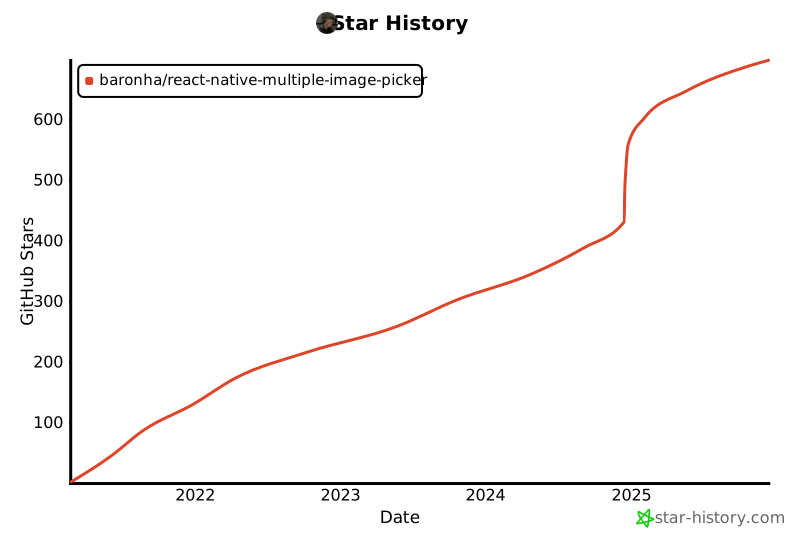](https://star-history.com/#bytebase/star-history&Date)
## Performance
We're trying to improve performance. If you have a better solution, please open a [issue](https://github.com/baronha/react-native-multiple-image-picker/issues)
or [pull request](https://github.com/baronha/react-native-multiple-image-picker/pulls). Best regards!
## Contributing
See the [contributing guide](CONTRIBUTING.md) to learn how to contribute to the repository and the development workflow.
## Contributors ✨
Thanks go to these wonderful people:
## License
MIT
1. Open your `ios/project.xcworkspace` project.
2. In the project navigator panel (located on the right side of Xcode), select your project group (i.e. the item with the blueprint icon).
3. The Xcode project editor should appear. In the left panel, under the "Project" section, select your project (if it isn't already selected).
4. In the project section's top tab bar, select the "Build Settings" tab (also make sure the "All" and "Combined" tabs are selected).
5. In the project navigator list, under the "Search Path" section, there should be a "Library Search Paths" setting (alternatively, you can search for "Library Search Paths" in the search bar).
6. Change the entry `"$(TOOLCHAIN_DIR)/usr/lib/swift-5.0/$(PLATFORM_NAME)"` to `"$(TOOLCHAIN_DIR)/usr/lib/swift-5.3/$(PLATFORM_NAME)"` i.e. change `swift-5.0` to `swift-5.3` (to show the popup dialog, double click the value/item).
- Alternatively, according to this [issue comment](https://github.com/facebook/react-native/issues/29246#issuecomment-667518920), you can clear all the items listed in the "Library Search Paths" setting. **TLDR**: Xcode automatically manages this setting, and the RN template hardcodes it to use Swift 5.0.
7. If you haven't already, make sure to create an empty swift file. Then clean the build folder (the option is in the menu bar under: "Product" -> "Clean Build Folder") and try building your project again.
8. If you are still having problems building the app, try the following and build your project again:
- Try clearing out Xcode's `derivedData` directory: `rm -rf ~/Library/Developer/Xcode/DerivedData/*` (check out this [gist](https://gist.github.com/maciekish/66b6deaa7bc979d0a16c50784e16d697) for instructions on how to clean up Xcode)
- Try clearing out the `Cocoapods` cache: `rm -rf "${HOME}/Library/Caches/CocoaPods"` (and then try running `pod install` again).
### Android
> Add Permission in `AndroidManifest.xml`
```xml
```
## Usage
See [options](#Options)
```js
import { openPicker } from '@sam904/react-native-multiple-image-picker';
// ...
const response = await openPicker(options);
```
## Options
| Property | Type | Default value | Platform | Description |
| ------------------------------------------- | :----: | :---------------------------------------------------: | :------: | :------------------------------------------------------------------------------------------------ |
| usedCameraButton | bool | true | Both | Show camera button in first row |
| mediaType | string | all | Both | Select the media format you want. Values include `all`, `image`, `video`. Default is `all`. |
| isPreview | bool | true | Both | Allows to preview the image / video will select (iOS - Forcetouch) |
| maxVideoDuration | number | 60 | Both | Show only video with time allowed (in seconds) |
| numberOfColumn | number | 3 | Both | Number of columns in a row |
| maxVideo | number | 20 | Both | Number of videos allowed to select |
| maxSelectedAssets | number | 20 | Both | Maximum number of one selection |
| singleSelectedMode | bool | false | Both | Only one image / video can be selected |
| isExportThumbnail | bool | false | Both | Export thumbnail image for Video type |
| [selectedAssets](#selectedassets-important) | Array | undefined | Both | Images / Videos selected to mark |
| doneTitle | string | Done | Both | Title in button Done |
| cancelTitle | string | Cancel | Both | Title in button Cancel |
| selectedColor | string | #FB9300 | Both | The color of the mark in the row when the user selected |
| isCrop | Boolean | false | Both | Enable crop image for `singleSelectedMode: true` |
| isCropCircle | Boolean | false | Both | Crop Image Circle for Avatar. |
| autoPlay | bool | true | iOS | Auto play video |
| allowedLivePhotos | bool | true | iOS | Allowed Live Photos type |
| emptyMessage | string | No albums | iOS | Show string when gallery empty |
| selectMessage | string | select | iOS | Show string when long pressing on image not selected |
| deselectMessage | string | deselect | iOS | Show string when long pressing on image selected |
| maximumMessageTitle | string | Notification | iOS | The title of the alert when the user chooses to exceed the specified number of pictures |
| messageTitleButton | string | Notification | iOS | The title of button in the alert when the user chooses to exceed the specified number of pictures |
| tapHereToChange | string | Tap here to change | iOS | The sub-title in navigation bar (under albums's name in iOS) |
| maximumMessage | string | You have selected the maximum number of media allowed | iOS | The description of the alert when the user chooses to exceed the specified number of pictures |
| maximumVideoMessage | string | You have selected the maximum number of media allowed | iOS | The description of the alert when the user chooses to exceed the specified number of videos |
#### selectedAssets (Important)
Get an Array value only(Only works when ```singleSelectedMode === false```). If you want React Native Multiple Image Picker to re-select previously selected images / videos, you need to add “selectedAssets” in [options](#Options). Perhaps I say a little bit confusing. See [Example](https://github.com/baronha/react-native-multiple-image-picker/tree/main/example) for more details.
## Response Object
| Property | Type | Platform | Description |
| ---------------- | :----: | :------: | :--------------------------------------------------------------------------------------------------- |
| path | string | Both | Selected media's path |
| fileName | string | Both | Selected media's file name |
| localIdentifier | string | Both | Selected media's local identifier |
| width | number | Both | Selected photo/video width |
| height | number | Both | Selected photo/video height |
| mime | string | Both | Selected photo/video MIME type (image/jpeg, image/png, video/mp4 etc...) |
| type | string | Both | Selected image type (image or video) |
| size | number | Both | Selected photo/video size in bytes |
| duration | number | Both | duration of the video (0 for images) |
| thumbnail | string | Both | Appears only in video format and you must have set isExportThumbnail = true. See [options](#Options) |
| [crop](#crop-response) | object | Both | reponse data when `isCrop: true` |
| realPath | string | Android | Real path to file |
| parentFolderName | string | Android | Parent folder name of file |
| creationDate | string | iOS | UNIX timestamp when image was created |
### Crop Response
| Property | Type | Platform |
| ---------------- | :----: | :------: |
| path | string | Both |
| width | number | Both |
| height | number | Both |
## To Do
- [x] Crop Image in iOS.
- [x] Preview Controller for `iOS`.
- [x] Handle Permission when limited on `iOS`.
- [ ] Migrating Library to the New Architecture.
- [ ] Open Camera Controller.
- [ ] Open Crop Controller.
- [ ] Open Preview Controller.
## Star History
[](https://star-history.com/#bytebase/star-history&Date)
## Performance
We're trying to improve performance. If you have a better solution, please open a [issue](https://github.com/baronha/react-native-multiple-image-picker/issues)
or [pull request](https://github.com/baronha/react-native-multiple-image-picker/pulls). Best regards!
## Contributing
See the [contributing guide](CONTRIBUTING.md) to learn how to contribute to the repository and the development workflow.
## Contributors ✨
Thanks go to these wonderful people:
## License
MIT
[TLPhotoPicker](https://github.com/tilltue/TLPhotoPicker/blob/master/LICENSE)
[PictureSelector](https://github.com/LuckSiege/PictureSelector/blob/master/LICENSE)
[iOS]: https://img.shields.io/badge/iOS-000000?style=for-the-badge&logo=ios&logoColor=white
[iOS-URL]: https://www.apple.com/ios
[Android]: https://img.shields.io/badge/Android-3DDC84?style=for-the-badge&logo=android&logoColor=white
[Android-URL]: https://www.android.com/
[React-Native]: https://img.shields.io/badge/React_Native-20232A?style=for-the-badge&logo=react&logoColor=61DAFB
[React-Native-URL]: https://reactnative.dev/
[React-Native]: https://img.shields.io/badge/React_Native-20232A?style=for-the-badge&logo=react&logoColor=61DAFB
[React-Native-URL]: https://reactnative.dev/
[Swift]: https://img.shields.io/badge/Swift-FA7343?style=for-the-badge&logo=swift&logoColor=white
[Swift-URL]: https://developer.apple.com/swift/
[Kotlin]: https://img.shields.io/badge/Kotlin-0095D5?&style=for-the-badge&logo=kotlin&logoColor=white
[Kotlin-URL]: https://kotlinlang.org/
[Logo]: https://img.shields.io/badge/React_Native_Multiple_Image_Picker-DF78C3?style=for-the-badge


