# ngRadialGauge
Angular.js Radial Gauge
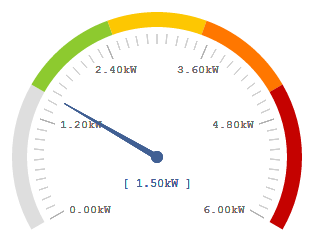
This radial gauge builded using D3.js JavaScript library is designed for Angular.js framework.
List of directive attributes:
```majorGraduations```: Quantity of major graduation distributed on the gauge
```minorGraduations```: Quantity of minor graduation between each major graduation
```majorGraduationColor```: Color used to draw major graduation lines
```majorGraduationPrecision```: Precision used for Major Graduation labels
```minorGraduationColor```: Color used to draw minor graduation lines
```majorGraduationTextColor```: Color used to draw text beside major graduation lines
```hideGraduationDetails```: Disable graduation ticks and labels. (1 = disable details) _Default: 0_
```needleColor```: Color used to draw needle pointing actual value
```precision```: Precision used for value labels
```width```: Width of the gauge
```angle```: Overall angle of the chart. e.g. 90 = half a circle. _Default: 120_
```barThickness```: Thickness of the colored bar. (Clamped between 15-60). _Default: 15_
```majorGraduationTextSize```: Numeric value used to override auto-sized graduation text
```needleValueTextSize```: Numeric value used to override auto-sized value text
```transitionMs```: Numeric value in milisecond to animate the needle. _Default: 750ms_
```data```: Single object that can hold any or all the gauge options for simplifying template. This object has higher priority then properties defined into the template, less verbose mapping into the html. Sample: options.transitionMs = 200;
**If no value are provided by the controller the needle won't be display.**
**If the value provided by the controller is outside the limits defined, the needle won't be display but the value will be display.**
## Installation
You can install with Bower:
`bower install ngRadialGauge`
## Usage
You need to include the module in your project:
```JavaScript
// in your app
angular.module('myApp', ['ngRadialGauge']);
```
Then create the content:
```HTML
```
or
```HTML
```
The variables must be provided, e.g., in your controller:
```JavaScript
app.controller('MyCtrl', ['$scope', function ($scope) {
$scope.value = 1.5;
$scope.upperLimit = 6;
$scope.lowerLimit = 0;
$scope.unit = "kW";
$scope.precision = 2;
$scope.ranges = [
{
min: 0,
max: 1.5,
color: '#DEDEDE'
},
{
min: 1.5,
max: 2.5,
color: '#8DCA2F'
},
{
min: 2.5,
max: 3.5,
color: '#FDC702'
},
{
min: 3.5,
max: 4.5,
color: '#FF7700'
},
{
min: 4.5,
max: 6.0,
color: '#C50200'
}
];
}]);
```
If you would like to help me to improve this control, notify me about any bug or just ask a for a new feature request feel free to contact me at stherrienaspnet@gmail.com.
Live Sample links:
http://plnkr.co/edit/XhzY1TTbT4Kmujhyb57b?p=preview
http://plnkr.co/edit/bcL37ZOn6YyFBX1n9oay?p=preview
(Inside a loop)
http://plnkr.co/edit/iRaxiad4Jpr7quhK1hoq?p=preview
*A Special thanks to Frank Thelen who brought this project to bower!