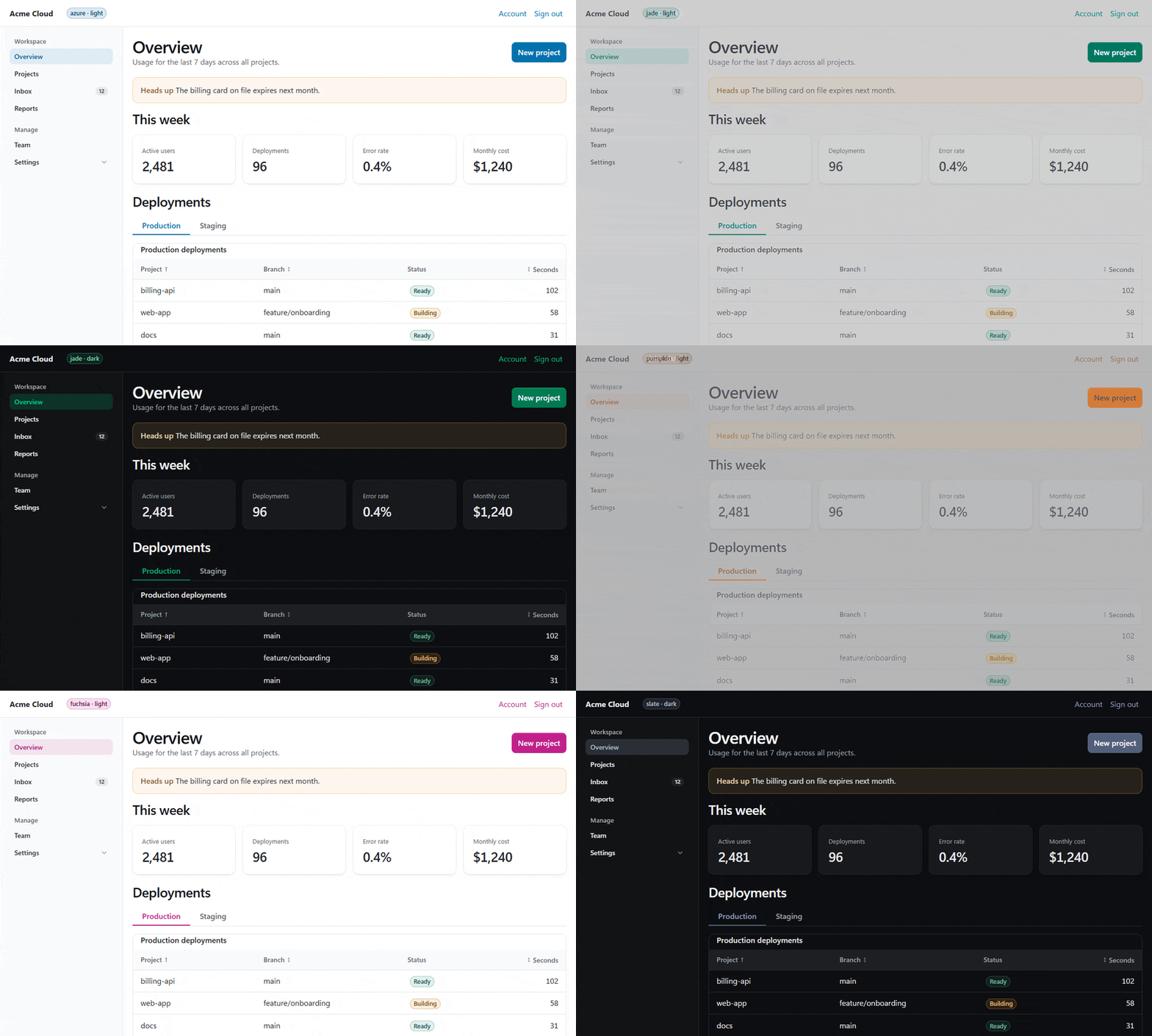
Minimal CSS for semantic HTML, rewritten in plain modern CSS.
Write the markup, get a clean, accessible, themeable page. No classes required, no JavaScript.
Pico Reforged continues [Pico CSS](https://github.com/picocss/pico) v2.1.1, the final upstream release, which is MIT licensed and archived. Pico CSS and its original design are the work of Lucas Larroche and the Pico contributors. This project is a fork with its own name. It is not the official Pico CSS and is not affiliated with it. The Pico CSS name and logo belong to the original project.
It is a drop-in for v2.1.1 markup with a modern default look. The classes, attributes and `--pico-*` variables of v2.1.1 are kept, and the CDN file names in `css/` are the same, so most pages work by changing one URL.
## What's new
- A modern default look: a 16px root, 42px controls, 8px corners, a 1px ring instead of heavy shadows, a near-neutral dark scheme, tonal secondary buttons and solid focus outlines. Field borders and focus rings reach 3:1 in every theme. See [ADR 0002](docs/adr/0002-modern-default-look.md).
- Plain CSS source in `src/`, no Sass. Cascade layers (`pico.tokens`, `pico.theme`, `pico.core`, `pico.extras`, `pico.utilities`), so your own CSS wins without `!important`.
- OKLCH colors and `light-dark()`. Light and dark are written once.
- The same 20 themes, plus custom themes from a single color.
- Opt-in extras for apps: tabs, alert, toast, badge, avatar, skeleton, app shell, data table, pagination, stepper and empty state.
- Popover and anchor positioning patterns, animated dialogs and accordions. The old markup still works.
- A compiler and CLI for custom bundles, scoping, classless builds and purging unused CSS.
- Vite and PostCSS integrations that purge unused rules in production, safely by default.
- An opt-in `modern` target (Chrome and Edge 123, Firefox 128, Safari 17.5) that ships native nesting and `light-dark()` for a smaller file.
- Files for AI agents: `llms.txt` on the site, an agent skill, `AGENTS.md`, a component manifest and DTCG design tokens.
- Size: the minified `pico.min.css` is 81 kB raw, 12.2 kB gzipped and 10.7 kB with brotli. v2.1.1 minified is 83 kB, 11.7 kB and 10.1 kB, so the raw file is 3% smaller and the compressed file 4% to 6% larger, with the popover and anchor positioning patterns and the new look included. The classless file is 70.7 kB raw against 71 kB, 11.1 kB gzipped against 10.3 kB. Details are in [docs/architecture.md](docs/architecture.md#file-size).
## Install
```sh
npm install @rusticstack/pico-reforged
# or
pnpm add @rusticstack/pico-reforged
```
Link a built file from `node_modules/@rusticstack/pico-reforged/css/` or use the CDN:
```html
```
The files in `css/` use the same names as v2.1.1:
| File | What it is |
| ------------------------------------------------------ | --------------------------------------- |
| `css/pico.min.css` | the full build, azure theme |
| `css/pico..min.css` | the full build in one of the 20 themes |
| `css/pico.classless.min.css` | classless |
| `css/pico.classless..min.css` | classless in one theme |
| `css/pico.conditional.min.css` | scoped to `.pico`, class build |
| `css/pico.classless.conditional..min.css` | scoped to `.pico`, classless |
| `css/pico.fluid.classless.min.css` | classless with a full width container |
| `css/pico.colors.min.css` | color and background utility classes |
| `css/pico.extras.min.css`, `css/extras/.min.css` | the opt-in extras (all of them, or one) |
Every file also has an unminified version without `.min`.
With Vite or Next.js you can import the package once in your CSS and get a purged stylesheet in production, see [Build integrations](#build-integrations).
## Quick start
```html
Hello
Hello, world
```
More pages are in [`examples/`](examples/). Run `pnpm build` once, then open them in a browser.
## Classless and conditional
The classless build styles the elements and needs no classes. `body > header`, `body > main` and `body > footer` become the centered container.
```html
```
The conditional build only styles what is inside `.pico`, so Pico can live next to other CSS:
```html
...
```
## Themes and dark mode
Pick a theme by file name, for example `css/pico.jade.min.css`. The themes are amber, azure, blue, cyan, fuchsia, green, grey, indigo, jade, lime, orange, pink, pumpkin, purple, red, sand, slate, violet, yellow and zinc.
Dark mode follows the system by default. Force it with `data-theme` on any element:
```html
```
Make a theme from one color with the CLI:
```sh
npx pico-reforged build --theme "#e5484d" --minify --out public/pico.css
```
See [docs/customization.md](docs/customization.md) for variables, layers, scoped builds and a runtime theme with relative colors.
## Extras
Extras are separate and never part of `pico.css`. They use semantic HTML and ARIA, so there are no classes to learn.
```html
```
Or load one: `css/extras/tabs.min.css`. The extras are tabs, alert, toast, badge, avatar, skeleton, app-shell, data-table, pagination, stepper and empty-state. [`examples/dashboard.html`](examples/dashboard.html) uses several of them.
## CLI
```sh
npx pico-reforged build --theme jade --extras tabs,badge --minify --out pico.css
```
| Command | What it does |
| ------------------------------- | ------------------------------------------ |
| `pico-reforged build [options]` | compile one stylesheet |
| `pico-reforged matrix [outDir]` | write the full file set, default `css` |
| `pico-reforged purge ` | remove unused Pico rules from a built site |
| `pico-reforged themes` | list the built-in themes |
| `pico-reforged modules` | list the modules that can be excluded |
| `pico-reforged extras` | list the opt-in extras |
Run `pico-reforged --help` for every build option (`--no-classes`, `--scope`, `--exclude`, `--fluid`, `--purge`, `--targets` and more).
## Build integrations
Import the package once in your CSS. In production the plugin scans your project and keeps only the rules you use.
```ts
// vite.config.ts
import { defineConfig } from "vite";
import pico from "@rusticstack/pico-reforged/vite";
export default defineConfig({ plugins: [pico()] });
```
```css
/* src/app.css */
@import "@rusticstack/pico-reforged";
@pico {
theme: jade;
extras: tabs badge;
}
```
Next.js uses the PostCSS plugin, `@rusticstack/pico-reforged/postcss`. Purging is safe by default: a rule is dropped only when a class, an id or an attribute name it needs is nowhere in your sources, so components, routers and scripts cannot lose a style they need. `purge: aggressive` also judges tags and attribute values and saves more, but needs `@source` or a safelist for markup that only exists at run time. Static site generators can run `pico-reforged purge ` on the built folder.
Setup for Vite, Astro, SvelteKit, Nuxt, Next.js and static generators is in [docs/integrations.md](docs/integrations.md). Working configs are in [`examples/vite`](examples/vite) and [`examples/next`](examples/next).
## File size
The ready-made files are already small, and a build can make yours smaller:
- The minified files merge sibling selectors into `:is()` (only when specificity stays the same) and write each OKLCH color with the shortest digits that give the same 8-bit sRGB value.
- With the Vite or PostCSS plugin, unused rules are dropped. On the example Vite app (`examples/vite`, jade theme and the badge extra, minified, counting only the Pico part of the stylesheet) the default safe purge takes it from 81,642 to 65,564 bytes, about 20% less, and `purge: aggressive` to 33,311 bytes, about 59% less. A page that uses more of Pico drops less: on the kitchen sink test page safe saves about 1%.
- `--targets modern` (or `targets: "modern"` in the config) skips the lowering for older browsers: `pico.min.css` drops to 70 kB raw and 10 kB with brotli, classless to 60 kB and 9.1 kB.
- When you host the files yourself, precompress them with brotli at quality 11. Most CDNs compress on the fly at a lower level, which costs about 1 kB more.
## Browser support
Chrome and Edge 111, Firefox 128 and Safari and iOS Safari 16.4, the same floor as Tailwind CSS v4. There is no legacy build. Newer features (popover, anchor positioning, `@starting-style`) are additive and degrade to a working page. Details are in [docs/browser-support.md](docs/browser-support.md).
## Coming from Pico CSS
Most pages work by swapping the CDN URL. The changes that matter (the browser floor, Sass settings and the new default look, with a block of variables that brings most of the v2.1.1 look back) are in [docs/migration.md](docs/migration.md).
## For AI agents
`AGENTS.md` is the guide for coding agents working on this repository. Agents writing pages that use Pico Reforged should read [`skills/pico-reforged/SKILL.md`](skills/pico-reforged/SKILL.md), which also ships in the npm package. [`ai/`](ai/) holds the component manifest and the design tokens as JSON, and the site serves `llms.txt` and `llms-full.txt`.
## Links
- Site: [pico.rusticstack.com](https://pico.rusticstack.com)
- Docs: [architecture](docs/architecture.md), [integrations](docs/integrations.md), [customization](docs/customization.md), [migration](docs/migration.md)
- Issues: [github.com/RusticStack/pico-reforged/issues](https://github.com/RusticStack/pico-reforged/issues), questions and ideas in [discussions](https://github.com/RusticStack/pico-reforged/discussions)
- Contributing: [.github/CONTRIBUTING.md](.github/CONTRIBUTING.md), [code of conduct](.github/CODE_OF_CONDUCT.md), [security policy](.github/SECURITY.md)
## License
[MIT](LICENSE.md). Copyright (c) 2019-2024 Pico (Lucas Larroche and contributors), copyright (c) 2026 rusticstack.