# pi-session-deck
One place to launch, monitor, reopen, and end Pi agents across repos, worktrees, and terminals.
Pi agents are most useful when they can work independently, but that can scatter context across terminal tabs, repos, and worktrees. Session Deck gives them one operational view: see what is running, understand what each agent is doing, and return to the right terminal without hunting for it.
Open Session Deck as a native Pi TUI with `/session-deck`, or keep it visible as an always-on iTerm2 Toolbelt sidebar.
 ## What you get
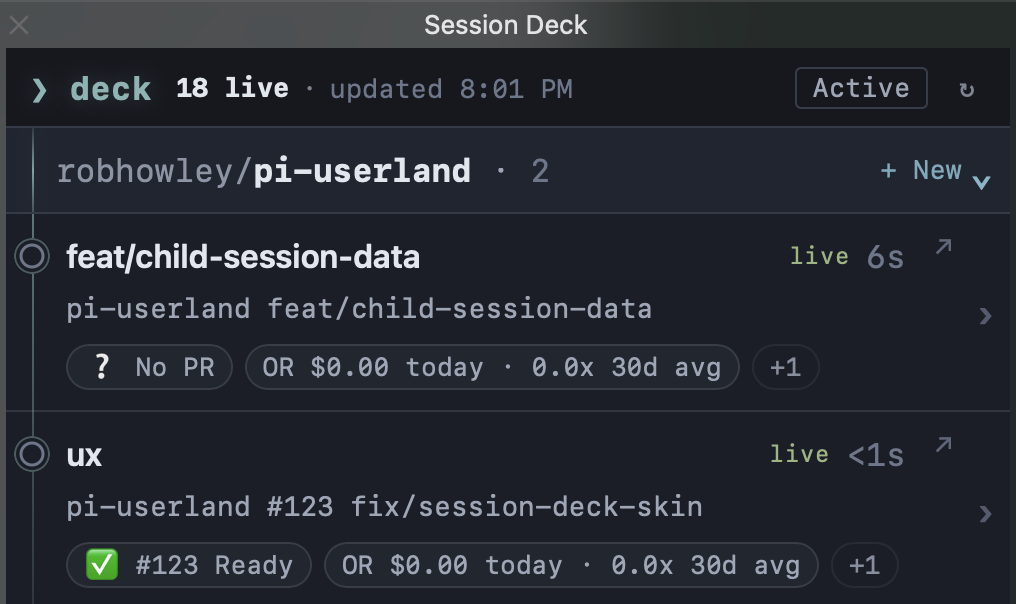
- **Agents organized by repo.** See all of your live sessions in their project context. Collapse repos that do not need attention. Temp child-runtime sessions stay hidden, with active spawned counts shown on their parent detail.
- **Detailed status at a glance.** Names, liveness, current activity, branch and worktree context, PR state, and status chips stay together.
- **A reliable way back.** Focus an active iTerm2 session or reattach to an existing tmux session from the deck.
- **End sessions without losing their history.** Preserve session history when an agent is done.
- **New isolated agents on demand.** Start Pi on a generated Git worktree in detached tmux and let it keep running headlessly.
## What you get
- **Agents organized by repo.** See all of your live sessions in their project context. Collapse repos that do not need attention. Temp child-runtime sessions stay hidden, with active spawned counts shown on their parent detail.
- **Detailed status at a glance.** Names, liveness, current activity, branch and worktree context, PR state, and status chips stay together.
- **A reliable way back.** Focus an active iTerm2 session or reattach to an existing tmux session from the deck.
- **End sessions without losing their history.** Preserve session history when an agent is done.
- **New isolated agents on demand.** Start Pi on a generated Git worktree in detached tmux and let it keep running headlessly.
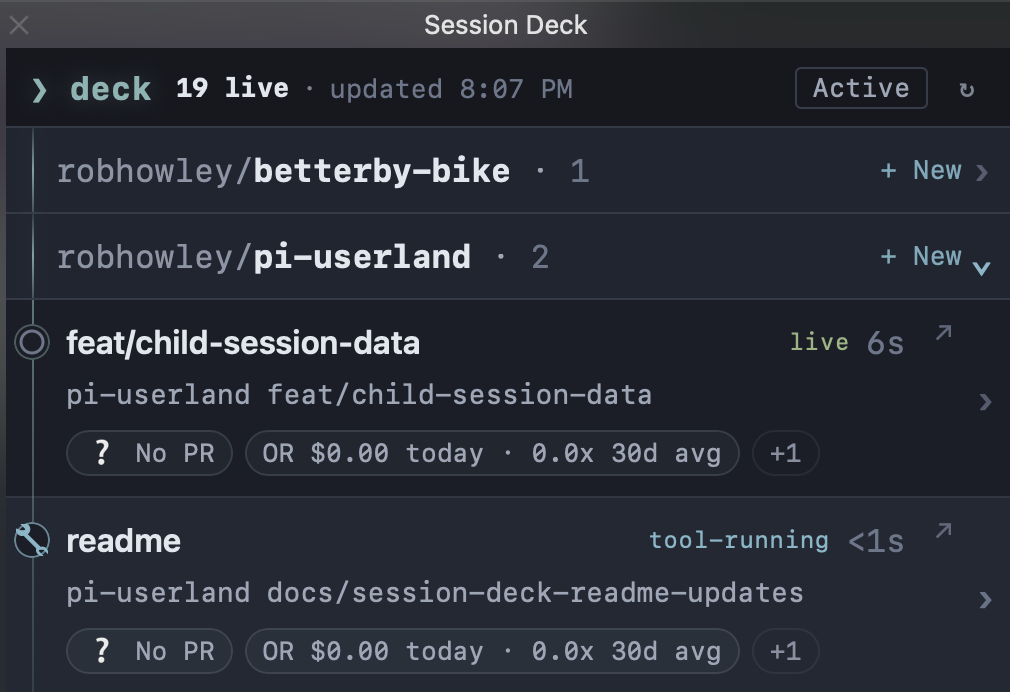 Repo groups make a busy deck readable: expand the work in motion, collapse everything else, and keep each agent's branch, activity, and status close at hand.
## Launch, return, and end sessions
Use `w` in the Pi TUI or **+ New** in the Toolbelt to start an agent on a new branch. Session Deck gives it an isolated Git worktree and detached tmux session, so it can keep working without occupying a terminal tab.
Repo groups make a busy deck readable: expand the work in motion, collapse everything else, and keep each agent's branch, activity, and status close at hand.
## Launch, return, and end sessions
Use `w` in the Pi TUI or **+ New** in the Toolbelt to start an agent on a new branch. Session Deck gives it an isolated Git worktree and detached tmux session, so it can keep working without occupying a terminal tab.
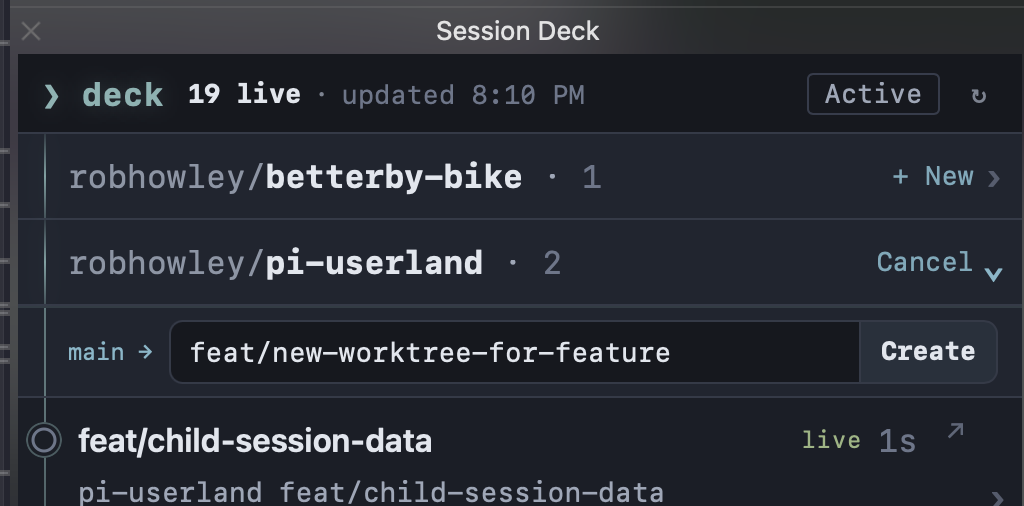 When you are ready to return, use `o` or **↗ Open** to focus or reattach to that agent's existing terminal. **↗ Open** always returns to the existing session; it never launches a duplicate.
When an agent is done, end it with `k` in the Pi TUI or **End session** in the Toolbelt.
## Installation
```shell
pi install npm:@robhowley/pi-session-deck
```
### Native Pi TUI
Run inside Pi:
```text
/session-deck
```
### iTerm2 Toolbelt
Install the Toolbelt integration:
```text
/session-deck iterm2 install
```
Enable the iTerm2 Python API if prompted, fully quit and reopen iTerm2, then open **Toolbelt → Session Deck**. If the view is missing, stale, or unable to launch/open an agent, run `/session-deck iterm2 doctor`.
The native TUI, text output, and JSON output do not require iTerm2 setup.
## Command reference
| Command | Purpose |
| ---------------------------------------- | ------------------------------------------- |
| `/session-deck` | Browse current sessions. |
| `/session-deck --all` | Include stale, dead, and unknown sessions. |
| `/session-deck --reap` | Clear expired sessions from the deck. |
| `/session-deck --identity` | Show full session identity details. |
| `/session-deck --json --session-id ` | Print one visible session record as JSON. |
| `/session-deck iterm2 install` | Install the iTerm2 Toolbelt integration. |
| `/session-deck iterm2 doctor` | Diagnose Toolbelt setup and runtime issues. |
| `/session-deck iterm2 uninstall` | Remove the iTerm2 Toolbelt integration. |
Flags can be combined.
## TUI controls
| Key | Action |
| --------- | ----------------------------------------------------------- |
| `↑` / `↓` | Move between sessions. |
| `←` / `→` | Switch repo filters. |
| `enter` | Toggle session details. |
| `w` | Launch a Pi agent on a generated worktree in detached tmux. |
| `o` | Open or focus the selected agent's terminal. |
| `k` | End the selected session. |
| `r` | Refresh. |
| `q` | Close Session Deck. |
| `esc` | Cancel an open prompt, or close Session Deck. |
## Privacy
Session Deck observes current operational state, not conversation history.
- It does not persist prompts, transcript content, tool arguments, or tool output.
- Status chips contain sanitized visible text only.
- Tool and assistant errors are reduced to compact, safe summaries.
- JSON output and the Toolbelt view omit raw terminal metadata and tmux attach details.
When you are ready to return, use `o` or **↗ Open** to focus or reattach to that agent's existing terminal. **↗ Open** always returns to the existing session; it never launches a duplicate.
When an agent is done, end it with `k` in the Pi TUI or **End session** in the Toolbelt.
## Installation
```shell
pi install npm:@robhowley/pi-session-deck
```
### Native Pi TUI
Run inside Pi:
```text
/session-deck
```
### iTerm2 Toolbelt
Install the Toolbelt integration:
```text
/session-deck iterm2 install
```
Enable the iTerm2 Python API if prompted, fully quit and reopen iTerm2, then open **Toolbelt → Session Deck**. If the view is missing, stale, or unable to launch/open an agent, run `/session-deck iterm2 doctor`.
The native TUI, text output, and JSON output do not require iTerm2 setup.
## Command reference
| Command | Purpose |
| ---------------------------------------- | ------------------------------------------- |
| `/session-deck` | Browse current sessions. |
| `/session-deck --all` | Include stale, dead, and unknown sessions. |
| `/session-deck --reap` | Clear expired sessions from the deck. |
| `/session-deck --identity` | Show full session identity details. |
| `/session-deck --json --session-id ` | Print one visible session record as JSON. |
| `/session-deck iterm2 install` | Install the iTerm2 Toolbelt integration. |
| `/session-deck iterm2 doctor` | Diagnose Toolbelt setup and runtime issues. |
| `/session-deck iterm2 uninstall` | Remove the iTerm2 Toolbelt integration. |
Flags can be combined.
## TUI controls
| Key | Action |
| --------- | ----------------------------------------------------------- |
| `↑` / `↓` | Move between sessions. |
| `←` / `→` | Switch repo filters. |
| `enter` | Toggle session details. |
| `w` | Launch a Pi agent on a generated worktree in detached tmux. |
| `o` | Open or focus the selected agent's terminal. |
| `k` | End the selected session. |
| `r` | Refresh. |
| `q` | Close Session Deck. |
| `esc` | Cancel an open prompt, or close Session Deck. |
## Privacy
Session Deck observes current operational state, not conversation history.
- It does not persist prompts, transcript content, tool arguments, or tool output.
- Status chips contain sanitized visible text only.
- Tool and assistant errors are reduced to compact, safe summaries.
- JSON output and the Toolbelt view omit raw terminal metadata and tmux attach details.