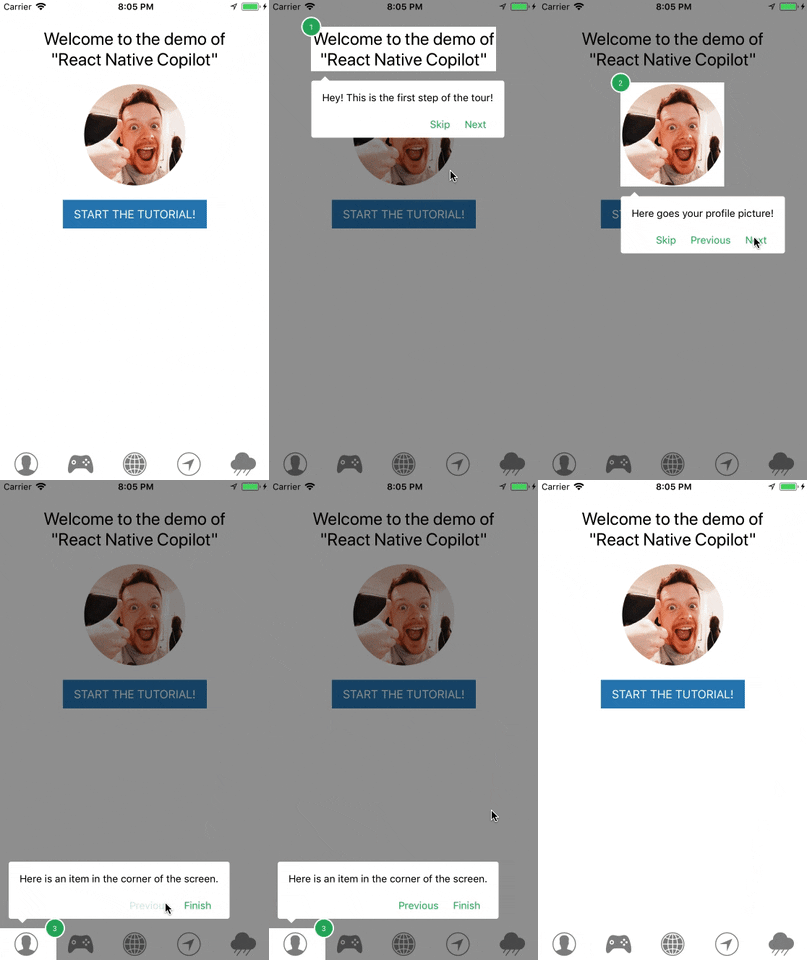
## 🚀 Quick Start
```jsx
import { TourProvider, TourStep, walkthroughable, useTour } from '@rn-vui/tour';
const WalkthroughableText = walkthroughable(Text);
function App() {
const { start } = useTour();
return (
Welcome!
);
}
```
## 📦 Installation
**NOTE**: This library provides a modern hooks-based API for creating interactive tours in React Native applications.
```javascript
import { TourProvider, TourStep, walkthroughable, useTour } from '@rn-vui/tour';
```
**Optional**: If you want to have the smooth SVG animation, you should install and link [`react-native-svg`](https://github.com/software-mansion/react-native-svg).
## 🏁 Basic Usage
### Setting up the Tour Provider
Wrap your app or the component tree where you want to use tours with `TourProvider`:
```jsx
import { TourProvider } from '@rn-vui/tour';
export default function App() {
return (
);
}
```
### Making Components Walkthroughable
Before you can highlight components, you need to make them "walkthroughable" using the `walkthroughable` HOC:
```jsx
import { walkthroughable } from '@rn-vui/tour';
const WalkthroughableText = walkthroughable(Text);
const WalkthroughableImage = walkthroughable(Image);
const WalkthroughableView = walkthroughable(View);
```
### Creating Tour Steps
Use `TourStep` to define each step in your tour:
```jsx
import { TourStep, useTour } from '@rn-vui/tour';
function HomeScreen() {
const { start } = useTour();
return (
Welcome to My App!
start()}>
Get Started
);
}
```
### Starting the Tour
Use the `start` function from `useTour` hook to begin the tour:
```jsx
function App() {
const { start } = useTour();
return (
);
}
```
## 📚 API Reference
### 🚀 Quick Reference
**Most Common Props:**
- `overlay`: Choose between `'svg'` (smooth) or `'view'` (simple)
- `backdropColor`: Customize the overlay color
- `tooltipStyle`: Style the tooltip appearance
- `verticalOffset`: Adjust tooltip position
- `stopOnOutsideClick`: Allow users to exit by clicking outside
**Essential TourStep Props:**
- `name`: Unique identifier (required)
- `order`: Step sequence number (required)
- `text`: Tooltip content (required)
- `active`: Enable/disable step (optional)
---
### 🎯 TourProvider Props
| Prop | Type | Default | Description |
|------|------|---------|-------------|
| `overlay` | `'svg' \| 'view'` | `'svg'` | 🎨 Type of overlay to use. SVG provides smooth animations but requires react-native-svg |
| `animationDuration` | `number` | `300` | ⏱️ Duration of animations in milliseconds |
| `tooltipComponent` | `React.ComponentType` | - | 🛠️ Custom tooltip component |
| `tooltipStyle` | `ViewStyle` | - | 🎨 Custom styles for the tooltip wrapper |
| `stepNumberComponent` | `React.ComponentType` | - | 🔢 Custom step number component |
| `animated` | `boolean` | `true` | ✨ Whether to animate the tour transitions |
| `labels` | `Labels` | - | 🌐 Custom labels for navigation buttons |
| `androidStatusBarVisible` | `boolean` | `false` | 📱 Whether to show status bar on Android during tour |
| `svgMaskPath` | `SvgMaskPathFunction` | - | 🎭 Custom SVG mask path function |
| `verticalOffset` | `number` | `0` | 📍 Vertical offset for tooltip positioning |
| `arrowColor` | `string` | - | 🎨 Color of the tooltip arrow |
| `arrowSize` | `number` | - | 📏 Size of the tooltip arrow |
| `margin` | `number` | - | 📐 Margin around the highlighted element |
| `stopOnOutsideClick` | `boolean` | `false` | 🖱️ Whether clicking outside stops the tour |
| `backdropColor` | `string` | `'rgba(0, 0, 0, 0.4)'` | 🌑 Color of the backdrop overlay |
| `easing` | `EasingFunction` | - | 🎬 Custom easing function for animations |
---
### 🎯 TourStep Props
| Prop | Type | Default | Required | Description |
|------|------|---------|----------|-------------|
| `name` | `string` | - | ✅ **Required** | 🏷️ Unique identifier for the step |
| `order` | `number` | - | ✅ **Required** | 🔢 Order of the step in the tour sequence |
| `text` | `React.ReactElement \| string` | - | ✅ **Required** | 💬 Text or React element to display in tooltip |
| `children` | `React.ReactElement` | - | ✅ **Required** | 👶 The component to be highlighted |
| `active` | `boolean` | `true` | ❌ Optional | 🔄 Whether this step is active/visible |
| `version` | `string \| number` | - | ❌ Optional | 🔄 Change this to force component re-registration |
---
### 🎣 useTour Hook Return Values
| Property | Type | Description |
|----------|------|-------------|
| `start` | `(fromStep?: string, scrollView?: ScrollView) => Promise` | 🚀 Start the tour from a specific step |
| `stop` | `() => Promise` | 🛑 Stop the current tour |
| `goToNext` | `() => Promise` | ⏭️ Navigate to the next step |
| `goToPrev` | `() => Promise` | ⏮️ Navigate to the previous step |
| `goToNth` | `(n: number) => Promise` | 🔢 Navigate to a specific step by index (1-based) |
| `currentStep` | `Step \| undefined` | 📍 Current active step |
| `visible` | `boolean` | 👁️ Whether the tour modal is visible |
| `tourEvents` | `Emitter` | 📡 Event emitter for tour lifecycle events |
| `isFirstStep` | `boolean` | 🎯 Whether current step is the first |
| `isLastStep` | `boolean` | 🏁 Whether current step is the last |
| `currentStepNumber` | `number` | 🔢 Current step number (1-based) |
| `totalStepsNumber` | `number` | 📊 Total number of steps |
---
### 🔧 walkthroughable HOC
The `walkthroughable` HOC doesn't accept any specific props. It simply wraps your component to make it compatible with the tour system.
```jsx
// Usage
const WalkthroughableText = walkthroughable(Text);
const WalkthroughableImage = walkthroughable(Image);
```
---
### 📡 Event Types
| Event | Payload | Description |
|-------|---------|-------------|
| `start` | `undefined` | 🎬 Fired when the tour starts |
| `stop` | `undefined` | 🛑 Fired when the tour ends or is stopped |
| `stepChange` | `Step \| undefined` | 🔄 Fired when navigating between steps |
---
### 🌐 Labels Interface
```typescript
type Labels = Partial<{
skip: string; // Skip button text
previous: string; // Previous button text
next: string; // Next button text
finish: string; // Finish button text
}>;
// Example usage
```
## 🎨 Advanced Features
### Overlays and Animation
The overlay in react-native-vikalp-tour draws a dark transparent overlay around the screen. Choose between two overlay options:
**SVG Overlay** (Recommended):
- Smooth animations
- Requires `react-native-svg`
- Better performance on most devices
**View Overlay**:
- Simple rectangles
- No additional dependencies
- Better for low-end Android devices
```jsx
// SVG overlay (default if react-native-svg is installed)
// View overlay
```
### Custom Tooltip Styling
Customize the appearance of your tooltips:
```jsx
const customTooltipStyle = {
backgroundColor: '#9FA8DA',
borderRadius: 10,
padding: 10,
};
```
### Custom Components
Create your own tooltip and step number components:
```jsx
const CustomTooltip = ({ isFirstStep, isLastStep, goToNext, goToPrev, stop, currentStep }) => (
{currentStep?.text}
{!isFirstStep && }
{!isLastStep && }
);
```
### Event Handling
Listen to tour events for analytics or custom behavior:
```jsx
import { useTour } from '@rn-vui/tour';
import { useEffect } from 'react';
function App() {
const { tourEvents } = useTour();
useEffect(() => {
const handleStart = () => console.log('Tour started');
const handleStop = () => console.log('Tour completed');
const handleStepChange = (step) => console.log('Step changed:', step?.name);
tourEvents.on('start', handleStart);
tourEvents.on('stop', handleStop);
tourEvents.on('stepChange', handleStepChange);
return () => {
tourEvents.off('start', handleStart);
tourEvents.off('stop', handleStop);
tourEvents.off('stepChange', handleStepChange);
};
}, [tourEvents]);
return ;
}
```
### ScrollView Support
For tours within ScrollViews, pass the ScrollView reference:
```jsx
import { ScrollView } from 'react-native';
function ScrollableScreen() {
const { start } = useTour();
const scrollViewRef = useRef(null);
return (
Scrollable Content
);
}
```
### Internationalization (i18n)
Customize button labels for different languages:
```jsx
```
## 🤝 Contributing
Issues and Pull Requests are always welcome.
If you are interested in becoming a maintainer, get in touch with us by sending an email or opening an issue. You should already have code merged into the project. Active contributors are encouraged to get in touch.
This project is maintained by the community. Feel free to contribute!