<br/>
<div align="center">
  <a href="//handsontable.com" target="_blank"><img src="https://raw.githubusercontent.com/handsontable/static-files/master/Images/Logo/Handsontable/Handsontable-logo-300-74-new.png" alt="Handsontable Community Edition logo" /></a>
</div>

<br/><br/>

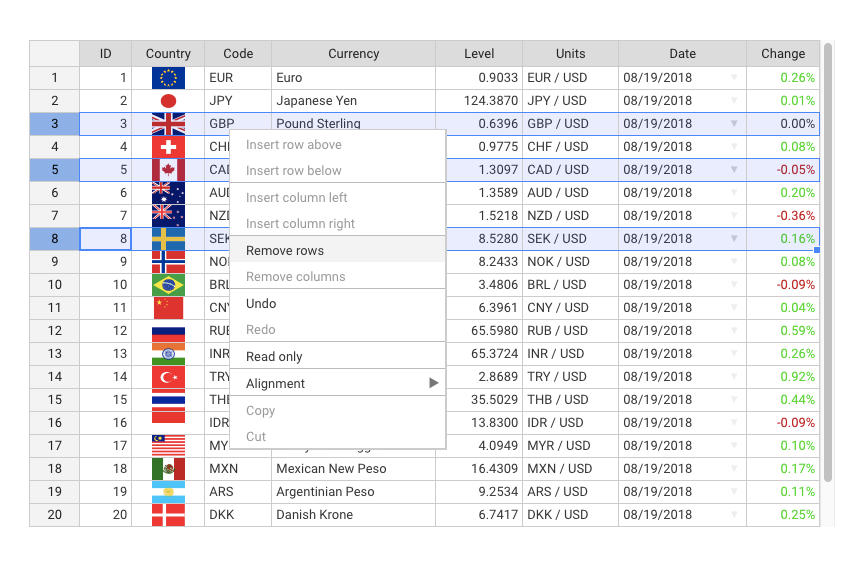
[**Handsontable Community Edition (CE)**](//handsontable.com) is an open source JavaScript/HTML5 UI Spreadsheet component for web apps. It easily integrates with any data source and comes with a variety of useful features like data binding, validation, sorting or powerful context menu. Actively supported by the Handsoncode team and many contributors.

If you are looking for a commercial version, try out [Handsontable Pro](//github.com/handsontable/handsontable-pro).

[![Build status](https://travis-ci.org/handsontable/handsontable.png?branch=master)](//travis-ci.org/handsontable/handsontable)
[![Known Vulnerabilities](https://snyk.io/test/github/handsontable/handsontable/badge.svg)](//snyk.io/test/github/handsontable/handsontable)
[![npm](https://img.shields.io/npm/dm/handsontable.svg)](//npmjs.com/package/handsontable)
[![npm](https://img.shields.io/github/contributors/handsontable/handsontable.svg)](//github.com/handsontable/handsontable/graphs/contributors)

<br/>

## Table of contents

1. [What to use it for?](#what-to-use-it-for)
1. [Installation](#installation)
2. [Basic usage](#basic-usage)
3. [Examples](#examples)
4. [Features](#features)
5. [Screenshot](#screenshot)
6. [Resources](#resources)
7. [Wrappers](#wrappers)
8. [Support](#support)
9. [Contributing](#contributing)
10. [Community](#community)
11. [License](#license)

<br/>

### What to use it for?
The list below gives a rough idea on what you can do with Handsontable CE, but it shouldn't limit you in any way:

- Database editing
- Configuration controlling
- Data merging
- Team scheduling
- Sales reporting
- Financial analysis

<br/>

### Installation
There are many ways to install Handsontable CE, but we suggest using npm:
```
npm install handsontable
```

**Alternative ways to install**
- See the [download section](//handsontable.com/ce-download.html) on how to install Handsontable CE using nuget, bower, yarn and more.

<br/>

### Basic usage
Assuming that you have already installed Handsontable CE, create an empty `<div>` element that will be turned into a spreadsheet:

```html
<div id="example"></div>
```
In the next step, pass a reference to that `<div>` element into the Handsontable CE constructor and fill the instance with sample data:
```javascript
var data = [
  ["", "Tesla", "Volvo", "Toyota", "Honda"],
  ["2017", 10, 11, 12, 13],
  ["2018", 20, 11, 14, 13],
  ["2019", 30, 15, 12, 13]
];

var container = document.getElementById('example');
var hot = new Handsontable(container, {
  data: data,
  rowHeaders: true,
  colHeaders: true
});
```

<br/>

### Examples
- [See a live demo](//handsontable.com/examples.html)

<br/>

### Features

**Some of the most popular features include:**

- Sorting data
- Data validation
- Conditional formatting
- Freezing rows/columns
- Merging cells
- Defining custom cell types
- Moving rows/columns
- Resizing rows/columns
- Context menu
- Adding comments to cells
- Dragging fill handle to populate data

[See a comparison table](//docs.handsontable.com/tutorial-features.html)

<br/>

### Screenshot
<div align="center">
<a href="//handsontable.com/examples.html">
<img src="https://raw.githubusercontent.com/handsontable/static-files/master/Images/Screenshots/handsontable-ce-showcase.png" align="center" alt="Handsontable Community Edition Screenshot"/>
</a>
</div>

<br/>

### Resources
- [API Reference](//docs.handsontable.com/Core.html)
- [Compatibility](//docs.handsontable.com/tutorial-compatibility.html)
- [Change log](//docs.handsontable.com/tutorial-release-notes.html)
- [Roadmap](//trello.com/b/PztR4hpj)
- [Newsroom](//twitter.com/handsontable)

<br/>

### Wrappers
Handsontable CE comes with wrappers and directives for most popular frameworks:

- [Angular](//github.com/handsontable/angular-handsontable)
- [Angular 1](//github.com/handsontable/ngHandsontable)
- [React](//github.com/handsontable/react-handsontable)
- [Vue](//github.com/handsontable/vue-handsontable-official)
- [Polymer](//github.com/handsontable/hot-table)
- [Typescript file](//github.com/handsontable/handsontable/blob/master/handsontable.d.ts)

<br/>

### Support
Report all the suggestions and problems on [GitHub Issues](//github.com/handsontable/handsontable/issues).

An open source version doesn't include a commercial support. You need to purchase [Handsontable Pro](//github.com/handsontable/handsontable-pro) license or [contact us](//handsontable.com/contact.html) directly in order to obtain a technical support from the Handsoncode team.

<br/>

### Contributing
If you would like to help us to develop Handsontable, please take a look at this [guide for contributing](//github.com/handsontable/handsontable/blob/master/CONTRIBUTING.md).

<br/>

### Community
- [GitHub issues](//github.com/handsontable/handsontable/issues)
- [Stackoverflow](//stackoverflow.com/tags/handsontable)
- [Forum](//forum.handsontable.com)
- [Twitter](//twitter.com/handsontable)

<br/>

### License
Handsontable Community Edition is released under the MIT license. [Learn more](//github.com/handsontable/handsontable/blob/master/LICENSE).

Copyrights belong to Handsoncode sp. z o.o.