# `` 导航栏
NavigationBar 组件定义一个页面导航条, 用于页面顶部显示页面标题及按钮等。
## Props
| Prop | Type | Default | Note |
|---|---|---|---|
| [View props...](https://facebook.github.io/react-native/docs/view.html) | | | NavigationBar 组件继承 View 组件的全部属性。
| type | string | 'ios' | 风格类型。
- auto: 自动, 根据操作系统自动选择
- ios: iOS风格
- android: Android风格
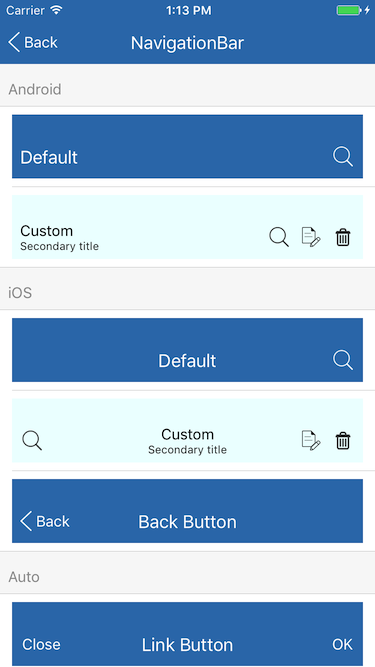
显示效果参见[Screenshots](#screenshots)。
| title | string
element | | 导航条标题, 可传入字符串或 React Native 组件, 传入字符串时使用``组件渲染。
| titleStyle | 同Text.style | | 导航条标题样式, 当 title 类型为 element 时无效。
| leftView | element | | 导航条左视图。
| rightView | element | | 导航条右视图。
| tintColor | string | | 导航条左、右视图文字与图像颜色, 默认值在 Theme 中设置。
| background | element | | 导航条背景视图。
| hidden | bool | false | 是否隐藏导航条
| animated | bool | true | 显示/隐藏导航条和状态栏时是否有动画效果
| statusBarStyle | string | 'default' | 系统状态栏样式(iOS only)。
- default: 默认, 黑色文字或图标。
- light-content: 亮色调, 白色文字或图标。
| statusBarColor | string | | 导航条背景颜色, 默认值在 Theme 中设置。
| statusBarHidden | bool | false | 是否隐藏系统状态栏, 为 true 时系统状态栏与导航条均不显示。
| statusBarInsets | bool | true | 是否自动增加状态栏占位空间(iOS only)。
## Static Props
| Prop | Type | Default | Note |
|---|---|---|---|
| [Title](#navigationbartitle--props) | class | | 导航条标题组件。
| [Button](#navigationbarbutton--props) | class | | 导航条按钮组件。
| [LinkButton](#navigationbarlinkbutton--props) | class | | 导航条链接按钮组件, 继承自 NavigationBar.Button。
| [IconButton](#navigationbariconbutton--props) | class | | 导航条图标按钮组件, 继承自 NavigationBar.Button。
| [BackButton](#navigationbarbackbutton--props) | class | | 导航条返回按钮组件, 继承自 NavigationBar.Button。
## `` Props
| Prop | Type | Default | Note |
|---|---|---|---|
| [Text props...](https://facebook.github.io/react-native/docs/text.html) | | | NavigationBar.Title 组件继承 Text 组件的全部属性。
| text | string
number | | 显示文本, 可以是字符串或数字。
| numberOfLines | number | 1 | 显示行数, 继承自 Text 组件并修改默认值。
| allowFontScaling | bool | false | 是否允许系统自动缩放字体大小(iOS only), 继承自 Text 组件并修改默认值。
## `` Props
| Prop | Type | Default | Note |
|---|---|---|---|
| [TouchableOpacity props...](https://facebook.github.io/react-native/docs/touchableopacity.html) | | | NavigationBar.Button 组件继承 TouchableOpacity 组件的全部属性。
| hitSlop | 同TouchableOpacity.hitSlop | {top: 12, bottom: 12, left: 8, right: 8} | 继承 TouchableOpacity 组件并修改默认值。
## `` Props
| Prop | Type | Default | Note |
|---|---|---|---|
| [NavigationBar.Button props...](#navigationbarbutton--props) | | | NavigationBar.LinkButton 组件继承 NavigationBar.Button 组件的全部属性。
| title | string
number | | 按钮标题, 可以是字符串或数字。
## `` Props
| Prop | Type | Default | Note |
|---|---|---|---|
| [NavigationBar.Button props...](#navigationbarbutton--props) | | | NavigationBar.IconButton 组件继承 NavigationBar.Button 组件的全部属性。
| icon | 同Image.source | | 按钮图标。
## `` Props
| Prop | Type | Default | Note |
|---|---|---|---|
| [NavigationBar.Button props...](#navigationbarbutton--props) | | | NavigationBar.BackButton 组件继承 NavigationBar.Button 组件的全部属性。
| title | string
number | | 标题, 可以是字符串或数字。默认值在 Theme 中设置。
| icon | 同Image.source | | 按钮图标, 默认为 iOS 系统返回按钮的样式。
## Example
简单用法
```
```
Android风格导航条
```
```
返回按钮
```
} />
```
自定义
```
}
leftView={}
rightView={
}
/>
```
## Screenshots