# ranui
Development scheme based on `Web Components`
## Feature
1. **High Cross-Framework Compatibility**: Our solution seamlessly adapts to a wide array of leading front-end frameworks, including `React`, `Vue`, `Preact`, `SolidJS`, `Svelte`, and more. It also integrates smoothly with any project built on `JavaScript` and adhering to `W3C` standards. No matter your choice of technology stack, we guarantee consistent and reliable support.
2. **Pure Native Experience**: Our solution eliminates the need for dependencies on front-end frameworks like `npm`, `React`/`Vue`, or complex build tools such as `webpack`/`vite`. It truly embodies the essence of Web technology. You can get started effortlessly, just like manipulating native `div` tags, immediately experiencing the purity and intuitiveness of the technology. This design not only simplifies project structure but also reduces the cost of learning and usage, enabling every developer to appreciate the native charm of Web technology.
3. **Ultimate Modular Design**: Utilizing the principle of minimal modularization, we carefully dismantle large and complex systems or applications into extremely small, functionally independent, and easily reusable component units. This approach significantly enhances code maintainability, scalability, and reusability.
4. **Fully Open-Source for Free Learning**: Our project fully adheres to the `MIT` open-source license, granting unrestricted access to all source code. This means you are free to access, learn from, reference, and even modify our code, whether for personal development or commercial applications. We firmly believe that open-source is a vital pathway for technological advancement and innovation.
5. **Interactive and Comprehensive Documentation**: We provide detailed and highly interactive documentation, where all component examples are live and interactive. This allows you to directly experience the component functionality while reading, deepening your understanding and enabling quick hands-on learning. This design is aimed at providing you with the most intuitive and efficient learning experience possible.
6. **Type-Checking Support**: Our development environment is fully built on `TypeScript`, equipped with comprehensive declaration files and type definitions, ensuring smooth integration for both `JavaScript` and `TypeScript` projects. With powerful type-checking capabilities, we significantly enhance code readability, maintainability, and project robustness, bringing unprecedented convenience and peace of mind to development work.
7. **Enhanced Durability and Stability**: Our solution offers exceptional stability, eliminating concerns about disruptive updates encountered during version upgrades, such as `React` from version `15` to `16` (with `fiber`) or `Vue` from version `2` to `3` (with `hooks`). We ensure that your components won't be forced into unnecessary updates or redevelopments, thus avoiding potential project interruptions and additional workloads. This translates into a continuous and hassle-free project operation.
## Situation




 - `git`:`https://github.com/chaxus/ran/tree/main/packages/ranui`
- `npm`:`https://www.npmjs.com/package/ranui`
## Usage
In most cases, you can use it just like a native `div` tag.
Here are some examples
1. `html`
2. `js`
3. `jsx`
4. `vue`
5. `tsx`
### 1.`html`
```html
Button
```
### 2.`js`
```js
import 'ranui';
const Button = document.createElement('r-button');
Button.appendChild('this is button text');
document.body.appendChild(Button);
```
### 3.`jsx`
Because `react` synthetic events, in order to more convenient to use, by `react` higher-order components encapsulation [ranui](https://www.npmjs.com/package/ranui), Output the [@ranui/react](https://www.npmjs.com/package/@ranui/react)
In `react`, use the [@ranui/react](https://www.npmjs.com/package/@ranui/react) will be more smooth, by higher-order functions after package, and `react` ecosystem.
[ranui](https://www.npmjs.com/package/ranui), however, still can be in any `js` or `ts` in use.
```jsx
import 'ranui';
const App = () => {
return (
<>
Button
);
};
```
### 4.`vue`
```vue
Button
```
### 5.`tsx`
Because `react` synthetic events, in order to more convenient to use, by `react` higher-order components encapsulation [ranui](https://www.npmjs.com/package/ranui), Output the [@ranui/react](https://www.npmjs.com/package/@ranui/react)
In `react`, use the [@ranui/react](https://www.npmjs.com/package/@ranui/react) will be more smooth, by higher-order functions after package, and `react` ecosystem.
[ranui](https://www.npmjs.com/package/ranui), however, still can be in any `js` or `ts` in use.
```tsx
// react 18
import type { SyntheticEvent } from 'react';
import React, { useRef } from 'react';
import 'ranui';
const FilePreview = () => {
const ref = useRef(null);
const uploadFile = (e: SyntheticEvent) => {
if (ref.current) {
const uploadFile = document.createElement('input');
uploadFile.setAttribute('type', 'file');
uploadFile.click();
uploadFile.onchange = (e) => {
const { files = [] } = uploadFile;
if (files && files?.length > 0 && ref.current) {
ref.current.setAttribute('src', '');
const file = files[0];
const url = URL.createObjectURL(file);
ref.current.setAttribute('src', url);
}
};
}
};
return (
- `git`:`https://github.com/chaxus/ran/tree/main/packages/ranui`
- `npm`:`https://www.npmjs.com/package/ranui`
## Usage
In most cases, you can use it just like a native `div` tag.
Here are some examples
1. `html`
2. `js`
3. `jsx`
4. `vue`
5. `tsx`
### 1.`html`
```html
Button
```
### 2.`js`
```js
import 'ranui';
const Button = document.createElement('r-button');
Button.appendChild('this is button text');
document.body.appendChild(Button);
```
### 3.`jsx`
Because `react` synthetic events, in order to more convenient to use, by `react` higher-order components encapsulation [ranui](https://www.npmjs.com/package/ranui), Output the [@ranui/react](https://www.npmjs.com/package/@ranui/react)
In `react`, use the [@ranui/react](https://www.npmjs.com/package/@ranui/react) will be more smooth, by higher-order functions after package, and `react` ecosystem.
[ranui](https://www.npmjs.com/package/ranui), however, still can be in any `js` or `ts` in use.
```jsx
import 'ranui';
const App = () => {
return (
<>
Button
);
};
```
### 4.`vue`
```vue
Button
```
### 5.`tsx`
Because `react` synthetic events, in order to more convenient to use, by `react` higher-order components encapsulation [ranui](https://www.npmjs.com/package/ranui), Output the [@ranui/react](https://www.npmjs.com/package/@ranui/react)
In `react`, use the [@ranui/react](https://www.npmjs.com/package/@ranui/react) will be more smooth, by higher-order functions after package, and `react` ecosystem.
[ranui](https://www.npmjs.com/package/ranui), however, still can be in any `js` or `ts` in use.
```tsx
// react 18
import type { SyntheticEvent } from 'react';
import React, { useRef } from 'react';
import 'ranui';
const FilePreview = () => {
const ref = useRef(null);
const uploadFile = (e: SyntheticEvent) => {
if (ref.current) {
const uploadFile = document.createElement('input');
uploadFile.setAttribute('type', 'file');
uploadFile.click();
uploadFile.onchange = (e) => {
const { files = [] } = uploadFile;
if (files && files?.length > 0 && ref.current) {
ref.current.setAttribute('src', '');
const file = files[0];
const url = URL.createObjectURL(file);
ref.current.setAttribute('src', url);
}
};
}
};
return (
choose file to preview
);
};
```
jsx defines the types of all HTML-native components in TypeScript. The type 'web component' is not in the jsx definition. You need to add it manually. Otherwise there is a type problem, but it actually works.
```ts
// typings.d.ts
interface RButton {
type?: string;
onClick?: React.MouseEventHandler | undefined;
}
interface RPreview {
src?: string | Blob | ArrayBuffer;
onClick?: React.MouseEventHandler | undefined;
ref?: React.MutableRefObject;
}
declare namespace JSX {
interface IntrinsicElements {
'r-preview': React.DetailedHTMLProps, HTMLDivElement> & RPreview;
'r-button': React.DetailedHTMLProps, HTMLDivElement> & RButton;
}
}
```
## Import
Support for on-demand import
```js
import 'ranui/button';
```
For some globally displayed components, such as preview and message, additional styles need to be loaded
```js
import 'ranui/preview';
import 'ranui/style';
```
It can also be imported globally, which is more convenient, so that there is no need to consider anything, so that it is done.
- `ES module`
```js
import 'ranui';
```
- `UMD`, `IIFE`, `CJS`
```html
```
## Overview
- `Button`
Primary button
Warning button
Text button
Default button
- `Icon`
- `Skeleton`
- `Input`
- `message`
Information prompt
Warning prompt
Error prompt
Success tip
toast tip
- `Tab`
tab1
tab2
tab3
- `Radar`
- `Progress`
- `Player`
- `Select`
Mike
Tom
Lucy
## Event
- `react`
[@ranui/react](https://www.npmjs.com/package/@ranui/react) By `react` higher-order functions encapsulated [ranui](https://www.npmjs.com/package/ranui) and become, `Event` events follow `react` Event specification. It is slightly different from the W3C standard.
- Modern 'web' standards
In the W3C standard, you can use the on attribute to define event handlers on HTML elements. But this is the old event handler approach.
Modern web development recommends the addEventListener method.
```html
Button
```
However, if you do need to use the 'on' attribute, here is an example:
```html
```
Note that using the 'on' attribute to define event handlers has some limitations and disadvantages.
For example, you can't use event capture or event delegation, and each event type requires a separate attribute.
This is why the addEventListener method is recommended for modern web development.
You can also use the 'property' method:
```html
```
## style
### `::part`
```html
```
For specific pseudo-class names(`::part`), please refer to the specific introduction.
### Pass in by attribute
A `sheet` attribute is added to all components, passing in a `CSSStyleSheet` string. It will be inserted directly into the `Shadow DOM`.
### `CSS3` variable `var`
By setting the `CSS3` variable for a component, you can customize the specified styles within the component, such as:
```html
```
For specific `CSS3` variable names, refer to the introduction and description of each component.
## Compatibility
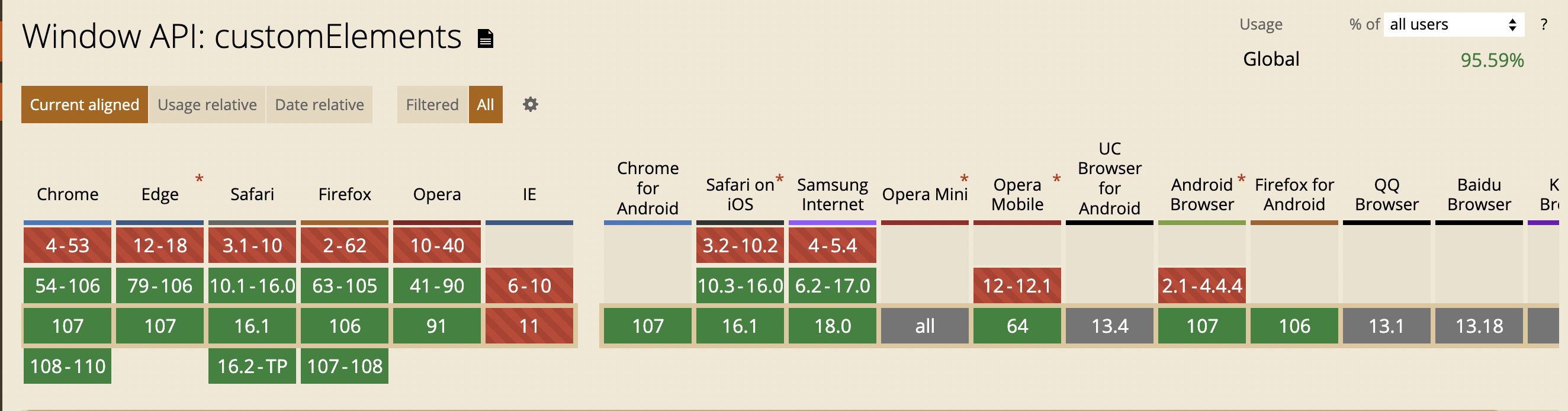
- Do not support `IE`, others have better support
## Contributors
 ## Other
1. [优秀的组件设计](https://www.checklist.design/)
2. [在线生成 CSS 渐变色](https://webgradients.com/)
3. [优秀设计作品,有 psd 和 sketch](https://webgradients.com/)
4. [3D UI 设计,类似于 3D 版的 figma](https://spline.design/)
5. [设计规范](https://lawsofux.com/)
6. [优秀设计作品](https://dribbble.com/)
7. [element UI 中文网](https://element.eleme.cn/#/zh-CN)
8. [Ant design 中文网](https://ant.design/index-cn)
9. [在线绘制 CSS 动画](https://animista.net/)
10. [tailwindcss](https://www.tailwindcss.cn/resources)
11. [animate css](https://animate.style/)
12. [can i use](https://caniuse.com/)
13. [figma](https://www.figma.com/)
## Protocols and standards
1. [RFCs](https://www.rfc-editor.org/)
2. [ECMA](https://www.ecma-international.org/)
3. [w3c](https://www.w3.org/)
## Other
1. [优秀的组件设计](https://www.checklist.design/)
2. [在线生成 CSS 渐变色](https://webgradients.com/)
3. [优秀设计作品,有 psd 和 sketch](https://webgradients.com/)
4. [3D UI 设计,类似于 3D 版的 figma](https://spline.design/)
5. [设计规范](https://lawsofux.com/)
6. [优秀设计作品](https://dribbble.com/)
7. [element UI 中文网](https://element.eleme.cn/#/zh-CN)
8. [Ant design 中文网](https://ant.design/index-cn)
9. [在线绘制 CSS 动画](https://animista.net/)
10. [tailwindcss](https://www.tailwindcss.cn/resources)
11. [animate css](https://animate.style/)
12. [can i use](https://caniuse.com/)
13. [figma](https://www.figma.com/)
## Protocols and standards
1. [RFCs](https://www.rfc-editor.org/)
2. [ECMA](https://www.ecma-international.org/)
3. [w3c](https://www.w3.org/)