# ranui
基于 `Web Components`开发方案
## Feature 特点
1. **高度跨框架兼容**: 能够轻松适配多种主流前端框架,包括`React`、`Vue`、`Preact`、`SolidJS`、`Svelte`等,甚至任何基于`JavaScript`并遵循`W3C`标准的项目也能无缝集成。无论您的技术栈如何选择,我们都能提供稳定且一致的支持。
2. **原生纯粹的体验**: 无需依赖`npm`、`React/Vue`等前端框架,也无需`webpack/vite`等复杂的构建工具,真正回归`Web`技术的最本质。您可以像操作原生`div`标签一样轻松上手,即刻感受技术的纯粹与直观。这样的设计不仅简化了项目的结构,更降低了学习和使用的成本,让每一个开发者都能体验到`Web`技术的原生魅力。
3. **极致模块化设计**: 采用最小模块化原则,将庞大复杂的系统或应用程序精心拆解为尺寸极小、功能独立且易于复用的组件单元。有助于提高代码的可维护性、可扩展性和可重用性
4. **全面开源自由学习**: 项目完全遵循`MIT`开源协议,所有源代码毫无保留地对外开放。这意味着可以自由地访问、学习、参考甚至修改我们的代码,无论是为了个人提升还是商业应用,我们都为您提供了一个开放、透明的平台。坚信,**开源是促进技术进步和创新的重要途径**。
5. **交互式丰富文档**: 提供详尽且互动性强的文档,其中所有组件实例均可进行实时交互,让您在阅读的同时能够直接体验组件功能,加深理解并快速上手。这样的设计旨在为您提供最直观、最高效的学习体验。
6. **支持类型校验**: 开发环境完全基于`TypeScript`构建,配备了完整的声明文件和类型定义,确保无论是`JavaScript`还是`TypeScript`项目都能得到顺畅的集成。通过强大的类型检查功能,我们极大地提升了代码的可读性、可维护性,以及项目的稳健性,为开发工作带来前所未有的便捷与安心。
7. **更加持久和稳定**:具备出色的稳定性,无需担忧类似于`React`从`15`版升级到`16`版(`fiber`),或`Vue`从`2`版升级到`3`版时(`hooks`)可能遭遇的破坏性更新问题。我们确保您的组件不会因此被迫进行不必要的更新或重新开发,从而避免了潜在的项目中断和额外工作量。意味着选择了持续、无忧的项目运行。
## Situation 项目情况




 - `git`:`https://github.com/chaxus/ran/tree/main/packages/ranui`
- `npm`:`https://www.npmjs.com/package/ranui`
## Usage 使用
大多数情况都可以像原生的 `div` 标签一样使用。
接下来是一些使用例子
1. `html`
2. `js`
3. `jsx`
4. `vue`
5. `tsx`
### 1.`html`
```html
Button
```
### 2.`js`
```js
import 'ranui';
const Button = document.createElement('r-button');
Button.appendChild('this is button text');
document.body.appendChild(Button);
```
### 3.`jsx`
由于`react`有合成事件,为了更加方便的使用,通过`react`高阶组件进行封装[ranui](https://www.npmjs.com/package/ranui),输出了[@ranui/react](https://www.npmjs.com/package/@ranui/react)
在`react`中,使用[@ranui/react](https://www.npmjs.com/package/@ranui/react)会更加丝滑,通过高阶函数包裹后,与`react`生态系统完全融合。
然而,[ranui](https://www.npmjs.com/package/ranui)仍然可以在任何`js`或者`ts`中使用。
```jsx
import 'ranui';
const App = () => {
return (
<>
Button
);
};
```
### 4.`vue`
```vue
Button
```
### 5.`tsx`
由于`react`有合成事件,为了更加方便的使用,通过`react`高阶组件进行封装[ranui](https://www.npmjs.com/package/ranui),于是有了[@ranui/react](https://www.npmjs.com/package/@ranui/react)
在`react`中,使用[@ranui/react](https://www.npmjs.com/package/@ranui/react)会更加丝滑,通过高阶函数包裹后,与`react`生态系统完全融合。
然而,[ranui](https://www.npmjs.com/package/ranui)仍然可以在任何`js`或者`ts`中使用。
```tsx
// react 18
import type { SyntheticEvent } from 'react';
import React, { useRef } from 'react';
import 'ranui';
const FilePreview = () => {
const ref = useRef(null);
const uploadFile = (e: SyntheticEvent) => {
if (ref.current) {
const uploadFile = document.createElement('input');
uploadFile.setAttribute('type', 'file');
uploadFile.click();
uploadFile.onchange = (e) => {
const { files = [] } = uploadFile;
if (files && files?.length > 0 && ref.current) {
ref.current.setAttribute('src', '');
const file = files[0];
const url = URL.createObjectURL(file);
ref.current.setAttribute('src', url);
}
};
}
};
return (
- `git`:`https://github.com/chaxus/ran/tree/main/packages/ranui`
- `npm`:`https://www.npmjs.com/package/ranui`
## Usage 使用
大多数情况都可以像原生的 `div` 标签一样使用。
接下来是一些使用例子
1. `html`
2. `js`
3. `jsx`
4. `vue`
5. `tsx`
### 1.`html`
```html
Button
```
### 2.`js`
```js
import 'ranui';
const Button = document.createElement('r-button');
Button.appendChild('this is button text');
document.body.appendChild(Button);
```
### 3.`jsx`
由于`react`有合成事件,为了更加方便的使用,通过`react`高阶组件进行封装[ranui](https://www.npmjs.com/package/ranui),输出了[@ranui/react](https://www.npmjs.com/package/@ranui/react)
在`react`中,使用[@ranui/react](https://www.npmjs.com/package/@ranui/react)会更加丝滑,通过高阶函数包裹后,与`react`生态系统完全融合。
然而,[ranui](https://www.npmjs.com/package/ranui)仍然可以在任何`js`或者`ts`中使用。
```jsx
import 'ranui';
const App = () => {
return (
<>
Button
);
};
```
### 4.`vue`
```vue
Button
```
### 5.`tsx`
由于`react`有合成事件,为了更加方便的使用,通过`react`高阶组件进行封装[ranui](https://www.npmjs.com/package/ranui),于是有了[@ranui/react](https://www.npmjs.com/package/@ranui/react)
在`react`中,使用[@ranui/react](https://www.npmjs.com/package/@ranui/react)会更加丝滑,通过高阶函数包裹后,与`react`生态系统完全融合。
然而,[ranui](https://www.npmjs.com/package/ranui)仍然可以在任何`js`或者`ts`中使用。
```tsx
// react 18
import type { SyntheticEvent } from 'react';
import React, { useRef } from 'react';
import 'ranui';
const FilePreview = () => {
const ref = useRef(null);
const uploadFile = (e: SyntheticEvent) => {
if (ref.current) {
const uploadFile = document.createElement('input');
uploadFile.setAttribute('type', 'file');
uploadFile.click();
uploadFile.onchange = (e) => {
const { files = [] } = uploadFile;
if (files && files?.length > 0 && ref.current) {
ref.current.setAttribute('src', '');
const file = files[0];
const url = URL.createObjectURL(file);
ref.current.setAttribute('src', url);
}
};
}
};
return (
choose file to preview
);
};
```
`jsx`在`TypeScript`中定义了所有`html`原生组件的类型。`web component`类型不在`jsx`定义中。需要手动添加。否则会有类型问题,但它实际上是有效的。
```ts
// typings.d.ts
interface RButton {
type?: string;
onClick?: React.MouseEventHandler | undefined;
}
interface RPreview {
src?: string | Blob | ArrayBuffer;
onClick?: React.MouseEventHandler | undefined;
ref?: React.MutableRefObject;
}
declare namespace JSX {
interface IntrinsicElements {
'r-preview': React.DetailedHTMLProps, HTMLDivElement> & RPreview;
'r-button': React.DetailedHTMLProps, HTMLDivElement> & RButton;
}
}
```
## Import 导入方式
支持按需引入
```js
import 'ranui/button';
```
对于一些全局展示的组件,比如 `preview` 和 `message`,需要加载一些额外的样式
```js
import 'ranui/preview';
import 'ranui/style';
```
也可以全局导入,更加方便,这样什么都不用考虑了,梭哈完事。
- `ES module`
```js
import 'ranui';
```
- `UMD`, `IIFE`, `CJS`
```html
```
## Overview 组件总览
- `Button`
主要按钮
警告按钮
文本按钮
默认按钮
- `Icon`
- `Skeleton`
- `Input`
- `message`
信息提示
警告提示
错误提示
成功提示
toast 提示
- `Tab`
tab1
tab2
tab3
- `Radar`
- `Progress`
- `Player`
- `Select`
Mike
Tom
Lucy
## Event 事件
- `react`
[@ranui/react](https://www.npmjs.com/package/@ranui/react) 是由`react`高阶函数封装[ranui](https://www.npmjs.com/package/ranui)而成,`Event` 事件遵循`react`事件规范。跟`W3C`标准略有不同。
- 现代`web`标准
在`W3C`标准中,你可以使用`on`属性在`HTML`元素上定义事件处理程序。但这是旧的事件处理程序的方法。
现代的`web`开发推荐使用`addEventListener`方法。
```html
按钮
```
然而,如果你确实需要使用`on`属性,下面是一个示例:
```html
```
请注意,使用`on`属性来定义事件处理程序有一些限制和缺点。
例如,你不能使用事件捕获或事件委托,而且每个事件类型都需要一个单独的属性。
这也是为什么现代的`web`开发推荐使用`addEventListener`方法的原因。
还可以使用`property`的方式:
```html
```
## style 自定义样式
### `::part`伪类
```html
```
具体的伪类名称可以查看具体的具体介绍
### 通过`sheet`属性传入
会在所有的组件上加一个`sheet`属性,传入`CSSStyleSheet`字符串。会直接插入到`Shadow DOM`中
### `css3`变量`var`
通过给组件设置`css3`变量,从而自定义组件内部的指定样式,比如:
```html
```
具体`css3`变量名称可以参考每个组件的介绍和说明
## Compatibility 兼容性
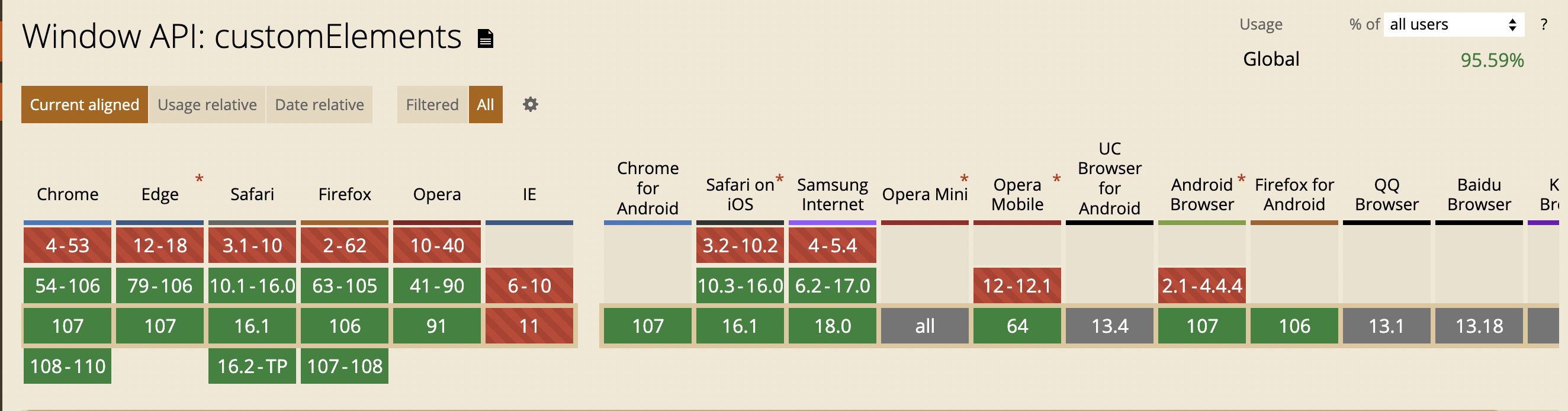
- 不支持 `IE`,其他均有较好支持
## Contributors 贡献者
 ## Other 相关资源
1. [优秀的组件设计](https://www.checklist.design/)
2. [在线生成 CSS 渐变色](https://webgradients.com/)
3. [优秀设计作品,有 psd 和 sketch](https://webgradients.com/)
4. [3D UI 设计,类似于 3D 版的 figma](https://spline.design/)
5. [设计规范](https://lawsofux.com/)
6. [优秀设计作品](https://dribbble.com/)
7. [element UI 中文网](https://element.eleme.cn/#/zh-CN)
8. [Ant design 中文网](https://ant.design/index-cn)
9. [在线绘制 CSS 动画](https://animista.net/)
10. [tailwindcss 组件库](https://www.tailwindcss.cn/resources)
11. [animate css 非常优秀的 css 动画](https://animate.style/)
12. [can i use 检测兼容性 API 网站](https://caniuse.com/)
13. [figma](https://www.figma.com/)
## 协议和标准
1. [RFCs](https://www.rfc-editor.org/)
2. [ECMA](https://www.ecma-international.org/)
3. [w3c](https://www.w3.org/)
## Other 相关资源
1. [优秀的组件设计](https://www.checklist.design/)
2. [在线生成 CSS 渐变色](https://webgradients.com/)
3. [优秀设计作品,有 psd 和 sketch](https://webgradients.com/)
4. [3D UI 设计,类似于 3D 版的 figma](https://spline.design/)
5. [设计规范](https://lawsofux.com/)
6. [优秀设计作品](https://dribbble.com/)
7. [element UI 中文网](https://element.eleme.cn/#/zh-CN)
8. [Ant design 中文网](https://ant.design/index-cn)
9. [在线绘制 CSS 动画](https://animista.net/)
10. [tailwindcss 组件库](https://www.tailwindcss.cn/resources)
11. [animate css 非常优秀的 css 动画](https://animate.style/)
12. [can i use 检测兼容性 API 网站](https://caniuse.com/)
13. [figma](https://www.figma.com/)
## 协议和标准
1. [RFCs](https://www.rfc-editor.org/)
2. [ECMA](https://www.ecma-international.org/)
3. [w3c](https://www.w3.org/)