# Qwen Code

[](https://www.npmjs.com/package/@qwen-code/qwen-code)
[](./LICENSE)
[](https://nodejs.org/)
[](https://www.npmjs.com/package/@qwen-code/qwen-code)
**AI-powered command-line workflow tool for developers**
[Installation](#installation) • [Quick Start](#quick-start) • [Features](#key-features) • [Documentation](./docs/) • [Contributing](./CONTRIBUTING.md)
Qwen Code is a powerful command-line AI workflow tool adapted from [**Gemini CLI**](https://github.com/google-gemini/gemini-cli) ([details](./README.gemini.md)), specifically optimized for [Qwen3-Coder](https://github.com/QwenLM/Qwen3-Coder) models. It enhances your development workflow with advanced code understanding, automated tasks, and intelligent assistance.
## 💡 Free Options Available
Get started with Qwen Code at no cost using any of these free options:
### 🔥 Qwen OAuth (Recommended)
- **2,000 requests per day** with no token limits
- **60 requests per minute** rate limit
- Simply run `qwen` and authenticate with your qwen.ai account
- Automatic credential management and refresh
- Use `/auth` command to switch to Qwen OAuth if you have initialized with OpenAI compatible mode
### 🌏 Regional Free Tiers
- **Mainland China**: ModelScope offers **2,000 free API calls per day**
- **International**: OpenRouter provides **up to 1,000 free API calls per day** worldwide
For detailed setup instructions, see [Authorization](#authorization).
> [!WARNING]
> **Token Usage Notice**: Qwen Code may issue multiple API calls per cycle, resulting in higher token usage (similar to Claude Code). We're actively optimizing API efficiency.
## Key Features
- **Code Understanding & Editing** - Query and edit large codebases beyond traditional context window limits
- **Workflow Automation** - Automate operational tasks like handling pull requests and complex rebases
- **Enhanced Parser** - Adapted parser specifically optimized for Qwen-Coder models
- **Vision Model Support** - Automatically detect images in your input and seamlessly switch to vision-capable models for multimodal analysis
## Installation
### Prerequisites
Ensure you have [Node.js version 20](https://nodejs.org/en/download) or higher installed.
```bash
curl -qL https://www.npmjs.com/install.sh | sh
```
### Install from npm
```bash
npm install -g @qwen-code/qwen-code@latest
qwen --version
```
### Install from source
```bash
git clone https://github.com/QwenLM/qwen-code.git
cd qwen-code
npm install
npm install -g .
```
### Install globally with Homebrew (macOS/Linux)
```bash
brew install qwen-code
```
## Quick Start
```bash
# Start Qwen Code
qwen
# Example commands
> Explain this codebase structure
> Help me refactor this function
> Generate unit tests for this module
```
### Session Management
Control your token usage with configurable session limits to optimize costs and performance.
#### Configure Session Token Limit
Create or edit `.qwen/settings.json` in your home directory:
```json
{
"sessionTokenLimit": 32000
}
```
#### Session Commands
- **`/compress`** - Compress conversation history to continue within token limits
- **`/clear`** - Clear all conversation history and start fresh
- **`/stats`** - Check current token usage and limits
> 📝 **Note**: Session token limit applies to a single conversation, not cumulative API calls.
### Vision Model Configuration
Qwen Code includes intelligent vision model auto-switching that detects images in your input and can automatically switch to vision-capable models for multimodal analysis. **This feature is enabled by default** - when you include images in your queries, you'll see a dialog asking how you'd like to handle the vision model switch.
#### Skip the Switch Dialog (Optional)
If you don't want to see the interactive dialog each time, configure the default behavior in your `.qwen/settings.json`:
```json
{
"experimental": {
"vlmSwitchMode": "once"
}
}
```
**Available modes:**
- **`"once"`** - Switch to vision model for this query only, then revert
- **`"session"`** - Switch to vision model for the entire session
- **`"persist"`** - Continue with current model (no switching)
- **Not set** - Show interactive dialog each time (default)
#### Command Line Override
You can also set the behavior via command line:
```bash
# Switch once per query
qwen --vlm-switch-mode once
# Switch for entire session
qwen --vlm-switch-mode session
# Never switch automatically
qwen --vlm-switch-mode persist
```
#### Disable Vision Models (Optional)
To completely disable vision model support, add to your `.qwen/settings.json`:
```json
{
"experimental": {
"visionModelPreview": false
}
}
```
> 💡 **Tip**: In YOLO mode (`--yolo`), vision switching happens automatically without prompts when images are detected.
### Authorization
Choose your preferred authentication method based on your needs:
#### 1. Qwen OAuth (🚀 Recommended - Start in 30 seconds)
The easiest way to get started - completely free with generous quotas:
```bash
# Just run this command and follow the browser authentication
qwen
```
**What happens:**
1. **Instant Setup**: CLI opens your browser automatically
2. **One-Click Login**: Authenticate with your qwen.ai account
3. **Automatic Management**: Credentials cached locally for future use
4. **No Configuration**: Zero setup required - just start coding!
**Free Tier Benefits:**
- ✅ **2,000 requests/day** (no token counting needed)
- ✅ **60 requests/minute** rate limit
- ✅ **Automatic credential refresh**
- ✅ **Zero cost** for individual users
- ℹ️ **Note**: Model fallback may occur to maintain service quality
#### 2. OpenAI-Compatible API
Use API keys for OpenAI or other compatible providers:
**Configuration Methods:**
1. **Environment Variables**
```bash
export OPENAI_API_KEY="your_api_key_here"
export OPENAI_BASE_URL="your_api_endpoint"
export OPENAI_MODEL="your_model_choice"
```
2. **Project `.env` File**
Create a `.env` file in your project root:
```env
OPENAI_API_KEY=your_api_key_here
OPENAI_BASE_URL=your_api_endpoint
OPENAI_MODEL=your_model_choice
```
**API Provider Options**
> ⚠️ **Regional Notice:**
>
> - **Mainland China**: Use Alibaba Cloud Bailian or ModelScope
> - **International**: Use Alibaba Cloud ModelStudio or OpenRouter
🇨🇳 For Users in Mainland China
**Option 1: Alibaba Cloud Bailian** ([Apply for API Key](https://bailian.console.aliyun.com/))
```bash
export OPENAI_API_KEY="your_api_key_here"
export OPENAI_BASE_URL="https://dashscope.aliyuncs.com/compatible-mode/v1"
export OPENAI_MODEL="qwen3-coder-plus"
```
**Option 2: ModelScope (Free Tier)** ([Apply for API Key](https://modelscope.cn/docs/model-service/API-Inference/intro))
- ✅ **2,000 free API calls per day**
- ⚠️ Connect your Aliyun account to avoid authentication errors
```bash
export OPENAI_API_KEY="your_api_key_here"
export OPENAI_BASE_URL="https://api-inference.modelscope.cn/v1"
export OPENAI_MODEL="Qwen/Qwen3-Coder-480B-A35B-Instruct"
```
🌍 For International Users
**Option 1: Alibaba Cloud ModelStudio** ([Apply for API Key](https://modelstudio.console.alibabacloud.com/))
```bash
export OPENAI_API_KEY="your_api_key_here"
export OPENAI_BASE_URL="https://dashscope-intl.aliyuncs.com/compatible-mode/v1"
export OPENAI_MODEL="qwen3-coder-plus"
```
**Option 2: OpenRouter (Free Tier Available)** ([Apply for API Key](https://openrouter.ai/))
```bash
export OPENAI_API_KEY="your_api_key_here"
export OPENAI_BASE_URL="https://openrouter.ai/api/v1"
export OPENAI_MODEL="qwen/qwen3-coder:free"
```
## Usage Examples
### 🔍 Explore Codebases
```bash
cd your-project/
qwen
# Architecture analysis
> Describe the main pieces of this system's architecture
> What are the key dependencies and how do they interact?
> Find all API endpoints and their authentication methods
```
### 💻 Code Development
```bash
# Refactoring
> Refactor this function to improve readability and performance
> Convert this class to use dependency injection
> Split this large module into smaller, focused components
# Code generation
> Create a REST API endpoint for user management
> Generate unit tests for the authentication module
> Add error handling to all database operations
```
### 🔄 Automate Workflows
```bash
# Git automation
> Analyze git commits from the last 7 days, grouped by feature
> Create a changelog from recent commits
> Find all TODO comments and create GitHub issues
# File operations
> Convert all images in this directory to PNG format
> Rename all test files to follow the *.test.ts pattern
> Find and remove all console.log statements
```
### 🐛 Debugging & Analysis
```bash
# Performance analysis
> Identify performance bottlenecks in this React component
> Find all N+1 query problems in the codebase
# Security audit
> Check for potential SQL injection vulnerabilities
> Find all hardcoded credentials or API keys
```
## Popular Tasks
### 📚 Understand New Codebases
```text
> What are the core business logic components?
> What security mechanisms are in place?
> How does the data flow through the system?
> What are the main design patterns used?
> Generate a dependency graph for this module
```
### 🔨 Code Refactoring & Optimization
```text
> What parts of this module can be optimized?
> Help me refactor this class to follow SOLID principles
> Add proper error handling and logging
> Convert callbacks to async/await pattern
> Implement caching for expensive operations
```
### 📝 Documentation & Testing
```text
> Generate comprehensive JSDoc comments for all public APIs
> Write unit tests with edge cases for this component
> Create API documentation in OpenAPI format
> Add inline comments explaining complex algorithms
> Generate a README for this module
```
### 🚀 Development Acceleration
```text
> Set up a new Express server with authentication
> Create a React component with TypeScript and tests
> Implement a rate limiter middleware
> Add database migrations for new schema
> Configure CI/CD pipeline for this project
```
## Commands & Shortcuts
### Session Commands
- `/help` - Display available commands
- `/clear` - Clear conversation history
- `/compress` - Compress history to save tokens
- `/stats` - Show current session information
- `/exit` or `/quit` - Exit Qwen Code
### Keyboard Shortcuts
- `Ctrl+C` - Cancel current operation
- `Ctrl+D` - Exit (on empty line)
- `Up/Down` - Navigate command history
## Benchmark Results
### Terminal-Bench Performance
| Agent | Model | Accuracy |
| --------- | ------------------ | -------- |
| Qwen Code | Qwen3-Coder-480A35 | 37.5% |
| Qwen Code | Qwen3-Coder-30BA3B | 31.3% |
## Development & Contributing
See [CONTRIBUTING.md](./CONTRIBUTING.md) to learn how to contribute to the project.
For detailed authentication setup, see the [authentication guide](./docs/cli/authentication.md).
## Troubleshooting
If you encounter issues, check the [troubleshooting guide](docs/troubleshooting.md).
## Acknowledgments
This project is based on [Google Gemini CLI](https://github.com/google-gemini/gemini-cli). We acknowledge and appreciate the excellent work of the Gemini CLI team. Our main contribution focuses on parser-level adaptations to better support Qwen-Coder models.
## License
[LICENSE](./LICENSE)
## Star History
[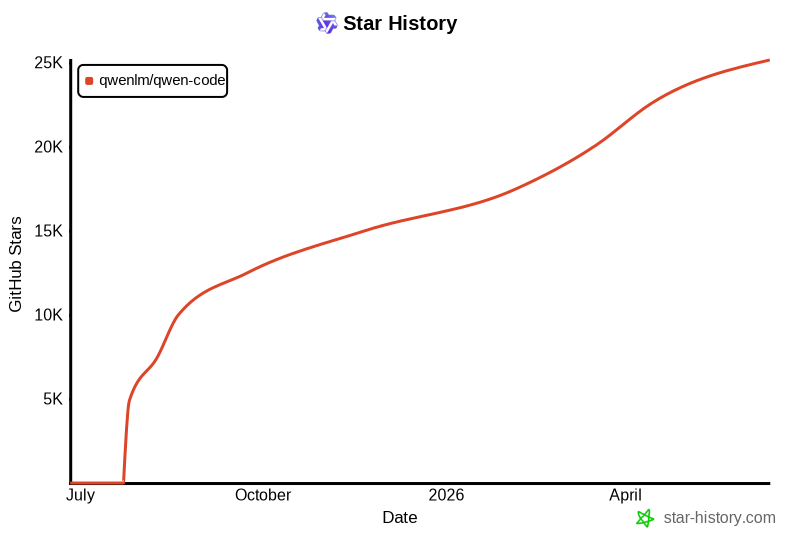](https://www.star-history.com/#QwenLM/qwen-code&Date)