# GrapesJS MJML
> Requires GrapesJS v0.15.9 or higher
[](https://github.com/artf/grapesjs-mjml/actions)
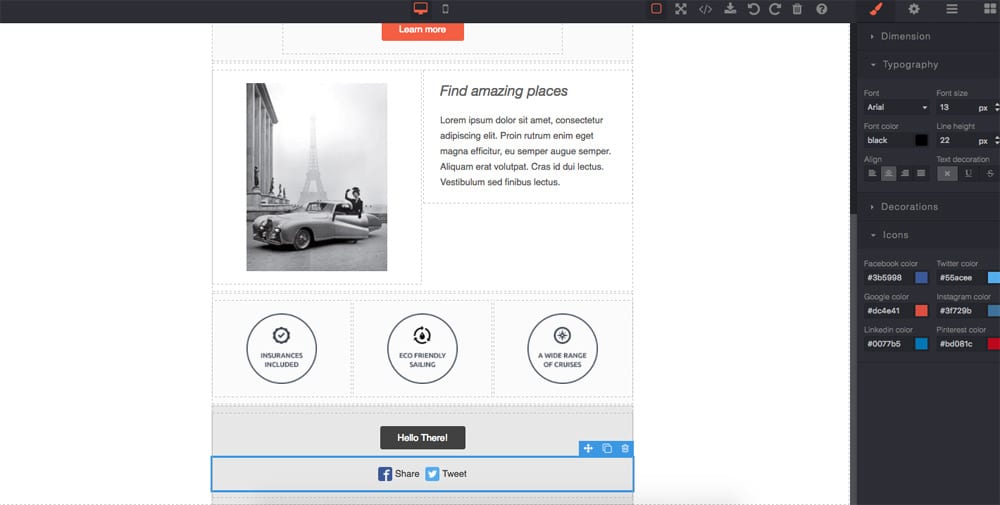
This plugin enables the usage of [MJML](https://mjml.io/) components inside the GrapesJS environment. MJML components are rendered in real-time using the official v4 compiler (+ some mocks to make it run in the browser), therefore the result is, almost, the same as using the [MJML Live Editor](https://mjml.io/try-it-live).
[Demo](http://grapesjs.com/demo-mjml.html)
Supported components:
`mj-wrapper`
`mj-group`
`mj-section`
`mj-column`
`mj-text`
`mj-image`
`mj-button`
`mj-social`
`mj-divider`
`mj-spacer`
`mj-style`
`mj-font`
`mj-hero`
## Options
|Option|Description|Default|
|-|-|-
|`fonts`|Custom fonts on exported HTML header [more info](https://github.com/mjmlio/mjml#inside-nodejs)|`{}`|
|`importPlaceholder`|Import placeholder MJML|`''`|
|`imagePlaceholderSrc`|Image placeholder source|`'https://via.placeholder.com/350x250/78c5d6/fff'`|
|`i18n`|I18n object containing language [more info](https://grapesjs.com/docs/modules/I18n.html#configuration)|`{}`|
|`overwriteExport`|Overwrite default export command|`true`|
|`preMjml`|String before the MJML in export code|`''`|
|`postMjml`|String after the MJML in export code|`''`|
|`resetBlocks`|Clean all previous blocks if true|`true`|
|`resetDevices`|Clean all previous devices and set a new one for mobile|`true`|,
|`resetStyleManager`|Reset the Style Manager and add new properties for MJML|`true`|,
## Download
* `npm i grapesjs-mjml`
## Usage
```html
My Company
```
#### Or using ESM imports:
```js
import 'grapesjs/dist/css/grapes.min.css'
import grapesJS from 'grapesjs'
import grapesJSMJML from 'grapesjs-mjml'
grapesJS.init({
fromElement: 1,
container : '#gjs',
avoidInlineStyle : false,
plugins: [grapesJSMJML],
pluginsOpts: {
[grapesJSMJML]: {/* ...options */}
},
});
```
#### i18n usage:
```js
import 'grapesjs/dist/css/grapes.min.css'
import grapesJS from 'grapesjs'
import nl from 'grapesjs/locale/nl'
import grapesJSMJML from 'grapesjs-mjml'
import mjmlNL from 'grapesjs-mjml/locale/nl'
grapesJS.init({
fromElement: 1,
container : '#gjs',
avoidInlineStyle : false,
i18n: {
// locale: 'en', // default locale
// detectLocale: true, // by default, the editor will detect the language
// localeFallback: 'en', // default fallback
messages: { nl: nl },
},
plugins: [grapesJSMJML],
pluginsOpts: {
[grapesJSMJML]: {
// Optional options
i18n: { nl: mjmlNL }
}
},
});
```
#### fonts usage:
```js
import 'grapesjs/dist/css/grapes.min.css'
import grapesJS from 'grapesjs'
import grapesJSMJML from 'grapesjs-mjml'
let editor = grapesJS.init({
fromElement: 1,
container : '#gjs',
avoidInlineStyle : false,
plugins: [grapesJSMJML],
pluginsOpts: {
[grapesJSMJML]: {
// The font imports are included on HTML
when fonts are used on the template
fonts: {
Montserrat: 'https://fonts.googleapis.com/css?family=Montserrat',
'Open Sans': 'https://fonts.googleapis.com/css?family=Open+Sans'
}
}
},
});
// add custom fonts options on editor's font list
editor.on('load', () => {
let styleManager = editor.StyleManager;
let fontProperty = styleManager.getProperty('typography', 'font-family');
let list = [];
// empty list
fontProperty.set('list', list);
// custom list
list.push(fontProperty.addOption({value: 'Montserrat, sans-serif', name: 'Montserrat'}));
list.push(fontProperty.addOption({value: 'Open Sans, sans-serif', name: 'Open Sans'}));
fontProperty.set('list', list);
styleManager.render();
});
```
## Development
Clone the repository
```sh
$ git clone https://github.com/artf/grapesjs-mjml.git
$ cd grapesjs-mjml
```
Install it
```sh
$ npm i
```
Start the dev server
```sh
$ npm start
```
## Releasing
1) Run `npm run v:patch` to bump the version in package.json and create a git tag
2) Push the commit + new tag
3) Go to github and draft a new release
4) Select the new tag and add some release notes
5) Hit publish, the release will automatically publish to npm
## License
BSD 3-Clause