# Kedro-Viz
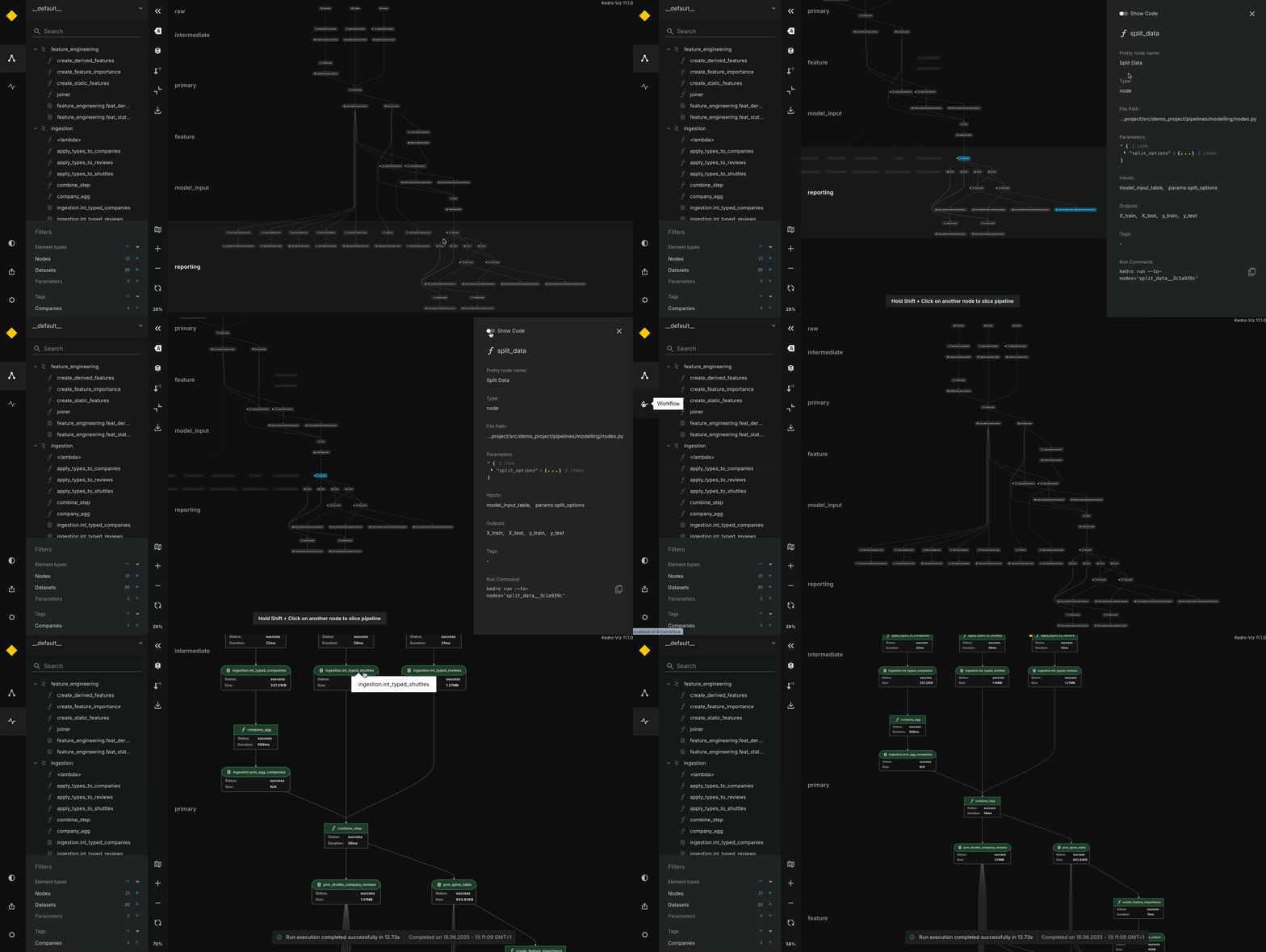
✨ Data Science Pipelines. Beautifully Designed ✨
Live Demo: https://demo.kedro.org/
[](https://github.com/kedro-org/kedro-viz/actions)
[](https://docs.kedro.org/en/stable/visualisation/)
[](https://pypi.org/project/kedro-viz/)
[](https://pypi.org/project/kedro-viz/)
[](https://pepy.tech/project/kedro-viz)
[](https://badge.fury.io/js/%40quantumblack%2Fkedro-viz)
[](https://opensource.org/licenses/Apache-2.0)
[](https://github.com/prettier/prettier)
[](https://slack.kedro.org)
## Introduction
Kedro-Viz is an interactive development tool for building data science pipelines with [Kedro](https://github.com/kedro-org/kedro).
## Features
- ✨ Complete visualisation of a Kedro project and its pipelines
- 🎨 Supports light & dark themes out of the box
- 🚀 Scales to big pipelines with hundreds of nodes
- 🔎 Highly interactive, filterable and searchable
- 🔬 Focus mode for modular pipeline visualisation
- 📊 Rich metadata side panel to display parameters, plots, and more.
- 📊 Supports all types of [Plotly charts](https://plotly.com/javascript/)
- ♻️ Autoreload on code change
- 🔍 Visual Workflow view to inspect execution, errors, and dataset stats.
- 🎩 Many more to come
## Installation
- As a standalone React component (for embedding Kedro-Viz in your web application).
To install the standalone React component:
```bash
npm install @quantumblack/kedro-viz
```
## Usage
To use Kedro-Viz as a standalone React component, you can follow the example below. Please note that Kedro-Viz does not support server-side rendering (SSR). If you are using Next.js or another SSR framework, you should be aware of this limitation.
```javascript
import KedroViz from '@quantumblack/kedro-viz';
import '@quantumblack/kedro-viz/lib/styles/styles.min.css';
const MyApp = () => (
);
```
### Visualise and inspect your `kedro run`
You can also pass pipeline run data directly to the React component using the `runData` prop. This allows you to visualise pipeline execution results without requiring a local Kedro project setup:
```javascript
import KedroViz from '@quantumblack/kedro-viz';
import '@quantumblack/kedro-viz/lib/styles/styles.min.css';
const runStatusData = {
"nodes": {
"69c523b6": {
"status": "success",
"duration": 0.02171195892151445,
"error": null
},
"ea604da4": {
"status": "success",
"duration": 0.031324208015576005,
"error": null
}
},
"datasets": {
"aed46479": {
"name": "companies",
"size": 1810602,
"status": "success",
"error": null
},
"7b2c6e04": {
"name": "reviews",
"size": 2937144,
"status": "success",
"error": null
}
},
"pipeline": {
"run_id": "6d962877-1fdf-4b9a-b953-3377f476d48e",
"start_time": "2025-06-18T12.10.44.342274Z",
"end_time": "2025-06-18T12.11.09.584093Z",
"duration": 12.730948126059957,
"status": "success",
"error": null
}
};
const MyApp = () => (
);
```
When `runData` is provided:
- The component will automatically display the **Workflow** view with pipeline run information
- Nodes will show visual indicators (green for success, red for failure)
- A notification will appear showing pipeline execution results
To use with NextJS:
```javascript
import '@quantumblack/kedro-viz/lib/styles/styles.min.css';
import dynamic from 'next/dynamic';
const NoSSRKedro = dynamic(() => import('@quantumblack/kedro-viz'), {
ssr: false,
});
const MyApp = () => ;
```
The JSON can be obtained by running:
```bash
kedro viz run --save-file=
```
On successful execution of the command above, it will generate a folder at the specified directory, containing the following structure:
```
/api/
├── main
├── nodes
│ ├── 23c94afb
│ ├── 28754fab
│ ├── 2ab3579f
│ ├── 329e963c
│ ├── 369acf98
│ └── ...
└── pipelines
├── __default__
├── data_processing
├── data_science
└── ...
```
Use the `main` file as the input JSON for the `data` prop in your Kedro-Viz component.
We also recommend wrapping the `Kedro-Viz` component with a parent HTML/JSX element that has a specified height (as seen in the above example) in order for Kedro-Viz to be styled properly.
**_Our documentation contains [additional examples on how to visualise with Kedro-Viz.](https://docs.kedro.org/en/stable/visualisation/index.html)_**
## Configure Kedro-viz with `options`
The example below demonstrates how to configure your kedro-viz using different `options`.
```
```
| Name | Type | Default | Description |
| -------------------------- | ---------------------------------------------------------------------------------- | -------------------------------------------------------- | ------------------------------------------------------------------------------------------------------------------------------------------------------------- |
| `data` | `{ edges: array (required), layers: array, nodes: array (required), tags: array }` | - | Pipeline data to be displayed on the chart |
| `runData` | `{ nodes: object, datasets: object, pipeline: object }` | - | Pipeline run data to visualise pipeline execution results. When provided, enables Workflow view with execution status, timing, and error information |
| `onActionCallback` | function | - | Callback function to be invoked when the specified action is dispatched. e.g. `const action = { type: NODE_CLICK, payload: node }; onActionCallback(action);` |
| options.display | | | |
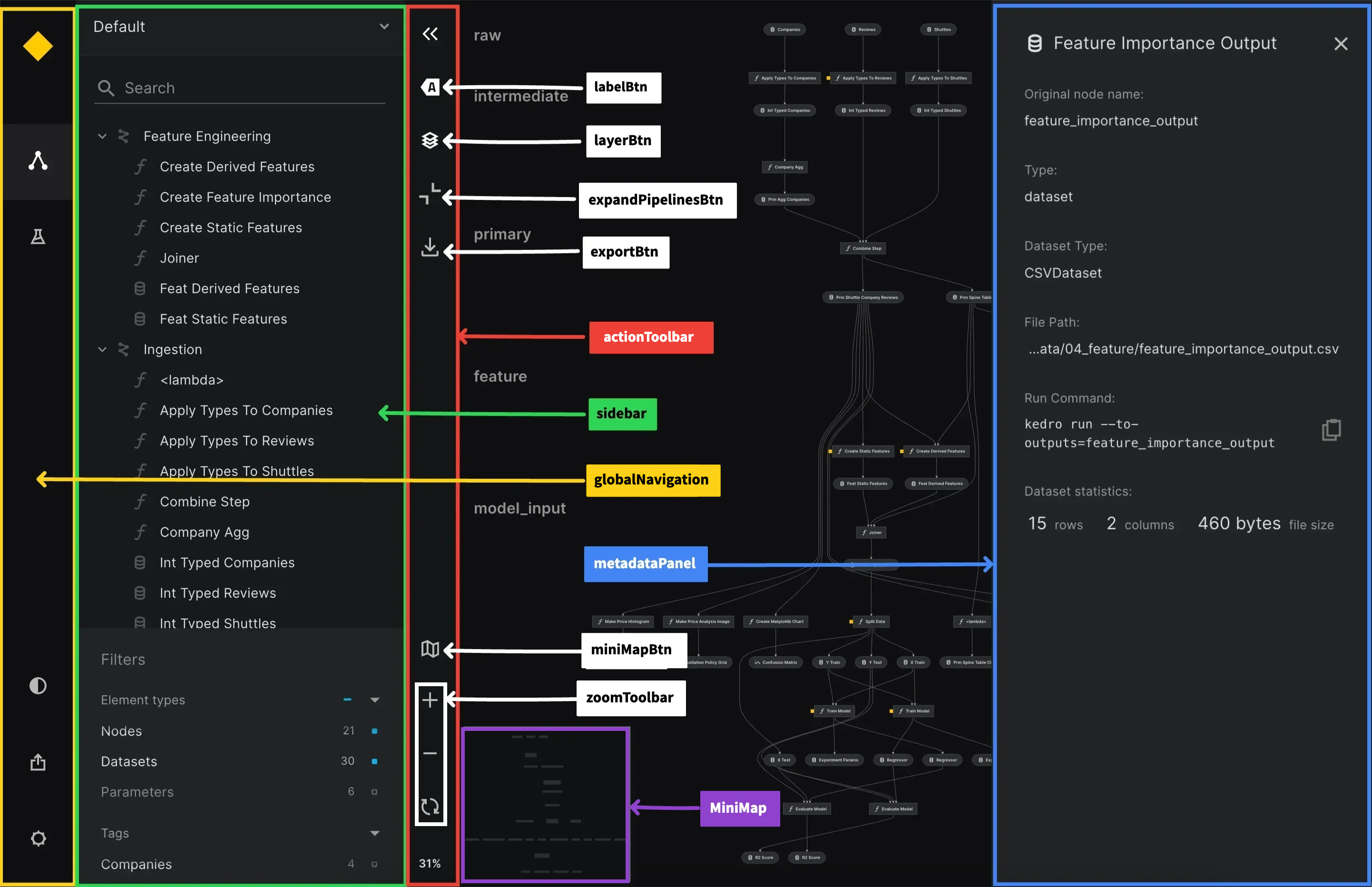
| `expandPipelinesBtn` | boolean | true | Show/Hide expand pipelines button |
| `exportBtn` | boolean | true | Show/Hide export button |
| `globalNavigation` | boolean | true | Show/Hide global navigation |
| `labelBtn` | boolean | true | Show/Hide label button |
| `layerBtn` | boolean | true | Show/Hide layer button |
| `metadataPanel` | boolean | true | Show/Hide Metadata Panel |
| `miniMap` | boolean | true | Show/Hide Mini map and mini map button |
| `sidebar` | boolean | true | Show/Hide Sidebar and action toolbar |
| `zoomToolbar` | boolean | true | Show/Hide zoom-in, zoom-out and zoom reset buttons together |
| `filterBtn` | boolean | false | Show/Hide filter button and sidebar toggle icon |
| `orientationBtn` | boolean | true | Show/Hide orientation button |
| options.expandAllPipelines | boolean | false | Expand/Collapse Modular pipelines on first load |
| options.behaviour | | | |
| `reFocus` | boolean | true | In the flowchart, enable or disable the node re-focus behaviour when clicking on nodes |
| options.nodeType | `{disabled: {parameters: boolean,task: boolean,data: boolean}}` | `{disabled: {parameters: true,task: false,data: false}}` | Configuration for node type options |
| options.tag | `{enabled: {: boolean}}` | - | Configuration for tag options |
| options.theme | string | dark | select `Kedro-Viz` theme : dark/light |
### Note
- `onActionCallback` callback is only called when the user clicks on a node in the flowchart, and we are passing the node object as the payload in the callback argument. In future releases, we will add more actions to be dispatched in this callback.
- When `display.sidebar` is `false`, `display.miniMap` prop will be ignored.
All components are annotated to understand their positions in the Kedro-Viz UI.
## Standalone Example Repository
We have created a [kedro-viz-standalone](https://github.com/kedro-org/kedro-viz-standalone.git) repository to demonstrate how to use Kedro-Viz in standalone mode or embedded in a React application.
This repository provides a fully functional example of Kedro-Viz, showcasing how to integrate it into your projects. The example includes setup instructions and demonstrates various features of Kedro-Viz.
To get started, clone the repository, install the dependencies and run the example React application:
```
git clone https://github.com/kedro-org/kedro-viz-standalone.git
cd kedro-viz-standalone
npm install
npm start
```
## Feature Flags
Kedro-Viz uses feature flags to roll out some experimental features. We have the following flags -
| Flag | Description |
| ------------------ | --------------------------------------------------------------------------------------- |
| sizewarning | From release v3.9.1. Show a warning before rendering very large graphs (default `true`) |
| expandAllPipelines | From release v4.3.2. Expand all modular pipelines on first load (default `false`) |
To enable or disable a flag, click on the settings icon in the toolbar and toggle the flag on/off.
Kedro-Viz also logs a message in your browser's [developer console](https://developer.mozilla.org/en-US/docs/Learn/Common_questions/What_are_browser_developer_tools#The_JavaScript_console) to show the available flags and their values as currently set on your machine.
## Maintainers
Kedro-Viz is maintained by the [Kedro team](https://docs.kedro.org/en/stable/contribution/technical_steering_committee.html#kedro-maintainers) and a number of [contributors from across the world](https://github.com/kedro-org/Kedro-Viz/contributors).
## Contribution
If you want to contribute to Kedro-Viz, please check out our [contributing guide](./CONTRIBUTING.md).
## License
Kedro-Viz is licensed under the [Apache 2.0](https://github.com/kedro-org/kedro-viz/blob/main/LICENSE.md) License.
## Citation
If you're an academic, Kedro-Viz can also help you, for example, as a tool to visualise how your publication's pipeline is structured. Find our citation reference on [Zenodo](https://doi.org/10.5281/zenodo.4277218).