# dsh-inline-pastes
[](https://www.npmjs.com/package/@qgynisc/dsh-inline-pastes)
[](https://github.com/qgynisc/dsh-inline-pastes/actions/workflows/test.yml)
[](https://github.com/qgynisc/dsh-inline-pastes/blob/main/LICENSE)
[](https://github.com/qgynisc/dsh-inline-pastes/releases)
**English** | [简体中文](README.md)
Adds four things to **DeepSeek Harness Desktop (built-in Web GUI)**:
1. **Images referenced inside your text** — when you paste an image, an inline chip `[icon] pic-1` is inserted **at the caret**. The image itself still goes out with the message as an attachment through the official pipeline (the model receives it exactly as before).
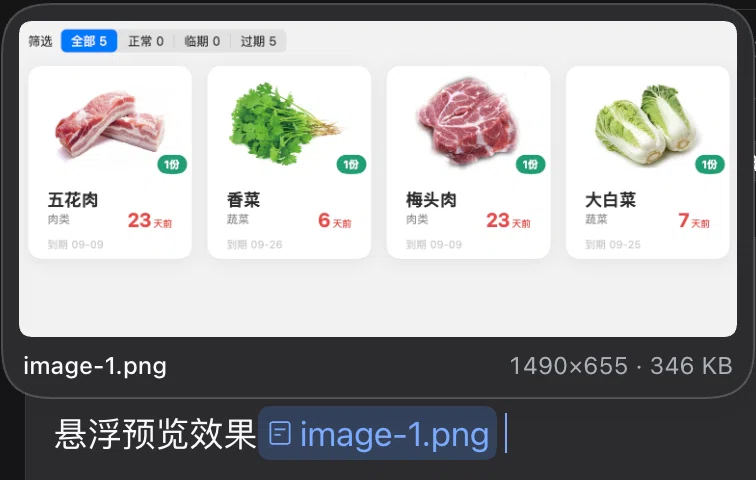
2. **Hover preview** — park the pointer on **that name** (the inline chip in the composer, or the same text in an already-sent bubble) and a thumbnail preview card pops up with dimensions and file size. Move away to dismiss; `Esc` also dismisses.
3. **Automatic numbering** — names are generated as `pic-1.png`, `pic-2.png`, … The prefix follows the media class and the extension follows the real MIME type, leaving room for future types such as mp3 and pdf.
4. **A settings page** — *Settings → Mixed layout* controls everything in one place: name prefix, short vs. full chip label, three thumbnail-badge sizes, interface language (follow DSH / 中文 / English), plus the master switch, paste takeover, hover preview and the pre-send audit. Changes take effect **immediately**.
## Installation
> The client half only uses the Web client APIs (`conversation` / `sessions` / `uiSession` / `inputTriggers`) plus the DOM.
> It does not depend on any desktop-only bridge (such as `__DSH_HOST_PATHS__` injected by the Electron preload),
> so it works under **both DSH Desktop and `dsh web` (browser)**.
**Option 1: clone locally and use the bundled scripts (tested on a real machine)**
```bash
git clone git@github.com:qgynisc/dsh-inline-pastes.git
cd dsh-inline-pastes
npm run build # optional: lib/ is committed, and the build output is exactly what the loader needs
npm run install:desktop # install into the desktop profile (backs up package.json / pnpm-lock.yaml automatically)
# another profile: node scripts/install.mjs --profile web
```
After installing, **restart DeepSeek Harness** (client plugins only take effect after their bundle is reloaded).
**Option 2: use the DSH plugin install command**
```bash
dsh plugin --profile desktop add git@github.com:qgynisc/dsh-inline-pastes.git
```
**Uninstall**: `npm run uninstall:desktop`, or simply delete the `@qgynisc/dsh-inline-pastes` line from
`dsh.profile.bundles` in the profile and its matching entry under `dependencies`.
**Verify it loaded**: after restarting, `__dshInlinePastes.version` in the browser console should equal the plugin version.
## What it looks like
**① Images referenced inside text** — paste an image, the chip lands at the caret, and the image is still sent as an attachment with the message:
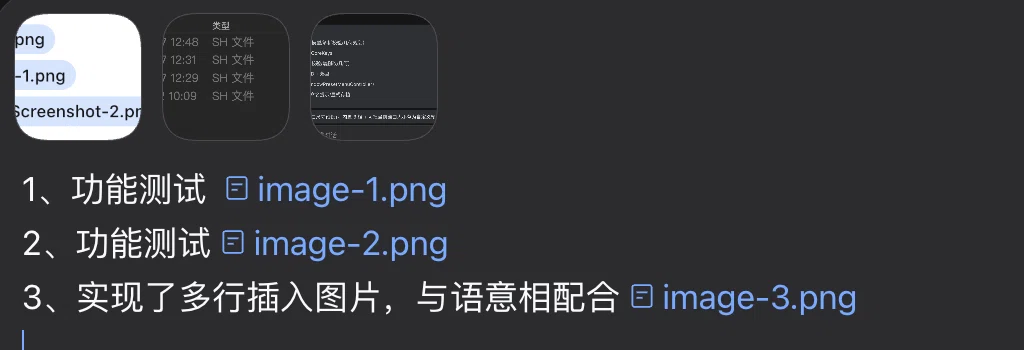
(The dark overlay near the top of that screenshot is a macOS file tooltip; it has nothing to do with this plugin.
These screenshots were taken when the default prefix was still `image`, and before the chip got its short alias —
the current default is `pic`, and the chip shows `pic-1`; see the settings section.)
**② Hover preview** — park the pointer on the name inside the chip and a preview card pops up (thumbnail + name + dimensions · size); it closes as soon as you move away:
---
```
1、功能1 [🖼 pic-1]
2、功能2 [🖼 pic-2]
3、修改bug如图:[🖼 pic-3],把它变成可自动定位。
```
---
## The settings page: Settings → Mixed layout
After installing, restart DeepSeek Harness and Settings gains a **Mixed layout** entry (Chinese UI: **混合排版**).

(Preview render; the panel follows the DSH interface language.)
| Row | Default | Notes |
| --- | --- | --- |
| Language | Follow DSH | Follows DSH's interface language (the `locale` service), or force 中文 / English — the panel copy *and* the nav label follow |
| Name prefix | `pic` | `pic` / `image`, or a custom prefix (`A-Za-z0-9_-`, starting with a letter or digit) |
| Chip label | Short `pic-1` | Or the full name `pic-1.png`; **display only** (next section) |
| Thumbnail badge | Medium | Off / Small (12px) / Medium (14px) / Large (18px) |
| Enable plugin | On | Turning it off falls back completely to the official behavior |
| Intercept image pastes | On | Off = images only go to the official attachment track |
| Hover preview | On | Master switch for the preview card |
| Show dimensions & size | On | |
| Pre-send audit | On | |
| Hold the first Enter on audit failure | On | Off = warn only |
| Restore defaults | — | Back to factory defaults (sequence counters untouched) |
- Settings are stored **per device in localStorage** (`dsh-inline-pastes:settings:v1`) — not synced across sessions or accounts; clearing site data restores the defaults.
- Changes apply **immediately**: badges resize or disappear at once, and the next pasted image uses the new name. The master switch is immediate in both directions too (while it is off the settings page stays available, so you can always switch it back on).
- If React / `slots` / `locale` are unavailable (a very old DSH, or a non-Web client), the settings page simply does not appear — pasting, chips, previews and badges keep working.
### The short chip label is a display alias
With the default `short` chip label the chip reads `pic-1`, but at **send time** the same reference is re-serialized by the codec into the full file name `pic-1.png`:
| Where | What you see |
| --- | --- |
| The chip in the composer | `pic-1` (short, saves space) |
| The text that is sent / the sent bubble | `pic-1.png` |
| The attachment name / the model-side handle line | `pic-1.png` |
**The model-side pairing is unaffected** (both the text and the handle line say `pic-1.png`). The trade-off: you see the short name while writing, and the full name in the bubble after sending — pick *Chip label → Full file name* if you want them identical.
Hover preview understands both spellings: hovering the short name in the composer and the full name in a bubble both open the same image.
## With multiple images, how names and images stay paired (no mix-ups)
**The model side works by "reading the name attached to the image", not by counting order.** When DSH sends images to a model it inserts a line of text
**immediately before each image** (`requestImageHandleText` in `@deepseek-ai/dsh-llm`; both the DeepSeek and pi-ai adapters go through it):
```
Image "pic-1.png" (sha256:abc…); request preview 1972x397px. …
Image "pic-2.png" (sha256:def…); request preview 1200x800px. …
```
So when the model reads `pic-1.png` in your text, the image right next to it carries the very same name — one-to-one.
Even if images dragged in or added with the `+` button are mixed in (they keep their own original file names, also with a handle line), nothing gets crossed.
**On the UI side**: DSH lays out all images of a message in an attachment row **above** the bubble, with the text inside the bubble — so what a human sees is
"a row of thumbnails on top, names in the text below", aligned by name (thumbnails themselves show no name, only an accessible label on hover).
**Three guarantees this plugin makes**:
1. Within one message: **paste order = numbering order = attachment order** (pasting several at once also follows clipboard order);
2. If you delete a chip from the text but leave the dock thumbnail in place, **numbering does not restart** (otherwise one message would contain two `pic-1`s);
3. Numbering restarts from `pic-1` only after sending (when both the draft and the attachments are cleared).
**Two caveats that remain**:
- If you **delete one thumbnail in the middle** of the dock before sending while leaving its chip in the text, that message's numbering will be off by one against the image count.
Either delete the chip together with the thumbnail, or glance over it before sending;
- Numbering restarts per message (which is the intent), so **the same name `pic-1.png` appears in different messages**. Within one message there is no ambiguity
(the handle line sits right next to the image), but names are not unique if you reference them across messages. If you want per-session uniqueness, set `CONFIG.counterScope` back to `'session'`.
## Naming rules
| Pasted content | Generated name |
| --- | --- |
| PNG screenshot | `pic-1.png`, `pic-2.png` … |
| WebP / JPEG / GIF | `pic-1.webp` / `pic-1.jpg` / `pic-1.gif` |
| MP3 / WAV | `audio-1.mp3` / `audio-1.wav` |
| MP4 / MOV | `video-1.mp4` |
| PDF | `pdf-1.pdf` |
| docx / xlsx / pptx | `doc-1.docx` |
| txt / md / json | `text-1.md` |
| zip / tar / 7z | `zip-1.zip` |
| Anything else | `file-1.` |
- Sequence numbers **count separately per prefix** (`pic-1` and `audio-1` are independent).
- **Every message starts over at `pic-1.png`**; consecutive pastes within the same message continue the sequence (`pic-1` → `pic-2` → `pic-3`).
The criterion is "the current draft contains no chip from this plugin yet", so **typing first and then pasting an image** (non-empty draft) also counts as a new message; after sending, the draft is cleared and the next message naturally starts at 1 again.
- To switch to "continuous numbering across the whole session": set `CONFIG.counterScope` to `'session'` in `src/client.js` and run `npm run build`.
- Counters **persist in localStorage** (one key per session id, keeping the most recent 100 sessions), so after a page refresh or an app restart, **the same unsent message** keeps counting upward instead of sending `pic-1.png` twice.
- v1 only takes over **image** pastes (`image/png|jpeg|webp|gif`). The naming machinery for audio/documents is already in place; enabling it only requires allowing the corresponding MIME type in `handlePaste`.
## Configuration
**Preferred way: Settings → Mixed layout** (see the settings section above) — changes apply immediately and are stored per device in localStorage.
**Code defaults** live in the `DEFAULTS` object at the top of `src/client.js` (run `npm run build` after changing them): use it for options the settings page does not expose, or to change the factory defaults.
| Key | Default | On the page | Description |
| --- | --- | --- | --- |
| `enabled` | `true` | ✅ | Master switch |
| `interceptPaste` | `true` | ✅ | Turn it off to fall back to the official behavior (images go to the attachment track only) |
| `hoverPreview` | `true` | ✅ | Master switch for the hover preview card |
| `startIndex` | `1` | — | First sequence number |
| `counterScope` | `'message'` | — | `'message'` restarts per message / `'session'` counts across the whole session |
| `hoverDelayMs` | `140` | — | How long the pointer must rest before the preview appears |
| `prefixes` | `{ image: 'pic', … }` | ✅ (image) | Prefix per media class |
| `chipDisplay` | `'short'` | ✅ | Chip shows the short name `pic-1` or the full name `pic-1.png` |
| `badgeSize` | `'md'` | ✅ | Thumbnail badge size: `off` / `sm` / `md` / `lg` |
| `badgeScanMinIntervalMs` | `80` | — | Minimum interval between badge re-scans (the MutationObserver is noisy during streaming, so it is throttled) |
| `maxRemembered` | `600` | — | Preview memory cap (oldest entries are evicted and their object URLs released) |
| `showMeta` | `true` | ✅ | Whether the preview card shows "width×height · size" |
| `auditBeforeSend` | `true` | ✅ | Pre-send audit: warn above the composer when names and images do not line up |
| `blockOnAuditFailure` | `true` | ✅ | When the audit fails, the first Enter press is held back (a second press sends anyway); `false` = warn only |
| `lang` | `'auto'` | ✅ | Language of this plugin's own copy: `auto` follows DSH / `zh` / `en` |
Settings live in localStorage under `dsh-inline-pastes:settings:v1` (separate from the sequence counters, so *Restore defaults* never clears numbering).
The console can drive them too: `__dshInlinePastes.setSettings({ badgeSize: 'lg' })` and `__dshInlinePastes.resetSettings()`.
## Chips must register a codec (a real bug fixed in v0.3.1)
At **send time** the official code does not read the text cached on the node; it re-serializes from "chip source → codec":
`sinkSerialized` in `ui-conversation` calls `inputTriggers.serializeReference(source, ref)` for every reference, and if the owner is missing or has no `codec`
the whole thing is rejected, the draft is thrown back, and you get:
```
slash: no serializer for reference source "inline-paste"
```
So this plugin registers a **codec-only source** with `ctx.inputTriggers.registerSource({ trigger, name: 'inline-paste', codec })`:
the trigger is the untypeable `\u0000inline-paste` (the core trigger detection is hard-coded to `@` and `/`, so it can never show up in any menu), and
`codec.serialize(ref)` turns the hidden ref (`dsh-inline-paste:`) back into the file name.
When `inputTriggers` is unavailable, the plugin **falls back to plain-text insertion**: losing a chip is better than blocking the send.
## Sequence badges on thumbnails
On the attachment track in the `dock` and on **the image row of already-sent bubbles**, every thumbnail gets a small numbered dot in its lower-left corner
(`pic-3.png` → `3`), and hovering a thumbnail still shows the full name (the native `title`). Even while viewing a full-size image you can tell at a glance
"which one this is".
**Sizes are configurable**: the settings page offers **Off / Small (12px) / Medium (14px, default) / Large (18px)**, applied immediately
(the page shows a live sample). A size only swaps a CSS class (`.dsh-ip-badge--sm|md|lg`) — no node is re-mounted.
**The number is "read", not counted**: the official code fills both thumbnail `alt` attributes with the file name
(the dock uses `attachment.file.name`; bubbles use the `name` of the persistent attachment ref — the same source as the line
`Image "pic-1.png" …` sent to the model), so even if you deleted one of the images or the order changed, the badge never goes out of sync.
**How it is implemented, and the price (the only DOM injection in the plugin)**: the official `conversation.input.attachments` declaration has
`kind: "single"`, and `slots.register` throws if a second registration arrives; taking it over would mean replacing it and rewriting the whole
attachment track (thumbnails / delete / drag / full-size view / upload progress), which is not worth it. So the badge node is appended **inside** the thumbnail's
`