# @pubnub/shaka-player
### Real-Time Synchronized Video Playback
[](https://www.npmjs.com/package/@pubnub/shaka-player)
[](https://www.pubnub.com/)
[](LICENSE)
---
**This is not vanilla Shaka Player.** This is a PubNub-enhanced fork that adds real-time playback synchronization—enabling "Watch Party" experiences where multiple viewers stay perfectly in sync.
Looking for the original? See [shaka-player on npm](https://www.npmjs.com/package/shaka-player).
---
## What's Different?
| Feature | Shaka Player | @pubnub/shaka-player |
|---------|--------------|---------------------|
| DASH/HLS Streaming | **Y** | **Y** |
| DRM Support | **Y** | **Y** |
| Offline Playback | **Y** | **Y** |
| **Real-Time Sync (Watch Party)** | - | **Y** |
| **Master/Follower Control** | - | **Y** |
| **Automatic Drift Correction** | - | **Y** |
| **Presence Events** | - | **Y** |
| **Access Manager (Token Security)** | - | **Y** |
---
## Quick Start
### 1. Install
```bash
npm install @pubnub/shaka-player shaka-player pubnub
```
### 2. Get PubNub Keys
1. Create an account at [admin.pubnub.com](https://admin.pubnub.com)
2. Create a new app and grab your **Publish Key** and **Subscribe Key**
### 3. Sync Playback
```javascript
import shaka from 'shaka-player';
import PubNub from 'pubnub';
import { SyncManager } from '@pubnub/shaka-player';
// Initialize player
const video = document.getElementById('video');
const player = new shaka.Player();
await player.attach(video);
await player.load('https://example.com/manifest.mpd');
// Create SyncManager with your PubNub keys
const syncManager = new SyncManager(player, {
publishKey: 'pub-c-YOUR-PUBLISH-KEY',
subscribeKey: 'sub-c-YOUR-SUBSCRIBE-KEY',
PubNub: PubNub, // Pass PubNub class
userId: 'user-123', // Optional: auto-generated if omitted
maxDriftThreshold: 0.5, // Seconds before force-sync (default: 0.5)
syncIntervalMs: 5000 // Sync pulse interval (default: 5000)
});
// Join a watch party room
syncManager.connect('friday-movie-night');
// Control playback for everyone (or stay as follower)
syncManager.becomeMaster();
```
---
## SyncManager API
| Method | Description |
|--------|-------------|
| `connect(roomId)` | Join a sync room |
| `disconnect()` | Leave the current room |
| `becomeMaster()` | Take control of playback for all viewers |
| `becomeFollower()` | Follow the master's playback |
| `getRole()` | Returns `'master'` or `'follower'` |
| `isConnected()` | Returns connection status |
| `getRoomId()` | Returns current room ID |
| `getUserId()` | Returns this client's user ID |
| `setAuthToken(token)` | Set or refresh the Access Manager auth token at runtime |
| `grantToken(options)` | Grant an Access Manager token (requires `secretKey`) |
| `parseToken(token)` | Decode a token to inspect permissions and TTL |
| `SyncManager.parseToken(token, PubNub)` | Static token parser (no connection needed) |
| `destroy()` | Clean up resources |
### Events
```javascript
syncManager.addEventListener('masterchanged', (event) => {
console.log('New master:', event.newMasterId);
});
syncManager.addEventListener('accessdenied', (event) => {
console.error('Access denied:', event.reason);
});
```
| Event | Data | Description |
|-------|------|-------------|
| `masterchanged` | `{ newMasterId, previousRole }` | Another user claimed master |
| `userjoined` | `{ userId, occupancy }` | A user joined the room |
| `userleft` | `{ userId, occupancy }` | A user left the room |
| `connected` | `{ roomId }` | Successfully connected to a room |
| `disconnected` | `{ roomId }` | Disconnected from a room |
| `accessdenied` | `{ reason }` | Access Manager denied a request (403) |
---
## Access Manager (Optional Security)
PubNub Access Manager lets you secure Watch Party rooms with time-limited, per-user tokens. Access Manager is **completely optional** — if you don't need it, the library works without any token configuration.
### Why Use Access Manager?
- Prevent unauthorized users from joining or controlling Watch Party rooms
- Restrict **Master** (publish) access to specific users
- Issue time-limited tokens that automatically expire
- Revoke access at any time
### Server-Side Token Granting (Recommended)
In production, your server authenticates users and grants scoped tokens. The client never sees the Secret Key.
```
Client → Your Server → PubNub grantToken() → token → Client → SyncManager
```
**Server-side (Node.js):**
```javascript
import PubNub from 'pubnub';
const pubnub = new PubNub({
publishKey: 'pub-c-xxx',
subscribeKey: 'sub-c-xxx',
secretKey: 'sec-c-xxx', // Never expose this to clients
userId: 'server',
});
// Grant a token for a specific user and room
const token = await pubnub.grantToken({
ttl: 60, // 60 minutes
authorized_uuid: 'user-123',
resources: {
channels: {
'shaka-sync-friday-movie': { read: true, write: true },
'shaka-sync-friday-movie-pnpres': { read: true }, // Required for presence events
},
},
});
// Send `token` to the authenticated client
```
**Client-side:**
```javascript
const syncManager = new SyncManager(player, {
publishKey: 'pub-c-xxx',
subscribeKey: 'sub-c-xxx',
PubNub: PubNub,
authToken: token, // Token from your server
});
syncManager.connect('friday-movie');
```
### Automatic Token Refresh
Tokens expire. Provide an `onTokenExpired` callback to seamlessly refresh tokens without interrupting the session:
```javascript
const syncManager = new SyncManager(player, {
publishKey: 'pub-c-xxx',
subscribeKey: 'sub-c-xxx',
PubNub: PubNub,
authToken: initialToken,
onTokenExpired: async () => {
const res = await fetch('/api/pubnub/token');
const { token } = await res.json();
return token;
},
});
```
When a `403 Forbidden` response is detected, the library automatically calls `onTokenExpired`, applies the new token, and retries the failed operation.
### Runtime Token Updates
Update the token at any time without reconnecting:
```javascript
syncManager.setAuthToken(newToken);
```
### Role-Based Tokens
Issue different tokens for different roles:
| Role | Channel Permissions | Presence Channel (`-pnpres`) | Use Case |
|------|------------|----------|----------|
| **Master** | `{ read: true, write: true }` | `{ read: true }` | Can publish sync commands |
| **Follower** | `{ read: true }` | `{ read: true }` | Can only receive sync commands |
> **Note:** Both roles need `{ read: true }` on the `-pnpres` suffixed channel for presence events (join/leave) to work.
### Token Debugging
Inspect a token's permissions and TTL:
```javascript
// Instance method (requires connection)
const info = syncManager.parseToken(token);
console.log(info.ttl, info.authorized_uuid, info.resources);
// Static method (no connection needed)
const info = SyncManager.parseToken(token, PubNub);
```
### Access Manager Events
Listen for access denial events:
```javascript
syncManager.addEventListener('accessdenied', (event) => {
console.error('Access denied:', event.reason);
// Redirect to login, show error UI, etc.
});
```
### Demo / Testing Mode
For quick testing, you can pass the Secret Key directly (browser demo only — **never do this in production**):
```javascript
const syncManager = new SyncManager(player, {
publishKey: 'pub-c-xxx',
subscribeKey: 'sub-c-xxx',
secretKey: 'sec-c-xxx', // Demo only!
PubNub: PubNub,
});
syncManager.connect('test-room');
// Grant a token from the client (demo only)
const token = await syncManager.grantToken({ ttl: 30 });
syncManager.setAuthToken(token);
```
### Setup Checklist
1. Enable **Access Manager** on your keyset in the [PubNub Admin Portal](https://admin.pubnub.com)
2. Store your **Secret Key** securely on your server
3. Implement a server endpoint that authenticates users and calls `grantToken()`
4. Pass the token to the client via `authToken` in the SyncManager config
5. Optionally add an `onTokenExpired` callback for automatic refresh
---
## How Sync Works
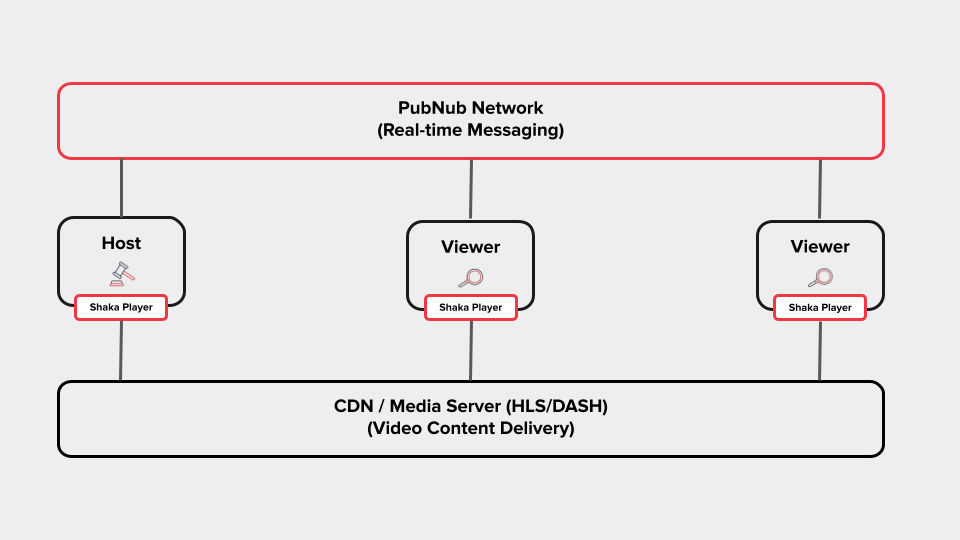 1. **Master** controls playback (play, pause, seek)
2. Commands are sent instantly via PubNub to all connected clients
3. **Followers** receive and apply commands with latency compensation
4. Periodic sync pulses correct any drift between clients
---
## Included Builds
| Build | File | Use Case |
|-------|------|----------|
| Full + UI | `shaka-player.ui.js` | Complete player with UI controls |
| Full | `shaka-player.compiled.js` | Player without UI |
| DASH Only | `shaka-player.dash.js` | Lightweight DASH-only build |
| HLS Only | `shaka-player.hls.js` | Lightweight HLS-only build |
All builds include the SyncManager for Watch Party functionality.
---
## Platform and Browser Support
|Browser |Windows |Mac |Linux |Android |iOS >= 9 |iOS >= 17.1|iPadOS >= 13|ChromeOS|Other|
|:------------:|:--------:|:-------:|:-------:|:-------:|:--------:|:---------:|:----------:|:------:|:---:|
|Chrome |**Y** |**Y** |**Y** |**Y** |**Native**|**Native** |**Native** |**Y** | - |
|Firefox |**Y** |**Y** |**Y** |untested⁵|**Native**|**Native** |**Native** | - | - |
|Edge |**Y** | - | - | - | - | - | - | - | - |
|Edge Chromium |**Y** |**Y** |**Y** |untested⁵|**Native**|**Native** |**Native** | - | - |
|IE | N | - | - | - | - | - | - | - | - |
|Safari | - |**Y** | - | - |**Native**|**Y** |**Y** | - | - |
|Opera |**Y** |**Y** |**Y** |untested⁵|**Native**| - | - | - | - |
|Chromecast² | - | - | - | - | - | - | - | - |**Y**|
|Tizen TV³ | - | - | - | - | - | - | - | - |**Y**|
|WebOS⁶ | - | - | - | - | - | - | - | - |**Y**|
|Hisense⁷ | - | - | - | - | - | - | - | - |**Y**|
|Vizio⁷ | - | - | - | - | - | - | - | - |**Y**|
|Xbox One | - | - | - | - | - | - | - | - |**Y**|
|Playstation 4⁷| - | - | - | - | - | - | - | - |**Y**|
|Playstation 5⁷| - | - | - | - | - | - | - | - |**Y**|
**Notes:**
- ²: The latest stable Chromecast firmware is tested. Both sender and receiver can be implemented.
- ³: Tizen 2017 model is actively tested. Tizen 2016 is community-supported.
- ⁵: Expected to work but not actively tested.
- ⁶: Community-supported. See [official WebOS support issue](https://github.com/shaka-project/shaka-player/issues/1330).
- ⁷: Community-supported and untested by us.
**iOS/iPadOS Notes:**
- iOS 9+ supported through Apple's native HLS player
- iPadOS 13+ supports MediaSource Extensions
- iPadOS 17 and iOS 17.1+ support ManagedMediaSource Extensions
---
## DRM Support
|Browser |Widevine |PlayReady|FairPlay |ClearKey |
|:------------:|:--------:|:-------:|:-------:|:-------:|
|Chrome¹ |**Y** | - | - |**Y** |
|Firefox² |**Y** | - | - |**Y** |
|Edge³ | - |**Y** | - | - |
|Edge Chromium |**Y** |**Y** | - |**Y** |
|Safari | - | - |**Y** | - |
|Opera |**Y** | - | - |**Y** |
|Chromecast |**Y** |**Y** | - |**Y** |
|Tizen TV |**Y** |**Y** | - |**Y** |
**Notes:**
- ¹: Only official Chrome builds contain Widevine CDM
- ²: DRM must be enabled by the user on first visit
- ³: PlayReady in Edge may not work on VMs or Remote Desktop
---
## Streaming Format Support
|Format|Video On-Demand|Live |Event|In-Progress Recording|
|:----:|:-------------:|:---:|:---:|:-------------------:|
|DASH |**Y** |**Y**| - |**Y** |
|HLS |**Y** |**Y**|**Y**| - |
Custom manifest formats can be supported via [manifest parser plugins](https://shaka-project.github.io/shaka-player/docs/api/tutorial-manifest-parser.html).
---
## Additional Features
This package includes all features from Shaka Player:
- Offline storage and playback via IndexedDB
- Subtitles: WebVTT, TTML, CEA-608/708, SubRip (SRT)
- Thumbnails: DASH-IF, HLS Image Playlists, I-frame playlists, external WebVTT
- VR/360° video support
- Monetization: IMA SDK, IMA DAI, AWS MediaTailor, HLS interstitials
- Content Steering (v1)
- MPEG-5 Part2 LCEVC decoding support
---
## Documentation
| Resource | Link |
|----------|------|
| Watch Party Demo | [demo/sync/](demo/sync/) |
| Full API Docs | [shaka-project.github.io/shaka-player/docs/api](https://shaka-project.github.io/shaka-player/docs/api/index.html) |
| Tutorials | [Shaka Tutorials](https://shaka-project.github.io/shaka-player/docs/api/tutorial-welcome.html) |
| PubNub Dashboard | [admin.pubnub.com](https://admin.pubnub.com) |
| PubNub Docs | [pubnub.com/docs](https://www.pubnub.com/docs) |
---
## Contributing
We welcome contributions. Please read [CONTRIBUTING.md](CONTRIBUTING.md) for guidelines.
---
## License
Apache 2.0 - See [LICENSE](LICENSE)
---
1. **Master** controls playback (play, pause, seek)
2. Commands are sent instantly via PubNub to all connected clients
3. **Followers** receive and apply commands with latency compensation
4. Periodic sync pulses correct any drift between clients
---
## Included Builds
| Build | File | Use Case |
|-------|------|----------|
| Full + UI | `shaka-player.ui.js` | Complete player with UI controls |
| Full | `shaka-player.compiled.js` | Player without UI |
| DASH Only | `shaka-player.dash.js` | Lightweight DASH-only build |
| HLS Only | `shaka-player.hls.js` | Lightweight HLS-only build |
All builds include the SyncManager for Watch Party functionality.
---
## Platform and Browser Support
|Browser |Windows |Mac |Linux |Android |iOS >= 9 |iOS >= 17.1|iPadOS >= 13|ChromeOS|Other|
|:------------:|:--------:|:-------:|:-------:|:-------:|:--------:|:---------:|:----------:|:------:|:---:|
|Chrome |**Y** |**Y** |**Y** |**Y** |**Native**|**Native** |**Native** |**Y** | - |
|Firefox |**Y** |**Y** |**Y** |untested⁵|**Native**|**Native** |**Native** | - | - |
|Edge |**Y** | - | - | - | - | - | - | - | - |
|Edge Chromium |**Y** |**Y** |**Y** |untested⁵|**Native**|**Native** |**Native** | - | - |
|IE | N | - | - | - | - | - | - | - | - |
|Safari | - |**Y** | - | - |**Native**|**Y** |**Y** | - | - |
|Opera |**Y** |**Y** |**Y** |untested⁵|**Native**| - | - | - | - |
|Chromecast² | - | - | - | - | - | - | - | - |**Y**|
|Tizen TV³ | - | - | - | - | - | - | - | - |**Y**|
|WebOS⁶ | - | - | - | - | - | - | - | - |**Y**|
|Hisense⁷ | - | - | - | - | - | - | - | - |**Y**|
|Vizio⁷ | - | - | - | - | - | - | - | - |**Y**|
|Xbox One | - | - | - | - | - | - | - | - |**Y**|
|Playstation 4⁷| - | - | - | - | - | - | - | - |**Y**|
|Playstation 5⁷| - | - | - | - | - | - | - | - |**Y**|
**Notes:**
- ²: The latest stable Chromecast firmware is tested. Both sender and receiver can be implemented.
- ³: Tizen 2017 model is actively tested. Tizen 2016 is community-supported.
- ⁵: Expected to work but not actively tested.
- ⁶: Community-supported. See [official WebOS support issue](https://github.com/shaka-project/shaka-player/issues/1330).
- ⁷: Community-supported and untested by us.
**iOS/iPadOS Notes:**
- iOS 9+ supported through Apple's native HLS player
- iPadOS 13+ supports MediaSource Extensions
- iPadOS 17 and iOS 17.1+ support ManagedMediaSource Extensions
---
## DRM Support
|Browser |Widevine |PlayReady|FairPlay |ClearKey |
|:------------:|:--------:|:-------:|:-------:|:-------:|
|Chrome¹ |**Y** | - | - |**Y** |
|Firefox² |**Y** | - | - |**Y** |
|Edge³ | - |**Y** | - | - |
|Edge Chromium |**Y** |**Y** | - |**Y** |
|Safari | - | - |**Y** | - |
|Opera |**Y** | - | - |**Y** |
|Chromecast |**Y** |**Y** | - |**Y** |
|Tizen TV |**Y** |**Y** | - |**Y** |
**Notes:**
- ¹: Only official Chrome builds contain Widevine CDM
- ²: DRM must be enabled by the user on first visit
- ³: PlayReady in Edge may not work on VMs or Remote Desktop
---
## Streaming Format Support
|Format|Video On-Demand|Live |Event|In-Progress Recording|
|:----:|:-------------:|:---:|:---:|:-------------------:|
|DASH |**Y** |**Y**| - |**Y** |
|HLS |**Y** |**Y**|**Y**| - |
Custom manifest formats can be supported via [manifest parser plugins](https://shaka-project.github.io/shaka-player/docs/api/tutorial-manifest-parser.html).
---
## Additional Features
This package includes all features from Shaka Player:
- Offline storage and playback via IndexedDB
- Subtitles: WebVTT, TTML, CEA-608/708, SubRip (SRT)
- Thumbnails: DASH-IF, HLS Image Playlists, I-frame playlists, external WebVTT
- VR/360° video support
- Monetization: IMA SDK, IMA DAI, AWS MediaTailor, HLS interstitials
- Content Steering (v1)
- MPEG-5 Part2 LCEVC decoding support
---
## Documentation
| Resource | Link |
|----------|------|
| Watch Party Demo | [demo/sync/](demo/sync/) |
| Full API Docs | [shaka-project.github.io/shaka-player/docs/api](https://shaka-project.github.io/shaka-player/docs/api/index.html) |
| Tutorials | [Shaka Tutorials](https://shaka-project.github.io/shaka-player/docs/api/tutorial-welcome.html) |
| PubNub Dashboard | [admin.pubnub.com](https://admin.pubnub.com) |
| PubNub Docs | [pubnub.com/docs](https://www.pubnub.com/docs) |
---
## Contributing
We welcome contributions. Please read [CONTRIBUTING.md](CONTRIBUTING.md) for guidelines.
---
## License
Apache 2.0 - See [LICENSE](LICENSE)
---
**Powered by [PubNub](https://www.pubnub.com)**

*Based on [Shaka Player](https://github.com/shaka-project/shaka-player) by Google*