 ## Kendo UI for Angular Scheduler
> * This package is part of [Kendo UI for Angular](https://www.telerik.com/kendo-angular-ui/)—a commercial UI library.
> * To use this package, you must install a license key file, whether you are on a paid license or a 30-day free trial. To receive a license key, either [purchase a license](https://www.telerik.com/purchase/kendo-ui) or start a [free trial](https://www.telerik.com/download-login-v2-kendo-angular-ui).
> * Adding a valid license key file ensures a seamless experience during the trial period—no watermarks, no warnings, and full access to all components and features.
> * Trial users can register for a free license key file. Without it, your trial may be interrupted by visual indicators or functionality limitations.
> * Additionally, for the period of your license, you get access to our legendary technical support provided directly by the Kendo UI for Angular team!
> * Learn more: https://www.telerik.com/kendo-angular-ui/components/licensing
>
> [Start using Kendo UI for Angular](https://www.telerik.com/download-login-v2-kendo-angular-ui) and speed up your development process!
## Angular Scheduler Component
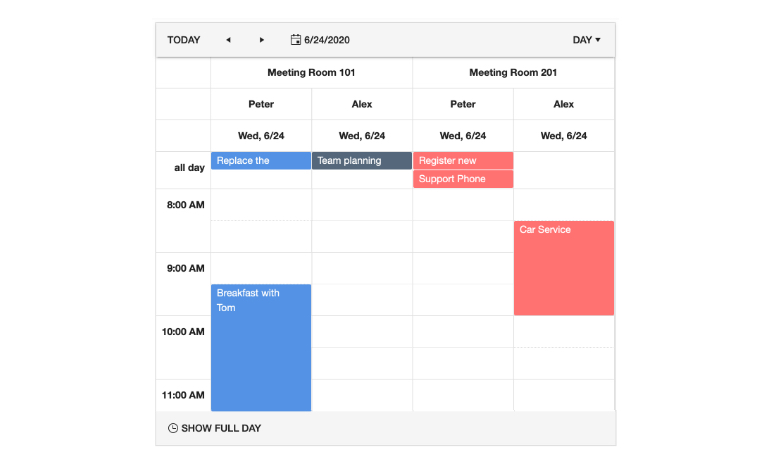
The [Kendo UI for Angular Scheduler](https://www.telerik.com/kendo-angular-ui/scheduler) component offers an in-app calendar experience similar to Outlook or Google Calendar. The Angular Scheduler comes with several essential user features: different views, including day and month views, support for multiple resources, editing of events through a form or by dragging and resizing, time zone conversions and more. Every feature can be enabled through a single configuration option or deeply customized with a flexible API.
## Kendo UI for Angular Scheduler
> * This package is part of [Kendo UI for Angular](https://www.telerik.com/kendo-angular-ui/)—a commercial UI library.
> * To use this package, you must install a license key file, whether you are on a paid license or a 30-day free trial. To receive a license key, either [purchase a license](https://www.telerik.com/purchase/kendo-ui) or start a [free trial](https://www.telerik.com/download-login-v2-kendo-angular-ui).
> * Adding a valid license key file ensures a seamless experience during the trial period—no watermarks, no warnings, and full access to all components and features.
> * Trial users can register for a free license key file. Without it, your trial may be interrupted by visual indicators or functionality limitations.
> * Additionally, for the period of your license, you get access to our legendary technical support provided directly by the Kendo UI for Angular team!
> * Learn more: https://www.telerik.com/kendo-angular-ui/components/licensing
>
> [Start using Kendo UI for Angular](https://www.telerik.com/download-login-v2-kendo-angular-ui) and speed up your development process!
## Angular Scheduler Component
The [Kendo UI for Angular Scheduler](https://www.telerik.com/kendo-angular-ui/scheduler) component offers an in-app calendar experience similar to Outlook or Google Calendar. The Angular Scheduler comes with several essential user features: different views, including day and month views, support for multiple resources, editing of events through a form or by dragging and resizing, time zone conversions and more. Every feature can be enabled through a single configuration option or deeply customized with a flexible API.
 ## Key Features
Among the many features which the Kendo UI for Angular Scheduler delivers are:
* [Multiple views](https://www.telerik.com/kendo-angular-ui/components/scheduler/views/)—Display Scheduler events in any of the available **Timeline**, **Day**, **Week**, **Month**, or **Agenda** views.
* [Editing](https://www.telerik.com/kendo-angular-ui/components/scheduler/editing/)—Depending on your users' requirements, you can provide editing from an external form or Reactive Forms, and also further customize the Scheduler.
* [Timezones](https://www.telerik.com/kendo-angular-ui/components/scheduler/timezones/)—You can display the events in the Scheduler in different timezones when building multinational applications.
* [Data Binding](https://www.telerik.com/kendo-angular-ui/components/scheduler/data-binding/)—The Scheduler provides a set of data binding approaches including the use of built-in directives, model and resource binding, as well as manual binding to the `events` attribute of the component.
* [Recurring Events](https://www.telerik.com/kendo-angular-ui/components/scheduler/recurring-events)—The built-in recurrence engine supports evaluation of recurring events in accordance to the Calendar format.
* [Toolbar](https://www.telerik.com/kendo-angular-ui/components/scheduler/toolbar/)—Provides a template that allows the customization of the toolbar and the addition of new components.
* [Export to PDF](https://www.telerik.com/kendo-angular-ui/components/scheduler/pdf-export/)—The Scheduler can be exported to PDF documents without the need for server-side helpers.
* [Templates](https://www.telerik.com/kendo-angular-ui/components/scheduler/templates)—Provides sets of configuration options for customizing the display of its elements such as event, slot, header, and agenda templates.
* [Slot Selection](https://www.telerik.com/kendo-angular-ui/components/scheduler/slot-selection)—Enables the user to choose time and day slots, and to select time ranges by clicking and dragging over a set of slots.
* [Styling](https://www.telerik.com/kendo-angular-ui/components/scheduler/styling)—You can customize the appearance of the Scheduler events, slots and views using the provided functional callbacks.
* [Globalization](https://www.telerik.com/kendo-angular-ui/components/scheduler/globalization/)—By using the available globalization options in Kendo UI for Angular, you can translate the Scheduler messages by adapting them to specific culture locales. Additionally, the Scheduler supports rendering in a right-to-left (RTL) direction.
* [Accessibility](https://www.telerik.com/kendo-angular-ui/components/scheduler/accessibility/)—The Kendo UI for Angular Scheduler is compliant with the Section 508 requirements. The Scheduler is accessible by screen readers and provides WAI-ARIA support.
* [Keyboard Navigation](https://www.telerik.com/kendo-angular-ui/components/scheduler/keyboard-navigation)—The Kendo UI for Angular Scheduler supports a number of keyboard shortcuts which allow users to accomplish various commands.
## Support Options
For any issues you might encounter while working with the Kendo UI for Angular Scheduler, you have the following support channels available:
* Industry-leading technical support—Kendo UI for Angular paid license holders and users with an active (free) trial license can take advantage of our outstanding customer support. To submit a ticket, use the [dedicated Kendo UI for Angular support system](https://www.telerik.com/account/support-tickets).
* Product forums—The [Kendo UI for Angular forums](https://www.telerik.com/forums/kendo-angular-ui) are part of the free support you can get from the community and from the Kendo UI for Angular team.
* Feedback portal—The [Kendo UI for Angular feedback portal](https://feedback.telerik.com/kendo-angular-ui) is where you can request and vote for new features to be added.
## Resources
* [Getting Started with Kendo UI for Angular](https://www.telerik.com/kendo-angular-ui/getting-started)
* [Getting Started with the Kendo UI for Angular Scheduler](https://www.telerik.com/kendo-angular-ui/components/scheduler/installation/getting-started)
* [Scheduler Overview page](https://www.telerik.com/kendo-angular-ui/components/scheduler) and [Scheduler API reference](https://www.telerik.com/kendo-angular-ui/components/scheduler/api)
* [Kendo UI for Angular roadmap](https://www.telerik.com/kendo-angular-ui/roadmap)
* [Blogs](http://www.telerik.com/blogs/kendo-ui)
* [Demos, documentation, and component reference](https://www.telerik.com/kendo-angular-ui/components)
* [Kendo UI for Angular pricing and licensing](https://www.telerik.com/purchase/kendo-ui)
*Copyright © 2026 Progress Software Corporation and/or one of its subsidiaries or affiliates. All rights reserved.*
*Progress, Telerik, and certain product names used herein are trademarks or registered trademarks of Progress Software Corporation and/or one of its subsidiaries or affiliates in the U.S. and/or other countries.*
## Key Features
Among the many features which the Kendo UI for Angular Scheduler delivers are:
* [Multiple views](https://www.telerik.com/kendo-angular-ui/components/scheduler/views/)—Display Scheduler events in any of the available **Timeline**, **Day**, **Week**, **Month**, or **Agenda** views.
* [Editing](https://www.telerik.com/kendo-angular-ui/components/scheduler/editing/)—Depending on your users' requirements, you can provide editing from an external form or Reactive Forms, and also further customize the Scheduler.
* [Timezones](https://www.telerik.com/kendo-angular-ui/components/scheduler/timezones/)—You can display the events in the Scheduler in different timezones when building multinational applications.
* [Data Binding](https://www.telerik.com/kendo-angular-ui/components/scheduler/data-binding/)—The Scheduler provides a set of data binding approaches including the use of built-in directives, model and resource binding, as well as manual binding to the `events` attribute of the component.
* [Recurring Events](https://www.telerik.com/kendo-angular-ui/components/scheduler/recurring-events)—The built-in recurrence engine supports evaluation of recurring events in accordance to the Calendar format.
* [Toolbar](https://www.telerik.com/kendo-angular-ui/components/scheduler/toolbar/)—Provides a template that allows the customization of the toolbar and the addition of new components.
* [Export to PDF](https://www.telerik.com/kendo-angular-ui/components/scheduler/pdf-export/)—The Scheduler can be exported to PDF documents without the need for server-side helpers.
* [Templates](https://www.telerik.com/kendo-angular-ui/components/scheduler/templates)—Provides sets of configuration options for customizing the display of its elements such as event, slot, header, and agenda templates.
* [Slot Selection](https://www.telerik.com/kendo-angular-ui/components/scheduler/slot-selection)—Enables the user to choose time and day slots, and to select time ranges by clicking and dragging over a set of slots.
* [Styling](https://www.telerik.com/kendo-angular-ui/components/scheduler/styling)—You can customize the appearance of the Scheduler events, slots and views using the provided functional callbacks.
* [Globalization](https://www.telerik.com/kendo-angular-ui/components/scheduler/globalization/)—By using the available globalization options in Kendo UI for Angular, you can translate the Scheduler messages by adapting them to specific culture locales. Additionally, the Scheduler supports rendering in a right-to-left (RTL) direction.
* [Accessibility](https://www.telerik.com/kendo-angular-ui/components/scheduler/accessibility/)—The Kendo UI for Angular Scheduler is compliant with the Section 508 requirements. The Scheduler is accessible by screen readers and provides WAI-ARIA support.
* [Keyboard Navigation](https://www.telerik.com/kendo-angular-ui/components/scheduler/keyboard-navigation)—The Kendo UI for Angular Scheduler supports a number of keyboard shortcuts which allow users to accomplish various commands.
## Support Options
For any issues you might encounter while working with the Kendo UI for Angular Scheduler, you have the following support channels available:
* Industry-leading technical support—Kendo UI for Angular paid license holders and users with an active (free) trial license can take advantage of our outstanding customer support. To submit a ticket, use the [dedicated Kendo UI for Angular support system](https://www.telerik.com/account/support-tickets).
* Product forums—The [Kendo UI for Angular forums](https://www.telerik.com/forums/kendo-angular-ui) are part of the free support you can get from the community and from the Kendo UI for Angular team.
* Feedback portal—The [Kendo UI for Angular feedback portal](https://feedback.telerik.com/kendo-angular-ui) is where you can request and vote for new features to be added.
## Resources
* [Getting Started with Kendo UI for Angular](https://www.telerik.com/kendo-angular-ui/getting-started)
* [Getting Started with the Kendo UI for Angular Scheduler](https://www.telerik.com/kendo-angular-ui/components/scheduler/installation/getting-started)
* [Scheduler Overview page](https://www.telerik.com/kendo-angular-ui/components/scheduler) and [Scheduler API reference](https://www.telerik.com/kendo-angular-ui/components/scheduler/api)
* [Kendo UI for Angular roadmap](https://www.telerik.com/kendo-angular-ui/roadmap)
* [Blogs](http://www.telerik.com/blogs/kendo-ui)
* [Demos, documentation, and component reference](https://www.telerik.com/kendo-angular-ui/components)
* [Kendo UI for Angular pricing and licensing](https://www.telerik.com/purchase/kendo-ui)
*Copyright © 2026 Progress Software Corporation and/or one of its subsidiaries or affiliates. All rights reserved.*
*Progress, Telerik, and certain product names used herein are trademarks or registered trademarks of Progress Software Corporation and/or one of its subsidiaries or affiliates in the U.S. and/or other countries.*