





ThreatCrush
All-in-one security agent — monitor, detect, scan, and protect servers in real-time.
Website •
Install •
Usage •
Features •
Modules •
GitHub
---
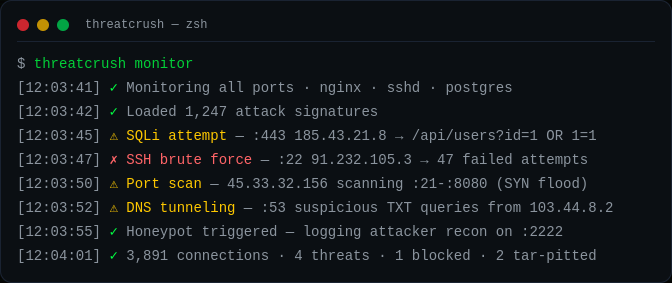
ThreatCrush is a security daemon that runs on your server, **reading your logs and watching inbound connections** for live attacks. It checks every nginx request against 96 OWASP CRS rules (paranoia level 1) + 1 ThreatCrush rule with CRS anomaly scoring, runs 18 detection rules over auth, web and network events, auto-bans attackers, scans your codebase, spot-checks your URLs, and alerts you in real-time.
```
$ threatcrush monitor
2026-09-25 12:03:41 [INFO] Starting foreground monitor...
2026-09-25 12:03:41 [INFO] Monitoring 3 log source(s):
● ssh-guard → /var/log/auth.log
● log-watcher → /var/log/nginx/access.log
● log-watcher → /var/log/syslog
Press Ctrl+C to stop
2026-09-25 12:03:45 [CRITICAL] [log-watcher] Attack detected [SQLI]: GET /api/users?id=1%20UNION%20SELECT%20password%20FROM%20users (185.43.21.8)
2026-09-25 12:03:46 [CRITICAL] [log-watcher] Attack detected [PATH_TRAVERSAL]: GET /../../etc/passwd (185.43.21.8)
2026-09-25 12:03:47 [HIGH] [ssh-guard] Failed SSH login for root from 91.232.105.3 (91.232.105.3)
2026-09-25 12:03:48 [HIGH] [ssh-guard] Invalid SSH user attempt: admin123 from 103.77.88.99 (103.77.88.99)
2026-09-25 12:03:52 [LOW] [log-watcher] Client error 404: GET /wp-login.php (203.0.113.9)
```
`monitor` tails your logs in the foreground. The daemon (`threatcrush start`) adds the connection poller, DNS monitor, journald, the rule engine and auto-ban.
## Install
**Preferred install:**
```bash
curl -fsSL https://threatcrush.com/install.sh | sh
```
The CLI needs **Node.js 22.6 or newer**. The installer detects whether the machine is a server or desktop, uses your existing package manager when available, and on a machine with no Node.js sets up Node.js LTS with `mise`, adding mise's shims to `~/.profile` so new login shells find `threatcrush`. If it finds an older Node.js it stops without installing anything and tells you how to upgrade.
- **Linux server** → installs the CLI
- **Desktop (Linux, macOS, Windows)** → installs the CLI and points you to the desktop app, a separate download from [GitHub Releases](https://github.com/profullstack/threatcrush/releases/latest). The desktop app talks to a ThreatCrush daemon on the same machine; log monitoring and firewall bans need Linux.
After install, the supported lifecycle commands are:
```bash
threatcrush update # upgrades the installed bundle
threatcrush remove # removes the installed bundle
```
Manual package-manager installs still work (Node.js 22.6+):
```bash
npm i -g @profullstack/threatcrush
pnpm add -g @profullstack/threatcrush
yarn global add @profullstack/threatcrush
bun add -g @profullstack/threatcrush
```
## Usage
```bash
threatcrush # Get started
threatcrush monitor # Watch nginx, auth & syslog for attacks (foreground)
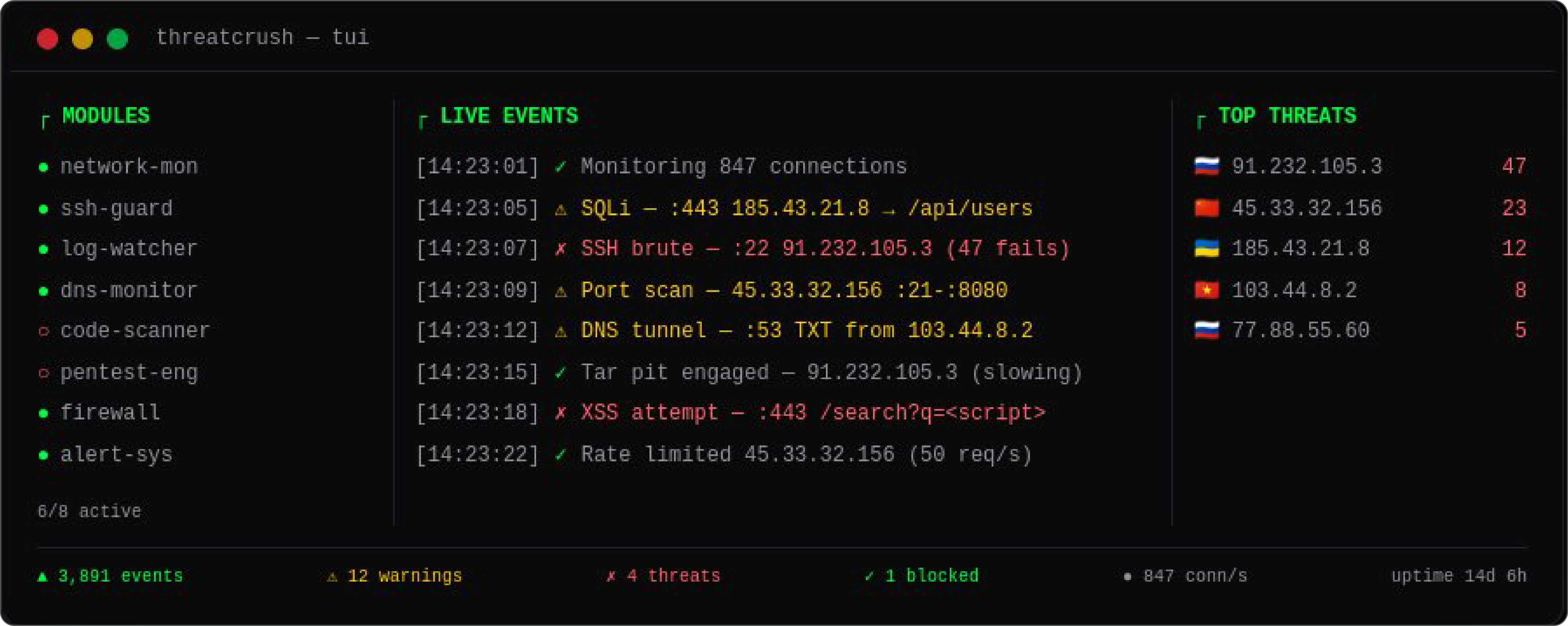
threatcrush tui # Interactive dashboard (htop for security)
threatcrush scan ./src # Scan code for vulnerabilities & secrets
threatcrush scan . --format sarif --output out.sarif --fail-on critical,high
threatcrush pentest URL # Quick web security checks against a URL
threatcrush init # Auto-detect services, generate config
threatcrush status # Show daemon status & loaded modules
threatcrush modules # Manage security modules
threatcrush store # Browse the module marketplace
threatcrush update # Upgrade the CLI using the supported path
```
## Features
| Feature | Description |
|---------|-------------|
| 🔍 **Live Attack Detection** | Tails nginx, auth, syslog and journald, and polls inbound connections to the ports you serve. Detects SQLi, XSS, path traversal, RFI, SSH brute force, port scans, SYN floods, DNS tunneling. |
| 🛡️ **Code Security Scanner** | Scan your codebase for vulnerabilities, hardcoded secrets, and misconfigurations. |
| 💥 **Pentest Checks** | `threatcrush pentest URL` spot-checks security headers, CSP, CORS, cookie flags, server banners, directory listings and error leaks, then probes for SQL errors, path traversal and unsafe HTTP methods. |
| 🔀 **Network Monitor** | Polls conntrack/`ss` every 5 s for inbound TCP connections to your listening ports. Flags port scans (10+ ports in 30 s) and SYN floods (50+ half-open from one source). No packet capture. |
| 🔔 **Real-time Alerts** | Slack, email, webhook notifications the instant a threat is detected. |
| ⚙️ **systemd Daemon** | Runs as a background service on your server. Auto-starts on boot, monitors 24/7. |
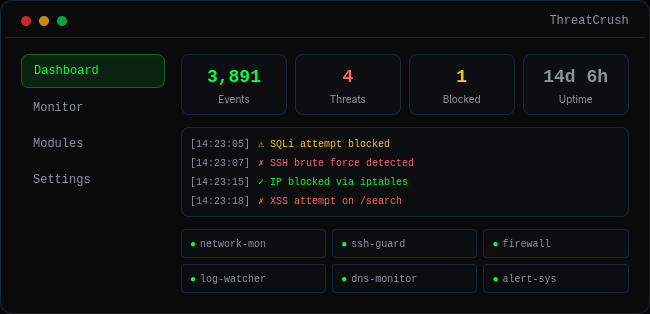
| 📊 **TUI Dashboard** | Interactive terminal dashboard — htop for security. |
## Modules
ThreatCrush uses a pluggable module system. Install from the marketplace or build your own:
```bash
threatcrush modules list # List built-in and installed modules
threatcrush modules install ssh-guard # Install a module
threatcrush modules install docker-monitor
threatcrush store search "firewall" # Search marketplace
threatcrush store publish https://github.com/you/my-module # Publish your own
```
### Built in
| Component | What it covers |
|-----------|----------------|
| `log-watcher` | nginx access log + syslog — 96 OWASP CRS rules (PL1: SQLi, XSS, path traversal, RFI, RCE, PHP/Java injection, SSRF, scanners) + 1 ThreatCrush rule (OS files in the path) scored on every request |
| `ssh-guard` | auth.log / secure — failed logins, brute force, root logins, user enumeration |
| `user-journal` | journald — the systemd journal |
| `network-monitor` | Inbound connections to your listening ports — port scans, SYN floods |
| `dns-monitor` | Resolver logs (systemd-resolved, dnsmasq, bind, Pi-hole) — DNS tunneling, DGA detection |
| `threatcrush scan` | Vulnerabilities, secrets, dependency CVEs (OSV.dev, with `--deps`) |
| `threatcrush pentest` | Header, CORS, cookie, SQL-error, path-traversal and HTTP-method checks |
| auto-defend | Bans via fail2ban, nftables or iptables |
| alerts | Slack, Discord, email, webhook, PagerDuty |
### Community Modules
Build and sell your own modules on the ThreatCrush marketplace:
- `docker-monitor` — Container escape detection
- `k8s-watcher` — Kubernetes cluster security
- `honeypot` — Deploy decoy services
- `geo-blocker` — Block traffic by country/ASN
- `compliance-reporter` — SOC2, HIPAA, PCI-DSS reports
## Configuration
```bash
threatcrush init # Auto-detect & generate config
threatcrush init --offline # Same, without signing in (scripts, CI, containers)
```
Config lives at `/etc/threatcrush/threatcrushd.conf` with module configs in `/etc/threatcrush/threatcrushd.conf.d/`.
## Cloud dashboard
The daemon reports to your ThreatCrush dashboard once the machine is logged in and linked to a server there:
```bash
threatcrush login # prints a link: approve it in a browser where you are signed in
threatcrush servers link # reuses the dashboard server with this hostname, or registers one
threatcrush servers link --org acme --name web-1
threatcrush save # store this machine's daemon config on its server (secrets redacted)
threatcrush status # shows the link
threatcrush servers unlink # stop reporting
```
`threatcrush login` needs no browser on the machine and never asks for a password: it prints a `threatcrush.com/cli/login` link and a short code, you approve it from any signed-in browser after checking the code matches, and the terminal finishes signing in on its own (PKCE-bound, so only the terminal that started it can redeem it; the link expires after 10 minutes). Each machine gets its own session. `threatcrush login --password` keeps the email-and-password prompt.
`threatcrush save` uploads the config the daemon reads (`/etc/threatcrush/threatcrushd.conf` as root). Values under keys that look like secrets (passwords, tokens, webhook URLs, API keys) are replaced with `[redacted]` before upload, and again by the server.
A running daemon picks up `link` and `unlink` within a minute; no restart. It then:
- uploads detections at or above `[cloud] min_severity` (rule detections, plus events from modules no rule reads, such as dns-monitor), batched (100 events or every 10 s), and every ban and unban the daemon makes;
- sends a heartbeat every 60 s with its version and hostname;
- runs the `threatcrush harden` checks and `threatcrush patches` a minute after it starts and every 24 h, and uploads the findings (both commands upload too; `--no-upload` skips it);
- every 15 s, picks up blocks and unblocks queued on the dashboard and applies them through auto-defence, so protected and allowlisted addresses and dry-run apply as they do locally;
- every 5 min, adds the organization's IP/CIDR allowlist to the never-block set.
Uploads never hold up detection or a ban. While the dashboard is unreachable, events wait in a spool (`/var/lib/threatcrush/cloud-spool.jsonl`, or `~/.threatcrush/state/` for a user daemon) of at most 10,000 events / 20 MB, oldest dropped first, which survives a restart and is sent when the dashboard answers again. The daemon uses the login of the user it runs as (`/root/.threatcrush/config.json` for the system service) and refreshes the session itself; if the refresh token is refused, it logs that `threatcrush login` is needed and keeps spooling.
```toml
[cloud]
enabled = true # false: the daemon neither reports to nor takes actions from the dashboard
min_severity = "medium" # info | low | medium | high | critical
```
## Automatic updates
The daemon keeps itself on the latest release. About every 6 hours (plus up to an hour of jitter, so a fleet does not restart in step) it asks the npm registry for `latest`. When a newer version has been published for at least 2 hours, and is on the same major version, it installs it and restarts onto it. The update shows in the live feed as an info event (`auto-update`).
Under systemd the unit's sandbox keeps the daemon from writing its own install, so it hands `npm i -g` to a transient unit (`systemd-run`) run as whoever owns the install, then restarts the service. A user-mode daemon runs npm itself. Only the npm global layout the installer produces is updated in place. A daemon running from a pnpm store or a source checkout logs that `threatcrush update` is needed instead. A version that was tried and did not take is not retried for a day.
```toml
[update]
auto = true # false (or THREATCRUSH_AUTO_UPDATE=0): upgrade by hand with `threatcrush update`
interval = "6h" # how often to check (at least 15m)
min_age = "2h" # how long a release must be public before it is taken
allow_major = false # true: also move to a new major version
```
## Pricing
The CLI is MIT-licensed (see [License](#license)). For pricing, [contact us for a quote](https://threatcrush.com/hire).
## Browser Extension
Monitor security from your browser:
- **Chrome** — Chrome Web Store (coming soon)
- **Firefox** — Firefox Add-ons (coming soon)
- **Safari** — Coming soon
Features: scan any site, real-time alerts, security headers check, dashboard popup.
## Links
- 🌐 **Website:** [threatcrush.com](https://threatcrush.com)
- 📦 **npm:** [@profullstack/threatcrush](https://www.npmjs.com/package/@profullstack/threatcrush)
- 🐙 **GitHub:** [profullstack/threatcrush](https://github.com/profullstack/threatcrush)
- 🐛 **Issues:** [GitHub Issues](https://github.com/profullstack/threatcrush/issues)
## License
MIT © [Profullstack, Inc.](https://profullstack.com)