# @prisma/security-rules
## Permission rules for Prisma Postgres
Prisma Security Rules is a **permission rules system for Prisma ORM and Prisma Postgres**. With Security Rules, you can:
- Define access permission rules in TypeScript
- Deploy the permission rules to your Prisma Postgres instance
- Query Prisma Postgres with the permission rules applied
- Access Prisma Postgres from the frontend
At the core of it, you define rules that allow/deny requests to your database based on model name, operation (e.g. `findMany`) and the parameters you pass to said operation.
## Usage
### Prerequisites
- A project with Prisma ORM (>=6.2.0) installed and a Prisma Postgres database. If you don’t have one, you can get started [here](https://www.prisma.io/docs/getting-started/prisma-postgres/from-the-cli?utm_source=readme&utm_medium=security_rules).
- The Prisma CLI being authenticated with Prisma Data Platform (via [`prisma platform auth login --early-access`](https://www.prisma.io/docs/platform/platform-cli/commands?utm_source=readme&utm_medium=security_rules#auth-login)).
### 1. Install the Security Rules package
```shell
npm install @prisma/security-rules
```
Expand to see installation instructions for `pnpm`, `yarn` and `bun`
#### pnpm
```shell
pnpm add @prisma/security-rules
```
#### Yarn
```shell
yarn add @prisma/security-rules
```
#### Bun
```shell
bun install @prisma/security-rules
```
### 2. Define your Security Rules
First, import the package and define your rules. Create a `rules.ts`in your `prisma` folder:
```ts
import { PrismaClient } from "@prisma/client";
import { defineRules } from "@prisma/security-rules";
import { z } from "zod";
import { decode } from "path/to/decode"; // imaginary import of your jwt token decode helper
export default defineRules({
prisma: new PrismaClient(),
contextSchema: z.object({
token: z.string(),
}),
rules: {
user: {
async read(req) {
// On each request, the context object can be used to perform custom auth/access business logic. We know it's shape thanks to the `contextSchema` property.
const { userId } = await decode(req.context.token);
return {
$where: { id: userId },
};
},
$allOperations: false,
},
$allModels: false,
$transaction: false,
},
});
```
> Note: While the rules are applied to your `PrismaClient` instance, this instance will retain _full_ database access.
This example uses `zod`, but you can use any schema library that implements the [standard schema](https://github.com/standard-schema/standard-schema#what-schema-libraries-implement-the-spec) specification.
This example includes rules that will deny all requests except for reads (e.g. `findMany`) on `user` model. It also ensures a user only sees their own data by applying a `where` override (effectively `AND(incoming_query_where, rule_$where)`) that filters by the user's id (decoded from the session token).
### 3. Deploy your Security Rules
```shell
prisma rules deploy -f ./prisma/rules.ts
```
Be sure to copy the public key from the deploy command's output in your terminal, and replace the `` below.
### 4. Use `AuthorizedClient` to access Prisma Postgres
`AuthorizedClient` is a lightweight version of `PrismaClient` that you can use in your browser. Once your rules are deployed, you can use it as follows in your application:
```ts
import { AuthorizedClient } from "@prisma/security-rules";
// It is important not to forget the `type` annotation here.
import type rules from "path/to/prisma/rules";
const authorizedClient = new AuthorizedClient({
publicKey: "",
});
prisma.setGlobalContext({ token: "" });
const users = await prisma.users.findMany();
```
## How it works
This package exposes:
- A `defineRules` helper to attach Prisma Security Rules to an existing Prisma ORM client, which gets deployed at the edge when you run `prisma rules deploy`.
- An `AuthorizedClient` class that is a drop-in replacement for `PrismaClient`, a lightweight client that will enforce the rules you've defined and deployed.
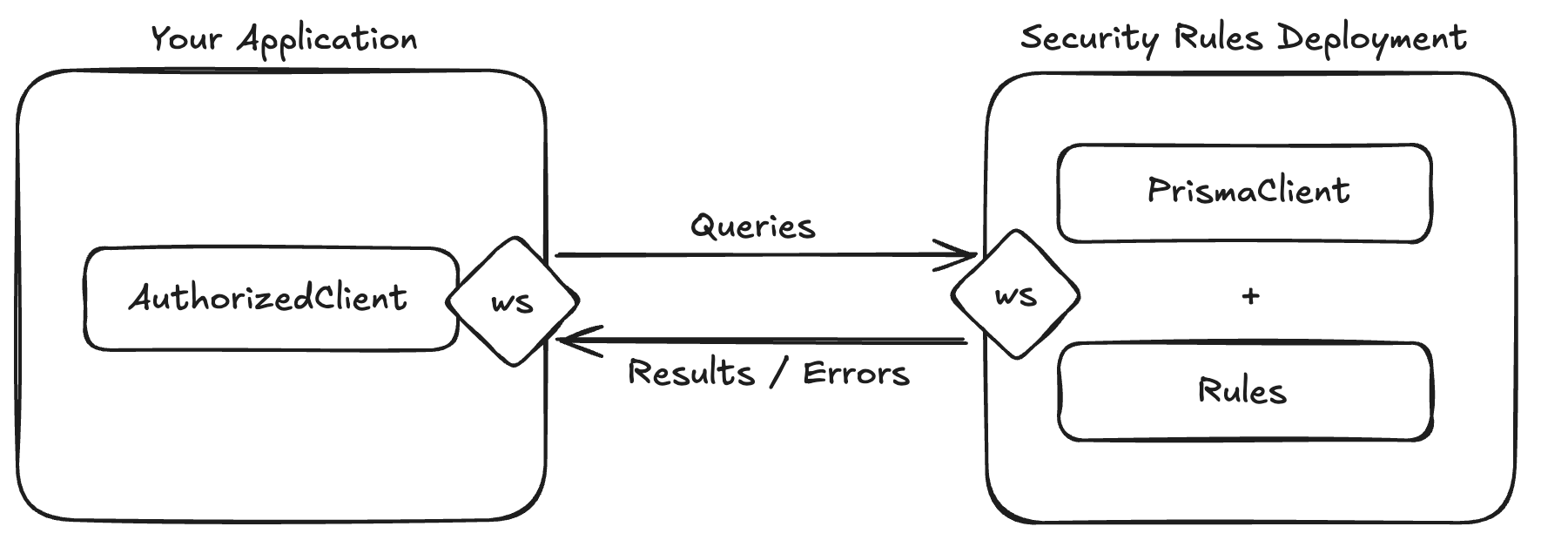
Here's a simplified high-level view of Prisma Security Rule's architecture:
### Rule Engine
Each request, that is received by Prisma Security Rules' workers, will be evaluated by a rule engine:
- If a request does not adhere to your rules, it will be denied with a reason, and the `AuthorizedClient` will throw an error.
- If a request adheres to your rules, it will be executed with the `PrismaClient` and the results will be sent to the `AuthorizedClient`.
#### Rules
Rules are defined with a JavaScript plain nested object.
The root object is defined as:
```ts
{
// model name must exist in your `PrismaClient`'s schema.
// when your schema changes, make sure to redeploy your rules,
// to avoid instant denies from the engine for requests that access new models.
[modelName: string]?: ModelRules;
// fallback in case the request's model name has no specific rules.
$allModels?: ModelRules;
// allow or deny transactions.
$transaction?: boolean;
}
```
Model rules are defined as follows:
```ts
type ModelRules =
// simple allow/deny toggle.
| boolean
// more nuanced rules.
| {
// rules for all create operations.
create?: OperationRules;
// rules for all read operations.
read?: OperationRules;
// rules for all update operations.
update?: OperationRules;
// rules for all delete operations.
delete?: OperationRules;
// fallback in case the request's operation group doesn't have specific rules.
$allOperations?: OperationRules;
// will deny requests if at least one of these fields is in the request's
// arguments or is returned by the query. If an operation has specific
// $blockedFields, they will override this property.
// Example: ['password']
$blockedFields?: string[];
};
```
Operation rules are best described by the following diagram:
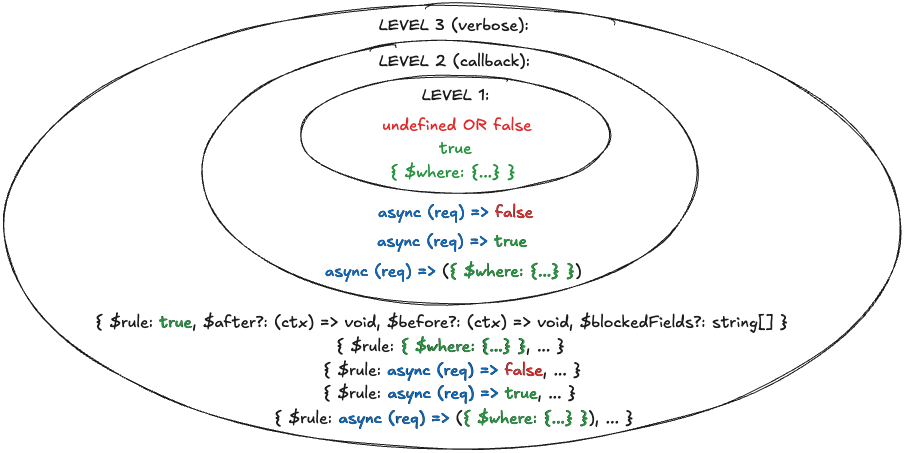
It's like an 🧅.
`$where` overrides the incoming request's filtering by `AND`ing any existing filters with it.
The callback's `req` argument is an object that includes the model name, operation, args object, and the global context object.
`$rule` is a verbose way of defining both an access rule and additional rules/logic for a specific operation:
- `$before` allows running custom code before the query is executed by `PrismaClient`.
- `$after` allows running custom code after the query is executed by `PrismaClient`.
- `$blockedFields` behaves similarly to the one that can be defined at the model level, but overrides it if it exists.
#### Rule Evaluation
Here's a diagram depicting the rule engine's evaluation process in a simplified manner:
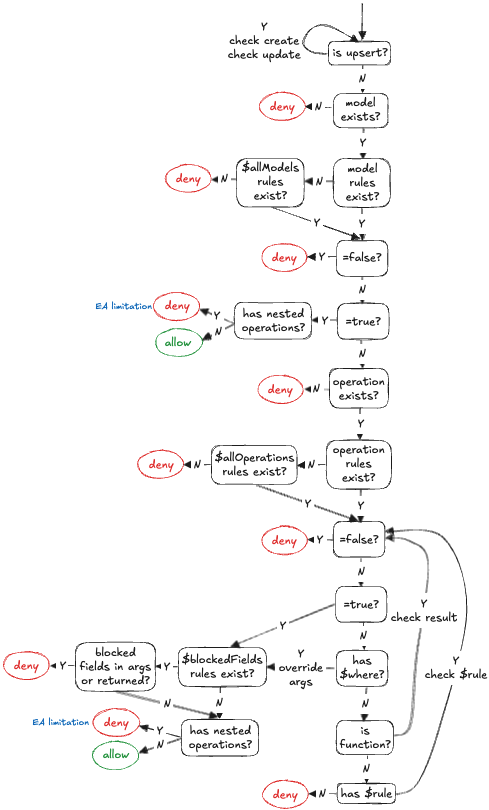
The rule engine is designed to introduce as little overhead as possible. As soon as a rule is not adhered by some check, the request is denied. Meaning, it doesn't try and run additional checks to collect more deny reasons.
## Need help?
If you need assistance, reach out in the #help-and-questions channel on our [Discord](https://pris.ly/discord), or connect with our community to see how others are using Prisma Security Rules.