# `@preact-signals/utils`
`@preact-signals/utils` is a standard library for Preact Signals, designed to provide essential utilities for comfortable and streamlined usage. This package includes several features to enhance the flexibility and maintainability of Preact Signal-based projects.
## Split your code because of you **want**, not because of you have to
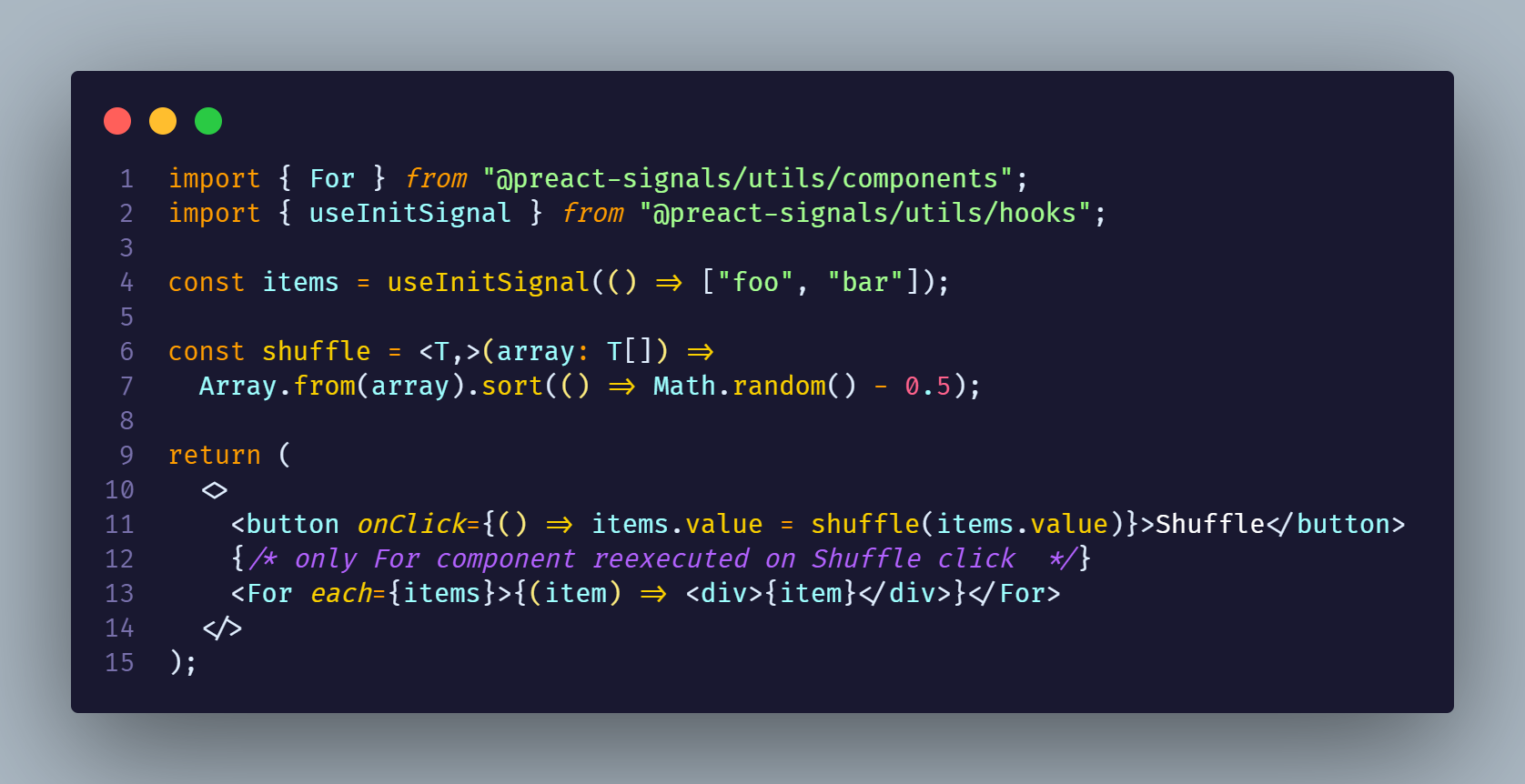
## [Documentation](./docs/README.md)
## Table of Contents
- [Prerequisites](#prerequisites)
- [`@preact/signals-core` additional step:](#preactsignals-core-additional-step)
- [`@preact-signals/safe-react` additional step:](#preact-signalssafe-react-additional-step)
- [`@preact-signals` additional step:](#preact-signals-additional-step)
- [Installation](#installation)
- [`@preact-signals/utils/macro`: Macros. Improving ergonomics](#preact-signalsutilsmacro-macros-improving-ergonomics)
- [State macros](#state-macros)
- [Ref macro shorthand](#ref-macro-shorthand)
- [Macro setup](#macro-setup)
- [Main Entry: `@preact-signals/utils`](#main-entry-preact-signalsutils)
- [`ReactiveRef`/`$`](#reactiveref)
- [`WritableReactiveRef`/`$w`](#writablereactiveref)
- [ReducerSignal](#reducersignal)
- [Deep Reactivity (Port of Vue 3 deep tracking API)](#deep-reactivity-port-of-vue-3-deep-tracking-api)
- [`deepSignal`](#deepsignal)
- [Store API](#store-api)
- [`reaction`](#reaction)
- [`rafReaction`](#rafreaction)
- [`accessor`/`setter`](#accessorsetter)
- [`resource`](#resource)
- [`createFlatStore`](#createflatstore)
- [`createFlatStoreOfSignals`](#createflatstoreofsignals)
- [`@preact-signals/utils/hooks`: Hooks for Signals](#preact-signalsutilshooks-hooks-for-signals)
- [Deep Reactivity Hooks](#deep-reactivity-hooks)
- [`useLinkedSignal`](#uselinkedsignal)
- [`@preact-signals/utils/components`: Reactive Components](#preact-signalsutilscomponents-reactive-components)
- [`@preact-signals/utils/hocs`: High Order Components (HOCs)](#preact-signalsutilshocs-high-order-components-hocs)
- [`reactifyLite`](#reactifylite)
- [Troubleshooting](#troubleshooting)
- [Third party libraries is not working with HOCs](#third-party-libraries-is-not-working-with-hocs-while-using-preact-signalssafe-react-or-preactsignals-react-with-babel)
- [Setup](#macro-setup)
- [Inspired by:](#heavily-inspired-by)
## Prerequisites
Ensure that [one of the preact signals runtimes](https://github.com/preactjs/signals) is installed:
- `@preact/signals` for `preact`, requiring an [additional step](#preactsignals-additional-step).
- `@preact/signals-core` for vanilla js requiring an additional step.
- `@preact-signals/safe-react` for `react`, requiring an [additional step](#preact-signalssafe-react-additional-step).
- `@preact/signals-react` for `react`.
### `@preact/signals-core` additional step:
We need to resolve `@preact/signals-react` as `@preact/signals-core`
#### Vite example:
```ts
import { defineConfig } from "vite";
export default defineConfig({
resolve: {
alias: {
"@preact/signals-react": "@preact/signals-core",
},
},
});
```
#### Astro example:
```ts
import { defineConfig } from "astro/config";
// https://astro.build/config
export default defineConfig({
vite: {
resolve: {
alias: {
"@preact/signals-react": "@preact/signals-core",
},
},
},
});
```
### `@preact-signals/safe-react` additional step:
Resolve `@preact-signals/safe-react` as `@preact/signals-react`
#### Vite example:
```ts
// vite.config.ts
import { defineConfig } from "vite";
export default defineConfig({
resolve: {
alias: {
"@preact/signals-react": "@preact-signals/safe-react",
},
},
});
```
#### Astro example:
```ts
// astro.config.mjs
import { defineConfig } from "astro/config";
// https://astro.build/config
export default defineConfig({
vite: {
resolve: {
alias: {
"@preact/signals-react": "@preact/signals-core",
},
},
},
});
```
#### Next.js
```ts
// next.config.js
module.exports = {
webpack: (config) => {
config.resolve.alias = {
...config.resolve.alias,
"@preact/signals-react": "@preact-signals/safe-react",
};
return config;
},
};
```
### `@preact/signals` additional step:
Resolve `@preact/signals-react` as `@preact/signals`. For guidance, see [resolve `react` as `preact`](https://preactjs.com/guide/v10/getting-started) and follow a similar process with signals. Additionally, dedupe `preact`.
#### [Vite example](../../apps/preact-test/vite.config.ts):
```ts
import preact from "@preact/preset-vite";
import { defineConfig } from "vite";
export default defineConfig({
plugins: [preact()],
resolve: {
dedupe: ["preact"],
alias: [
{ find: "react", replacement: "preact/compat" },
{ find: "react-dom/test-utils", replacement: "preact/test-utils" },
{ find: "react-dom", replacement: "preact/compat" },
{ find: "react/jsx-runtime", replacement: "preact/jsx-runtime" },
{ find: "@preact/signals-react", replacement: "@preact/signals" },
],
},
});
```
## Installation
Fetch `@preact-signals/utils` via your preferred package manager:
```bash
# Using npm
npm install @preact-signals/utils
# Using yarn
yarn add @preact-signals/utils
# Using pnpm
pnpm add @preact-signals/utils
```
Library consist from many entries:
- `@preact-signals/utils` library agnostic utils and deep reactivity implementation
- `@preact-signals/utils/components` for reactive components
- `@preact-signals/utils/hooks` for reactive hooks
- `@preact-signals/utils/hocs` provides hocs wrappers that bring reactivity to your components
- `@preact-signals/utils/macro` provides babel macros
## `@preact-signals/utils/macro`: Macros. Improving ergonomics
This entry provides macros distributed as babel plugin. It's allows you to write more concise code. There are two types of macros: `state macros`, and ref macro shorthand.
You can play with it in the interactive playground
### State macros
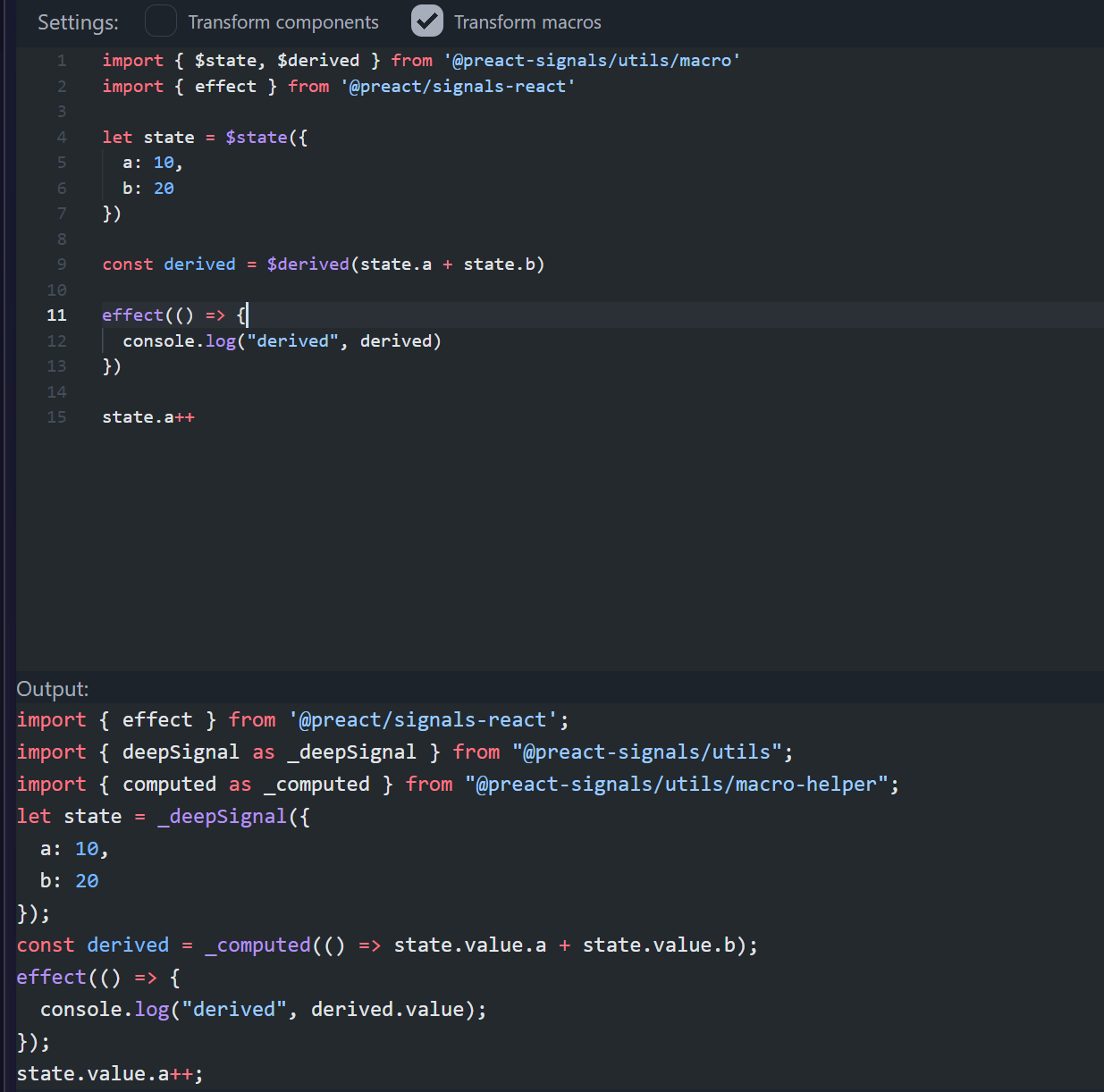
Shorthands that allows you to do omit `.value` access and work with signals like with regular values.
Allowed state macros:
- `$state`
- `$useState`
- `$useLinkedState`
- `$derived`
- `$useDerived`
- `$deref`
Here is example of how it works. You can play with it [here](https://preact-signals.netlify.app/?transformerConfig=N4Igxg9gtgDhB2BTeAXAziAXAMwIYBs1EAaEKXMAJwixUoFdEBfIA&code=JYWwDg9gTgLgBAbzgEgM4wIYwKYBoUAm2UwAbtgXAL5wBmUEIcA5AAJhTYYDGMAtKmABzAHYYANqgD0AVxjBJUkDwbMAUKEixEcbLVrZe1OgyZsOXXlMGiJqPpx4x1a8dnjos2OAF4UnnAAKBDU4OAwALjgARgAGXFC4ACMogCZYtSoASjU1bggRdDgiEnJKP2QSsgpAgOwAOgw4AGo4OvqknLU9A15AwKzfAD5ERPzCiDd68QghQIAiKrL5-CWKHOzc9oxm5qA)
### Ref macro shorthand
```tsx
import { $$ } from "@preact-signals/utils/macro";
const a = signal(1);
const b = signal(2);
// $$ is macro, which will be replaced with $(() => ...)
// $$(a.value + b.value) -> $(() => a.value + b.value)
// C component will not be reexecuted if a or b changed
const C = () => {$$(a.value + b.value)}
;
```
### Macro setup
To use macros you need to add babel plugin to your babel config:
```json
// babel.config.json
{
"plugins": [
[
"module:@preact-signals/utils/babel",
{
// if you want to use stateMacros
"stateMacros": true
}
]
]
}
```
## Main Entry: `@preact-signals/utils`
### `ReactiveRef`/`$`
The `ReactiveRef` type functions similarly to a Preact signal, essentially wrapping a function that can be passed into props or JSX. You can create it using the `$` function.
```tsx
const sig = signal(1);
{$(() => sig.value * 10)}
;
```
### `WritableReactiveRef`/`$w`
Creates editable signal from getter and setter functions.
```ts
const a = signal({ a: 1 });
const aField = $w({
get() {
return a.value.a;
},
set(value) {
a.value = { a: value };
},
});
console.log(aField.value); // 1
aField.value = 2;
console.log(aField.value); // 2
console.log(a.value); // { a: 2 }
```
### ReducerSignal
Reducer pattern for signals
```ts
const reducer = (it: number, action: { type: "increment" | "decrement" }) => {
switch (action.type) {
case "increment":
return it + 1;
case "decrement":
return it - 1;
}
};
const counter = reducerSignal(0, reducer);
effect(() => {
console.log("counter value", counter.value);
});
// prints 1
counter.dispatch({ type: "increment" });
// dispatch can be destructured, other parameters not
const { dispatch } = reducerSignal;
// prints 2
dispatch({ type: "increment" });
```
[_Implementation_](./src/lib/utils/reducer.ts)
### Deep Reactivity (Port of Vue 3 deep tracking API)
#### `deepSignal`
Takes an inner value and returns a reactive and mutable signal, with deepReactive inside of it.
```typescript
const a = deepSignal({ a: 1, b: 2 });
const c = computed(() => a.value.a + a.value.b);
a.value = { a: 2, b: 3 };
console.log(c.value); // 5
a.value.b = 4;
console.log(c.value); // 6
```
#### Store API
Store API contains Vue-like API for deep reactivity. It's has one significant change: if reactive
wrapper is deep - it will be named with `deep` prefix. So `reacitve` becomes `deepReactive`.
| Vue | `@preact-signals/utils/store` |
| ----------------- | ----------------------------- |
| `reactive` | `Store.deepReactive` |
| `readonly` | `Store.deepReadonly` |
| `shallowReadonly` | `Store.shallowReadonly` |
| `shallowReactive` | `Store.shallowReactive` |
| `isReactive` | `Store.isReactive` |
| `isReadonly` | `Store.isReadonly` |
| `isProxy` | `Store.isProxy` |
| `toRaw` | `Store.toRaw` |
| `markRaw` | `Store.markRaw` |
To use Store API you should wrap your object with `Store.deepReactive` or `Store.shallowReactive`:
```typescript
import { Store } from "@preact-signals/utils";
const a = Store.deepReactive({ a: 1, b: 2 });
const b = Store.shallowReactive({ a: 1, b: 2 });
const c = computed(() => a.value.a + a.value.b + b.value.a + b.value.b);
```
### `reaction`
The `reaction` function allows responding to changes tracked within a dependent function. It is useful for managing side-effects or synchronizing non-reactive parts of your code.
`reaction` is enhanced version of this:
```ts
const reaction = (deps, fn) =>
effect(() => {
const value = deps();
untracked(() => fn(value));
});
```
```tsx
const sig = signal(1);
const sig2 = signal(2);
// reaction(deps, effect, options?: {memoize: boolean})
const dispose = reaction(
() => sig.value,
(value) => {
// you can read signals here without tracking
if (sig2.value * 10 === value) {
sig2.value = value;
}
}
);
// will only reexecute reaction if deps result actually changed
reaction(
() => {
sig.value;
return sig2.value;
},
() => {
console.log("reacted");
return () => {
console.log("reaction disposed");
};
},
{
memoize: true,
}
);
```
### `rafReaction`
Will execute reaction after deps changed on next animation frame. Return dispose function.
```tsx
const sig = signal(1);
const el = document.createElement("div");
rafReaction(
// deps
() => sig.value,
// effect
(value) => {
el.style.transform = `translateX(${value}px)`;
}
);
sig.value = 10;
```
### `accessor`/`setter`
These functions act as wrapper creators for signals, offering a convenient way to separate reading and writing responsibilities.
### `resource`
The `resource` type binds a signal to a promise, including Preact Signals' reactivity. It can be retried, rejected, or resolved, offering a streamlined way to manage asynchronous operations.
```tsx
const [resource, { refetch }] = createResource({
fetcher: async () => {
const response = await fetch("https://example.com");
return response.json();
},
});
return {(result) => {result()}
};
```
### `createFlatStore`
This function offers a simple store implementation, converting key values into signals on demand.
> When deep reactivity API will be stable, possibly flat stores will be deprecated
```typescript
const [store, setStore] = createFlatStore({
a: 1,
b: 2,
// computeds will be created from getters
get c() {
return this.a + this.b;
},
});
const c = computed(() => store.a + store.b); // 3
store.a = 2;
store.b = 3;
console.log(store.c); // 5
console.log(c.value); // 5
// will be auto bached
setStore({ a: 3, b: 4 });
console.log(c.value); // 7
```
### `createFlatStoreOfSignals`
This function wraps provided **signals and value** to flat store. You can pass computed's too and it will be readonly field
> When deep reactivity API will be stable, possibly flat stores will be deprecated
```typescript
const [store, setStore] = createFlatStoreOfSignals({
a: 1,
b: 2,
c: signal(10),
d: computed(() => 10),
// computeds will be created from getters
get e() {
return this.a + this.b;
},
});
// ok
setStore({
a: 10,
b: 11,
c: 12,
});
setStore({
// type error and throws
e: 10,
d: 10,
});
```
## `@preact-signals/utils/hooks`: Hooks for Signals
This entry provides hooks designed to work with signals, enhancing reactivity and composability in your components.
It provides hooks like
- [`useSignalEffectOnce`](./src/lib/hooks/utility.ts)
- [`useComputedOnce`](./src/lib/hooks/useComputedOnce.ts)
- [`useInitSignal`](./src/lib/hooks/utility.ts)
- [`useReducerSignal`](./src/lib/hooks/utility.ts)
- [`useReaction`](./src/lib/hooks/utility.ts)
- [`useLinkedSignal`](./src/lib/hooks/useLinkedSignal.ts)
- [`useResource`](./src/lib/hooks/resource.ts)
- [`useFlatStore`](./src/lib/hooks/flat-store.ts)
- [`useFlatStoreOfSignals`](./src/lib/hooks/flat-store.ts)
- [`useComputedFlatStore`](./src/lib/hooks/flat-store.ts)
- [`useDeepSignal`](./src/lib/hooks/store.ts)
- [`useDeepReactive`](./src/lib/hooks/store.ts)
- [`useShallowReactive`](./src/lib/hooks/store.ts)
```typescript
// execute function run only once, and you can access other signals inside without tracking
const a = useInitSignal(() => new Set());
// uses first provided clojure, so it can be jit
const b = useComputedOnce(() => a.value.size);
useSignalEffectOnce(() => a.value.size);
// create flat store from provided value
const [store, setStore] = useFlatStore(() => ({
a: 1,
b: 2,
}));
const [store2, setStore2] = useFlatStoreOfSignals(() => ({
a: 1,
b: signal(10),
}));
// create resource from provided fetcher
const [resource, { refetch }] = useResource({
fetcher: async () => {
const response = await fetch("https://example.com");
return response.json();
},
});
```
### Deep Reactivity Hooks
Exports hook which takes as first argument callback which will be applied on the first rended to create reactive
primitive.
#### `useDeepSignal`
Takes creator callback and returns a reactive and mutable signal, with deepReactive inside of it.
```typescript
const a = useDeepSignal(() => ({ a: 1, b: 2 }));
```
There are also: `useDeepReactive`, `useShallowReactive`.
### `useLinkedSignal`
Creates signal that linked to value passed to hook, with unwrapping of signals to avoid `.value.value`
```tsx
// always linked to value passed to hook
const s1 = useLinkedSignal(Math.random() > 0.5 ? 1 : 0);
// 0 | 1
console.log(s1.peek());
const s2 = useLinkedSignal(Math.random() > 0.5 ? signal(true) : false);
// false | true
console.log(s2.peek());
// deeply unwrapping
const s3 = useLinkedSignal(signal(signal(signal(false))));
// false
console.log(s3.peek());
```
## `@preact-signals/utils/components`: Reactive Components
This section includes components like `Show`, `Switch`, `Match`, `For`, allowing you to scope reactivity within your JSX. These components aid in writing more declarative and readable code.
All of this component works with reactive unit, which is Signal or Accessor callback
```tsx
import { Show, For } from "@preact-signals/utils/components";
Loading...} when={() => arr.value}>
{(data) => (
item.id}>
{(item) => - {renderItem(item)}
}
)}
;
```
```tsx
import { Switch, Match } from "@preact-signals/utils/components";
Not found}>
route.value === "home"}>
route.value === "about"}>
route.value === "users"}>
;
```
## `@preact-signals/utils/hocs`: High Order Components (HOCs)
HOCs in this entry allow you to inject signals or `ReactiveRef`-s into props, aiding in the creation of reusable and composable logic across various components.
Examples:
```tsx
const View$ = withSignalProps(View);
const Text$ = withSignalProps(Text);
const a = signal(10);
const b = signal(5);
a.value + b.value)} />;
a.value + b.value)} />;
```
### `reactifyLite`
Makes you component truly reactive. Your props are will be use getter to signals under the hood (destructuring forces a whole component to rerender - so you should avoid it). So you can safely pass it into effect or reactive component like `Show` or `Switch` without worries about tracking.
```tsx
const Comp = (props: ReactiveProps<{ a: number }>) => (
props.a > 10}>{(v) => v + 10}
);
const B = reactifyLite(Comp);
a.value + b.value)} />;
```
### Troubleshooting
#### Third party libraries is not working with HOCs while using `@preact-signals/safe-react` or `@preact/signals-react` with babel
If you are using `reactifyLite` or `withSignalProps` and you component has no reaction on signal changes, probably parent the component has no signals tracking.
- `@preact-signals/safe-react` solution is to wrap component with HOC `withTrackSignals` to ensure that all signals will be tracked.
```tsx
import { withTrackSignals } from "@preact-signals/safe-react/manual";
import { withSignalProps } from "@preact-signals/utils/hocs";
const View$ = withSignalProps(withTrackSignals(View));
```
- `@preact/signals-react` has no `withTrackSignals` HOC, but we can use this workaround:
```tsx
import { useSignals } from "@preact/signals-react/runtime";
/**
* @useSignals
*/
const _View = (...args) => View(...args);
const View$ = withSignalProps(_View);
```
If you wrapped some component with
### Heavily inspired by:
- [SolidJS](https://www.solidjs.com/)
- [Vue 3](https://v3.vuejs.org/)
### License
`@preact-signals/utils` is licensed under the [MIT License](LICENSE), and you're free to use, modify, and distribute it under the terms outlined in the LICENSE file.