# @power-seo/schema

![Type-safe JSON-LD structured data builder for schema.org rich results in Next.js and React](https://raw.githubusercontent.com/CyberCraftBD/power-seo/main/image/schema/banner.svg)

Type-safe JSON-LD structured data for TypeScript and React — 23 schema.org builder functions, 22 React components, `@graph` support, and Google Rich Results field validation. Works in Next.js, Remix, Node.js, and Edge runtimes.

[![npm version](https://img.shields.io/npm/v/@power-seo/schema)](https://www.npmjs.com/package/@power-seo/schema)
[![npm downloads](https://img.shields.io/npm/dm/@power-seo/schema)](https://www.npmjs.com/package/@power-seo/schema)

[![Socket](https://socket.dev/api/badge/npm/package/@power-seo/schema)](https://socket.dev/npm/package/@power-seo/schema)
[![License: MIT](https://img.shields.io/badge/License-MIT-yellow.svg)](https://opensource.org/licenses/MIT)
[![TypeScript](https://img.shields.io/badge/TypeScript-5.x-blue)](https://www.typescriptlang.org/)
[![tree-shakeable](https://img.shields.io/badge/tree--shakeable-yes-brightgreen)](https://bundlephobia.com/package/@power-seo/schema)

`@power-seo/schema` is a type-safe JSON-LD structured data library for developers who want Google-compliant schema.org markup without hand-writing raw JSON. It gives you 23 builder functions with compile-time type checking on every property, a `validateSchema()` utility that surfaces missing required fields before pages go live, and 22 pre-built React components that render `<script type="application/ld+json">` tags in one line. Combine multiple schemas into a single `@graph` document with `schemaGraph()` so Google parses all of them.

![JSON-LD schema builder pipeline from typed props to validated rich-result markup](https://raw.githubusercontent.com/CyberCraftBD/power-seo/main/image/schema/header.svg)

---

## Why @power-seo/schema?

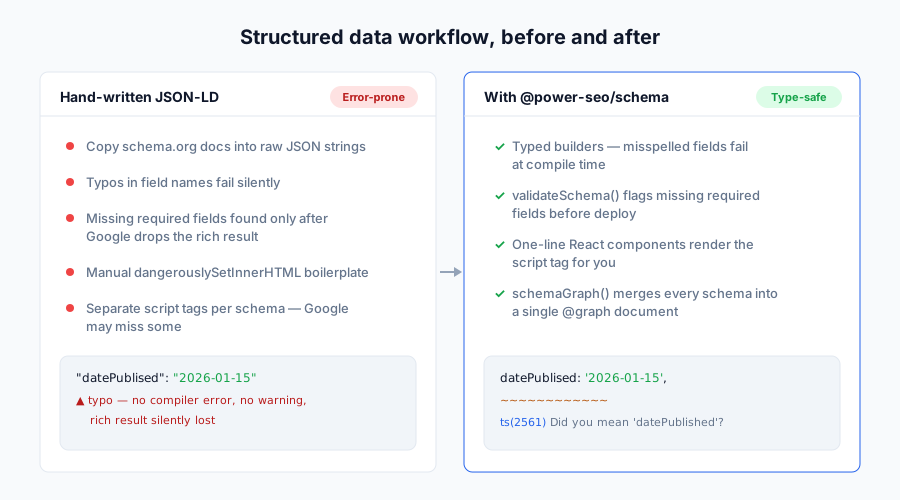
Structured data is how you earn rich results — star ratings, FAQ accordions, breadcrumbs, recipe cards, job listings. Writing that JSON-LD by hand means silent typos, missing required fields, and pages that quietly fail Google's Rich Results Test. This package makes every schema property type-checked at compile time and validated against Google's field requirements before deploy.

|                           | Without @power-seo/schema                                 | With @power-seo/schema                                                  |
| ------------------------- | --------------------------------------------------------- | ----------------------------------------------------------------------- |
| Field type safety         | Hand-written JSON, no types, typos ship silently          | Typed builder functions catch missing/misspelled fields at compile time |
| Multiple schemas per page | Separate `<script>` tags, Google may parse only the first | `schemaGraph()` merges all into one `@graph` document                   |
| Field validation          | Silent failures in the Rich Results Test                  | `validateSchema()` returns structured `{ valid, issues }` before deploy |
| React rendering           | Manual `dangerouslySetInnerHTML` boilerplate              | `<ArticleJsonLd>` and 21 other components in one import                 |
| XSS safety                | `"</script>"` in a field can break out of the tag         | `<`, `>`, `&` auto-escaped to `<`, `>`, `&`                             |
| Schema coverage           | Only Article/FAQ in most libraries                        | 23 types incl. Product, LocalBusiness, Event, Recipe, JobPosting        |
![Workflow comparison: hand-written JSON-LD with silent failures versus typed, validated schemas with @power-seo/schema](https://raw.githubusercontent.com/CyberCraftBD/power-seo/main/image/schema/roi.svg)

![Schema builder comparison against hand-written JSON-LD and other libraries](https://raw.githubusercontent.com/CyberCraftBD/power-seo/main/image/schema/comparison.svg)

---

## Features

- **23 schema.org builder functions** — `article`, `blogPosting`, `newsArticle`, `product`, `faqPage`, `breadcrumbList`, `localBusiness`, `organization`, `person`, `event`, `recipe`, `howTo`, `videoObject`, `course`, `jobPosting`, `softwareApp`, `webSite`, `itemList`, `review`, `service`, `brand`, `siteNavigationElement`, `imageObject`
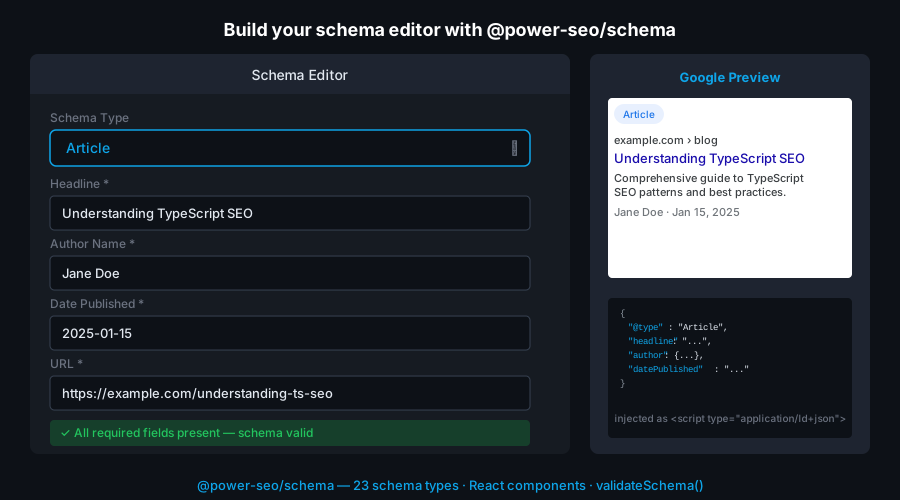
- **22 React components** — 21 typed `*JsonLd` components (`<ArticleJsonLd>`, `<FAQJsonLd>`, `<BreadcrumbJsonLd>`, `<ProductJsonLd>`, and more) plus a generic `<JsonLd>` that renders any schema object
- **`schemaGraph(schemas[])`** — combine multiple schemas into a single `@graph` document so Google parses every schema on the page, not just the first script tag
- **`validateSchema(schema)`** — validate required fields against Google Rich Results requirements without throwing; accepts a single object or an array and returns `{ valid, issues }`
- **`toJsonLdString(schema, pretty?)`** — serialize any schema to a JSON-LD string with automatic XSS escaping (`pretty` defaults to `false`)
- **React optional** — all 23 builders work with no React installed; components live on the `/react` subpath and `react` is an optional peer dependency
- **Tree-shakeable** — `"sideEffects": false` with named exports; import only the types you use
- **Dual ESM + CJS** — ships both formats for any bundler or `require()`
![Pre-built React JSON-LD components rendering structured data script tags](https://raw.githubusercontent.com/CyberCraftBD/power-seo/main/image/schema/react-ui.svg)

---

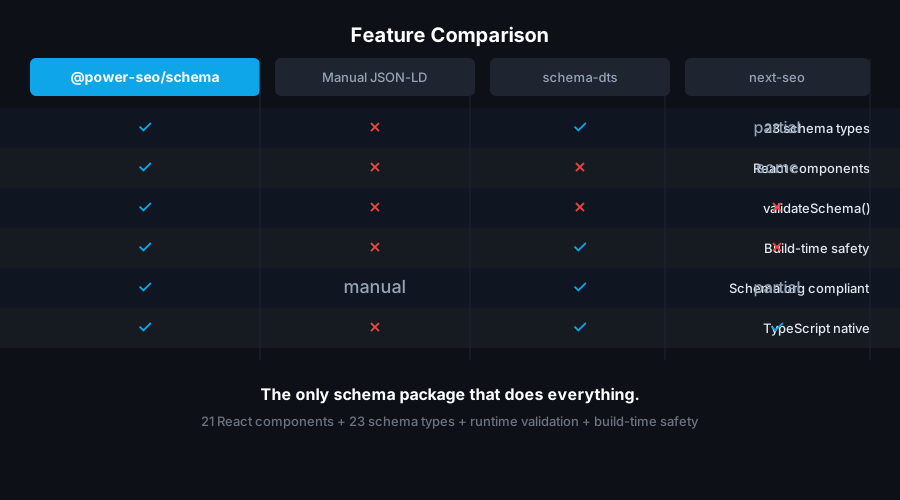
## Comparison

| Feature                       | @power-seo/schema | next-seo | schema-dts | json-ld.js | react-schemaorg |
| ----------------------------- | :---------------: | :------: | :--------: | :--------: | :-------------: |
| Typed builder functions       |        Yes        | Partial  |     No     |     No     |       No        |
| Ready-to-use React components |        Yes        |   Yes    |     No     |     No     |     Partial     |
| `@graph` support              |        Yes        |    No    |     No     |    Yes     |       No        |
| Built-in field validation     |        Yes        |    No    |     No     |     No     |       No        |
| Works without React           |        Yes        |    No    |    Yes     |    Yes     |       No        |
| 23 schema types               |        Yes        | Partial  |    Yes     |    Yes     |       No        |
| CI / Node.js usage            |        Yes        |    No    |    Yes     |    Yes     |       No        |
| Zero third-party runtime deps |        Yes        |    No    |    Yes     |     No     |       No        |
| XSS-escaped serialization     |        Yes        | Partial  |     No     |     No     |       No        |
![Schema validation catching missing required fields before Google Rich Results test](https://raw.githubusercontent.com/CyberCraftBD/power-seo/main/image/schema/validation-accuracy.svg)

---

## Installation

```bash
npm install @power-seo/schema
```

```bash
yarn add @power-seo/schema
```

```bash
pnpm add @power-seo/schema
```

React is an **optional** peer dependency (`^18 || ^19`). The builder functions work without it; install React only if you use the `/react` components.

---

## Usage

### How do I generate JSON-LD without React?

Call any builder function with a typed props object to get a schema-ready JSON-LD object, then pass it to `toJsonLdString()` to serialize it. The builders run in any JavaScript environment — Node.js, Edge, Deno, or the browser — with no DOM requirement. Every property is type-checked, and `undefined` fields are stripped automatically so your output stays clean.

```ts
import { article, toJsonLdString } from '@power-seo/schema';

const schema = article({
  headline: 'My Blog Post',
  description: 'An informative article about structured data.',
  datePublished: '2026-01-15',
  dateModified: '2026-01-20',
  author: { '@type': 'Person', name: 'Jane Doe', url: 'https://example.com/authors/jane-doe' },
  image: { '@type': 'ImageObject', url: 'https://example.com/cover.jpg', width: 1200, height: 630 },
});

const script = toJsonLdString(schema);
// → '{"@context":"https://schema.org","@type":"Article","headline":"My Blog Post",...}'
```

### How do I add JSON-LD to a Next.js App Router page?

Import a builder in your Server Component, serialize it with `toJsonLdString()`, and inject the result into a `<script>` tag with `dangerouslySetInnerHTML`. Because `toJsonLdString()` escapes `<`, `>`, and `&`, a field value like `"</script>"` cannot break out of the tag. This runs entirely on the server, so the markup is in the initial HTML that Googlebot crawls.

```tsx
import { article, toJsonLdString } from '@power-seo/schema';

export default function BlogPost({ post }: { post: Post }) {
  const schema = article({
    headline: post.title,
    description: post.excerpt,
    datePublished: post.publishedAt,
    dateModified: post.updatedAt,
    author: { '@type': 'Person', name: post.author.name, url: post.author.profileUrl },
    image: { '@type': 'ImageObject', url: post.coverImage, width: 1200, height: 630 },
  });

  return (
    <>
      <script
        type="application/ld+json"
        dangerouslySetInnerHTML={{ __html: toJsonLdString(schema) }}
      />
      <article>{/* page content */}</article>
    </>
  );
}
```

### How do I render JSON-LD with React components?

Import from the `/react` subpath. Each `*JsonLd` component takes the same props as its builder (minus `@type`/`@context`) and renders a ready-to-place `<script type="application/ld+json">` tag with the same automatic XSS escaping. There are 21 typed components plus a generic `<JsonLd schema={...}>` that accepts any schema object.

```tsx
import { FAQJsonLd, BreadcrumbJsonLd } from '@power-seo/schema/react';

function PageHead() {
  return (
    <>
      <FAQJsonLd
        questions={[
          { question: 'What is JSON-LD?', answer: 'A structured data format Google recommends.' },
          { question: 'Do I need React?', answer: 'No — builder functions work without React.' },
        ]}
      />
      <BreadcrumbJsonLd
        items={[
          { name: 'Home', url: 'https://example.com' },
          { name: 'Blog', url: 'https://example.com/blog' },
          { name: 'My Post' },
        ]}
      />
    </>
  );
}
```

### How do I put multiple schemas on one page?

Use `schemaGraph(schemas[])` to merge several schema objects into a single `@graph` document. Google reliably parses every node in a `@graph`, whereas multiple separate `<script>` tags can be partially ignored. Pass the builder outputs straight in — the function wraps them with a shared `@context`.

```ts
import {
  article,
  breadcrumbList,
  organization,
  schemaGraph,
  toJsonLdString,
} from '@power-seo/schema';

const graph = schemaGraph([
  article({
    headline: 'My Post',
    datePublished: '2026-01-01',
    author: { '@type': 'Person', name: 'Jane Doe' },
  }),
  breadcrumbList([
    { name: 'Home', url: 'https://example.com' },
    { name: 'Blog', url: 'https://example.com/blog' },
    { name: 'My Post' },
  ]),
  organization({ name: 'Acme Corp', url: 'https://example.com' }),
]);

const script = toJsonLdString(graph);
// → '{"@context":"https://schema.org","@graph":[{...},{...},{...}]}'
```

![Rich results preview showing structured data eligibility in Google Search](https://raw.githubusercontent.com/CyberCraftBD/power-seo/main/image/schema/rich-results.svg)

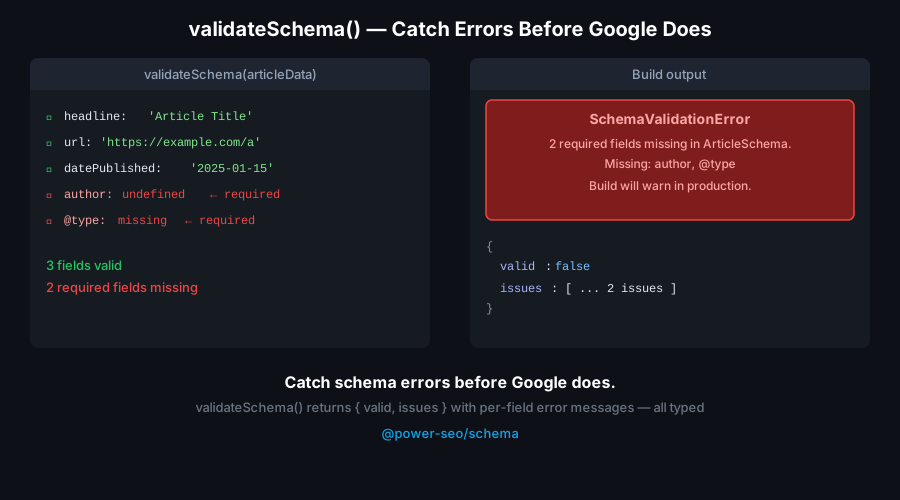
### How do I validate schema before deploy?

`validateSchema()` checks a schema against Google Rich Results requirements and returns `{ valid, issues }` without throwing. Each issue has a `severity` (`'error'` or `'warning'`), a `field`, and a `message`. Errors are missing required fields; warnings are recommended fields. `valid` is `true` only when there are zero errors. Pass an array to validate a whole page graph at once.

```ts
import { article, validateSchema } from '@power-seo/schema';

const schema = article({ headline: 'Incomplete Article' }); // missing author, datePublished

const result = validateSchema(schema);
// result.valid  → false
// result.issues → [
//   { severity: 'error',   field: 'author',        message: 'Required field "author" is missing.' },
//   { severity: 'error',   field: 'datePublished', message: 'Required field "datePublished" is missing.' },
//   { severity: 'warning', field: 'image',         message: 'Recommended field "image" is missing.' },
//   ...
// ]

if (!result.valid) {
  const errors = result.issues.filter((i) => i.severity === 'error');
  errors.forEach((i) => console.error(` [${i.field}] ${i.message}`));
  process.exit(1);
}
```

### FAQ and Breadcrumb builder signatures

`faqPage()` and `breadcrumbList()` take a **plain array** directly — not a config-object wrapper. `faqPage` maps each `{ question, answer }` into a `Question`/`Answer` pair; `breadcrumbList` assigns sequential `position` values from your ordered `{ name, url? }` list.

```ts
import { faqPage, breadcrumbList } from '@power-seo/schema';

const faq = faqPage([
  { question: 'What is schema.org?', answer: 'A shared vocabulary for structured data.' },
  { question: 'Is JSON-LD required?', answer: 'JSON-LD is the format Google recommends.' },
]);

const breadcrumb = breadcrumbList([
  { name: 'Home', url: 'https://example.com' },
  { name: 'Products', url: 'https://example.com/products' },
  { name: 'Headphones' }, // last item usually has no url
]);
```

### CI validation gate

Block deploys when any page schema is missing a required field. `validateSchema()` accepts an array, so you can validate every page's schema in one pass.

```ts
import { validateSchema } from '@power-seo/schema';
import { allPageSchemas } from './build-schemas';

const result = validateSchema(allPageSchemas); // array in → merged issues out
if (!result.valid) {
  const errors = result.issues.filter((i) => i.severity === 'error');
  console.error('Schema validation failed:');
  errors.forEach((i) => console.error(` [${i.field}] ${i.message}`));
  process.exit(1);
}
```

---

## API Reference

### Entry points

| Import                    | Description                                                                                    |
| ------------------------- | ---------------------------------------------------------------------------------------------- |
| `@power-seo/schema`       | Builder functions, `schemaGraph`, `toJsonLdString`, `validateSchema`, and all TypeScript types |
| `@power-seo/schema/react` | React components for rendering JSON-LD `<script>` tags                                         |

### Builder functions

Each builder returns a `WithContext<...>` object (schema plus `@context: "https://schema.org"`). `undefined` props are stripped automatically.

| Function                       | Schema `@type`          | Rich result           |
| ------------------------------ | ----------------------- | --------------------- |
| `article(props)`               | `Article`               | Article               |
| `blogPosting(props)`           | `BlogPosting`           | Article               |
| `newsArticle(props)`           | `NewsArticle`           | Top Stories           |
| `product(props)`               | `Product`               | Product / star rating |
| `faqPage(questions[])`         | `FAQPage`               | FAQ                   |
| `breadcrumbList(items[])`      | `BreadcrumbList`        | Breadcrumbs           |
| `localBusiness(props)`         | `LocalBusiness`         | Local Business panel  |
| `organization(props)`          | `Organization`          | Knowledge Panel       |
| `person(props)`                | `Person`                | Knowledge Panel       |
| `event(props)`                 | `Event`                 | Events                |
| `recipe(props)`                | `Recipe`                | Recipe                |
| `howTo(props)`                 | `HowTo`                 | How-to                |
| `videoObject(props)`           | `VideoObject`           | Video                 |
| `course(props)`                | `Course`                | Course                |
| `jobPosting(props)`            | `JobPosting`            | Google for Jobs       |
| `softwareApp(props)`           | `SoftwareApplication`   | App                   |
| `webSite(props)`               | `WebSite`               | Sitelinks Searchbox   |
| `itemList(props)`              | `ItemList`              | Carousel              |
| `review(props)`                | `Review`                | Review snippet        |
| `service(props)`               | `Service`               | —                     |
| `brand(props)`                 | `Brand`                 | —                     |
| `siteNavigationElement(props)` | `SiteNavigationElement` | —                     |
| `imageObject(props)`           | `ImageObject`           | Image metadata        |

### Utility functions

| Function         | Signature                                                            | Description                                                                                                           |
| ---------------- | -------------------------------------------------------------------- | --------------------------------------------------------------------------------------------------------------------- |
| `toJsonLdString` | `(schema, pretty?: boolean) => string`                               | Serialize a schema or graph to a JSON-LD string with `<`/`>`/`&` escaped for XSS safety. `pretty` defaults to `false` |
| `schemaGraph`    | `(schemas: SchemaObject[]) => SchemaGraph`                           | Combine schemas into one `@graph` document under a shared `@context`                                                  |
| `validateSchema` | `(schema: SchemaObject \| SchemaObject[]) => SchemaValidationResult` | Validate required/recommended fields; returns `{ valid, issues }` without throwing                                    |

### Validated schema types

`validateSchema()` runs type-specific field checks for these `@type` values (others pass through with no issues): `Article`, `BlogPosting`, `NewsArticle`, `TechArticle`, `Product`, `FAQPage`, `BreadcrumbList`, `Event`, `MusicEvent`, `BusinessEvent`, `EducationEvent`, `Recipe`, `VideoObject`, `JobPosting`, `LocalBusiness`, `Restaurant`, `Store`, `Course`. For example, `Article` requires `headline`, `author`, and `datePublished`, and warns when `image`, `dateModified`, or `publisher` are missing.

### React components

Import from `@power-seo/schema/react`. Each `*JsonLd` component accepts the same props as its builder, minus `@type`/`@context`.

| Component               | Props                                                          | Renders             |
| ----------------------- | -------------------------------------------------------------- | ------------------- |
| `<JsonLd>`              | `{ schema: WithContext \| SchemaGraph; dataTestId?: string }`  | Any schema object   |
| `<ArticleJsonLd>`       | `Omit<ArticleSchema, '@type' \| '@context'> & { type? }`       | Article             |
| `<BlogPostingJsonLd>`   | `Omit<ArticleSchema, '@type' \| '@context'>`                   | BlogPosting         |
| `<NewsArticleJsonLd>`   | `Omit<ArticleSchema, '@type' \| '@context'>`                   | NewsArticle         |
| `<ProductJsonLd>`       | `Omit<ProductSchema, '@type' \| '@context'>`                   | Product             |
| `<FAQJsonLd>`           | `{ questions: Array<{ question; answer }> }`                   | FAQPage             |
| `<BreadcrumbJsonLd>`    | `{ items: Array<{ name; url? }> }`                             | BreadcrumbList      |
| `<LocalBusinessJsonLd>` | `Omit<LocalBusinessSchema, '@type' \| '@context'> & { type? }` | LocalBusiness       |
| `<OrganizationJsonLd>`  | `Omit<OrganizationSchema, '@type' \| '@context'>`              | Organization        |
| `<PersonJsonLd>`        | `Omit<PersonSchema, '@type' \| '@context'>`                    | Person              |
| `<EventJsonLd>`         | `Omit<EventSchema, '@type' \| '@context'> & { type? }`         | Event               |
| `<RecipeJsonLd>`        | `Omit<RecipeSchema, '@type' \| '@context'>`                    | Recipe              |
| `<HowToJsonLd>`         | `Omit<HowToSchema, '@type' \| '@context'>`                     | HowTo               |
| `<VideoJsonLd>`         | `Omit<VideoObjectSchema, '@type' \| '@context'>`               | VideoObject         |
| `<CourseJsonLd>`        | `Omit<CourseSchema, '@type' \| '@context'>`                    | Course              |
| `<JobPostingJsonLd>`    | `Omit<JobPostingSchema, '@type' \| '@context'>`                | JobPosting          |
| `<SoftwareAppJsonLd>`   | `Omit<SoftwareAppSchema, '@type' \| '@context'> & { type? }`   | SoftwareApplication |
| `<WebSiteJsonLd>`       | `Omit<WebSiteSchema, '@type' \| '@context'>`                   | WebSite             |
| `<ItemListJsonLd>`      | `Omit<ItemListSchema, '@type' \| '@context'>`                  | ItemList            |
| `<ReviewJsonLd>`        | `Omit<ReviewSchema, '@type' \| '@context'>`                    | Review              |
| `<ServiceJsonLd>`       | `Omit<ServiceSchema, '@type' \| '@context'>`                   | Service             |
| `<BrandJsonLd>`         | `Omit<BrandSchema, '@type' \| '@context'>`                     | Brand               |

> Note: `siteNavigationElement` and `imageObject` ship as builder functions only. Render them with the generic `<JsonLd schema={...}>` component in React.

---

## Types

| Type                                                                     | Description                                                                                 |
| ------------------------------------------------------------------------ | ------------------------------------------------------------------------------------------- |
| `WithContext<T>`                                                         | A schema `T` with `@context: "https://schema.org"` added — the return type of every builder |
| `SchemaObject`                                                           | Union of all builder output schemas                                                         |
| `SchemaGraph`                                                            | `{ '@context'; '@graph': SchemaObject[] }` — the return type of `schemaGraph()`             |
| `SchemaValidationResult`                                                 | `{ valid: boolean; issues: ValidationIssue[] }` — the return type of `validateSchema()`     |
| `ValidationIssue`                                                        | `{ severity: 'error' \| 'warning'; field: string; message: string }`                        |
| `ArticleSchema`                                                          | Props for `article`, `blogPosting`, and `newsArticle`                                       |
| `ProductSchema`, `OfferSchema`, `AggregateRatingSchema`                  | Product with offers and ratings                                                             |
| `FAQPageSchema`, `BreadcrumbListSchema`                                  | Output types of `faqPage()` and `breadcrumbList()`                                          |
| `LocalBusinessSchema`, `OrganizationSchema`, `PersonSchema`              | Entity schemas                                                                              |
| `EventSchema`, `RecipeSchema`, `HowToSchema`, `VideoObjectSchema`        | Content schemas                                                                             |
| `CourseSchema`, `JobPostingSchema`, `SoftwareAppSchema`, `WebSiteSchema` | Vertical schemas                                                                            |
| `ItemListSchema`, `ReviewSchema`, `ServiceSchema`, `BrandSchema`         | Additional schemas                                                                          |

---

## Use Cases

- **Blog posts and articles** — `article` / `blogPosting` schema for Google Discover and Top Stories eligibility
- **FAQ pages** — `faqPage` schema for FAQ accordion rich results in the SERP
- **Product pages** — `product` schema with offers and aggregate ratings for star display
- **Local business sites** — `localBusiness` schema for the Google Business panel and Local Pack
- **Recipe sites** — `recipe` schema for cards with images, ratings, and cook time
- **Job boards** — `jobPosting` schema for Google for Jobs integration
- **Event pages** — `event` schema for Google Events rich results
- **Course platforms** — `course` schema for education carousels
- **Multi-schema pages** — `schemaGraph()` to merge Article + Breadcrumb + Organization into one `@graph`
- **CI content pipelines** — `validateSchema()` to block deploys when required fields are missing

---

## Architecture Overview

- **Pure TypeScript** — no compiled binary, no native modules
- **One workspace dependency** — depends only on `@power-seo/core`; no third-party runtime packages
- **Framework-agnostic core** — builder functions run in any JavaScript environment with no DOM requirement
- **SSR compatible** — safe in Next.js Server Components, Remix loaders, and Express handlers
- **Edge runtime safe** — no Node.js-specific APIs; runs in Cloudflare Workers, Vercel Edge, and Deno
- **XSS-safe serialization** — `toJsonLdString()` and every React component escape `<`, `>`, `&` to Unicode sequences
- **Tree-shakeable** — `"sideEffects": false` with named exports per schema type
- **Dual ESM + CJS** — ships both formats via tsup for any bundler or `require()`

---

## Supply Chain Security

- Published to npm with **provenance attestation** — every release is built and signed by the verified `github.com/CyberCraftBD/power-seo` GitHub Actions workflow, so you can trace each tarball back to its exact source commit
- **Zero third-party runtime dependencies** — packages depend only on other `@power-seo` packages, nothing else gets pulled in
- **No network access at runtime** — pure computation on the inputs you pass; nothing is fetched, phoned home, or telemetered
- No install scripts (`postinstall`, `preinstall`)
- No `eval` or dynamic code execution
- Safe for SSR, Edge, and server environments

---

## The [@power-seo](https://www.npmjs.com/org/power-seo) Ecosystem

All 17 packages are independently installable — use only what you need.

| Package                                                                                    | Install                             | Description                                                                        |
| ------------------------------------------------------------------------------------------ | ----------------------------------- | ---------------------------------------------------------------------------------- |
| [`@power-seo/ai`](https://www.npmjs.com/package/@power-seo/ai)                             | `npm i @power-seo/ai`               | LLM-agnostic prompt templates and response parsers for AI-assisted SEO             |
| [`@power-seo/analytics`](https://www.npmjs.com/package/@power-seo/analytics)               | `npm i @power-seo/analytics`        | Merge Search Console data with audit results — trends and ranking insights         |
| [`@power-seo/audit`](https://www.npmjs.com/package/@power-seo/audit)                       | `npm i @power-seo/audit`            | SEO site health auditing with meta, content, structure, and performance rules      |
| [`@power-seo/content-analysis`](https://www.npmjs.com/package/@power-seo/content-analysis) | `npm i @power-seo/content-analysis` | Yoast-style SEO content analysis engine with scoring, checks, and React components |
| [`@power-seo/core`](https://www.npmjs.com/package/@power-seo/core)                         | `npm i @power-seo/core`             | Framework-agnostic SEO analysis engines, types, validators, and utilities          |
| [`@power-seo/images`](https://www.npmjs.com/package/@power-seo/images)                     | `npm i @power-seo/images`           | Image SEO analysis — alt text quality, lazy loading, formats, image sitemaps       |
| [`@power-seo/integrations`](https://www.npmjs.com/package/@power-seo/integrations)         | `npm i @power-seo/integrations`     | Semrush and Ahrefs API clients with a shared rate-limited HTTP client              |
| [`@power-seo/links`](https://www.npmjs.com/package/@power-seo/links)                       | `npm i @power-seo/links`            | Internal link graph analysis — orphan detection, suggestions, equity scoring       |
| [`@power-seo/meta`](https://www.npmjs.com/package/@power-seo/meta)                         | `npm i @power-seo/meta`             | SSR meta tag helpers for Next.js App Router, Remix v2, and generic SSR             |
| [`@power-seo/preview`](https://www.npmjs.com/package/@power-seo/preview)                   | `npm i @power-seo/preview`          | SERP, Open Graph, and Twitter Card preview generators with React components        |
| [`@power-seo/react`](https://www.npmjs.com/package/@power-seo/react)                       | `npm i @power-seo/react`            | React SEO components — meta tags, Open Graph, Twitter Card, breadcrumbs            |
| [`@power-seo/readability`](https://www.npmjs.com/package/@power-seo/readability)           | `npm i @power-seo/readability`      | Readability scoring — Flesch-Kincaid, Gunning Fog, Coleman-Liau, ARI               |
| [`@power-seo/redirects`](https://www.npmjs.com/package/@power-seo/redirects)               | `npm i @power-seo/redirects`        | Redirect rule engine with Next.js, Remix, and Express adapters                     |
| [`@power-seo/schema`](https://www.npmjs.com/package/@power-seo/schema)                     | `npm i @power-seo/schema`           | Type-safe JSON-LD structured data — 23 schema.org builders plus React components   |
| [`@power-seo/search-console`](https://www.npmjs.com/package/@power-seo/search-console)     | `npm i @power-seo/search-console`   | Google Search Console API client — OAuth2, service accounts, rate limiting, retry  |
| [`@power-seo/sitemap`](https://www.npmjs.com/package/@power-seo/sitemap)                   | `npm i @power-seo/sitemap`          | XML sitemap generation, streaming, and validation with image, video, news support  |
| [`@power-seo/tracking`](https://www.npmjs.com/package/@power-seo/tracking)                 | `npm i @power-seo/tracking`         | Analytics script builders with consent management and React components             |

---

## Keywords

json-ld, schema.org, structured-data, rich-results, seo, nextjs-json-ld, react-json-ld, faq-schema, product-schema, article-schema, breadcrumb-schema, local-business-schema, job-posting-schema, schema-graph, validate-schema, typescript-json-ld, nextjs, remix, programmatic-seo, google-rich-results

---

## About [CyberCraft Bangladesh](https://ccbd.dev)

**[CyberCraft Bangladesh](https://ccbd.dev)** is a Bangladesh-based enterprise-grade software development and Full Stack SEO service provider company specializing in ERP system development, AI-powered SaaS and business applications, full-stack SEO services, custom website development, and scalable eCommerce platforms. We design and develop intelligent, automation-driven SaaS and enterprise solutions that help startups, SMEs, NGOs, educational institutes, and large organizations streamline operations, enhance digital visibility, and accelerate growth through modern cloud-native technologies.

[![Website](https://img.shields.io/badge/Website-ccbd.dev-blue?style=for-the-badge)](https://ccbd.dev)
[![GitHub](https://img.shields.io/badge/GitHub-cybercraftbd-black?style=for-the-badge&logo=github)](https://github.com/cybercraftbd)
[![npm](https://img.shields.io/badge/npm-power--seo-red?style=for-the-badge&logo=npm)](https://www.npmjs.com/org/power-seo)
[![Email](https://img.shields.io/badge/Email-info@ccbd.dev-green?style=for-the-badge&logo=gmail)](mailto:info@ccbd.dev)

© 2026 [CyberCraft Bangladesh](https://ccbd.dev) · Released under the [MIT License](../../LICENSE)