

joiner
Multi/Mono-Repository Task Runner
`joiner` is intended to sub-automate commands over a span of projects/packages/folders.
`joiner` can run arbitrary commands in each target project, or specific commands (`update`, `commit`, etc.) based on supported workflows.
`joiner` is a sub-automation tool in that the commands are manually called from the [`command-line`](#command-line-interface), from the [`dashboard`](#dashboard), or from the [`api`](#api), and it requires another publish/subscribe-like layer on top of it in order to reach full automation.
Supported languages:
+ `JavaScript`/`TypeScript`
For `JavaScript`/`TypeScript`, `joiner` can be used on its own or conjoined with `Yarn Workspaces`.
### Contents
+ [Install](#install)
+ [Usage](#usage)
+ [Setup](#setup)
+ [Command-Line Interface](#command-line-interface)
+ [Configuration File](#configuration-file)
+ [Dashboard](#dashboard)
+ [API](#api)
+ [Advanced Usage](#advanced-usage)
+ [Aliases](#aliases)
+ [Development](#development)
+ [High-Scale](#high-scale)
+ [Joiner Package](#joiner-package)
+ [Path Resolution](#path-resolution)
+ [Packages](#packages)
+ [Codeophon](#codeophon)
## Install
It is recommended that `joiner` is installed globally. To install, [NodeJS](https://nodejs.org/en/) is presumed to be already on the system, run the command
``` bash
npm install --global @plurid/joiner
```
or
``` bash
yarn global add @plurid/joiner
```
If global installation is not an option or not preferred, run the command using `npx`
``` bash
npx @plurid/joiner
```
## Usage
### Setup
Initialize by running, in the root folder of the project(s), the command
``` bash
joiner initialize
```
`joiner` requires† a `joiner`‡ configuration file where the packages paths must be registered, using [`deon`](https://github.com/plurid/deon) or `yaml`, such as:
``` deon
{
packages [
/path/to/package-1
/path/to/package-2
]
}
```
Catch-all paths can be used with `/*` such as
``` deon
{
packages [
/path/to/multi-package-folder/*
/path/to/package-2
]
}
```
where the `multi-package-folder` is a directory containing multiple folders with their own `package.json`, or [`joiner.package`](#joiner-package).
The packages paths are resolved relative to the folder from where the command is called. See [path resolution](#path-resolution).
† when using `yarnWorkspace true` [`.deon`] the `packages` field can be removed/commented; `joiner` will look for the packages in the `workspaces` field of the root `package.json`.
‡ `joiner` will by default look for a `joiner.deon` file in the working directory, but the file can be arbitrarily named/placed, provided it is passed to the `-c, --configuration` option.
### Command-Line Interface
```
Usage: joiner
Options:
-v, --version output the version number
-c, --configuration path to the ".deon" or ".yaml" configuration file (defaults: "joiner", "scripts/joiner", "scripts/joiner.packages")
-h, --help display help for command
Commands:
manual the "joiner" manual
dashboard configure a local web server with a global view over the "joiner" packages registered on the machine
initialize [options] initialize the "joiner" configuration file
list list joiner commandable packages
run [options] run an arbitrary command on package by name or on "all" packages
command [options] run the named commands specified in the "joiner" file on package by name or on "all" packages
update [options] update package by name or "all" packages
patch [options] patch package version by name or "all" packages
commit [options] commit package by name or "all" packages
publish [options] publish package by name or "all" packages
ucom [options] ucom - update, commit - package by name or "all" packages
upcom [options] upcom - update, patch, commit - package by name or "all" packages
upcomlish [options] upcomlish - update, patch, commit, publish - package by name or "all" packages
develop start a server to listen for changes in the development watched packages and update the cross-dependencies
```
Instead of `package`, the signifier `all` can be used to run the command on all the registered packages.
Instead of `package`, a zero-based index can be passed, `%`, given the position of the package in the packages list (e.g., `joiner update %2` will update the third package as listed by `joiner list`).
If `joiner` is configured with only one package, instead of `package` the signifier `self` can be used.
To `run` a `command...` with flags, the divider `--` must be used, e.g. `joiner run all -- yarn add -D `.
### Configuration File
The `joiner` configuration file can be at the root of the packages/workspaces and the `CLI` will parse it by default, or it can be specified at runtime with the `-c, --configuration ` option.
The `joiner` configuration file has as required fields only the `packages` field (or, if using Yarn Workspaces, the `yarnWorkspace` field set to `true`).
The `joiner` configuration file can be formatted using [`deon`](https://github.com/plurid/deon) or `yaml`.
The `joiner.deon` fields with example and default values:
``` deon
{
// required
#packages
// default false
yarnWorkspace false // false | true
// optional
#package
#commit
#runFrom
#development
}
packages [
/path/to/package
/path/to/multi-package/*
]
package {
// default yarn
manager yarn // yarn | npm
// default npm
publisher npm // yarn | npm
// Names of the packages or paths of the folders to be ignored by the "all" signifier.
// Helpful when the packages are registered in bulk with "/*"
// and some of the folders are not actually packages (fixtures, specifications).
// default []
ignore []
}
commit {
// At the moment, only git is supported.
engine git
// The commit message is formed from:
// commitRoot + packageFolderName + commitDivider + commitMessage
// default false
combine false // false | true
// The root of the packages/workspace.
root '/path/to/root'
// Use the full folder of the package in the commit message
// or only the folder name of the package.
fullFolder false
// Separator between the packageFolderName and the commitMessage.
// default ' > '
divider ' > '
// The actual commit messsage.
// default 'setup: package'
message 'setup: package'
}
// see Advanced Usage -> Path Resolution
runFrom ''
// see Advanced Usage -> Development
development {
// default all
watchPackages 'all' // ['packageName'] | 'packageName' | 'all'
serverPort 55000
watchDirectories [
build
distribution
dist
]
externalPackages []
}
```
### Dashboard
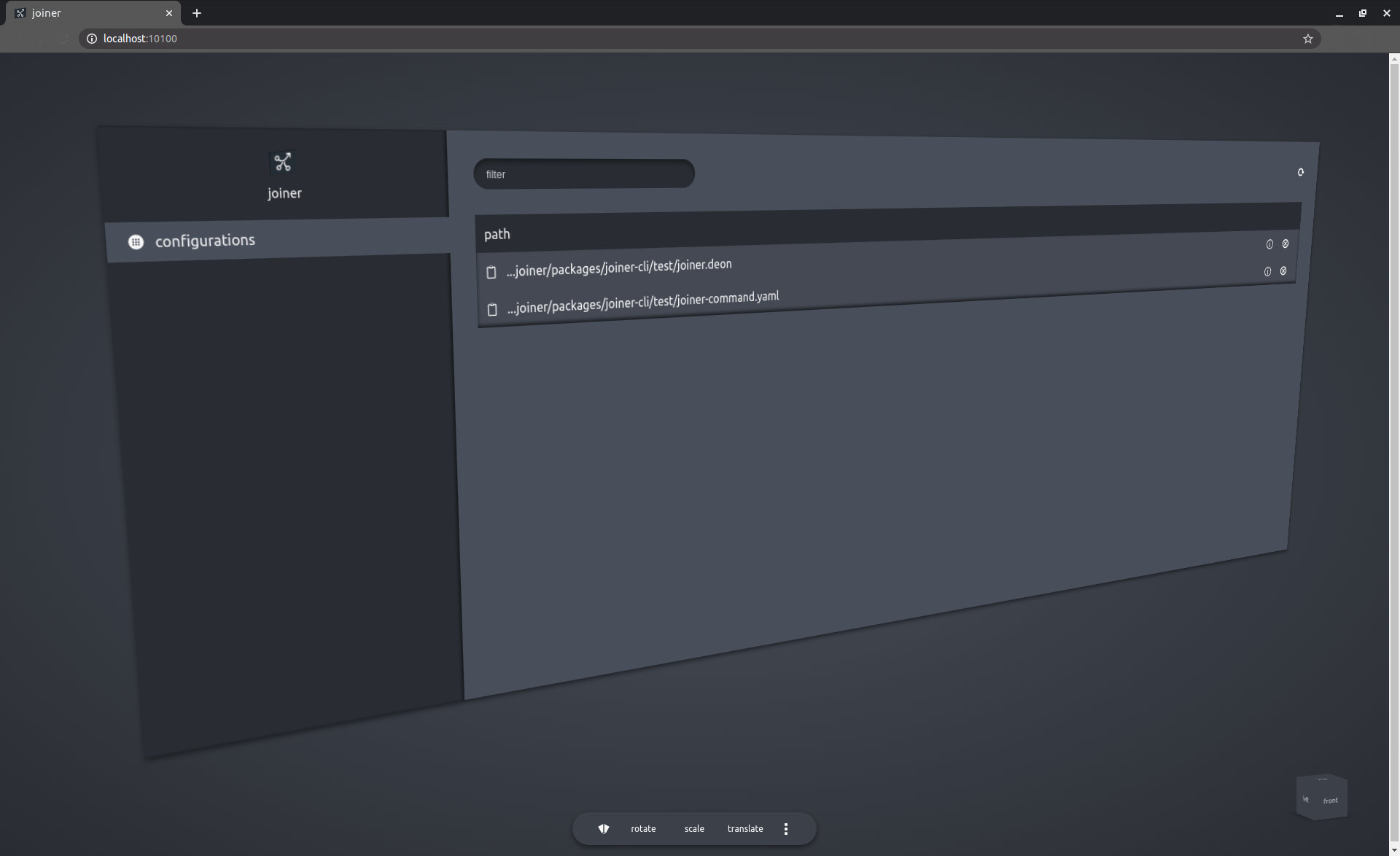
In order to provide a global view of all the `joiner` configurations and packages from the machine, the dashboard server can be started by running:
```
joiner dashboard start
```
In order to populate the dashboard with configurations, the `joiner` configuration files must be registered
```
joiner dashboard register /path/to/joiner-configuration-file
```
### API
Once the dashboard server has been started, it can receive GraphQL-based API requests on `http://localhost:/joiner` (the default port is `10100`: `http://localhost:10100/joiner`).
``` graphql
input InputExecuteCommand {
configurationID: String!
command: String!
package: String!
}
mutation ExecuteCommand($input: InputExecuteCommand!) {
executeCommand(input: $input) {
status
error {
type
path
message
}
}
}
```
## Advanced Usage
### Aliases
Recommended `Joiner` Aliases for the terminal
``` bash
alias j='joiner'
alias jd='joiner dashboard'
alias ju='joiner update'
alias jua='joiner update all'
alias jp='joiner patch'
alias jpa='joiner patch all'
alias jc='joiner commit'
alias jca='joiner commit all'
alias jpub='joiner publish'
alias jpuba='joiner publish all'
```
### Development
Cross-linking packages depending on each other with symlinks becomes very fast a complete mess, especially when the dependency chain is beyond 2-3 links, and even more so when one of the packages does not play well with having a copy of itself in the dependency graph.
`Joiner` goes the "dumb" way: instead of symlinking the complete folder into `node_modules`, giving rise to the mess in the first place, `joiner` merely watches and copies the build process output (`/build`, `/distribution`, or any other folder) of a package into the adequate dependency folder for each 'linked', that is referenced, package.
To setup the packages linkage, the configuration file should have at least the `watchPackages` field, if not, all the registered packages will be watched.
``` deon
development {
// The packages which are targeted for development watch.
// The server will listen for file changes in the `watch directory` of the `package`
// and copy the files to the `node_modules` of all the packages which require them.
// The catch-all 'all' can be used, or a single package can be passed.
// default all
watchPackages 'all' // ['packageName'] | 'packageName' | 'all'
// Port for the server started with `joiner develop`.
// default 55000
serverPort 55000
// default ['build', 'distribution', 'dist']
watchDirectories [
build
distribution
dist
]
// Paths to other packages which need to be linked/watched/updated
// but which do not belong to the same life-cycle management
// as the top-defined `packages`.
// default []
externalPackages []
}
```
To start the development server and the watchers, run the command
``` bash
joiner develop
```
### High-Scale
For multi-/mono-repositories containing 100+ packages, it is generally useful to have a `/scripts/joiner` directory as close as possible to the root directory with multiple, segmented `joiner.yaml` files, appropriately named, e.g. `joiner.backends.yaml`, `joiner.frontends.yaml`. The `joiner` commands will then be run from the root directory, and all the `joiner.yaml` files will resolve the paths in a similar fashion.
### Joiner Package
Instead of relying on the `package.json` file to specify the package-related data (name, dependencies), a `joiner.package.deon` (or `.yaml`) file can be created.
``` deon
{
name package-name
}
```
This feature is recommended for using `joiner` with other languages besides `JavaScript`-based project, and/or for using `joiner` as a meta-controller of multiple separated projects.
### Path Resolution
`Joiner` can be used to couple arbitrary packages, spread across the filesystem, and perform any kind of maintenance cycle (run commands, update, patch, commit, publish) on them specifically.
The `joiner.deon` (or `.yaml`) files can be anywhere on the filesystem. Consider the following file structure
``` fs
| .
| - packages
| - package-a
| - package-b
| - package-b1
| - package-b2
| - scripts
| - joiners
```
The folder `./scripts/joiners` contains multiple `joiner.deon` (or `.yaml`) files. For example
``` deon
// joiner-b2-a.deon
{
packages [
./packages/package-b/package-b2
./packages/package-a
]
}
```
``` yaml
# joiner-all.yaml
---
packages:
- ../../packages/package-b/*
- ../../packages/package-a
```
Running the command
``` bash
joiner update all -c ./scripts/joiners/joiner-b2-a.deon
```
from the `root` directory will update all the packages mentioned in the `./scripts/joiners/joiner-b2-a.deon` file (`package-b/package-b2` first, and then `package-a`).
While running the command
``` bash
joiner update all -c ./joiner-all.yaml
```
from the `./scripts/joiners` directory will update all the packages in `./packages/package-b` and the `packages/package-a` package.
In order to avoid running the command from a wrong directory, which will result in bad path resolution, the field `runFrom` can be specified
``` yaml
runFrom: ../../
```
which contains a path trunk, relative to the `joiner.deon` (or `.yaml`) file, from which the packages paths will be resolved, irrespective from where the `joiner` command is run.
## Packages
 [@plurid/joiner][joiner-cli] • the CLI application
[joiner-cli]: https://github.com/plurid/joiner/tree/master/packages/joiner-cli
## [Codeophon](https://github.com/ly3xqhl8g9/codeophon)
+ licensing: [delicense](https://github.com/ly3xqhl8g9/delicense)
+ versioning: [αver](https://github.com/ly3xqhl8g9/alpha-versioning)
[@plurid/joiner][joiner-cli] • the CLI application
[joiner-cli]: https://github.com/plurid/joiner/tree/master/packages/joiner-cli
## [Codeophon](https://github.com/ly3xqhl8g9/codeophon)
+ licensing: [delicense](https://github.com/ly3xqhl8g9/delicense)
+ versioning: [αver](https://github.com/ly3xqhl8g9/alpha-versioning)