``
=============
[](https://travis-ci.org/plotly/react-msa-viewer)
[](https://www.npmjs.com/package/@plotly/react-msa-viewer)
[](https://codecov.io/gh/plotly/react-msa-viewer)
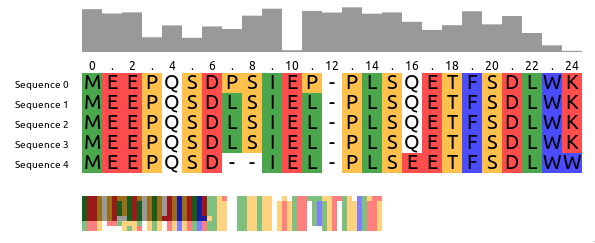
`react-msa-viewer` is a performant, extendable, highly-customizable, production-ready
React Component that renders a Multiple Sequence Alignment (MSA).
__WARNING: Work in progress - use with caution__
Live demo
---------
Checkout the storybook at https://msa.bio.sh
Getting started
---------------
```jsx
import MSAViewer from '@plotly/react-msa-viewer';
function MSA() {
const options = {
sequences: [
{
name: "seq.1",
sequence: "MEEPQSDPSIEP-PLSQETFSDLWKLLPENNVLSPLPS-QA-VDDLMLSPDDLAQWLTED"
},
{
name: "seq.2",
sequence: "MEEPQSDLSIEL-PLSQETFSDLWKLLPPNNVLSTLPS-SDSIEE-LFLSENVAGWLEDP"
},
{
name: "seq.3",
sequence: "MEEPQSDLSIEL-PLSQETFSDLWKLLPPNNVLSTLPS-SDSIEE-LFLSENVAGWLEDP"
},
],
colorScheme: "zappo",
};
return (
);
}
```
[Open on CodePen](https://codepen.io/greenify/pen/ReJxvX?editors=0010)
### Installation
For [npm](https://www.npmjs.com) users, run:
```
npm i --save @plotly/react-msa-viewer
```
For [yarn](https://yarnpkg.com/en) users, run:
```
yarn add @plotly/react-msa-viewer
```
### Use your own layout
`` acts a Context Provider for all MSA subcomponents.
Hence, it will automatically take care of synchronization between all MSA components in its tree:
```jsx
import {
Labels,
MSAViewer,
OverviewBar,
PositionBar,
SequenceOverview,
SequenceViewer,
} from '@plotly/react-msa-viewer';
function MSA() {
const options = {
sequences: [
{
name: "seq.1",
sequence: "MEEPQSDPSIEP-PLSQETFSDLWKLLPENNVLSPLPS-QA-VDDLMLSPDDLAQWLTED"
},
{
name: "seq.2",
sequence: "MEEPQSDLSIEL-PLSQETFSDLWKLLPPNNVLSTLPS-SDSIEE-LFLSENVAGWLEDP"
},
{
name: "seq.3",
sequence: "MEEPQSDLSIEL-PLSQETFSDLWKLLPPNNVLSTLPS-SDSIEE-LFLSENVAGWLEDP"
},
],
};
return (
);
}
```
[Open on CodePen](https://codepen.io/greenify/pen/qJKpPK/left?editors=0010)
### Usage in Vanilla JS
Using the `react-msa-viewer` with React is highly recommended.
However, it can be used in Vanilla JS:
```html
```
See an [example on CodePen](https://codepen.io/greenify/pen/xyYaWN?editors=1010).
Props
-----
__Warning__: these properties are still susceptible to a _change at any moment_.
### `MSAViewer` (component)
A general-purpose layout for the MSA components
When children are passed it acts as a Context Provider for the msaStore,
otherwise it provides a default layout and forwards it props the respective
components.
TBD
### `Labels` (component)
Displays the sequence names.
#### Props
##### `cacheElements`
defaultValue: `10`
##### `font`
Font of the sequence labels, e.g. `20px Arial`
type: `string`
##### `labelAttributes`
Attributes to apply to each label.
type: `object`
##### `labelComponent`
Component to create labels from.
type: `union(object|func)`
##### `labelStyle`
Inline styles to apply to each label.
type: `object`
defaultValue: `{}`
##### `style`
Inline styles to apply to the Label component
type: `object`
### `OverviewBar` (component)
Creates a small overview box of the sequences for a general overview.
#### Props
##### `engine`
Rendering engine: `canvas` or `webgl` (experimental).
type: `enum('canvas'|'webgl')`
defaultValue: `"canvas"`
##### `fillColor`
Fill color of the OverviewBar, e.g. `#999999`
type: `string`
defaultValue: `"#999999"`
##### `height` (required)
Width of the component (in pixels), e.g. `100`
type: `number`
defaultValue: `50`
##### `method`
Method to use for the OverviewBar:
- `information-content`: Information entropy after Shannon of a column (scaled)
- `conservation`: Conservation of a column (scaled)
type: `enum('information-content'|'conservation')`
defaultValue: `"conservation"`
##### `style`
Custom style configuration.
type: `object`
##### `width` (required)
Width of the component (in pixels), e.g. `100`
type: `number`
### `PositionBar` (component)
Displays the sequence names with an arbitrary Marker component
#### Props
##### `cacheElements`
defaultValue: `10`
##### `font`
Font of the sequence labels, e.g. `20px Arial`
type: `string`
##### `height`
Height of the PositionBar (in pixels), e.g. `100`
type: `number`
defaultValue: `15`
##### `markerAttributes`
Attributes to apply to each marker.
type: `object`
##### `markerComponent`
Component to create markers from.
type: `union(object|func)`
##### `markerSteps`
At which steps the position labels should appear, e.g. `2` for (1, 3, 5)
type: `number`
defaultValue: `2`
##### `markerStyle`
Inline styles to apply to each marker.
type: `object`
defaultValue: `{}`
##### `startIndex`
At which number the PositionBar marker should start counting.
Typical values are: `1` (1-based indexing) and `0` (0-based indexing).
type: `number`
defaultValue: `1`
##### `style`
Inline styles to apply to the PositionBar component
type: `object`
defaultValue: `{
font: "12px Arial",
}`
### `SequenceOverview` (component)
#### Props
##### `engine`
Rendering engine: `canvas` or `webgl` (experimental).
type: `enum('canvas'|'webgl')`
defaultValue: `"canvas"`
##### `height` (required)
Width of the component (in pixels), e.g. `100`
type: `number`
defaultValue: `50`
##### `style`
Custom style configuration.
type: `object`
##### `tileHeight`
Height of a tile in the OverviewBar, e.g. `5`
type: `number`
defaultValue: `5`
##### `tileWidth`
Width of a tile in the OverviewBar, e.g. `5`
type: `number`
defaultValue: `5`
##### `width` (required)
Width of the component (in pixels), e.g. `100`
type: `number`
### `SequenceViewer` (component)
Component to draw the main sequence alignment.
#### Props
##### `border`
Whether to draw a border.
type: `bool`
defaultValue: `false`
##### `borderColor`
Color of the border. Name, hex or RGB value.
type: `string`
defaultValue: `"black"`
##### `borderWidth`
Width of the border.
type: `number`
defaultValue: `1`
##### `cacheElements`
Number of residues to prerender outside of the visible viewbox.
type: `number`
defaultValue: `20`
##### `onResidueClick`
Callback fired when the mouse pointer clicked a residue.
type: `func`
##### `onResidueDoubleClick`
Callback fired when the mouse pointer clicked a residue.
type: `func`
##### `onResidueMouseEnter`
Callback fired when the mouse pointer is entering a residue.
type: `func`
##### `onResidueMouseLeave`
Callback fired when the mouse pointer is leaving a residue.
type: `func`
##### `overflow`
What should happen if content overflows.
type: `enum("hidden"|"auto"|"scroll")`
defaultValue: `"hidden"`
##### `overflowX`
What should happen if x-axis content overflows (overwrites "overflow")
type: `enum("hidden"|"auto"|"scroll"|"initial")`
defaultValue: `"auto"`
##### `overflowY`
What should happen if y-axis content overflows (overwrites "overflow")
type: `enum("hidden"|"auto"|"scroll"|"initial")`
defaultValue: `"auto"`
##### `scrollBarPositionX`
X Position of the scroll bar ("top or "bottom")
type: `enum("top"|"bottom")`
defaultValue: `"bottom"`
##### `scrollBarPositionY`
Y Position of the scroll bar ("left" or "right")
type: `enum("left"|"right")`
defaultValue: `"right"`
##### `showModBar`
Show the custom ModBar
type: `bool`
defaultValue: `false`
##### `textColor`
Color of the text residue letters (name, hex or RGB value)
type: `string`
defaultValue: `"black"`
##### `textFont`
Font to use when drawing the individual residues.
type: `string`
defaultValue: `"18px Arial"`
##### `xGridSize`
Number of residues to cluster in one tile (x-axis) (default: 10)
type: `number`
defaultValue: `10`
##### `yGridSize`
Number of residues to cluster in one tile (y-axis) (default: 10)
type: `number`
defaultValue: `10`
### Creating your own MSA components
The React MSA Viewer uses an Redux store internally.
You can connect your components with it too.
```jsx
import React, {Component} from 'react';
import {
msaConnect,
MSAViewer,
SequenceViewer,
} from '@plotly/react-msa-viewer';
class MyFirstMSAPluginComponent extends React.Component {
render() {
const residue = "E";
const style = {
width: this.props.tileWidth,
height: this.props.tileHeight,
backgroundColor: this.props.colorScheme.getColor(residue),
}
return (
{residue}
);
}
}
const mapStateToProps = state => {
return {
tileHeight: state.props.tileHeight,
tileWidth: state.props.tileWidth,
colorScheme: state.props.colorScheme,
}
}
const MyFirstMSAPlugin = msaConnect(
mapStateToProps,
)(MyFirstMSAPluginComponent);
function MyMSA() {
return (
);
}
```
[Open on CodePen](https://codepen.io/greenify/pen/MPLOZE?editors=0010)
However, for performance reasons you need to use a special mixin to listen for
position events.
```jsx
import {
withPositionStore,
MSAViewer,
SequenceViewer,
} from '@plotly/react-msa-viewer';
class MyFirstMSAPlugin extends React.Component {
shouldRerender(newPosition) {
return true;
}
render() {
return (
x: {this.position.xPos}, y: {this.position.yPos}
);
}
}
// inject the MSAPositionStore as this.position
withPositionStore(MyFirstMSAPlugin);
function MyMSA() {
return (
);
}
ReactDOM.render(, document.getElementById("my-msa"));
```
[Open on CodePen](https://codepen.io/greenify/pen/PyVOKM?editors=0010)
Alternatively, you can also listen to events.
Listen to events
----------------
The `MSAViewer` components (and its subcomponents) provide a variety of callbacks
like `onResidueClick` that can be used to plug with your code:
```jsx
import {
MSAViewer,
} from 'react-msa-viewer';
function MyMSA() {
return
}
```
[Open on CodePen](https://codepen.io/greenify/pen/QZYOep?editors=1011)
Some events also trigger custom DOM events which might simply subscription
outside of React:
```html
```
[Open on CodePen](https://codepen.io/greenify/pen/yRZPga?editors=1011).
The custom DOM events bubble up the tree and contain their payload in`.detail`.
Sending actions
---------------
While the most common way to update the MSA is to update its properties, you
can also send a variety of actions to the MSAViewer.
```jsx
import {
MSAViewer,
} from 'react-msa-viewer';
class MyMSA extends React.Component {
moveLeft = () => {
this.msa.movePosition({yMovement: -10})
}
moveRight = () => {
this.msa.movePosition({yMovement: 10})
}
jumpOrigin = () => {
debugger;
this.msa.movePosition({yPos: 0})
}
render() {
return (
this.msa = ref} />
);
}
}
```
[Open on CodePen](https://codepen.io/greenify/pen/LgqeNo?editors=0010)
It's also possible to use `actions` to create a payload and dispatch it later:
```jsx
import {
MSAViewer,
} from 'react-msa-viewer';
class MyMSA extends React.Component {
moveLeft = () => {
const payload = actions.movePosition({yMovement: -10});
this.msa.dispatch(payload);
}
moveRight = () => {
const payload = actions.movePosition({yMovement: 10});
this.msa.dispatch(payload);
}
jumpOrigin = () => {
const payload = actions.updatePosition({yPos: 0});
this.msa.dispatch(payload);
}
render() {
return (
this.msa = ref} />
);
}
}
```
Development
-----------
### Getting started
Get the code:
```
git clone https://github.com/plotly/react-msa-viewer
```
Install the project `dev` dependencies:
```
npm install
```
Contributing
------------
Please, see the [CONTRIBUTING](CONTRIBUTING.md) file.
Contributor Code of Conduct
---------------------------
Please note that this project is released with a [Contributor Code of
Conduct](http://contributor-covenant.org/). By participating in this project you
agree to abide by its terms. See [CODE_OF_CONDUCT](CODE_OF_CONDUCT.md) file.
License
-------
react-msa-viewer is released under the MIT License. See the bundled
[LICENSE](LICENSE) file for details.