# pi-ask - interactive Q&A for pi.dev
Multiple choice and single answer questions with **notes** and **custom answers**,
Claude Code style. When the agent needs input - requirements, preferences,
decisions - it calls the `ask` / `interview` tools and the question is
rendered as a full-screen picker in the terminal. The developer answers with a
**number key**, the **arrow keys**, or types a **custom answer**; a **note** can
be attached to any answer with `n`.
## Install
```bash
pi install npm:@pixu1980/pi-ask
```
Requires **Node.js ≥ 22** (uses `--experimental-strip-types`).
## What you get
| Resource | What it does |
|---|---|
| `ask` tool | One question: options + custom answer + optional note + optional multi-select - also covers sharp plan interviews (recommended answers, codebase exploration) |
| `interview` tool | A batch of questions as **sequential interview waves** with tab navigation, a review tab before submit, and **caller-controlled waves** of any length (respected in full); the "con dominio" variant adds domain-aware interviews (CONTEXT.md / ADR) |
| `/ask ` | Command that tells the model to ask you a single question (or run a sharp plan interview) |
| `/ask-interview ` | Command that tells the model to run a structured interview; append "con dominio" or `--docs` for a domain-aware interview |
| Auto-trigger | Phrases like "fammi una domanda", "fammi un questionario", "sfida il piano", or "intervistami col dominio" route into the matching mode automatically |
The tools are callable by the model automatically (no setup). The slash
commands make the "interview mode" flow explicit.
## How answering works
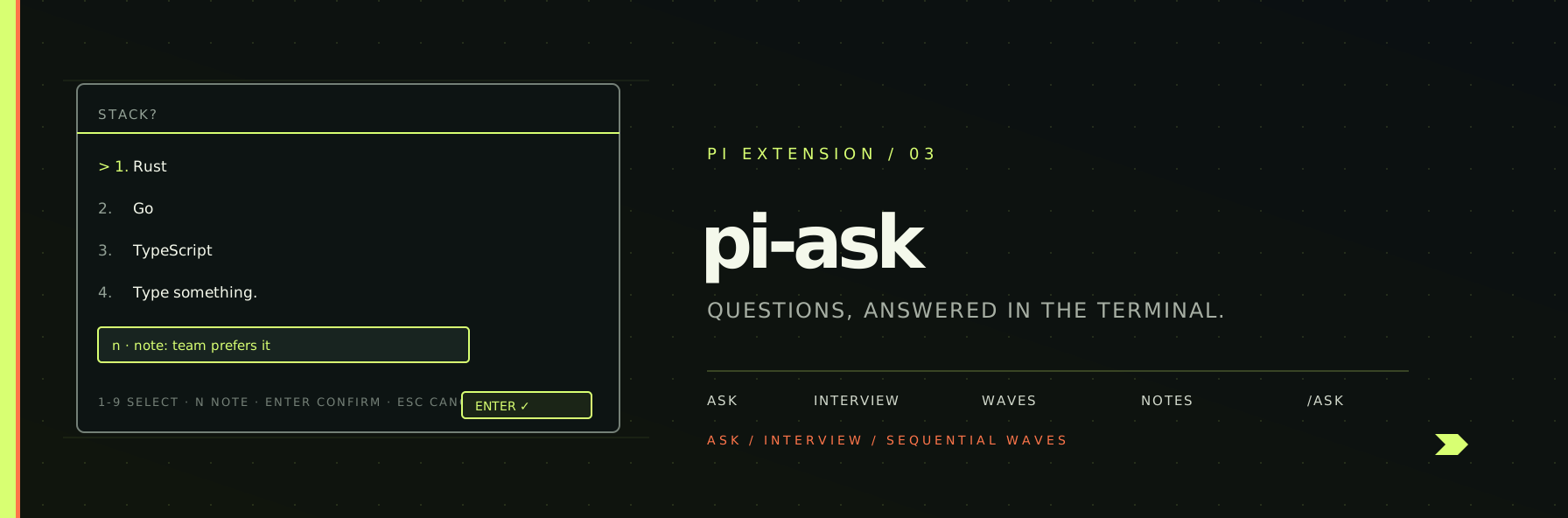
When the model calls `ask`, the editor is temporarily replaced by the question
picker:
```
────────────────────────────────────────────────────────────────────────────
Which stack?
> ✓ 1. Rust
2. Go
3. TypeScript
4. Type something.
Enter submit • n note • ↑↓ change • Esc back
────────────────────────────────────────────────────────────────────────────
```
| Key | Action |
|---|---|
| `1`-`9`, `0` | Jump the highlight (1-9, 0 = 10th) - quick-select submits in single mode |
| `↑` / `↓` | Move the highlight (a highlighted option is always present) |
| `Enter` | **Confirm the highlighted option** (submits / advances) |
| `n` | Open the note editor - the note travels with the confirmed answer |
| `Space` | Toggle the highlighted checkbox (multi-select mode) |
| `Esc` | Close editor → cancel |
Answering is **instant**: the highlighted option + `Enter` confirms - no
confirmation step. **"Type something." enters write mode as soon as it is
highlighted** (arrow down to it); navigating away clears the field.
### Single vs multi select
- **Single (default):** pick one option - or "Type something." for a custom
answer. Selection submits immediately.
- **Multi (`multiSelect: true`):** toggle options with `Space` or digits,
add a note with `n`, submit with Enter.
### Notes
Press `n` **before** selecting to open the note editor; the note is attached
to the next answer you pick. The note travels with the answer back to the model:
```
Q1: 1. Frontend - note: team prefers it
```
### Paths (optional)
The custom-answer and note fields are plain text editors, so with
[`@pixu1980/pi-path-picker`](https://github.com/pixu1980/pi-coding-agent-extensions/tree/main/packages/pi-path-picker)
installed they get **path completion** - the same one the main prompt has:
```
Type something. -> `.//` + Tab → lists the contents of ./ inside the field
```
The rule is unchanged: `./`, `~/` or `/` inside a quote (`"`, `'`, `` ` ``)
plus Tab. Nothing else opens the picker, and `Tab` keeps its other jobs -
switching interview tabs when no editor is focused.
pi-ask does not depend on pi-path-picker. It asks for the provider over pi's
event bus at the moment the field opens, so when the picker is not installed the
fields behave exactly as before.
## Interview
The `interview` tool renders a tab bar: one tab per question (labels chosen by
us) plus a **Submit** tab. Move between tabs freely with `←` / `→`
(or Tab / Shift+Tab) - questions can be answered in any order. Answer a question
with a digit (records and advances to the next tab) or by highlighting an option
with `↑` / `↓` and pressing `Enter`. Enter records the highlighted option (or the
current multi-selects) and **advances to the next question**; on the last
question it lands on the Submit tab, where Enter submits everything. Unanswered
questions are listed on the review screen, and answers can be edited by tabbing
back.
### Waves (caller-controlled structure)
Long interviews are broken into **sequential waves**: each wave
renders on its own with a header (`Interview 1/2`, `Interview 2/2` -
localized, e.g. `Intervista 1/2` in Italian chats) and its own review +
Submit step - the next wave only starts after you confirm the previous
one.
The caller controls the grouping: pass `waves` with a label and **any number
of questions per wave** (decided by hierarchical or structural criteria -
sections, difficulty, phases). Each wave is respected in full, never split,
so a 20-question baseline stays one interview chunk if that is how you
structured it.
### Waves
Pass `waves` to the `interview` tool when the interview spans phases
measured at different points in time (e.g. a baseline and a follow-up). Each wave is a labelled group of questions with any
length - the caller decides the grouping by hierarchical/structural criteria;
waves are rendered one after the other as sequential interview chunks:
```json
{
"title": "Progetto di ricerca",
"waves": [
{ "label": "Wave 1 - Baseline", "questions": [ { "id": "w1q1", "prompt": "...", "options": [...] }, ... ] },
{ "label": "Wave 2 - Follow-up", "questions": [ { "id": "w2q1", "prompt": "...", "options": [...] }, ... ] }
]
}
```
Each wave renders as its own chunk: a header shows the wave label
(e.g. "Wave 1 - Baseline"), and answers carry the wave label in the final
result so the two waves can be compared. A flat `questions` list is treated
as a single unlabelled wave.
## Slash commands & auto-trigger
- `/ask ` - single-question mode about a topic. Also handles sharp plan interviews:
when you ask to sharpen a plan, the model asks one question at a time with
recommended answers and codebase exploration.
- `/ask-interview ` - structured interview (multi-question, optional
sequential waves) about a topic. Append "con dominio" or
`--docs` for a domain-aware interview against CONTEXT.md glossary, ADRs and
the code.
The same modes activate automatically from natural language, so you do not
have to remember the commands:
| You write | Mode |
|---|---|
| "fammi una domanda", "chiedimi qualcosa", "ask me one question" | `/ask` |
| "intervistami", "fammi un questionario", "due wave di domande" | `/ask-interview` |
| "intervistami sul piano", "sfida il piano", "stress-test il piano" | `/ask` (sharp) |
| "intervistami col dominio", "contro il domain model" | `/ask-interview` (docs) |
## Guardrails
When your prompt signals ask / interview intent, pi-ask appends a
**mandatory directive to the system prompt** (via `before_agent_start`) that
forces the model to drive the session through the `ask` / `interview` tool
instead of replying with plain-text questions. The guardrail lives inside the
extension, so it is active **only when pi-ask is installed**.
## Non-interactive modes
In `-p` / `--mode json` / `--mode rpc` the tools degrade gracefully: they
return the question and options without an answer so the model can adapt.
## Example: requirements interview
```
you: /ask-interview new CLI tool
pi: Which language? → 1. TypeScript 2. Rust 3. Go 4. Python
(n) note: "team is Rust-first"
pi: How will it be distributed? → 1. npm 2. Homebrew 3. cargo 4. binary tarball
pi: Got it: TypeScript-first CLI... (summarizes and starts working)
```
## Development
```bash
cd packages/pi-ask
pnpm test # unit + UI tests (fake TUI driver)
pnpm exec tsc --noEmit # strict type check
pi -e . # run pi with the extension loaded locally
```
## License
MIT