# PicGo BumpVersion
A full `git commit` -> `changelog` -> `release` workflow & convention.
It's now only available for Node.js projects. Thanks [standard-version](https://github.com/conventional-changelog/standard-version) for the inspiration.
> Starting from v1.2.0, bump-version requires Node.js 20 or higher.




## Installation
```bash
npm install -D @picgo/bump-version commitizen
#or
yarn add -D @picgo/bump-version commitizen
#or
pnpm add -D @picgo/bump-version commitizen
```
Also, add the following data at the top level in your `package.json` to properly config `bump-version` (replace old `config` if you have already configured `commitizen` or `cz-customizable` before):
```json
"husky": {
"hooks": {
"commit-msg": "commitlint -E HUSKY_GIT_PARAMS"
}
},
"config": {
"commitizen": {
"path": "./node_modules/cz-customizable"
},
"cz-customizable": {
"config": "./node_modules/@picgo/bump-version/.cz-config.js"
}
},
"commitlint": {
"extends": ["./node_modules/@picgo/bump-version/commitlint-picgo"]
}
```
And then add the following (inside the braces) to the `scripts` field of your package.json:
```json
"scripts": {
"cz": "git-cz",
"release": "bump-version"
}
```
Then you can use `npm run cz` for committing standard message and use `npm run release` to bump version & auto generate changelog in your project!
If you are using [yarn](https://yarnpkg.com/), then it will be more simple just like:
```bash
# to commit
yarn cz
# to bump version
yarn release
```
So the workflow is the following:
1. `git add` something changed
2. `npm run cz` to commit
3. `npm run release` to release or deploy
## Usage
> If you installed bump-version in a project, then you can just write down the `bump-version` command in your `package.json`'s `scripts` field. Then just `npm run you-command`.
### Commit
```bash
npm run cz
# or
yarn cz
```
This leads to an interactive submit message interface:
```
? Select the type of change that you're committing: (Use arrow keys)
❯ Feature: when adding new features
Fix: when fixing bugs
WIP: when working in progress
Refactor: when changing the code without adding features or fixing bugs
Chore: when changing the build process or auxiliary tools and libraries such as documentation generation
Style: when improving the format/structure of the code
Upgrade: when upgrading dependencies
```
You can use this interface to quickly generate commit information that is compliant with the PicGo convention.
### Bump version
```bash
npm run release
# or
yarn run cz
```
```txt
Usage
bump-version
Example
bump-version -t major
Options
-a, --preid-alpha Prerelease id: alpha. Exp. 1.0.0.alpha-0
-b, --preid-beta Prerelease id: beta. Exp. 1.0.0.beta-0
-d, --dry Run bump version without change anything & output the log in console
-f, --file Read and write the CHANGELOG file, relative to package.json's path
Default: CHANGELOG.md
-p, --path A filepath of where your package.json is located
Default: ./
-h, --help Display help message
-t, --type Release type. [major, minor, patch, premajor, preminor, prepatch, prerelease]
Default: patch
--push Auto push commits to origin master
Default: false
--no-tag Tag won't be created
Default: tag will be created
--no-changelog Changelog won't be created
Default: changelog will be created
```
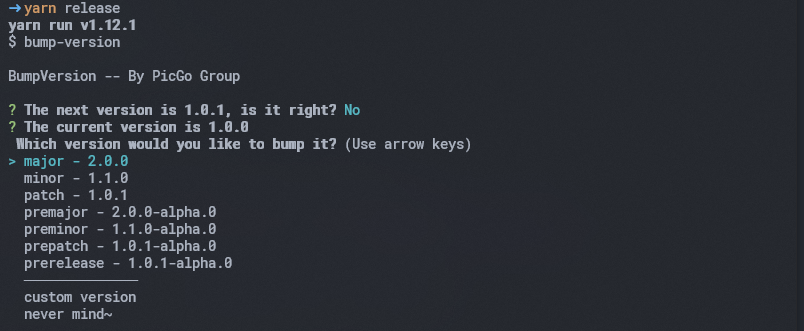
Don't know which version should be the next? Never mind:
If you reject the default next version, then you can choose which version you want or customize one.
if you just want to see what the changelog will be created and nothing will be changed:
```bash
npm run release --dry
```
## Badges
Let more people know that you are using PicGo bump-version for elegant workflow!
```md
[](https://github.com/PicGo/bump-version)
```
## PicGo Convention
PicGo's commit message guidelines.
### Git Commit Message
- Use the present tense ("add feature" not "added feature")
- Use the imperative mood ("move cursor to..." not "moves cursor to...")
- Do not repeat the word in type ("Fix: xxx bugs when..." not "Fix: fix xxx bugs when...")
- Limit the first line to 72 characters or less
- Start the commit message with an applicable `emoji` & `type`:
- :sparkles: Feature `:sparkles: Feature` when adding new features
- :bug: Fix `:bug: Fix` when fixing bugs
- :construction: WIP `:construction: WIP` when working in progress
- :hammer: Refactor `:hammer: Refactor` when changing the code without adding features or fixing bugs
- :package: Chore `:package: Chore` when changing the build process or auxiliary tools and libraries such as documentation generation
- :art: Style `:art: Style` when improving the format/structure of the code
- :arrow_up: Upgrade `:arrow_up: Upgrade` when upgrading dependencies
- :zap: Perf `:zap: Perf` when improving performance
- :pencil: Docs `:pencil: Docs` when wrting docs
- :white_check_mark: Test `:white_check_mark: Test` when adding or updating tests
- :back: Revert `:back: Revert` when reverting some commits
- :pushpin: Init `:pushpin: Init` when initializing a project
- :tada: Release `:tada: Release` when releasing (**will be automatically committed by `bump-version`**)
#### Commit Message Format
A commit message consists of a **header**, **body**(optional) and **footer**(optional). The header has a **emoji**, **type**, **scope**(optional) and **subject**:
```txt
([scope]):
[body]
[footer]
```
#### Examples
##### 1. Normal
:sparkles: Feature(core): add error notification
:bug: Fix(core): xxx error should be thrown
```txt
:sparkles: Feature(core): add error notification
:bug: Fix(core): xxx error should be thrown
```
and they will be rendered into the following changelog:
```markdown
# x.x.0 (20xx-xx-xx)
## :sparkles: Features
- add error notification
## :bug: Bug Fixes
- xxx error should be thrown
```
##### 2. BREAKING CHANGE
**Note: BREAKING CHANGE can only be in the type of `Feature` or `Fix`.**
:sparkles: Feature(core): add error notification
BREAKING CHANGE: change api for error notification
```md
:sparkles: Feature(core): add error notification
BREAKING CHANGE: change api for error notification
```
and they will be rendered into the following changelog:
```markdown
# x.x.0 (20xx-xx-xx)
## :sparkles: Features
- add error notification
## BREAKING CHANGES
- change api for error notification
```
### Git Branch Management
**Important**: Always use `rebase` or `squash` or `cherry-pick` instead of `merge`
Available branches:
- `master` for the release
- `dev` for the development
- `docs` or `gh-pages` for the documentation **[optional]**
- `pr` for the pull request **[optional]**
- `hot-fix` for fixing the bug in master **[optional]**
- `feat-*` for developing a new feature
- `fix-*` for fixing a bug in dev branch
## License
[MIT](http://opensource.org/licenses/MIT)
Copyright (c) 2019 Molunerfinn