# Using phi
This page collects day-to-day usage details that do not fit on the quickstart page.
## Interactive Mode
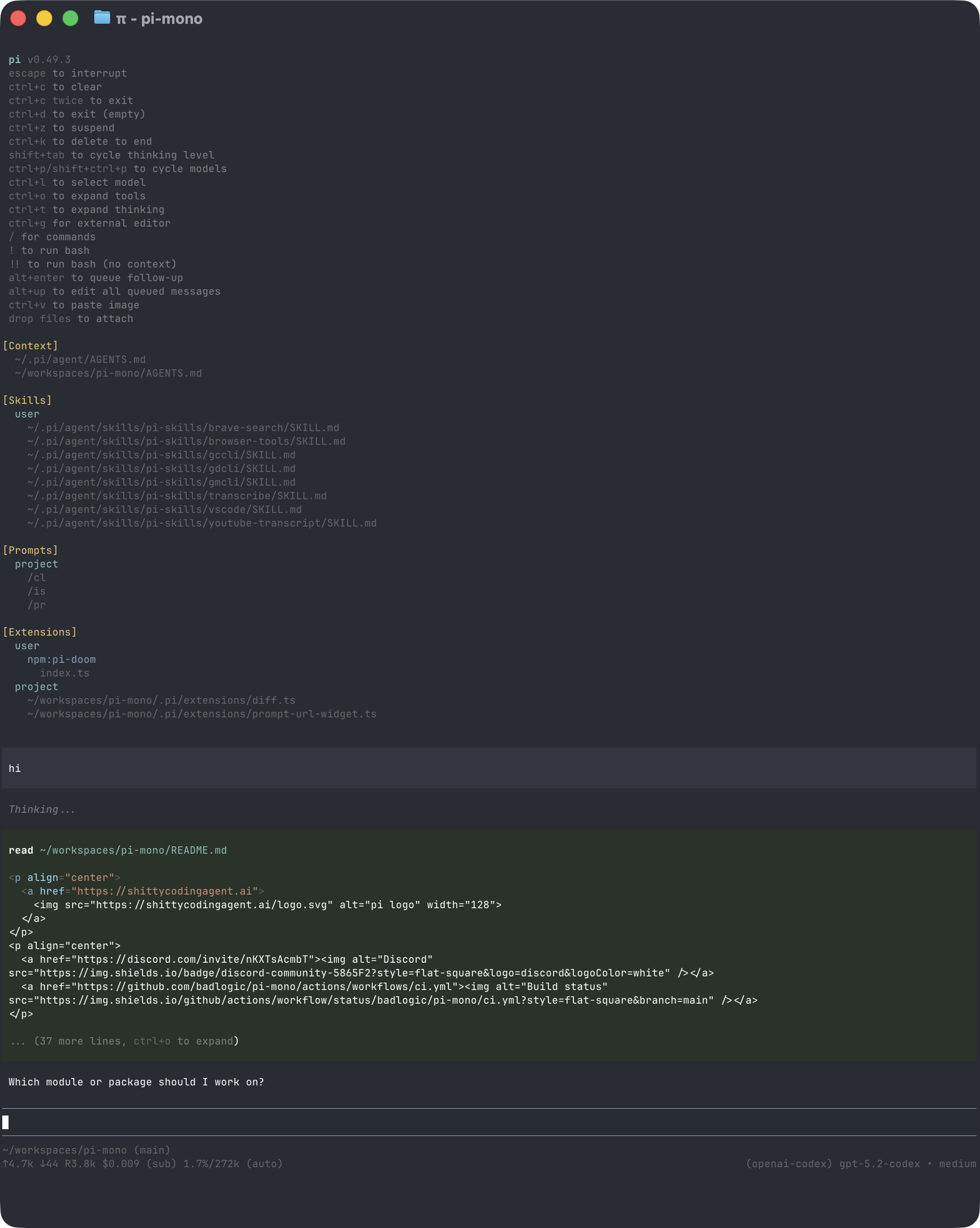
The interface has four main areas:
- **Startup header** - shortcuts, loaded context files, prompt templates, skills, and extensions
- **Messages** - user messages, assistant responses, tool calls, tool results, notifications, errors, and extension UI
- **Editor** - where you type; border color indicates the current thinking level
- **Footer** - working directory, session name, token/cache usage, cost, context usage, and current model. Totals include assistant responses, usage reported by tools, and summary generation.
The editor can be replaced temporarily by built-in UI such as `/settings` or by custom extension UI.
### Editor Features
| Feature | How |
|---------|-----|
| File reference | Type `@` to fuzzy-search project files |
| Path completion | Press Tab to complete paths |
| Multi-line input | Shift+Enter, or Ctrl+Enter on Windows Terminal |
| Copy response | Ctrl+X copies the last assistant message; in `/tree`, it copies the selected message |
| Images | Paste with Ctrl+V, Alt+V on Windows, or drag into the terminal |
| Shell command | `!command` runs and sends output to the model |
| Hidden shell command | `!!command` runs without sending output to the model |
| External editor | Ctrl+G opens `externalEditor`, `$VISUAL`, `$EDITOR`, Notepad on Windows, or `nano` elsewhere |
See [Keybindings](keybindings.md) for all shortcuts and customization.
## Slash Commands
Type `/` in the editor to open command completion. Extensions can register custom commands, skills are available as `/skill:name`, and prompt templates expand via `/templatename`.
| Command | Description |
|---------|-------------|
| `/login`, `/logout` | Manage OAuth or API-key credentials |
| [`/llama`](llama-cpp.md) | Download, load, and unload llama.cpp router models |
| `/model` | Switch models |
| `/scoped-models` | Enable/disable models for Ctrl+P cycling |
| `/settings` | Thinking level, theme, message delivery, transport |
| `/resume` | Pick from previous sessions |
| `/new` | Start a new session |
| `/name ` | Set session display name |
| `/session` | Show session file, ID, messages, tokens, and cost |
| `/tree` | Jump to any point in the session and continue from there |
| `/trust` | Save project trust decision for future sessions |
| `/fork` | Create a new session from a previous user message |
| `/clone` | Duplicate the current active branch into a new session |
| `/compact [prompt]` | Manually compact context, optionally with custom instructions |
| `/copy` | Copy last assistant message to clipboard |
| `/export [file]` | Export session to HTML or JSONL |
| `/import ` | Import and resume a session from a JSONL file |
| `/share` | Upload as private GitHub gist with shareable HTML link |
| `/reload` | Reload keybindings, extensions, skills, prompts, themes, and context files |
| `/hotkeys` | Show all keyboard shortcuts |
| `/changelog` | Display version history |
| `/quit` | Quit phi |
## Message Queue
You can submit messages while the agent is still working:
- **Enter** queues a steering message, delivered after the current assistant turn finishes executing its tool calls.
- **Alt+Enter** queues a follow-up message, delivered after the agent finishes all work.
- **Escape** aborts and restores queued messages to the editor.
- **Alt+Up** retrieves queued messages back to the editor.
On Windows Terminal, Alt+Enter is fullscreen by default. Remap it as described in [Terminal setup](terminal-setup.md) if you want phi to receive the shortcut.
Configure delivery in [Settings](settings.md) with `steeringMode` and `followUpMode`.
## Sessions
Sessions are saved automatically to `~/.phi/agent/sessions/`, organized by working directory.
```bash
phi -c # Continue most recent session
phi -r # Browse and select a session
phi --no-session # Ephemeral mode; do not save
phi --name "my task" # Set session display name at startup
phi --session # Use a specific session file or session ID
phi --fork # Fork a session into a new session file
```
Useful session commands:
- `/session` shows the current session file and ID.
- `/tree` navigates the in-file session tree and can summarize abandoned branches.
- `/fork` creates a new session from an earlier user message.
- `/clone` duplicates the current active branch into a new session file.
- `/compact` summarizes older messages to free context.
See [Sessions](sessions.md) and [Compaction](compaction.md) for details.
## Context Files
phi loads `AGENTS.md` or `CLAUDE.md` at startup from:
- `~/.phi/agent/AGENTS.md` for global instructions
- parent directories, walking up from the current working directory
- the current directory
If a directory contains `AGENTS.override.md`, phi loads it instead of `AGENTS.md` or `CLAUDE.md` from that directory. Context files from other directories still layer normally.
Use context files for project conventions, commands, safety rules, and preferences. Disable loading with `--no-context-files` or `-nc`.
### System Prompt Files
Replace the default system prompt with:
- `.phi/SYSTEM.md` for a project
- `~/.phi/agent/SYSTEM.md` globally
Append to the default prompt without replacing it with `APPEND_SYSTEM.md` in either location.
### Project Trust
On interactive startup, phi asks before trusting a project folder that contains project-local settings, resources, or project `.agents/skills` and has no saved decision for the folder or a parent folder in `~/.phi/agent/trust.json`. Trusting a project allows phi to load `.phi/settings.json` and `.phi` resources, install missing project packages, and execute project extensions.
Before the trust decision, phi loads only context files, user/global extensions, and CLI `-e` extensions so they can handle the `project_trust` event. Project-local extensions, project package-managed extensions, and project settings are loaded only after the project is trusted. This split also applies when switching to a session from a different cwd whose trust has not been resolved in the current process.
Non-interactive modes (`-p`, `--mode json`, and `--mode rpc`) do not show a trust prompt. Without an applicable saved trust decision, they use `defaultProjectTrust` from global settings: `ask` (default) and `never` ignore those project resources, while `always` trusts them. Pass `--approve`/`-a` or `--no-approve`/`-na` to override project trust for one run.
If no extension or saved decision applies, `defaultProjectTrust` controls the fallback behavior. Set it to `"ask"`, `"always"`, or `"never"` in `~/.phi/agent/settings.json`, or change it with `/settings`.
`phi config` and package commands use the same project trust flow, except `phi update` never prompts. Pass `--approve` to trust project-local settings for one command or `--no-approve` to ignore them.
Use `/trust` in interactive mode to save a project trust decision for future sessions, including trust for the immediate parent folder. It writes `~/.phi/agent/trust.json` only; the current session is not reloaded, so restart phi for changes to take effect.
## Exporting and Sharing Sessions
Use `/export [file]` to write a session to HTML.
Use `/share` to upload a private GitHub gist with a shareable HTML link.
If you use phi (or another coding agent) for open source work and want to publish sessions for model, prompt, tool, and evaluation research, see [`badlogic/pi-share-hf`](https://github.com/badlogic/pi-share-hf). It publishes sessions to Hugging Face datasets.
## CLI Reference
```bash
phi [options] [@files...] [messages...]
```
### Package Commands
```bash
phi install [-l] # Install package, -l for project-local
phi remove [-l] # Remove package
phi uninstall [-l] # Alias for remove
phi update [source|self|phi] # Update phi only, or one package source
phi update --all # Update phi and packages; reconcile pinned git refs
phi update --extensions # Update packages only; reconcile pinned git refs
phi update --models # Refresh model catalogs only
phi update --self # Update phi only
phi update --extension # Update one package
phi list # List installed packages
phi config # Enable/disable package resources
```
These commands manage phi packages and `phi update` can update the phi CLI installation. To uninstall phi itself, see [Quickstart](quickstart.md#uninstall). `phi config` and project package commands accept `--approve`/`--no-approve` to trust or ignore project-local settings for one command. `phi update` never prompts for project trust.
See [Phi Packages](packages.md) for package sources and security notes.
### Modes
| Flag | Description |
|------|-------------|
| default | Interactive mode |
| `-p`, `--print` | Print response and exit |
| `--mode json` | Output all events as JSON lines; see [JSON mode](json.md) |
| `--mode rpc` | RPC mode over stdin/stdout; see [RPC mode](rpc.md) |
| `--export [out]` | Export a session to HTML |
In print mode, phi also reads piped stdin and merges it into the initial prompt:
```bash
cat README.md | phi -p "Summarize this text"
```
### Model Options
| Option | Description |
|--------|-------------|
| `--provider ` | Provider, such as `anthropic`, `openai`, or `google` |
| `--model ` | Model pattern or ID; supports `provider/id` and optional `:` |
| `--api-key ` | API key, overriding environment variables |
| `--thinking ` | `off`, `minimal`, `low`, `medium`, `high`, `xhigh`, `max` |
| `--models ` | Comma-separated patterns for Ctrl+P cycling |
| `--list-models [search]` | List available models |
### Session Options
| Option | Description |
|--------|-------------|
| `-c`, `--continue` | Continue the most recent session |
| `-r`, `--resume` | Browse and select a session |
| `--session ` | Use a specific session file or partial UUID |
| `--fork ` | Fork a session file or partial UUID into a new session |
| `--session-dir ` | Custom session storage directory |
| `--no-session` | Ephemeral mode; do not save |
| `--name `, `-n ` | Set session display name at startup |
### Tool Options
| Option | Description |
|--------|-------------|
| `--tools `, `-t ` | Allowlist specific built-in, extension, and custom tools |
| `--exclude-tools `, `-xt ` | Disable specific built-in, extension, and custom tools |
| `--no-builtin-tools`, `-nbt` | Disable built-in tools but keep extension/custom tools enabled |
| `--no-tools`, `-nt` | Disable all tools |
Built-in tools: `read`, `bash`, `edit`, `write`, `grep`, `find`, `ls`.
### Resource Options
| Option | Description |
|--------|-------------|
| `-e`, `--extension ` | Load an extension from path, npm, or git; repeatable |
| `--no-extensions` | Disable extension discovery |
| `--skill ` | Load a skill; repeatable |
| `--no-skills` | Disable skill discovery |
| `--prompt-template ` | Load a prompt template; repeatable |
| `--no-prompt-templates` | Disable prompt template discovery |
| `--theme ` | Load a theme; repeatable |
| `--no-themes` | Disable theme discovery |
| `--no-context-files`, `-nc` | Disable `AGENTS.md` and `CLAUDE.md` discovery |
Combine `--no-*` with explicit flags to load exactly what you need, ignoring settings. Example:
```bash
phi --no-extensions -e ./my-extension.ts
```
### Other Options
| Option | Description |
|--------|-------------|
| `--system-prompt ` | Replace default prompt; context files and skills are still appended |
| `--append-system-prompt ` | Append to system prompt |
| `--tui-mode ` | TUI mode: `regular` (default) or `fullscreen` |
| `--use-theme ` | Set the initial interactive theme for this run without changing settings |
| `--verbose` | Force verbose startup |
| `-a`, `--approve` | Trust project-local files for this run |
| `-na`, `--no-approve` | Ignore project-local files for this run |
| `-h`, `--help` | Show help |
| `-v`, `--version` | Show version |
In `fullscreen` mode, the transcript scrolls inside the terminal viewport while queued messages, working status, extension widgets, editor, and footer remain fixed at the bottom. Mouse/trackpad input scrolls the region under the pointer; keyboard viewport actions always remain available. Inline images work in terminals that support the Kitty graphics protocol, including Kitty and Ghostty. In iTerm2 they render as text placeholders because its inline-image protocol cannot delete or crop placements during application-owned scrolling. In `regular` mode, phi uses the main screen and terminal-owned scrollback, and iTerm2 inline images continue to render normally. See [Terminal setup](terminal-setup.md) for terminal-specific settings and workarounds.
Set **TUI mode** in `/settings` to switch between `regular` and `fullscreen` immediately and choose the default for future sessions. **Fullscreen exit output** controls whether exiting fullscreen prints the final transcript or restores the previous screen and prints only the session resume hint.
### File Arguments
Prefix files with `@` to include them in the message:
```bash
phi @prompt.md "Answer this"
phi -p @screenshot.png "What's in this image?"
phi @code.ts @test.ts "Review these files"
```
### Examples
```bash
# Interactive with initial prompt
phi "List all .ts files in src/"
# Non-interactive
phi -p "Summarize this codebase"
# Non-interactive with piped stdin
cat README.md | phi -p "Summarize this text"
# Named one-shot session
phi --name "release audit" -p "Audit this repository"
# Different model
phi --provider openai --model gpt-4o "Help me refactor"
# Model with provider prefix
phi --model openai/gpt-4o "Help me refactor"
# Model with thinking level shorthand
phi --model sonnet:high "Solve this complex problem"
# Limit model cycling
phi --models "claude-*,gpt-4o"
# Read-only mode
phi --tools read,grep,find,ls -p "Review the code"
# Disable one extension or built-in tool while keeping the rest available
phi --exclude-tools ask_question
```
### Environment Variables
| Variable | Description |
|----------|-------------|
| `AI_AGENT` | Set by the CLI and RPC entry points so generic tooling can attribute child processes to the coding agent |
| `PI_CODING_AGENT` | Set to `true` by the CLI and RPC entry points so child processes can detect that they run inside phi |
| `PHI_CODING_AGENT_DIR` | Override config directory; default is `~/.phi/agent` |
| `PHI_CODING_AGENT_SESSION_DIR` | Override session storage directory; overridden by `--session-dir` |
| `PHI_DISABLE_BUNDLED_EXTENSIONS` | Set to `1` to skip the bundled phi extensions (the ones the package copies into `~/.phi/agent/extensions`); other extensions you installed there still load. `PI_DISABLE_BUNDLED_EXTENSIONS` is accepted too |
| `PHI_DISABLE_PROJECT_EXTENSIONS` | Set to `1` to skip every project-scoped extension (`.phi/extensions` and project packages), e.g. when opening an untrusted repo; global and bundled extensions still load. `PI_DISABLE_PROJECT_EXTENSIONS` is accepted too |
| `PI_PACKAGE_DIR` | Override package directory, useful for Nix/Guix store paths |
| `PI_OFFLINE` | Disable startup network operations, including update checks and package update checks |
| `PI_SKIP_VERSION_CHECK` | Skip the phi-code version update check at startup. This prevents the npm registry latest-version request |
| `PHI_TELEMETRY` (or `PI_TELEMETRY`) | `1`/`true`/`yes` or `0`/`false`/`no`: overrides `enableInstallTelemetry`, which only controls the provider attribution headers (OpenRouter, Cloudflare, NVIDIA NIM). phi-code sends no install/update ping. Does not disable update checks |
| `PI_CACHE_RETENTION` | Set to `long` for extended prompt cache where supported |
| `VISUAL`, `EDITOR` | Fallback external editor for Ctrl+G when `externalEditor` is unset; defaults to Notepad on Windows and `nano` elsewhere |
Commands run by the LLM-callable bash tool also receive current session metadata:
| Variable | Description |
|----------|-------------|
| `PI_SESSION_ID` | Current session ID |
| `PI_SESSION_FILE` | Absolute session JSONL path; unset for ephemeral sessions |
| `PI_PROVIDER` | Currently selected model provider |
| `PI_MODEL` | Currently selected model ID |
| `PI_REASONING_LEVEL` | Current effective reasoning level |
See [Environment Variables](environment-variables.md#bash-tool-session-environment) for semantics, examples, and custom-tool opt-out.
## Design Principles
phi keeps the core small and pushes workflow-specific behavior into extensions, skills, prompt templates, and packages.
It bundles MCP support (see the MCP extension) and sub-agents. It does not include permission popups, to-dos, or background bash by default: you can build or install those workflows as extensions or packages, or use external tools such as containers and tmux.
For the full rationale, read the [blog post](https://mariozechner.at/posts/2025-11-30-pi-coding-agent/).