# WebViewer HTML
[WebViewer](https://apryse.com/products/webviewer) is a powerful JavaScript-based PDF Library that's part of the [Apryse SDK](https://apryse.com/). It allows you to view and annotate PDFs, MS Office, images, videos and web pages on your web app with a fully customizable UI.
This is an addon for WebViewer that allows loading HTML web pages so that HTML pages can be annotated. You can watch the demo on [YouTube](https://youtu.be/pamn97LMD6s) or read a [blog](https://apryse.com/blog/webviewer/webpage-annotation-and-collaboration).
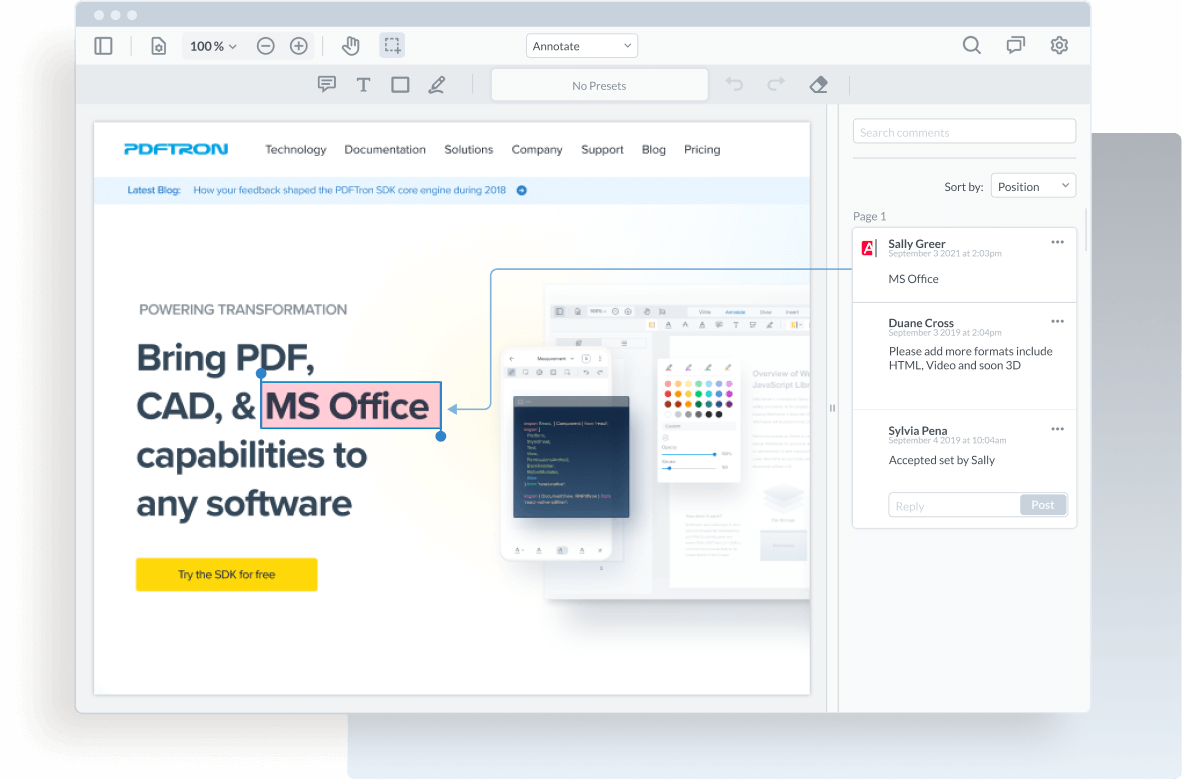
Let me know how you are planning to use WebViewer HTML or if you have any feedback on any feature missing. You can [email me](mailto:andrey@pdftron.com) directly.
## Disclaimer
This project is experimental. A proxy server is used to serve webpage assets. This is done to get around various security issues, when loading a webpage in an iframe. This works for a good amount of pages but there are many exceptions. If you have a subset of web pages that you would like to support then we recommend forking [this repository](https://github.com/PDFTron/webviewer-html-proxy-server) and making the necessary fixes. We won't be making those changes because it would likely result in other pages failing.
## What's new?
- Highlight, underline, draw shapes, callouts, stamps
- View a live web page
- Search for wording on the page using different search modes
- Get access to all the links present on the web page
## Demo
https://showcase.apryse.com/webviewer-html
## Sample Integration
Try out the react sample [here](https://github.com/PDFTron/webviewer-html-annotate-proxy/). It shows how to integrate WebViewer, WebViewer-HTML, and webviewer-html-proxy-server.
## Initial setup
Before you begin, make sure your development environment includes [Node.js and npm](https://www.npmjs.com/get-npm).
## Install
```
npm install @pdftron/webviewer-html
```
## How to use
WebViewer-HTML requires the server component, [@pdftron/webviewer-html-proxy-server](https://www.npmjs.com/package/@pdftron/webviewer-html-proxy-server). This proxy server solves CORS issues. It will also parse the page for text and links, allowing you to use text annotations and page navigation.
Call the `createServer` function in your server component and pass in an object that includes `SERVER_ROOT` and `PORT`.
```javascript
const HTMLProxyServer = require('@pdftron/webviewer-html-proxy-server');
HTMLProxyServer.createServer({
SERVER_ROOT: `http://localhost`,
PORT: 3100
});
```
When making the request to the proxy-server, make sure to pass along `{ credentials: 'include' }` to be able to send cookies in cross-origin requests. Read more [here](https://developer.mozilla.org/en-US/docs/Web/API/Fetch_API/Using_Fetch).
You can either load HTML pages from URLs, or static resources using the relative path. This API is available to load an HTML page by calling `loadHTMLPage`.
```javascript
import WebViewer from '@pdftron/webviewer';
import { initializeHTMLViewer } from '@pdftron/webviewer-html';
WebViewer(
{
path: 'lib',
},
document.getElementById('viewer')
).then(async (instance) => {
const url = 'https://apryse.com/';
const htmlProxyServerUrl = 'http://localhost:3100';
// Tell webviewer-html-proxy-server that you want to proxy this URL
const proxyUrlRes =
await fetch(
`${htmlProxyServerUrl}/pdftron-proxy?url=${url}`,
{ credentials: 'include' },
);
const { validUrl } = await proxyUrlRes.json();
const { href, origin, pathname } = new URL(validUrl);
const hrefWithoutOrigin = href.split(origin)[1] || pathname;
const license = `---- Insert commercial license key here after purchase ----`;
// Extends WebViewer to allow loading HTML5 files from URL or static folder.
const { loadHTMLPage } = await initializeHTMLViewer(instance, { license });
loadHTMLPage({
iframeUrl: `${htmlProxyServerUrl}${hrefWithoutOrigin}`,
// URL that is being proxied
urlToProxy: validUrl,
width: 1440,
height: 770,
});
});
```
## Passing custom HTTP headers to the proxy request
For version v1.9.6 and above, the [proxy server](https://www.npmjs.com/package/@pdftron/webviewer-html-proxy-server) can accept extra custom HTTP headers using `customheaders` when making the request, read more [here](https://developer.mozilla.org/en-US/docs/Glossary/Request_header). Make sure to stringify your custom headers before passing them to the value of `customheaders`.
```javascript
// Tell webviewer-html-proxy-server that you want to proxy this URL
const proxyUrlRes =
await fetch(
`${htmlProxyServerUrl}/pdftron-proxy?url=${url}`,
{
credentials: 'include',
headers: {
customheaders: JSON.stringify({
Authorization: 'token',
'custom-header': 'custom token',
}),
// invalid values: {}, { key: value }, "random string that can't be parsed"
},
},
);
```
## For WebViewer v8.5 and above
New versions of [WebViewer v8.5](https://docs.apryse.com/documentation/web/changelog/v8-5-0/) and above requires the `disableVirtualDisplayMode: true` constructor option. See [documentation](https://docs.apryse.com/api/web/global.html#WebViewerOptions__anchor).
```javascript
WebViewer(
{
path: 'lib',
disableVirtualDisplayMode: true,
},
document.getElementById('viewer')
).then(async (instance) => {
// ...
});
```
## Detecting when the proxy is loaded
You can add a `proxyLoaded` event listener to detect when the proxy iframe is fully loaded. This event comes from the `DOMContentLoaded` event attached to the proxy website.
```javascript
import WebViewer from '@pdftron/webviewer';
WebViewer(
{
path: 'lib',
},
document.getElementById('viewer')
).then((instance) => {
const { docViewer } = instance;
docViewer.addEventListener('proxyLoaded', listener);
});
```
## Version 3.x
Older versions 3.x of WebViewer-HTML used website scraping to save the website as a snapshot in time, without the need for a separate server component. Please refer to [this sample](https://github.com/PDFTron/webviewer-html-annotate) that scrapes the content of a live website and allows you to annotate. This sample along with WebViewer-HTML v3.x are no longer maintained, as the proxy solution allows to better capture accurately the content of a live website. Read more [here](https://apryse.com/blog/webviewer/webviewer-annotate-html-via-proxy-vs-scraping).
## Adding a license key
Beginning with version 3.x, we have added a watermark on all HTML pages being viewed in the demo mode. Version 3.x introduces quite a number of feature additions including text tools like highlighting and strikeout, as well as searching capabilities. To remove the `Apryse Demo` watermark, please pass the license key to the function. The license key can be obtained on [Apryse's website](https://apryse.com/form/contact-sales).
```javascript
WebViewer(
{
path: 'lib',
},
document.getElementById('viewer')
).then(async (instance) => {
const license = `---- Insert commercial license key here after purchase ----`;
const { loadHTMLPage } = await initializeHTMLViewer(instance, { license });
});
```
For versions v4.5x and below, please pass the licence key to `loadHTMLPage`.
```javascript
loadHTMLPage({
// Your webviewer-html-proxy-server url
iframeUrl: 'http://localhost:3100',
// URL that is being proxied
urlToProxy: 'https://apryse.com/',
width: 1440,
height: 770,
license: 'license-key-goes-here',
});
```
## Ready-to-deploy Collaboration Sample
We have put together a ready to deploy collaboration sample based on [collaboration.pdftron.com](https://collaboration.pdftron.com/). You can read about it in a [blog](https://apryse.com/blog/webviewer/webpage-annotation-and-collaboration) and get started with a [sample](https://github.com/PDFTron/website-reviewer).
Please note that this is only supported with Webviewer-HTML v3.x.
## Documentation
[Client API documentation](https://docs.apryse.com/api/html/)
[Server API documentation](https://docs.apryse.com/api/html-proxy-server/)
## License
WebViewer HTML will run in trial mode until a license is provided. For more information on licensing, please visit our [website](https://apryse.com/feature-chart).