# Indoor mapping support
For some use cases (touristic venues, emergency response, public transit...), it can be interesting to offer __Indoor mapping support__ in your viewer. Panoramax offers this through two complementary datasets:
- __Panoramax Semantics__, with the `osm|level=n` tag. Add it on your selected pictures or sequences this tag through _Tags_ editor or `semantics` API.
- __OpenStreetMap [Simple Indoor Tagging](https://wiki.openstreetmap.org/wiki/Simple_Indoor_Tagging)__, the tag model to map building indoors. We rely on [indoor=](https://indoorequal.org) stack for map display.
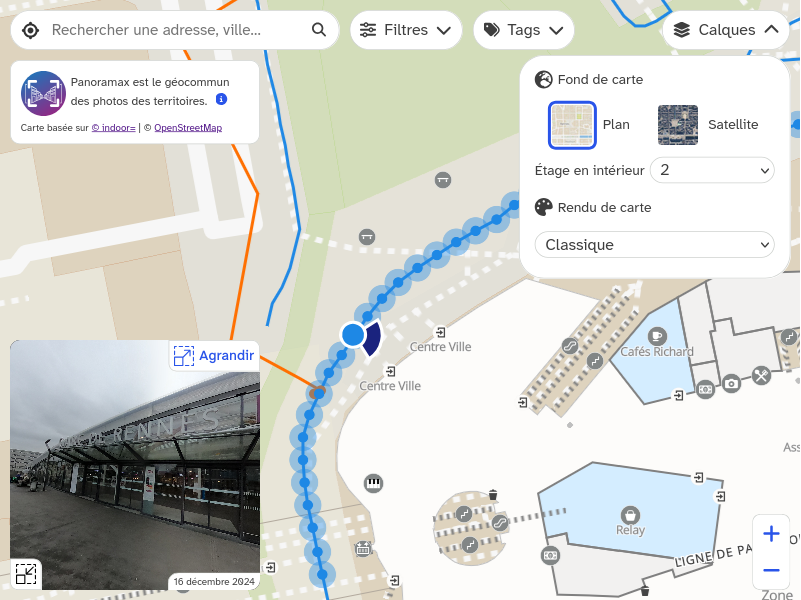
To offer indoor maps in Panoramax viewer, you have to:
- Make sure __proper indoor mapping is available in OpenStreetMap__, check [indoor=](https://indoorequal.org/) map to see covered maps. If missing, you can contribute to OpenStreetMap, or get help from [community](https://www.openstreetmap.org/communities) or [professionals](https://fposm.fr/) to add your own building in OSM.
- Enable [maplibre-gl-indoorequal](https://indoorequal.com/doc/maplibre-gl-indoorequal) plugin in your web page:
```html
```
- Set `indoor` parameters in your Panoramax Viewer, based on [maplibre-gl-indoorequal's constructor options](https://indoorequal.com/doc/maplibre-gl-indoorequal/api#parameters):
```html
```
!!! note
You can rely on any _indoor=_ server by changing `url` parameter.