# @oya-ai/cli

<p align="center">
  <strong>The Command-Line Interface for the Oya Browser Control Plane.</strong>
</p>

<p align="center">
  <a href="https://www.npmjs.com/package/@oya-ai/cli"><img src="https://img.shields.io/npm/v/@oya-ai/cli?color=39ed35&label=@oya-ai/cli&logo=npm" alt="NPM Version"></a>
  <a href="https://github.com/OyadotAI/oya-browser/blob/main/packages/cli/LICENSE"><img src="https://img.shields.io/badge/license-MIT-blue.svg?color=39ed35" alt="License: MIT"></a>
  <a href="https://nodejs.org"><img src="https://img.shields.io/badge/node-%3E%3D20.0.0-brightgreen.svg" alt="Node Version"></a>
</p>

---

<p align="center">
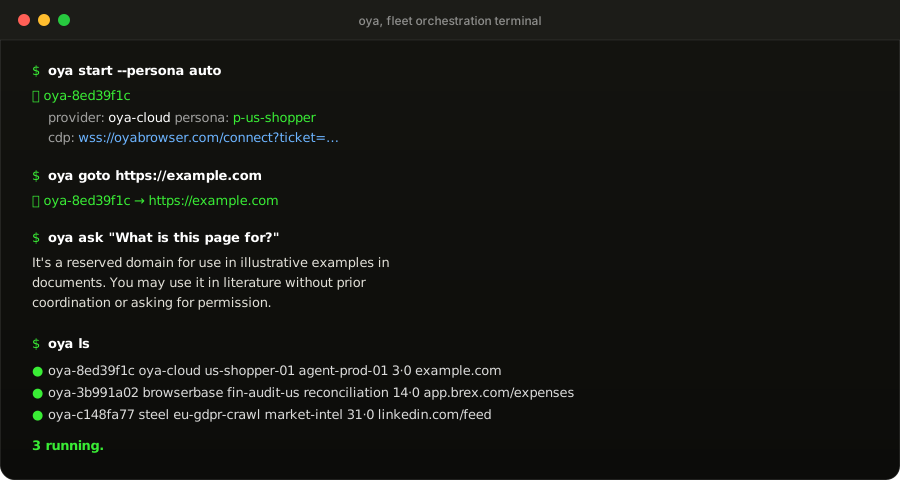
  <img src="https://raw.githubusercontent.com/OyadotAI/oya-browser/main/assets/cli-demo.svg" alt="oya start, goto, ask and ls in a terminal" width="100%">
</p>

Manage, navigate, benchmark, and watch browser agent instances on Oya Cloud, Browserbase, Steel, Anchor, Browser Use, or your self-hosted Chrome fleet straight from your terminal.

Oya does for browser vendors what OpenRouter does for LLM providers: one interface, and the vendor behind it is a setting.

```bash
npm install -g @oya-ai/cli
```

---

## ⚡ 60-Second Setup

```bash
# 1. Authenticate with an API key (interactive or via flags)
oya login

# 2. Interactive onboarding: pick your AI model, default browser provider, and solver
oya init
```

---

## 🚀 Everyday Workflow

```bash
# Start an orchestrated browser with an automatically rotated persona
oya start --persona auto
# Output: ✅ oya-8ed39f1c

# Navigate to a target website (defaults to your newest active browser)
oya goto https://news.ycombinator.com

# Drive the browser in plain English using your configured LLM
oya ask "Extract top 3 articles with points and comments"

# Open the sub-second interactive live stream in your desktop browser
oya open

# Check real-time health, command logs, and latencies
oya status

# Inspect running fleet instances
oya ls

# Gracefully terminate all active browsers
oya rm --all
```

---

## Scripting: `--json` and exit codes

- `--json` puts exactly one JSON document on stdout. Prompts and progress go to stderr.
- A failure prints one line on stderr (`✗ message`, then a hint), or with `--json` one object: `{"error", "code", "status"}`.
- Exit codes: `0` done, `1` the request failed or got no answer, `2` the command could not be run as typed and nothing was sent.
- An unknown flag is an error, not ignored. `--flag=value` works as well as `--flag value`.
- `--debug` (or `OYA_DEBUG=1`) adds the status, the response body and the stack to a failure.
- `oya install`, `oya init` and `oya stealth-test` are for people and refuse `--json`.

## 📖 Command Reference

### Fleet Execution & Control

| Command              | Flags                                                                                  | Description                                               |
| :------------------- | :------------------------------------------------------------------------------------- | :-------------------------------------------------------- |
| `oya start`          | `[--persona <id\|auto>] [--provider <p>] [--name <n>] [--governed] [--budget-usd <n>]` | Launch browser instance and print its ID and CDP endpoint |
| `oya goto <url>`     | `[--id <id>]`                                                                          | Navigate to URL (defaults to newest browser)              |
| `oya ask "<prompt>"` | `[--id <id>]`                                                                          | Drive page using configured AI model                      |
| `oya open`           | `[--id <id>]`                                                                          | Launch interactive SSE live view in system browser        |
| `oya ls`             | `[--json]`                                                                             | List active fleet browsers with health status             |
| `oya status`         | `[--id <id>] [--json]`                                                                 | Detailed metrics, error counts, and recent activity log   |
| `oya rm <id>...`     | `[--all]`                                                                              | Terminate target browser or entire fleet                  |

### Persona Management (Anti-Ban Identities)

```bash
# List all saved personas and active concurrency
oya personas

# Create a new persona with fixed device parameters
oya personas new us-shopper --platform MacIntel --tz America/New_York --locale en-US --max 2 --geo US

# Preview generated hardware fingerprint without saving
oya personas new --preview --platform Win32 --tz Europe/London

# Clone an existing persona (same hardware fingerprint class, clean cookie jar)
oya personas clone <id> --name us-shopper-backup

# Edit persona concurrency cap or residential proxy geo
oya personas edit <id> --max 4 --geo US

# Delete a persona and its stored cookie jar
oya personas rm <id>
```

### Moving logins (`oya cookies`)

A persona's cookie jar is its logins. Sign in once, then carry the session to wherever it is needed:

```bash
# Save a persona's logins to a file (owner-readable only: it holds live sessions)
oya cookies export <persona> --out logins.json

# The same, shaped for Playwright's context.addCookies()
oya cookies export <persona> --format playwright --out pw-cookies.json

# Bring logins in from a file: an export, or any JSON list of cookies
oya cookies import <persona> logins.json

# Give one persona another persona's logins (each keeps its own device)
oya cookies copy <from-persona> <to-persona>
```

### Human-in-the-Loop Takeover

When automation encounters hardware 2FA, phone biometric approvals, or complex verification:

```bash
# 1. Acquire human control lease (pauses agent execution safely)
oya takeover <browser-id>

# 2. Complete manual verification via interactive live view
oya open --id <browser-id>

# 3. Release control when done
oya release <browser-id>

# 4. Acknowledge and resume autonomous agent execution
oya resume <browser-id>
```

### Governance, Auditing & Webhooks

```bash
# View fleet overview, spend rate cards, and limits
oya control

# Inspect durable sessions (including cleanup-pending or disconnected nodes)
oya sessions [id]

# Force termination of an unresponsive session
oya stop <id> --force

# Read durable append-only lifecycle events
oya events [--after <cursor>]

# Audit hourly token and sandbox spend
oya usage

# Mint scoped service credentials
oya credential new --role operator --label "ci-runner"

# Register an HMAC-signed webhook for fleet lifecycle events
oya webhook new https://api.mycorp.com/oya-events
```

### Stealth Benchmarking

Benchmark your browser deployment against live detection platforms (CreepJS and Bot.Sannysoft). The harness lives in `server/`, so run this from a checkout of the repo, or set `OYA_SERVER_DIR`:

```bash
# Run local evasion probe suite
oya stealth-test

# Run live benchmark against detection platforms
oya stealth-test --live
```

---

## 🤖 CI/CD & Headless Environments

In automated pipelines (GitHub Actions, GitLab CI, Docker), use flags or environment variables to bypass interactive prompts:

```bash
export OYA_API_KEY="oya_live_..."
export OYA_BASE_URL="https://oyabrowser.com"

# Non-interactive launch with JSON output
oya start --provider browserbase --persona auto --json
```

| Global Flag   | Description                               |
| :------------ | :---------------------------------------- |
| `--key <key>` | Override API key for command              |
| `--url <url>` | Override control plane URL                |
| `--id <id>`   | Target specific browser instance ID       |
| `--json`      | Output pure JSON for programmatic parsing |

---

## 📄 License

MIT © [Oya](https://getoya.ai)